Product schema for Wix eCommerce: price, availability and rich product listings
Module 6: Technical SEO, Structured Data & Rich Snippets for Wix | Lesson 73 of 683 | 55 min read
By Michael Andrews, Wix SEO Expert UK
Product schema unlocks rich product listings in Google Search, showing price, availability, star ratings, and product details directly in the SERP. For Wix eCommerce stores, this structured data type is arguably the most commercially valuable you can implement. Product rich results make your listings significantly more attractive than plain blue links, providing crucial purchase-decision information at a glance and potentially appearing in Google Shopping results. This lesson covers everything from what Wix Stores adds automatically, through filling the gaps with custom schema, handling variants, managing inventory status, and building a complete Product schema strategy for your entire store.
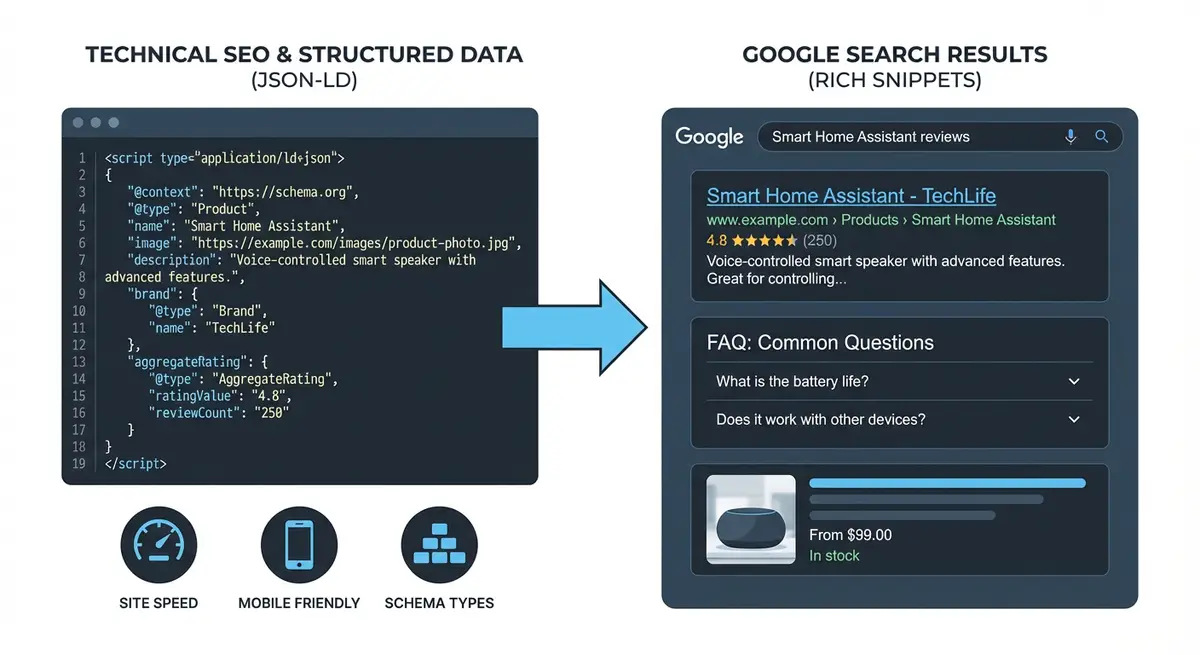
What Product Rich Results Look Like
Product rich results can appear in several ways across Google Search:
- Standard search: product name, price, availability status, and star rating displayed below your listing title.
- Google Shopping tab: your products can appear in the Shopping results with image, price, and store name.
- Product Knowledge Panel: for specific product searches, Google may show a panel with product details from multiple sellers.
- Image search: product schema can enhance image search results with price and availability overlays.
- Mobile product carousels: swipeable product cards showing multiple products from your store.
- Google Merchant Center integration: Product schema feeds into Google's product database.
What Wix Stores Adds Automatically
Wix Stores generates some Product schema automatically for product pages. Understanding what Wix adds helps you know what to supplement.
Checking what Wix auto-generates
- Go to one of your published product pages.
- Enter the URL at search.google.com/test/rich-results.
- Check the "Detected items" section for Product type.
- Click on the Product result to see which properties Wix has included.
- Note any missing required or recommended properties.
- Common auto-generated properties: name, image, description, price, availability.
- Commonly missing properties: brand, sku, gtin, aggregateRating, review.
Essential Product Schema Properties
- name (required): the product name. Must match the visible product title.
- image (required): at least one product image. Google recommends multiple images from different angles. Minimum 1200px wide.
- description (required): a clear description of the product. Should match the visible description.
- offers (required): pricing and availability information using the Offer type.
- sku (recommended): your unique product identifier.
- brand (recommended): the product brand using the Brand type.
- gtin/gtin13/gtin8/mpn (recommended): global identifiers like UPC, EAN, or ISBN.
- aggregateRating (optional): average customer rating. Only if you have genuine reviews.
- review (optional): individual customer reviews. Must match visible reviews.
- category (optional): Google product category for better classification.
The Offers Property in Detail
The offers property is where pricing, availability, and purchase information live. Getting this right is critical for product rich results.
"offers": {
  "@type": "Offer",
  "url": "https://yourstore.com/product/blue-running-shoes",
  "priceCurrency": "GBP",
  "price": "89.99",
  "priceValidUntil": "2026-12-31",
  "availability": "https://schema.org/InStock",
  "itemCondition": "https://schema.org/NewCondition",
  "seller": {
    "@type": "Organization",
    "name": "Your Store Name"
  },
  "shippingDetails": {
    "@type": "OfferShippingDetails",
    "shippingRate": {
      "@type": "MonetaryAmount",
      "value": "4.99",
      "currency": "GBP"
    },
    "deliveryTime": {
      "@type": "ShippingDeliveryTime",
      "handlingTime": {
        "@type": "QuantitativeValue",
        "minValue": 1,
        "maxValue": 2,
        "unitCode": "DAY"
      },
      "transitTime": {
        "@type": "QuantitativeValue",
        "minValue": 2,
        "maxValue": 5,
        "unitCode": "DAY"
      }
    },
    "shippingDestination": {
      "@type": "DefinedRegion",
      "addressCountry": "GB"
    }
  }
}
Availability Values
- https://schema.org/InStock: product is available for immediate purchase.
- https://schema.org/OutOfStock: product is currently unavailable.
- https://schema.org/PreOrder: product is available for pre-order.
- https://schema.org/BackOrder: product is on back order but can be ordered.
- https://schema.org/LimitedAvailability: limited stock remaining.
- https://schema.org/SoldOut: product is permanently sold out.
- https://schema.org/Discontinued: product has been discontinued.
Complete Product Schema Template
<script type="application/ld+json">
{
  "@context": "https://schema.org",
  "@type": "Product",
  "name": "Premium Running Shoes - Blue",
  "description": "Lightweight running shoes with advanced cushioning technology, perfect for road running and daily training.",
  "image": [
    "https://yourstore.com/images/shoes-front.jpg",
    "https://yourstore.com/images/shoes-side.jpg",
    "https://yourstore.com/images/shoes-back.jpg"
  ],
  "sku": "RUN-BLUE-001",
  "gtin13": "0123456789012",
  "brand": {
    "@type": "Brand",
    "name": "Your Brand"
  },
  "color": "Blue",
  "material": "Mesh and synthetic",
  "offers": {
    "@type": "Offer",
    "url": "https://yourstore.com/product/running-shoes-blue",
    "priceCurrency": "GBP",
    "price": "89.99",
    "priceValidUntil": "2026-12-31",
    "availability": "https://schema.org/InStock",
    "itemCondition": "https://schema.org/NewCondition"
  },
  "aggregateRating": {
    "@type": "AggregateRating",
    "ratingValue": "4.7",
    "bestRating": "5",
    "worstRating": "1",
    "ratingCount": "42"
  },
  "review": [
    {
      "@type": "Review",
      "author": { "@type": "Person", "name": "Jane Smith" },
      "datePublished": "2025-11-20",
      "reviewBody": "Incredibly comfortable for long runs. Great cushioning and lightweight feel.",
      "reviewRating": { "@type": "Rating", "ratingValue": "5", "bestRating": "5" }
    }
  ]
}
</script>
Handling Product Variants
If your product comes in multiple sizes, colours, or options, you need to handle variants correctly. There are two approaches.
Approach 1: Single Product Page with Multiple Offers
{
  "@type": "Product",
  "name": "Running Shoes",
  "offers": [
    {
      "@type": "Offer",
      "name": "Size UK 8",
      "priceCurrency": "GBP",
      "price": "89.99",
      "availability": "https://schema.org/InStock",
      "sku": "RUN-BLUE-UK8"
    },
    {
      "@type": "Offer",
      "name": "Size UK 9",
      "priceCurrency": "GBP",
      "price": "89.99",
      "availability": "https://schema.org/InStock",
      "sku": "RUN-BLUE-UK9"
    },
    {
      "@type": "Offer",
      "name": "Size UK 10",
      "priceCurrency": "GBP",
      "price": "89.99",
      "availability": "https://schema.org/OutOfStock",
      "sku": "RUN-BLUE-UK10"
    }
  ]
}
Approach 2: AggregateOffer for Price Ranges
"offers": {
  "@type": "AggregateOffer",
  "lowPrice": "69.99",
  "highPrice": "129.99",
  "priceCurrency": "GBP",
  "offerCount": "5",
  "availability": "https://schema.org/InStock"
}Google Merchant Center Integration
Product schema on your pages feeds into Google Merchant Center, which powers Google Shopping results. For maximum visibility:
- Ensure your Wix Store is connected to Google Merchant Center via the Wix Google Shopping channel.
- Product schema on individual pages reinforces the product data submitted through the feed.
- Consistency between your Merchant Center feed and on-page schema is essential.
- GTIN (Global Trade Item Number) or MPN (Manufacturer Part Number) significantly improves product matching.
- Free product listings in Google Shopping are available to all merchants with valid Product schema.
Adding Product Schema to Wix: Step-by-Step
Complete implementation for Wix eCommerce
- First, completely fill out every field in the Wix Stores product editor for each product.
- Publish your store and run 3-5 product page URLs through the Rich Results Test.
- Document which Product schema properties Wix generates automatically.
- Identify any missing required or recommended properties.
- If Wix covers the basics, focus on adding: brand, gtin/mpn, aggregateRating (if reviews exist), and shippingDetails.
- Create supplementary JSON-LD with only the missing properties.
- Validate the complete page (Wix auto + your custom schema) in Rich Results Test.
- Ensure no conflicts between Wix-generated and custom schema.
- Add via Wix Custom Code to specific product pages.
- For stores with many products, prioritise your top sellers and highest-margin items first.
- Test live URLs and check for zero errors.
- Monitor Google Search Console Enhancements > Products for detection across your store.
- Set up alerts for price or availability changes that need schema updates.
Common Product Schema Mistakes
- Price in schema does not match visible price on the page.
- Availability status not updated when products sell out.
- Missing currency code (priceCurrency) or using wrong currency.
- Adding aggregateRating without genuine visible reviews on the page.
- Not including product images (at least one is required).
- Using generic descriptions instead of specific product descriptions.
- Duplicate Product schema from both Wix auto-generation and custom code.
- Missing brand property for branded products.
- Not updating schema when product details change (seasonal pricing, new variants).
- Using commas in price values (use "89.99" not "89,99").
Product Schema for Digital Products and Services
Digital products (courses, ebooks, software) and services can also use Product schema with some adjustments.
- For digital downloads: set itemCondition to NewCondition and availability to InStock (always available).
- For courses: consider using both Product and Course schema for maximum coverage.
- For subscriptions: use the Offer type with priceSpecification for recurring pricing.
- For free products: set price to "0" or "0.00" rather than omitting it.
- Digital products do not need shipping information.
Snippet or merchant listing
There are two different things Google can do with product markup, and knowing which you are aiming at saves a lot of confusion. Product snippets are for pages where people cannot buy directly, like a review or a roundup, and they lean on rating and review information. Merchant listings are for pages where someone can actually buy, and they let you add the fuller detail like shipping, returns and sizing. On Wix stores you are usually after the merchant listing.
The core, and the traps
Whichever one you want, a product needs a name, an image, and an offers block, and inside that offer the price, the priceCurrency and the availability. That is the core. Then add what you have: brand, sku, a gtin if the product has one, and for a merchant listing the shipping and returns details, because those show up in the listing and Google increasingly wants them.
The single biggest way people lose this is a price in the markup that does not match the price on the page. Google checks, and a mismatch gets the whole thing dropped, sometimes with a manual warning. Two others to avoid: marking a category or collection page as if it were one single product, and adding an aggregateRating with numbers you have made up. That last one matters, because review stars on products follow strict rules, and inventing a rating count is exactly the sort of thing that gets a site into trouble. I cover where review stars are and are not allowed in Review and AggregateRating star ratings. For the offer side in detail, see Product and Offer schema.
Was this lesson useful?
It takes 1 minute to tell me. The course is free and I want to keep it that way, and your feedback shows me what is working and helps other people find it.
This lesson on Product schema for Wix eCommerce: price, availability and rich product listings is part of Module 6: Technical SEO, Structured Data & Rich Snippets for Wix in The Most Comprehensive Complete Wix SEO Course in the World (2026 Edition). Created by Michael Andrews, a Wix Marketplace Legend Partner with 14 years of hands-on experience, 800 completed Wix SEO projects and 456 verified five-star reviews.