What is structured data? JSON-LD vs Microdata vs RDFa, which to use on Wix
Module 6: Technical SEO, Structured Data & Rich Snippets for Wix | Lesson 65 of 683 | 50 min read
By Michael Andrews, Wix SEO Expert UK
Structured data is code you add to your web pages that tells Google exactly what your content means, not just what it says. While Google can understand unstructured content, structured data eliminates ambiguity and unlocks rich results in search. For Wix sites, structured data is one of the most powerful competitive advantages available because most Wix competitors do not implement it. This lesson explains what structured data is, the three formats available, which one to use on Wix, every type of rich result you can unlock, and how to plan a complete structured data strategy for your site.
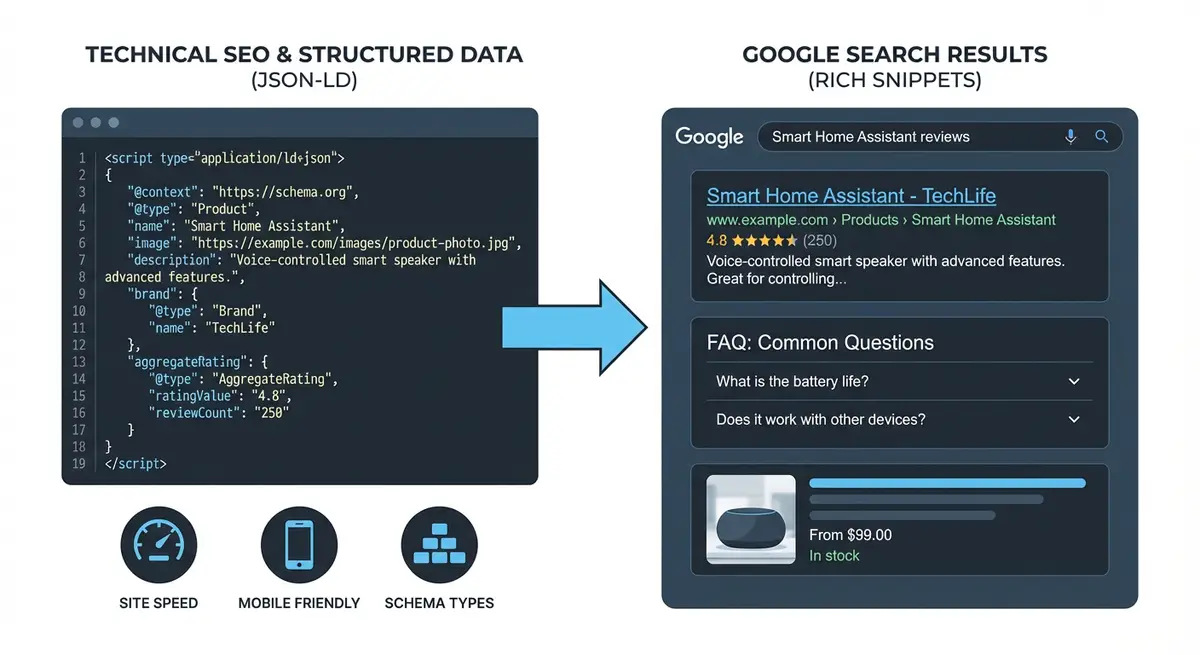
What Structured Data Does for Your Wix Site
When you write "Our business is open Monday to Friday, 9am to 5pm" in your content, Google may or may not interpret that as business hours. When you add structured data using the OpeningHours schema type, there is zero ambiguity. Google knows exactly what those hours mean and can display them in Knowledge Panels, Maps, and local search results.
- Eliminates ambiguity: tells Google exactly what your content means, not just what it says.
- Unlocks rich results and AI citations: star ratings, event cards, product prices, how-to steps displayed directly in search, plus improved visibility in AI Overviews.
- Increases SERP real estate: rich results take up more space, pushing competitors further down the page.
- Improves CTR: rich results are more visually attractive and informative, increasing click-through rates by 15-30%.
- Feeds the Knowledge Graph: structured data helps Google build a comprehensive understanding of your business entity.
- Supports voice search: Google Assistant and other voice assistants use structured data to answer questions.
- Future-proofs your site: as Google develops new SERP features, they will rely on structured data to populate them.
JSON-LD vs Microdata vs RDFa
There are three formats for adding structured data to web pages. Only one is recommended for Wix.
JSON-LD (Recommended for Wix)
JSON-LD (JavaScript Object Notation for Linked Data) is a block of JavaScript code placed in the <head> or <body> of your page. It is Google's recommended format because it is completely separate from your HTML content. You can add, edit, or remove it without touching your visible page layout. In Wix, you add JSON-LD via the Custom Code feature in your Dashboard settings.
- Google's officially recommended format.
- Completely separate from page content: adding or changing schema never affects what visitors see.
- Easy to implement on Wix via Custom Code.
- Easy to validate and debug using online tools.
- Supports all schema types Google recognises.
- Can be generated with free online tools without coding knowledge.
Microdata (Not Recommended for Wix)
Microdata is embedded directly in your HTML markup using specific attributes (itemscope, itemtype, itemprop). It requires editing the HTML structure of your content, which is not possible in the standard Wix Editor. Avoid on Wix.
RDFa (Not Recommended for Wix)
RDFa is similar to Microdata in that it is woven into HTML markup using attributes. Also not practical for Wix implementation. Stick with JSON-LD.
Understanding Schema.org
Schema.org is the vocabulary used by structured data. It defines hundreds of "types" (like Organization, Product, Event) and their "properties" (like name, description, price). Think of Schema.org as the dictionary, and JSON-LD as the language format you write in.
- Schema.org was created jointly by Google, Bing, Yahoo, and Yandex in 2011.
- It defines 800 types of things (entities) and thousands of properties.
- Not all Schema.org types result in rich results. Google only supports a subset.
- Google's supported types are documented at developers.google.com/search/docs/appearance/structured-data.
- You should always check Google's documentation, not just Schema.org, to see which properties Google actually uses.
Rich Results You Can Unlock on Wix
Each rich result type requires specific structured data. Here is every type relevant to Wix sites:
- FAQ rich results (discontinued May 2026): previously showed expandable Q&A sections in the SERP. FAQPage schema now serves AI citation systems.
- HowTo rich results: numbered steps used to show in Google until Google retired them in September 2023. Uses HowTo schema.
- Review/star rating rich results: star ratings below your result. Uses Review/AggregateRating schema.
- Event rich results: event cards with dates, venue, and ticket info. Uses Event schema.
- Product rich results: price and availability in search and Google Shopping. Uses Product schema.
- LocalBusiness rich results: business details in Knowledge Panel and Maps. Uses LocalBusiness schema.
- Article/BlogPosting: author and date display in search results. Uses Article/BlogPosting schema.
- Breadcrumb rich results: clean URL path display. Uses BreadcrumbList schema.
- Video rich results: video thumbnails and carousels in search. Uses VideoObject schema.
- Sitelinks search box: a search box within your SERP listing. Uses WebSite schema with SearchAction.
- Logo: your logo displayed in the Knowledge Panel. Uses Organization schema with logo property.
What Schema Wix Adds Automatically
Wix automatically generates some structured data on your pages, but it is often incomplete or missing key properties.
- Wix Blog: adds basic BlogPosting schema with headline and datePublished, but often lacks author details and dateModified.
- Wix Stores: adds basic Product schema with name and price, but may miss aggregateRating, brand, and detailed offers.
- Wix Events: may add basic Event schema, but details vary by template.
- Wix Bookings: limited schema, usually requires manual supplementation.
- Standard pages: no automatic schema. You must add Organization, LocalBusiness, FAQ, and other types manually.
- Always test your Wix pages in the Rich Results Test to see what schema exists before adding your own.
Planning Your Structured Data Strategy
Creating a schema implementation plan
- Audit your Wix site: list every page type (homepage, about, service pages, blog posts, products, events, location pages).
- Test each page type in the Rich Results Test to see what schema already exists.
- Match each page type to the appropriate schema type(s).
- List the schema types you need to add manually because Wix does not generate them.
- Prioritise implementation: Organization/LocalBusiness first (site-wide), then page-specific types.
- Create a spreadsheet tracking: page URL, schema type needed, implementation status, test result, date.
- Plan to implement one schema type per week for a sustainable pace.
Schema Prioritisation for Different Business Types
- Local service businesses: 1) LocalBusiness, 2) Service, 3) FAQPage, 4) BreadcrumbList, 5) BlogPosting.
- E-commerce on Wix: 1) Organization, 2) Product, 3) BreadcrumbList, 4) FAQPage, 5) Review.
- Professional services: 1) Organization/ProfessionalService, 2) Service, 3) FAQPage, 4) Article, 5) Person.
- Event-based businesses: 1) Organization, 2) Event, 3) FAQPage, 4) BreadcrumbList.
- Blogs and content sites: 1) Organization, 2) BlogPosting, 3) FAQPage, 4) BreadcrumbList, 5) HowTo.
JSON-LD Syntax Basics
Before implementing specific schema types, understand the basic JSON-LD syntax you will be working with.
<script type="application/ld+json">
{
  "@context": "https://schema.org",
  "@type": "Organization",
  "name": "Your Business Name",
  "url": "https://www.yourdomain.com",
  "logo": "https://www.yourdomain.com/logo.png",
  "description": "A brief description of your business"
}
</script>- @context: always "https://schema.org". This tells parsers which vocabulary you are using.
- @type: the Schema.org type (Organization, Product, Event, etc.).
- Properties: key-value pairs describing the entity (name, url, description, etc.).
- Nested objects: some properties contain other objects (e.g., address contains a PostalAddress object).
- Arrays: some properties accept multiple values in square brackets (e.g., sameAs with multiple social URLs).
- The entire block is wrapped in <script type="application/ld+json"> tags.
Common Structured Data Mistakes on Wix
- Adding schema for rich results the page is not eligible for (e.g., star ratings on a service page).
- Schema content not matching visible page content. Google requires content parity.
- Syntax errors in JSON-LD (missing commas, unclosed brackets). Always validate before publishing.
- Duplicate schema: Wix auto-generates some schema, and manual additions create conflicts.
- Adding schema to all pages when it should be page-specific (e.g., Event schema on every page).
- Not updating dateModified in Article schema when content is refreshed.
- Using outdated schema properties that Google no longer supports.
How to Audit Your Wix Site for Existing Structured Data
Before adding new schema, always audit what structured data already exists on your Wix site to avoid conflicts and duplication.
Complete structured data audit for your Wix site
- Go to search.google.com/test/rich-results and paste your homepage URL into the URL test field.
- Wait for the test to complete and note every schema type detected (e.g., Organization, WebSite, BreadcrumbList).
- Click on each detected schema type to see the full property details and identify any missing or incomplete properties.
- Check for errors (red) and warnings (yellow) in the test results and note each one.
- Repeat the test for each of your key page types: a service page, a blog post, a product page, a contact page.
- Create a spreadsheet listing: page URL, schema types already present, errors found, missing schema types needed.
- In Wix Dashboard, go to Settings > Custom Code and review any existing code snippets. Note any JSON-LD blocks already installed.
- Check your Wix apps: go to Wix Dashboard > Apps > Manage Apps and identify any apps that might be injecting schema (review apps, booking apps, product apps).
- Compare your audit findings to Google's supported rich result types at developers.google.com/search/docs/appearance/structured-data.
- Prioritise your implementation plan: fix errors first, add missing required properties second, add new schema types third.
Essential Tools for This Lesson
- Google Rich Results Test: Test any URL or code snippet for valid structured data and rich result eligibility
- Schema.org: The official vocabulary reference for all structured data types and properties
- Schema Markup Validator: Detailed validation of your JSON-LD code against Schema.org specifications
- Google Structured Data Docs: Google's official documentation on which schema types they support and require
- Technical SEO Schema Generator: Free tool to generate JSON-LD schema without writing code
Once you understand what structured data is, these lessons cover the specific types and how to add them on Wix: adding JSON-LD schema with Custom Code, Event schema, Product schema for Wix eCommerce, BreadcrumbList schema, and HowTo schema and what it earns today.
Was this lesson useful?
It takes 1 minute to tell me. The course is free and I want to keep it that way, and your feedback shows me what is working and helps other people find it.
This lesson on What is structured data? JSON-LD vs Microdata vs RDFa, which to use on Wix is part of Module 6: Technical SEO, Structured Data & Rich Snippets for Wix in The Most Comprehensive Complete Wix SEO Course in the World (2026 Edition). Created by Michael Andrews, a Wix Marketplace Legend Partner with 14 years of hands-on experience, 800 completed Wix SEO projects and 456 verified five-star reviews.