FAQ schema on Wix: boost AI citations and semantic search clarity
Module 6: Technical SEO, Structured Data & Rich Snippets for Wix | Lesson 69 of 683 | 55 min read
By Michael Andrews, Wix SEO Expert UK
FAQPage structured data is still worth adding to pages that have a real, visible FAQ. While Google discontinued the visible FAQ rich result (expandable dropdowns in SERPs) in May 2026, the schema itself continues to serve critical purposes: it describes question and answer pairs clearly to any machine reading the page, including AI tools, improves semantic clarity for search engines parsing your content, and future-proofs your pages for whatever SERP features Google introduces next. This lesson covers content strategy, implementation, validation, advanced techniques, and ongoing maintenance of FAQ schema for maximum AI citation and search visibility.
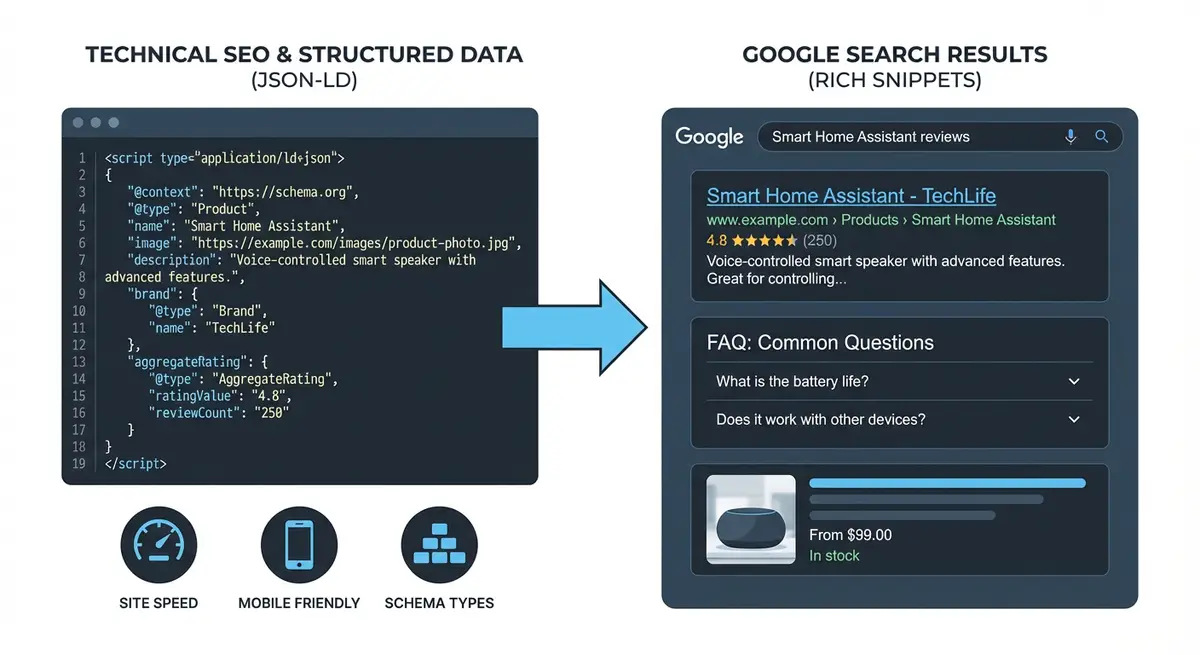
What FAQ Rich Results Were (Discontinued May 2026)
Previously, when Google displayed FAQ rich results for your page, your standard blue link listing gained two to four expandable question/answer dropdowns below it. Clicking a question revealed the answer directly in the search results. Google discontinued this visible SERP feature in May 2026. However, understanding what they looked like helps you appreciate the historical context and why Google still processes FAQPage schema for AI systems today.
- Your listing took up more vertical space in the SERP.
- Competitor results were pushed further down the page.
- Users saw some of your answers before clicking.
- Google usually showed two to four questions, depending on the query and device.
Rules for FAQ markup
Google has specific policies about which pages benefit from FAQ schema implementation. Following these guidelines ensures your schema is processed correctly by AI systems and validated without errors.
- FAQ content must be visible on the page. An accordion is fine, as long as the questions and answers are in the HTML when the page loads.
- Each question must have a single definitive answer authored by the site owner.
- The FAQ must not be user-generated content (forums, community Q&A platforms).
- Content must not be used primarily for advertising purposes.
- The page must comply with Google's spam policies.
- The schema content must match the visible page content word for word.
- Pages should have genuine, helpful FAQ content, not keyword-stuffed questions.
Identifying the Best Pages for FAQ Schema
Not every page needs FAQ schema. Focus on pages where FAQs add genuine value for readers.
- Service pages: answer common questions about your service, pricing, timeline, and process.
- Product pages: answer questions about specifications, shipping, returns, and compatibility.
- Location pages: answer questions about parking, accessibility, opening hours, and areas served.
- Key blog posts: answer follow-up questions that expand on the main topic.
- Pricing pages: answer questions about payment methods, discounts, and contract terms.
- Landing pages for high-value keywords: a strong FAQ answers objections before the visitor leaves.
Researching Genuine Questions
The quality of your FAQ content determines how effectively AI systems can cite your answers. Generic, obvious questions are less likely to be selected for AI Overviews or conversational search citations. Use these methods to find questions your customers actually ask.
Finding real customer questions
- Search your target keyword on Google and expand every "People Also Ask" result, clicking through 3-4 levels of related questions.
- Check your customer emails, chat logs, and phone call notes for recurring questions.
- Look at competitor FAQ pages and review sections for questions you could answer better.
- Use AnswerThePublic (answerthepublic.com) with your keyword to visualise question clusters.
- Check Reddit and Quora for questions asked about your service or product category.
- Review Google Search Console "Queries" for question-format searches you already rank for.
- Ask your sales team or customer service team for the top 10 questions they get asked.
- Look at reviews on Google, Trustpilot, and industry directories for questions embedded in reviews.
Writing FAQ Content That Gets Selected
AI citation systems favour concise, authoritative answers. Writing high-quality FAQ content maximises your chances of being cited.
- Write 3-8 FAQs per page: enough to be comprehensive but not so many that quality drops.
- Keep answers between 2-4 sentences: long enough to be genuinely helpful, short enough to be scannable.
- Lead with the direct answer in the first sentence, then provide supporting detail.
- Use natural language, not keyword-stuffed phrasing.
- Include specific numbers, timeframes, or prices where appropriate.
- Answer the question your customer would actually ask, not a reformulated SEO keyword.
- Avoid vague answers like "it depends" or "contact us for details".
- Do not duplicate content between your FAQ answers and your main page content.
Complete FAQPage Schema Code
Here is the full JSON-LD template for FAQ schema. Each question-answer pair is a separate Question entity within the mainEntity array.
<script type="application/ld+json">
{
  "@context": "https://schema.org",
  "@type": "FAQPage",
  "mainEntity": [
    {
      "@type": "Question",
      "name": "How long does Wix SEO take to show results?",
      "acceptedAnswer": {
        "@type": "Answer",
        "text": "Most Wix websites begin to see measurable ranking improvements within 3-6 months of consistent SEO work. Local SEO results can appear faster, sometimes within 4-6 weeks for less competitive areas."
      }
    },
    {
      "@type": "Question",
      "name": "How much does Wix SEO cost per month?",
      "acceptedAnswer": {
        "@type": "Answer",
        "text": "Wix SEO services typically range from £300 to £1,500 per month depending on the competitiveness of your target market, the number of target keywords, and the scope of work required."
      }
    },
    {
      "@type": "Question",
      "name": "Is Wix good for SEO in 2026?",
      "acceptedAnswer": {
        "@type": "Answer",
        "text": "Yes, Wix is a fully capable SEO platform in 2026. Wix sites can rank on page 1 for competitive terms when properly optimised with correct technical SEO, quality content, and strategic link building."
      }
    },
    {
      "@type": "Question",
      "name": "Can you do SEO on a free Wix plan?",
      "acceptedAnswer": {
        "@type": "Answer",
        "text": "Basic SEO is possible on a free Wix plan, but you cannot connect a custom domain or remove Wix ads. For serious SEO, you need at least the Combo plan to use your own domain, which is essential for ranking."
      }
    },
    {
      "@type": "Question",
      "name": "Do I need to hire an SEO expert for my Wix site?",
      "acceptedAnswer": {
        "@type": "Answer",
        "text": "Not necessarily. Many Wix site owners achieve good SEO results by learning the fundamentals and implementing them consistently. However, for competitive markets or complex technical issues, a specialist can accelerate results significantly."
      }
    }
  ]
}
</script>
Adding FAQ Schema to Wix: Step-by-Step
Complete implementation process
- Write your FAQ content first: create 3-8 genuine question-answer pairs for the page.
- Add the visible FAQ section to your Wix page using text elements or an accordion widget.
- Ensure the visible questions and answers match exactly what will go in the schema.
- Open a text editor and create your FAQPage JSON-LD using the template above.
- Replace the example questions and answers with your real content, copying text exactly from the visible page.
- Validate the JSON-LD in the Schema Markup Validator at validator.schema.org before adding it to Wix.
- Fix any errors shown: common issues include missing commas, unclosed quotes, or invalid property names.
- In your Wix Dashboard, go to Settings > Custom Code.
- Click "+ Add Custom Code" and paste the validated JSON-LD.
- Name it descriptively: "FAQ Schema - [Page Name]" (e.g., "FAQ Schema - SEO Services Page").
- Set "Place Code in" to "Head".
- Set "Add Code to Pages" to the specific page where this FAQ appears.
- Click Apply and publish your site.
- Test the live page URL in the Schema Markup Validator.
- Check that the validator shows "FAQPage" with the correct number of questions.
Advanced: HTML in FAQ Answers
FAQ answers support limited HTML formatting. When AI systems parse your FAQ schema, plain text with minimal formatting works best for citation extraction.
{
  "@type": "Answer",
  "text": "There are three main steps: <ol><li>Set up your <a href='https://yourdomain.com/gsc-guide'>Google Search Console</a> account.</li><li>Submit your sitemap.</li><li>Monitor your indexing status weekly.</li></ol> This process takes approximately <b>15 minutes</b> to complete."
}- Use <a href=""> for links within answers.
- Use <b> or <strong> for emphasis on key points.
- Use <ol> and <ul> for ordered and unordered lists.
- Use
for line breaks if needed. - Do not use complex HTML, iframes, or JavaScript.
- Keep HTML minimal: Google may strip excessive formatting.
Combining FAQ Schema with Other Schema Types
FAQ schema works beautifully alongside other schema types on the same page. You can combine it with LocalBusiness, Service, Product, or Article schema using the @graph approach.
<script type="application/ld+json">
{
  "@context": "https://schema.org",
  "@graph": [
    {
      "@type": "LocalBusiness",
      "name": "Your Business",
      "url": "https://yourdomain.com"
    },
    {
      "@type": "FAQPage",
      "mainEntity": [
        {
          "@type": "Question",
          "name": "Your question here?",
          "acceptedAnswer": {
            "@type": "Answer",
            "text": "Your answer here."
          }
        }
      ]
    }
  ]
}
</script>
FAQ Schema for Different Page Types
Service Pages
- Focus on process questions: "How does your [service] work?"
- Include pricing questions: "How much does [service] cost?"
- Address timeline questions: "How long does [service] take?"
- Cover comparison questions: "What is the difference between [option A] and [option B]?"
Product Pages
- Specification questions: "What are the dimensions of [product]?"
- Shipping questions: "How long does delivery take?"
- Return questions: "What is your return policy?"
- Compatibility questions: "Does [product] work with [other product]?"
Blog Posts
- Follow-up questions that expand on the article topic.
- Beginner questions for advanced articles.
- Application questions: "How do I apply this to my [situation]?"
- Common misconception questions: "Is it true that [myth]?"
Monitoring FAQ Schema Performance
Tracking your FAQ schema performance
- Re-check each FAQ page in the Schema Markup Validator after any change.
- In the Search Console Performance report, monitor impressions and clicks for your FAQ pages as you would for any page.
- Set up a monthly review: update FAQ content if questions become outdated.
Common FAQ Schema Mistakes
- Schema content does not match visible page content: this is the number one reason for rejection.
- Using FAQ schema on pages without visible FAQ sections.
- Adding user-generated Q&A as FAQ schema (against Google's policy).
- Including promotional content disguised as FAQ answers.
- Not updating FAQ schema when page content changes.
- Adding too many FAQs (10+) which dilutes quality: stick to 3-8 high-quality pairs.
- Using FAQ schema on every page of the site: focus on your highest-value pages.
- Forgetting to validate before deployment: a syntax error means no machine can read the markup.
- Not wrapping JSON-LD in <script type="application/ld+json"> tags.
- Having duplicate FAQ schema on the same page from multiple implementations.
Updating and Maintaining FAQ Schema
- Review FAQ content quarterly: are the answers still accurate?
- Check if new "People Also Ask" questions have emerged for your target keywords.
- Update pricing, timeframe, or specification answers when they change.
- Remove FAQ schema from pages where the visible FAQ section has been removed.
- Re-validate in the Schema Markup Validator after any change.
- Track which FAQ pages get the most impressions in GSC and prioritise those for content refresh.
Was this lesson useful?
It takes 1 minute to tell me. The course is free and I want to keep it that way, and your feedback shows me what is working and helps other people find it.
This lesson on FAQ schema on Wix: boost AI citations and semantic search clarity is part of Module 6: Technical SEO, Structured Data & Rich Snippets for Wix in The Most Comprehensive Complete Wix SEO Course in the World (2026 Edition). Created by Michael Andrews, a Wix Marketplace Legend Partner with 14 years of hands-on experience, 800 completed Wix SEO projects and 456 verified five-star reviews.