Organisation and LocalBusiness schema: tell Google exactly who you are
Module 6: Technical SEO, Structured Data & Rich Snippets for Wix | Lesson 67 of 683 | 55 min read
By Michael Andrews, Wix SEO Expert UK
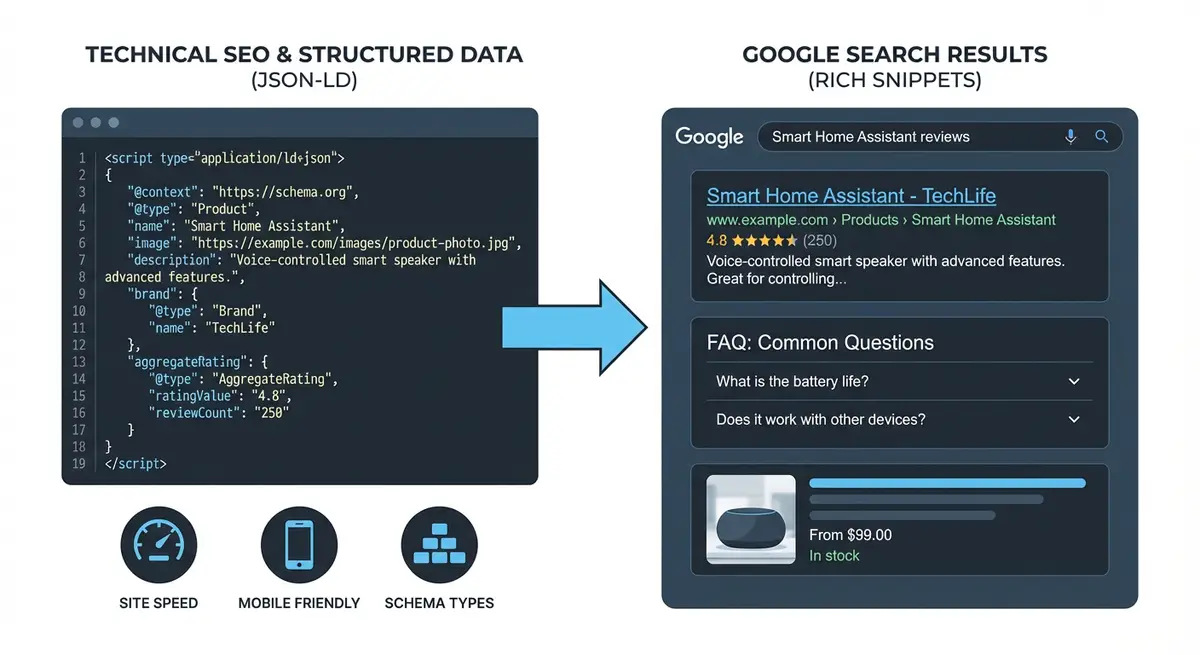
Organization and LocalBusiness schema are the most foundational structured data types for any business website. They tell Google who you are, where you are, what you do, and how to contact you. When implemented correctly they reinforce your business entity across the Knowledge Graph, connect your website to your Google Business Profile, and establish the entity signals that underpin E-E-A-T across your entire domain. Every Wix business website should have one of these schema types deployed site-wide as an absolute minimum. This lesson covers every property, every sub-type, every implementation pattern, and every mistake to avoid.
Why Organization/LocalBusiness Schema Is Non-Negotiable
Google's Knowledge Graph is a database of entities: people, businesses, places, things. When Google understands your business as a distinct entity with clear attributes, it can connect your website to your Google Business Profile, your social media accounts, your reviews on third-party platforms, and your mentions across the web. This entity consolidation is the foundation of brand SERP control, Knowledge Panel generation, and local pack eligibility. Without Organization or LocalBusiness schema, Google has to guess these connections from unstructured data, which is slower and less reliable.
- Entity consolidation: connects your website, GBP, social profiles, and citations into one recognised entity.
- Knowledge Panel eligibility: Google uses Organization schema as a strong signal for generating Knowledge Panels.
- Brand SERP control: clear entity data helps Google display accurate information when someone searches your brand name.
- Local pack support: LocalBusiness schema reinforces the NAP (Name, Address, Phone) signals that drive local rankings.
- E-E-A-T foundation: the publisher entity is referenced by Article and BlogPosting schema, establishing the chain of trust from content to organisation.
- Rich result eligibility: certain rich results (logo, contact info) only appear when Organization schema is present.
Organization vs LocalBusiness: Which One to Use
This is the first decision you need to make, and getting it wrong can confuse Google about what type of entity you are.
Use Organization If
- Your business operates entirely online with no physical location customers visit.
- You are a remote consultancy, digital agency, or SaaS company.
- You serve customers nationally or internationally without a storefront.
- You are a non-profit, educational institution, or government body.
- Your business has multiple locations (use Organization as the parent with multiple LocalBusiness sub-entities).
Use LocalBusiness If
- You have a physical location customers can visit (shop, office, clinic, restaurant).
- You serve a specific geographic area from a fixed location.
- You appear in the Google Map Pack for local searches.
- You have a Google Business Profile listing.
- You are a service-area business that operates from a home office but serves a defined area.
LocalBusiness Sub-Types: Be as Specific as Possible
Schema.org provides dozens of specific LocalBusiness sub-types. Using the most specific type gives Google clearer information about your business category.
- Dentist (not LocalBusiness or MedicalBusiness): for dental practices.
- Plumber: for plumbing businesses.
- Electrician: for electrical contractors.
- RealEstateAgent: for estate agents and realtors.
- Restaurant, BarOrPub, CafeOrCoffeeShop: for food and drink establishments.
- BeautySalon, HairSalon, DaySpa: for beauty and wellness businesses.
- AutoRepair, AutoDealer: for automotive businesses.
- LegalService, Attorney: for law firms and solicitors.
- AccountingService: for accountants and bookkeepers.
- HomeAndConstructionBusiness, Locksmith, RoofingContractor: for trades.
- ProfessionalService: a catch-all for professional services not covered by more specific types.
- Store, ClothingStore, ElectronicsStore, HardwareStore: for retail businesses.
- MedicalClinic, Physician, Optician, Pharmacy: for healthcare providers.
- LodgingBusiness, Hotel, Motel, BedAndBreakfast: for accommodation.
Essential Properties Every Business Must Include
Whether you choose Organization or LocalBusiness, these properties should always be present:
- @type: Organization or your specific LocalBusiness sub-type.
- name: your exact legal business name as it appears on Google Business Profile.
- url: the full canonical URL of your website homepage.
- logo: the full URL to your business logo image (minimum 112x112 pixels, recommended 1200x1200).
- description: a clear description of your business in 1-2 sentences.
- telephone: your primary business phone number in international format (+44-XXXX-XXXXXX).
- email: your primary business email address.
- sameAs: an array of all your official social media and directory profile URLs.
- founder or foundingDate: establishes business history and credibility.
Address and Location Properties (LocalBusiness)
For any business with a physical presence, the address block is critical. It must match your Google Business Profile NAP exactly, character for character.
"address": {
  "@type": "PostalAddress",
  "streetAddress": "123 High Street, Unit 4",
  "addressLocality": "Manchester",
  "addressRegion": "Greater Manchester",
  "postalCode": "M1 1AA",
  "addressCountry": "GB"
}Geo Coordinates
Adding latitude and longitude gives Google a precise pin for your business location, which is especially important for map pack rankings.
"geo": {
  "@type": "GeoCoordinates",
  "latitude": "53.4808",
  "longitude": "-2.2426"
}
Finding your exact coordinates
- Open Google Maps and search for your business address.
- Right-click on your exact location.
- Click the latitude/longitude numbers that appear at the top of the context menu.
- This copies the coordinates to your clipboard.
- Paste into your schema, separating latitude (first number) and longitude (second number).
Opening Hours Specification
Google uses opening hours from schema to display business hours in Knowledge Panels and search results. These must match your Google Business Profile hours exactly.
"openingHoursSpecification": [
  {
    "@type": "OpeningHoursSpecification",
    "dayOfWeek": ["Monday", "Tuesday", "Wednesday", "Thursday", "Friday"],
    "opens": "09:00",
    "closes": "17:30"
  },
  {
    "@type": "OpeningHoursSpecification",
    "dayOfWeek": ["Saturday"],
    "opens": "10:00",
    "closes": "14:00"
  }
]The sameAs Property: Connecting Your Entity
The sameAs array is one of the most powerful properties for entity consolidation. It tells Google which profiles around the web belong to the same entity as your website.
- Facebook business page URL.
- LinkedIn company page URL.
- Instagram profile URL.
- Twitter/X profile URL.
- YouTube channel URL.
- Google Business Profile URL (extremely important for local businesses).
- Wikidata entry URL (if you have one).
- Wikipedia page URL (if you have one).
- Crunchbase profile (for tech/startup businesses).
- Industry-specific directory listings (Yell, TrustPilot, etc.).
Contact Point Property
ContactPoint provides structured contact information that can appear in Knowledge Panels and search results.
"contactPoint": [
  {
    "@type": "ContactPoint",
    "telephone": "+44-161-XXX-XXXX",
    "contactType": "customer service",
    "areaServed": "GB",
    "availableLanguage": ["English"]
  }
]
Complete LocalBusiness Schema Template
Here is a comprehensive LocalBusiness schema template with all recommended properties. Replace every placeholder with your real business information.
<script type="application/ld+json">
{
  "@context": "https://schema.org",
  "@type": "LocalBusiness",
  "name": "Your Business Name",
  "alternateName": "Your Brand Abbreviation",
  "description": "A clear 1-2 sentence description of your business and what you do.",
  "url": "https://www.yourdomain.com",
  "telephone": "+44-XXXX-XXXXXX",
  "email": "hello@yourdomain.com",
  "logo": {
    "@type": "ImageObject",
    "url": "https://www.yourdomain.com/logo.png",
    "width": 600,
    "height": 600
},
  "image": "https://www.yourdomain.com/hero-image.jpg",
  "priceRange": "££",
  "currenciesAccepted": "GBP",
  "paymentAccepted": "Cash, Credit Card, Bank Transfer",
  "address": {
    "@type": "PostalAddress",
    "streetAddress": "123 High Street",
    "addressLocality": "Manchester",
    "addressRegion": "Greater Manchester",
    "postalCode": "M1 1AA",
    "addressCountry": "GB"
  },
  "geo": {
    "@type": "GeoCoordinates",
    "latitude": "53.4808",
    "longitude": "-2.2426"
  },
  "openingHoursSpecification": [
    {
      "@type": "OpeningHoursSpecification",
      "dayOfWeek": ["Monday","Tuesday","Wednesday","Thursday","Friday"],
      "opens": "09:00",
      "closes": "17:30"
    }
  ],
  "contactPoint": {
    "@type": "ContactPoint",
    "telephone": "+44-XXXX-XXXXXX",
    "contactType": "customer service",
    "areaServed": "GB",
    "availableLanguage": "English"
  },
  "founder": {
    "@type": "Person",
    "name": "Your Name"
  },
  "foundingDate": "2020",
  "sameAs": [
    "https://www.facebook.com/yourbusiness",
    "https://www.linkedin.com/company/yourbusiness",
    "https://www.instagram.com/yourbusiness",
    "https://twitter.com/yourbusiness",
    "https://www.google.com/maps/place/Your+Business"
  ]
}
</script>
Complete Organization Schema Template
For online-only or national businesses without a physical location:
<script type="application/ld+json">
{
  "@context": "https://schema.org",
  "@type": "Organization",
  "name": "Your Company Name",
  "alternateName": "Brand Abbreviation",
  "description": "What your company does in 1-2 sentences.",
  "url": "https://www.yourdomain.com",
  "logo": {
    "@type": "ImageObject",
    "url": "https://www.yourdomain.com/logo.png",
    "width": 600,
    "height": 600
},
  "contactPoint": {
    "@type": "ContactPoint",
    "telephone": "+44-XXXX-XXXXXX",
    "contactType": "customer service",
    "email": "hello@yourdomain.com"
  },
  "founder": {
    "@type": "Person",
    "name": "Your Name",
    "url": "https://www.linkedin.com/in/yourname"
  },
  "foundingDate": "2020",
  "numberOfEmployees": {
    "@type": "QuantitativeValue",
    "value": 5
  },
  "sameAs": [
    "https://www.facebook.com/yourbusiness",
    "https://www.linkedin.com/company/yourbusiness",
    "https://www.instagram.com/yourbusiness",
    "https://twitter.com/yourbusiness"
  ]
}
</script>
Multi-Location Businesses
If your business has multiple physical locations, use Organization as the parent entity and nest LocalBusiness entries for each location using the department or subOrganization property.
{
  "@context": "https://schema.org",
  "@type": "Organization",
  "name": "Your Company",
  "url": "https://www.yourdomain.com",
  "subOrganization": [
    {
      "@type": "LocalBusiness",
      "name": "Your Company - Manchester",
      "address": {
        "@type": "PostalAddress",
        "streetAddress": "123 High Street",
        "addressLocality": "Manchester",
        "postalCode": "M1 1AA",
        "addressCountry": "GB"
      }
    },
    {
      "@type": "LocalBusiness",
      "name": "Your Company - London",
      "address": {
        "@type": "PostalAddress",
        "streetAddress": "456 Oxford Street",
        "addressLocality": "London",
        "postalCode": "W1D 1AN",
        "addressCountry": "GB"
      }
    }
  ]
}
Service-Area Business Schema
If you travel to customers rather than having them visit you (plumber, electrician, mobile hairdresser), use the areaServed property instead of a physical address.
"areaServed": [
  {
    "@type": "City",
    "name": "Manchester"
  },
  {
    "@type": "City",
    "name": "Salford"
  },
  {
    "@type": "City",
    "name": "Stockport"
  }
]
Adding to Wix: Step-by-Step
Implementing Organization or LocalBusiness schema on your Wix site
- Choose whether Organization or LocalBusiness is correct based on the criteria above.
- If LocalBusiness, find the most specific sub-type at schema.org/LocalBusiness.
- Copy the appropriate template from this lesson into a text editor.
- Replace every placeholder with your real business information.
- Ensure your name, address, and phone match your Google Business Profile exactly.
- Find your geo coordinates from Google Maps using right-click.
- Add all your social media profile URLs to the sameAs array.
- Add your Google Business Profile URL to sameAs (critical for local businesses).
- Validate the complete code at search.google.com/test/rich-results.
- Fix any errors or warnings shown in the validation.
- In Wix Dashboard, go to Settings > Custom Code.
- Click "+ Add Custom Code" and paste your validated JSON-LD.
- Name it descriptively: "Organization Schema" or "LocalBusiness Schema".
- Set "Place Code in" to "Head".
- Set "Add Code to Pages" to "All Pages" since this schema represents your entire business.
- Click Apply and publish your site.
- Test the live homepage URL in the Rich Results Test.
- Check Google Search Console > Enhancements for Organization or LocalBusiness detection.
Common Mistakes to Avoid
- Using Organization when you have a physical location: use LocalBusiness instead.
- Using generic LocalBusiness when a more specific sub-type exists.
- NAP mismatch between schema, website footer, and Google Business Profile.
- Missing logo property: Google requires this for Knowledge Panel eligibility.
- Forgetting sameAs: without it, Google cannot connect your entity across platforms.
- Using a relative URL for logo instead of the full absolute URL.
- Not including geo coordinates for local businesses.
- Adding both Organization and LocalBusiness schema: pick one (LocalBusiness includes Organization properties).
- Incorrect phone format: always use international format with country code.
- Not updating schema when business details change (new phone number, new address).
Verifying Your Implementation
Post-implementation verification checklist
- Run your homepage through the Rich Results Test: search.google.com/test/rich-results.
- Check for zero errors and zero warnings.
- Verify the detected type matches what you intended (Organization or LocalBusiness sub-type).
- Run schema.org validator at validator.schema.org for deeper validation.
- Check Google Search Console Enhancements tab weekly for 2-4 weeks.
- Search your brand name on Google and look for Knowledge Panel improvements.
- Verify your logo appears correctly in any Knowledge Panel or rich result.
- Check that your business hours display correctly in search results.
Connecting to Google Business Profile
The most powerful entity signal you can create is a bidirectional connection between your website schema and your Google Business Profile. Your schema should reference your GBP in sameAs, and your GBP should link to your website. This creates a reinforcing loop that strengthens Google's confidence in your entity.
Monitoring and Maintenance
- Update schema immediately when any business details change (phone, address, hours, email).
- Review sameAs URLs quarterly to ensure all profiles are still active.
- When you create a new social media profile, add it to sameAs.
- If you change your business name, update the schema on the same day.
- Monitor Google Search Console Enhancements monthly for any new errors.
- Re-validate with Rich Results Test after any changes to the schema.
- Track Knowledge Panel appearances: search your brand name monthly and screenshot the result.
Was this lesson useful?
It takes 1 minute to tell me. The course is free and I want to keep it that way, and your feedback shows me what is working and helps other people find it.
This lesson on Organisation and LocalBusiness schema: tell Google exactly who you are is part of Module 6: Technical SEO, Structured Data & Rich Snippets for Wix in The Most Comprehensive Complete Wix SEO Course in the World (2026 Edition). Created by Michael Andrews, a Wix Marketplace Legend Partner with 14 years of hands-on experience, 800 completed Wix SEO projects and 456 verified five-star reviews.