Wix Studio vs Wix Studio 2 Review
By Michael Andrews | Published: 2026-11-04 | Updated: 2026-11-04 | 25 min read
A hands-on review of Wix Studio against Wix Studio 2, with screenshots from my own account and every claim checked against Wix's announcement, Help Center and developer documentation. Includes a full comparison table.
Key Takeaways
- Wix Studio 2 (the Studio Two Editor) is a separate editor, not an update. Wix says existing Wix Studio sites remain supported
- Wix lists the main differences as dark mode, Draw Element, an action bar, a Design and Code toggle, a Responsive Settings panel and Aria
- Coding moves from Velo to a React code workspace, written in TypeScript in a browser version of Visual Studio Code
- Wix's developer docs list Velo features not in this first release, including the Wix IDE, Git integration, the $w API, web modules, routers, scheduled jobs, datasets and data hooks
- Export to React code is in beta, and sites with dynamic pages cannot be exported yet
- Site comments are in the Studio Editor but not in the Studio Two Editor, according to Wix's comparison table
Wix Studio 2 is now in my account, so I have tested it and read everything Wix has published about it. Is it just a new look for Wix Studio, or a different tool? It is a different editor. This review shows you exactly how, with nothing guessed.
Every claim in this post comes from one of two places. Either I saw it myself in my Studio Two test site, with a screenshot below. Or Wix says it in its own announcement, Help Center or developer documentation. Where a point comes from Wix, I say so. There is a full comparison table at the end.
If SEO is your main interest, I covered that separately in my Wix Studio 2 SEO first look. This review is about everything else: design, layout, responsive settings, animation, AI, coding, export and what is not in Studio Two yet.
The short answer
Wix Studio is the editor Wix launched for agencies and freelancers in August 2023. It codes with Velo, and it has the Wix IDE and Git integration.
Studio Two is the new editor Wix announced on 2 November 2026. Wix describes it as an open, AI-native editor. It puts three ways of working in one place: generating with AI, designing on an infinite canvas and working in a standard React code layer.
Wix's own developer documentation calls this the initial release and says more features are planned. It also lists a number of Wix Studio coding features that are not in this release. So the real choice is this. One editor has the full Velo toolkit. The newer one is built around AI and React, and does not have all of those tools yet.
What Wix Studio is
Wix announced Wix Studio on 1 August 2023 as a platform for agencies and freelancers. The press release described a new design and development editor, multi-site management workspaces and new ways for partners to earn.
The launch features Wix listed included Responsive AI, which generates responsive layouts for every screen size with one click. There were AI text and images, and no-code animations: scroll, loop and entrance animations, click and hover interactions, a custom cursor and text masks. You could paste custom CSS into the editor and apply it to elements.
Wix also highlighted concurrent workflows, so teams could work together and stakeholders could give feedback and approve designs. There was one dashboard for all clients and projects, a client-facing dashboard and editor, and a resource kit for clients.
For developers, Wix described an online VS Code-based IDE for frontend and backend code, and a GitHub connection for people who prefer their own IDE. It also listed Wix Blocks for reusable apps and an AI code assistant.
I covered the SEO side of the Studio Editor in my Wix Studio SEO guide. How it compares with the classic editor is in the course lesson on Wix Studio vs the classic Wix Editor.
What Wix Studio 2 is
Wix announced Studio Two on 2 November 2026. In its blog post, Wix calls it the most advanced editor Wix has ever built. Wix's Help Center says that as of November 2026, it has been released to a small number of users.
Wix says Studio Two is rolling out to Wix Partners first, then gradually to all users. Existing Wix Studio sites remain supported, and partners can keep creating sites in both editors during the rollout.
Wix says Studio Two ships with around 60 major new features, including advanced animations, variables, site styles, automatic responsiveness and a browser-based VS Code environment.
The big idea is openness. Wix says you can start in any AI tool, bring the project into Studio Two and refine it visually. You can export it as a standard React project, keep working in Claude, Codex, Cursor or any IDE, then bring it back.
Wix also says Studio Two is built on the same foundation as Wix Harmony. That is the AI-native platform Wix launched this year for DIY users. Partners can open any Wix Harmony site in Studio Two and carry on working on it.
Choosing an editor in your workspace
When I click Create New Site in my Wix Studio workspace, I get five options. Studio Two Editor is at the top with a NEW label. Then come the Studio Editor, the Harmony Editor, the Classic Editor and Headless.
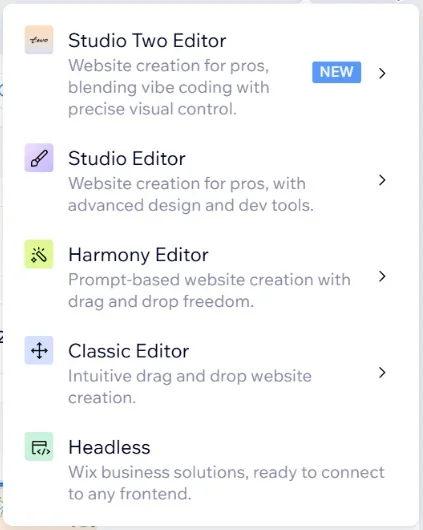
The descriptions under each one are worth reading. Studio Two Editor says: website creation for pros, blending vibe coding with precise visual control. Studio Editor says: website creation for pros, with advanced design and dev tools.
In my sites list, my Studio Two site shows a small Studio Two badge on its thumbnail. That makes it easy to see which editor a site uses when you have both kinds in one workspace.
How Wix itself compares the two editors
Wix has published a Help Center article on the difference between the Studio Editor and the Studio Two Editor. It says the list covers only the main differences and may be updated. Here is what it says, in plain terms.
- Appearance: the Studio Editor uses light mode, the Studio Two Editor uses dark mode
- Adding elements: both have an Add Elements panel, and Studio Two adds Draw Element
- Quick actions on an element: the Studio Editor has a toolbar, Studio Two has an action bar, plus an AI editing toolbar on some elements
- Further element options: both use the Inspector
- Aria, the AI assistant: no in the Studio Editor, yes in the Studio Two Editor
- Coding: Velo in the Studio Editor, a React code workspace in the Studio Two Editor
- Site comments: yes in the Studio Editor, no in the Studio Two Editor
The same article compares the top bars. The Studio Editor has the Studio logo, page dropdown, breakpoints, editing size, zoom, undo and redo, notifications, and preview and publish. Studio Two has the Studio Two logo, site overview, a Design and Code toggle and the page dropdown. Then come a Responsive Settings panel, zoom, undo and redo, and preview and publish.
Wix describes the Studio Editor as having a bright, airy white background, with more specific options down the left side. It describes Studio Two as a sleek, dark colour scheme with a minimal layout and a canvas you can move around, not just zoom.
Expert Tip: Site comments are the one that may catch agencies out. If your client sign-off process relies on comments left in the Studio Editor, Wix's table says that feature is not in the Studio Two Editor.
First look inside Studio Two
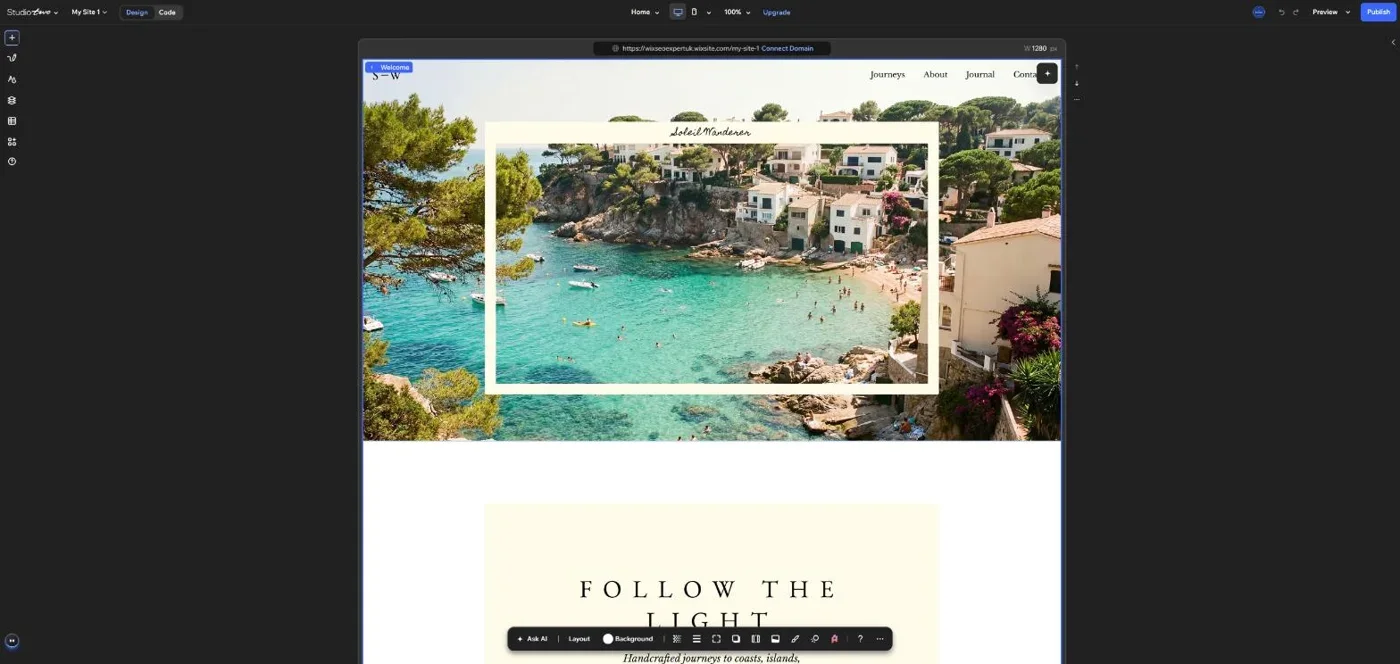
On my test site, the top bar showed the Studio Two logo, my site name, the Design and Code switch and the page picker. Then came device views, zoom, Upgrade, undo and redo, Preview and Publish. The left edge is a narrow column of icons.
While the editor loads, Studio Two shows a wall of template thumbnails with short messages. One of them read Full creative toolkit.
When I selected a section, the action bar appeared at the bottom of the screen. It showed Ask AI, Layout and Background, then a row of icons and a help button. This matches Wix's description of an action bar with options specific to the element you are working on.
Adding elements
Studio Two's Add Elements panel opens with four large buttons at the top: Upload Media, Generate Image, Generate or Import Element, and Generate From Brik.
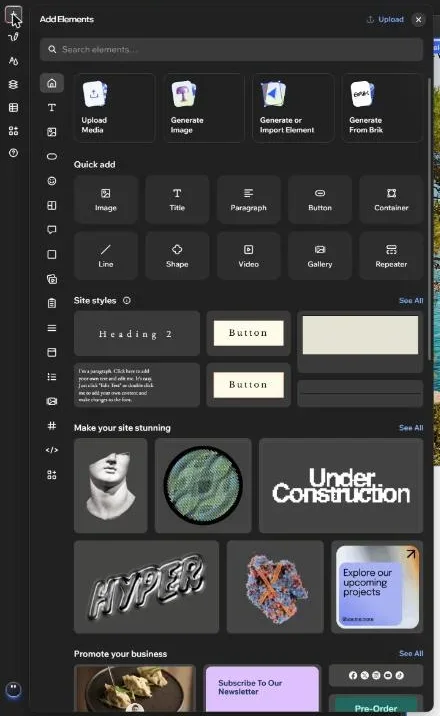
Under those is a Quick add section with Image, Title, Paragraph, Button, Container, Line, Shape, Video, Gallery and Repeater. Then comes a Site styles section, showing the heading, paragraph and button styles already set up for the site. Further down are sections headed Make your site stunning and Promote your business.
Wix says that if something does not exist natively in Studio Two, you can build it on any external platform and import it. Generate or Import Element is where that sits in the panel.
Draw Element
Draw Element is one of the two new left-menu features Wix highlights. Wix describes it as a tool to draw an element the size you want straight onto the canvas.
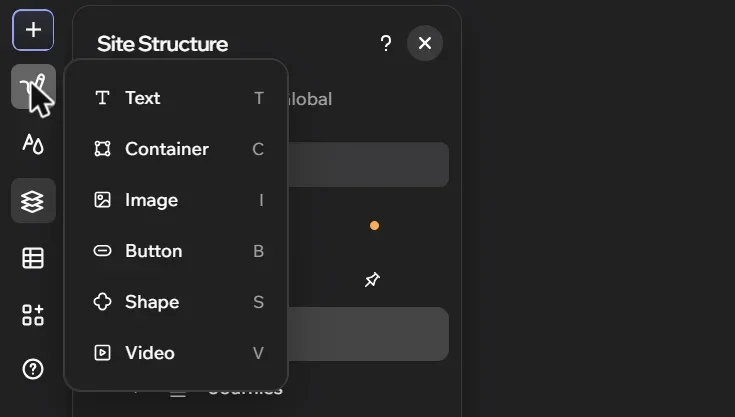
In my editor, the menu offers Text, Container, Image, Button, Shape and Video. Each has a one-letter shortcut shown beside it: T, C, I, B, S and V.
Wix's blog says the team set out to give complete freedom on the canvas, as if you are drawing, while AI works alongside you. Draw Element is the clearest example of that in the editor.
Site styles
Site Styles has its own icon on the left of the Studio Two editor. Wix's Help Center lists it as one of the entry points in the left menu.
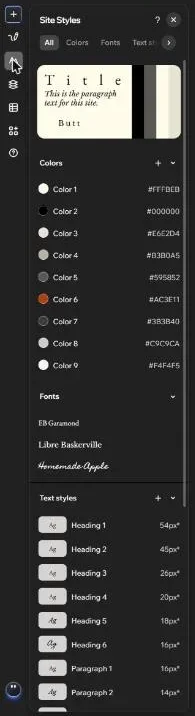
The panel has tabs for All, Colors, Fonts, Text styles, Buttons and Lines. On my test site, the Colors list showed nine colours, each with its hex code. The Fonts list showed three fonts.
The Text styles list ran from Heading 1 to Heading 6, then Paragraph 1 and Paragraph 2, each with its size. Wix lists variables and site styles among Studio Two's new features.
Expert Tip: A text style named Heading 1 sets how text looks. It does not decide the heading tag. In either editor, check the actual tag on each title. I explain why in my Studio 2 SEO first look.
Site Structure and layers
In my Studio Two editor, Site Structure has three tabs: Pages, Layers and Global. The Layers tab shows the page as a tree. It starts with the page, then the header, each section and the footer, with a search box at the top.
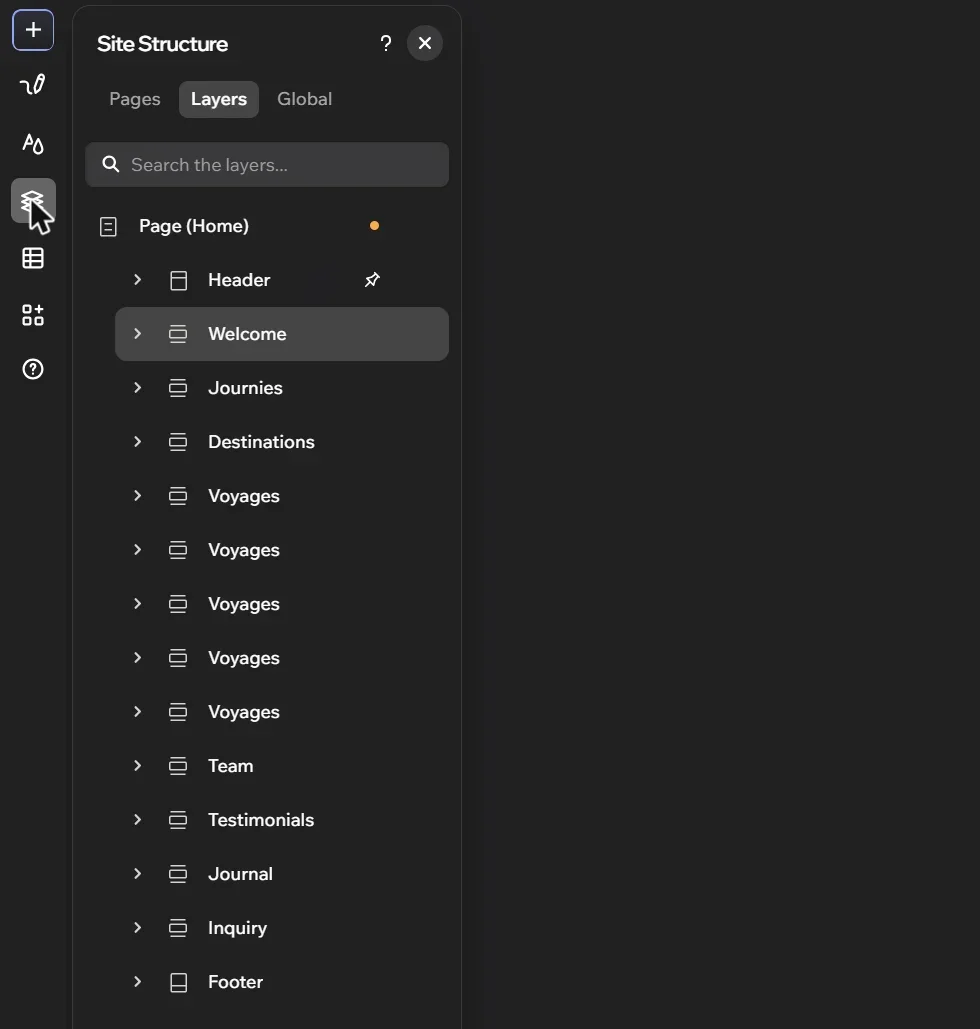
The section names in the tree come straight from the site, such as Welcome, Journies, Destinations, Team and Journal. That spelling of Journies is the template's own, not mine.
Naming sections clearly matters in any editor. It makes a site much easier to hand over to a client or a colleague.
Layout and the Inspector
With a section selected, clicking Layout on the action bar opened a small panel in my editor. It showed Change layout, set to Rows on my section, then Add cell and Adjust grid options, and a link to All Design Options.
All Design Options opened the Inspector on the right, with three tabs: Design, Motion and Settings. Under Design, I saw Size, Fill, Borders, Corners, Shadow, Effects, Layout, Position, Cursor, Anchor and Custom CSS.
When I expanded Custom CSS, it said: design this element by adding custom CSS, manually or with AI, with an Add button. Wix's developer comparison page, last updated 3 November 2026, lists custom CSS as not supported yet in Studio Two's code features. So check how far custom CSS goes on your own site before you plan a build around it.
In the Studio Editor, Wix's developer docs say global.css applies styles to every page. The CSS Classes panel styles specific elements from the Code panel.
Responsive settings and breakpoints
Wix's Help Center says the Studio Editor starts with three breakpoints, for mobile, tablet and desktop. You can define up to six breakpoints for each page or master section.
In Studio Two, breakpoints live in a Responsive Settings panel, which opens from the arrow next to the device icons. On my test site, it showed two breakpoints: Desktop at 1024px and up, and Mobile at 320 to 1023px. There is an Add Breakpoint link.
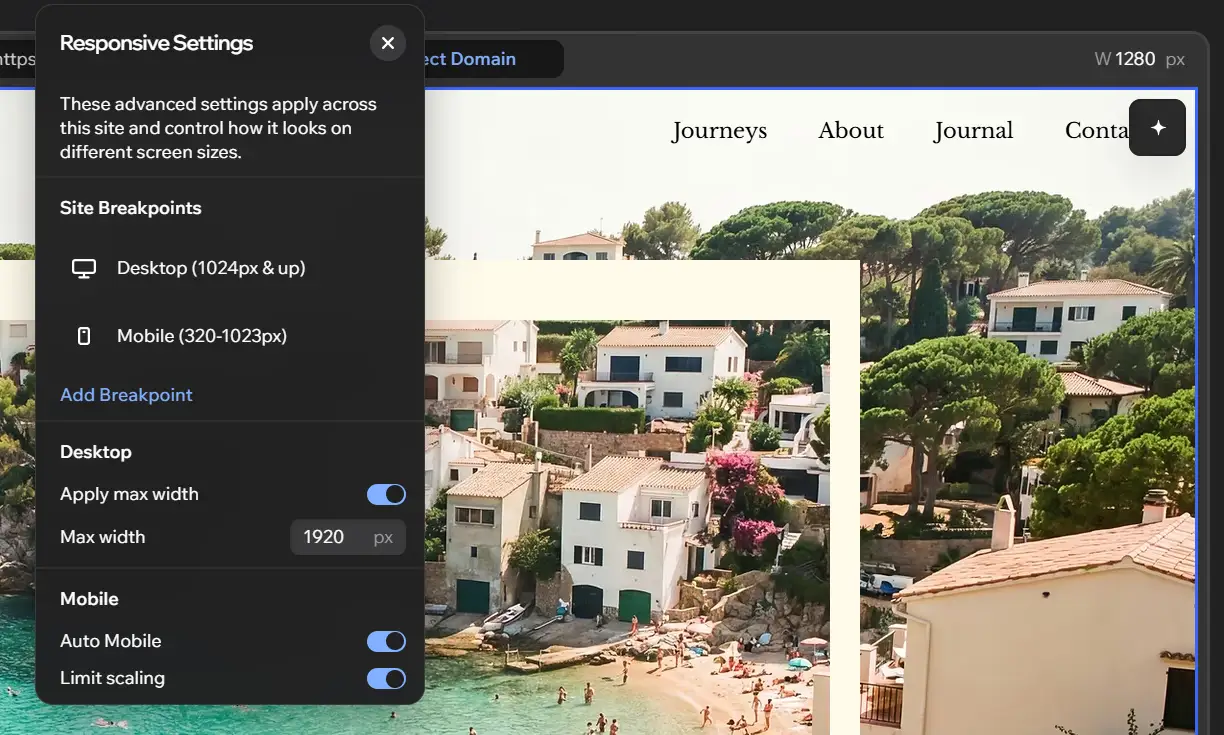
With those two ranges, any screen narrower than 1024px uses the mobile layout. That includes many tablets held upright. If you need a separate tablet layout on a Studio Two site, add a breakpoint.
The panel also showed Apply max width, switched on, with Max width set to 1920px. Under Mobile were Auto Mobile and Limit scaling, both switched on.
Wix's Help Center describes Auto Mobile as a tool that automatically arranges the page's layout for mobile devices. In the Studio Editor, the launch feature Wix listed for automatic layouts was Responsive AI. I still check every page on a real phone, whichever editor a site uses.
Motion and animation
Wix's 2023 launch release listed scroll, loop and entrance animations, plus click and hover interactions, for the Studio Editor.
In Studio Two, the Motion tab in the Inspector opened with a card called Meet Ani-Mate, labelled New. It said it would turn the section into a dynamic experience with AI-powered motion, with an Animate with AI button. Below it were Scroll, Click and Hover sections.
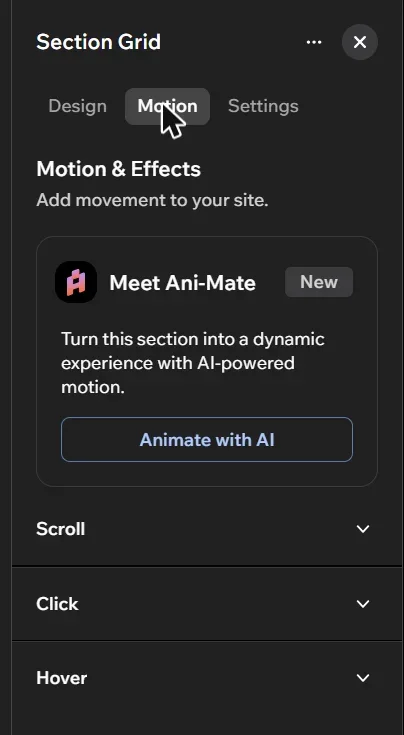
Wix lists advanced animations among Studio Two's new features. When I opened Aria on a section, one of its starter suggestions was Add a complete motion experience.
AI: Aria in Studio Two
Wix's comparison table is simple on this point. Aria, the AI assistant, is not in the Studio Editor and is in the Studio Two Editor. In Wix Studio, the AI tools Wix listed at launch were Responsive AI, AI text and images, and an AI code assistant.
In Studio Two, Aria opens from the bottom of the left edge. When I opened it, it greeted me by name: Hi Michael, let's work together to build your vision for this site.
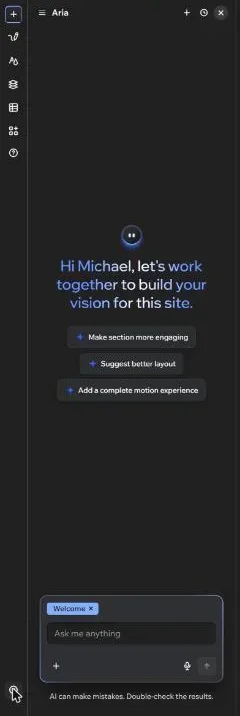
It offered three suggestions for the section I had selected: Make section more engaging, Suggest better layout, and Add a complete motion experience. The section name showed as a tag in the chat box. Under the box was the line: AI can make mistakes. Double-check the results.
What Wix says Aria can do
Wix's Help Center says you can ask Aria to build pages and sections, or restyle the site to match a brand. Aria can also write content, add apps, adjust site settings or write custom code.
You can start a site from a client's own materials, such as a brief, logo, photos, a questionnaire or a deck. With Plan Mode on, you review and edit the brief with Aria first. Aria then generates three homepage directions that share the same colours, typography and branding.
Wix says you can save a prompt as a skill, so you do not repeat the same directions on every project. You can also install ready-made skills from a Skills Library.
On the canvas, Wix says an AI Actions icon appears on a selected element. It can expand an image to fit the layout, remove a background or rewrite a line of copy. For images, Smart Edits are ready-made AI flows for specific results.
Wix's blog says Aria 2.0 was rebuilt after Wix Harmony launched. Wix describes it as flatter, fetching whatever capabilities a request needs and running multiple actions at once.
Common Mistake: Wix's own Help Center warns that Aria may produce unexpected or inaccurate results. It says to always review Aria's suggestions or changes. I would never publish AI changes to a client site without checking every page.
Coding: Velo in Wix Studio
Wix's developer docs say you can code a Wix Studio site in three places. The Code panel suits small projects with custom interactions and frontend CSS. The Wix IDE is a VS Code-based IDE in the browser for larger projects. Git integration with the Wix CLI lets you work locally with GitHub.
The docs note that the Wix IDE and GitHub integration cannot be used at the same time. They also say concurrent editing is not available with Git integration.
Velo gives you page code, global page code and masterpage.js on the frontend. On the backend there are web modules, data hooks, routers, backend events, HTTP functions and scheduled jobs. You can use npm packages and Velo packages, connect external databases and build apps with Wix Blocks.
Coding: React in Wix Studio 2
When I clicked Code in my Studio Two editor, a welcome screen read Extend site capabilities with custom code. It said the tab shows only your custom code files, from components to backend logic.
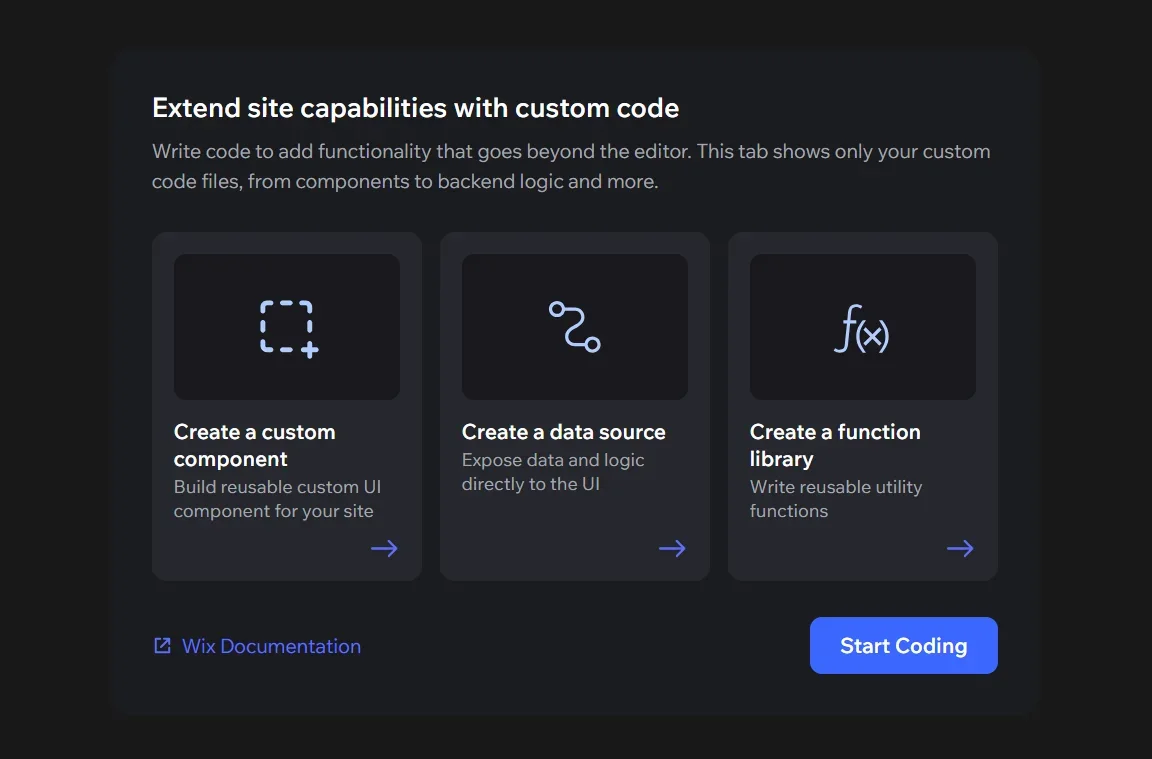
It offered three cards: Create a custom component, Create a data source and Create a function library. Then there was a Start Coding button and a link to Wix Documentation.
What Wix's developer docs say about the Code tab
Wix's About the Code Tab page says the Code tab runs Visual Studio Code in the browser, with the site's project already open. You can edit code, add extensions and check logs without installing anything locally.
The sidebar has Explorer, Search, the Wix Extension Builder and Wix Data. The panel along the bottom has a Terminal, Problems and WIX LOGS. Edits save to the site as you work.
Wix's comparison page says Studio Two code is written in TypeScript, which compiles to JavaScript. npm packages are supported, installed from the Terminal. A Secrets Manager and an AI assistant are supported.
Site history includes code changes. Wix says restoring an earlier version also restores the code.
Studio Two has no $w API. Instead, you build custom UI as Editor React Components, which Wix calls ERCs. A Wix user then connects an ERC's props to values and functions from Data Sources and function libraries.
For backend code, Wix says Studio Two uses HTTP endpoints to call backend code from the site's own frontend. Backend events, service plugins and dashboard pages are supported. Wix CMS collections, the Data API, dynamic pages and external databases are supported too.
One more practical point from Wix's docs: some browsers cannot open the Code tab, including some versions of Safari. The editor tells you when you need to switch.
What is not in Studio Two yet
This is the most important section for anyone with Velo code on client sites. Wix's developer page comparing Studio Two with Wix Editor and Wix Studio, last updated 3 November 2026, lists these features as not in this release:
- Development environment: the Wix IDE, local IDE and Git integration, GitHub Actions and Velo packages
- Frontend: the $w API, custom elements and forms with code
- Backend: web modules, HTTP functions, routers and scheduled jobs
- Data: datasets, data hooks and dynamic page hooks
- Business solutions: replacing a business solution's default pages
- Tests: functional testing
- Maintenance: Google Cloud Logs and external logging tool connections
Wix gives some alternatives. Studio Two replaces datasets with CMS Data Sources, which only display data. Data events are a partial alternative to data hooks, but they run after a change is saved, so they cannot validate or block it.
Studio Two HTTP endpoints serve only your site's own frontend. Wix says you cannot yet create endpoints that external systems call, as you can with HTTP functions. Instead of routers, Wix points to dynamic pages.
There is also a difference in backend capacity. Wix says backend code in Studio Two runs with fixed compute limits that apply to every site, with no auto-scaling. In Wix Editor and Wix Studio, the limits depend on the site's premium plan.
Wix says this is the initial release and that more features are planned. Until the ones you rely on arrive, a Velo-heavy site belongs in Wix Studio.
Export and import as React code
The Wix Studio launch release described a GitHub connection so developers could work in their own IDE. It did not describe exporting the site to host it elsewhere.
Wix says a Studio Two site can be exported as React source code. You can host it on your own infrastructure, work on it outside Wix, or import your changes back into Wix. Wix's developer docs mark this feature as beta, subject to change, and say it may have bugs, issues and limitations.
Wix says the export is a Yarn workspace. It contains a site package with pages, shared sections, menus and theme. If the site has code, it also contains a code package, which is a standard Wix CLI app.
The export includes files for coding agents. Wix lists AGENTS.md and CLAUDE.md instructions, an editing skill, a component catalog and component contracts. These help tools such as Claude Code or Cursor make changes the import will accept.
Building an exported site produces a Node server that can run on any platform that runs Node. But Wix is clear that the running site still loads fonts and media from Wix and calls Wix APIs for business features. Wix describes it as a frontend you host for a site Wix still runs.
Importing back
Each export is a copy of the site at that moment. Wix says importing replaces the site with the exported version, overwriting any changes made in Studio Two since the export.
Every page except the home page is deleted and added again, so those pages get new IDs, though their URLs stay the same. Pages that are not in the export are deleted. The import does not change installed apps, CMS collections or other site data, and it does not publish the site.
Current export limitations
- A site with dynamic pages cannot be exported
- Lightboxes are exported and kept on import, but do not appear on the running site
- A page with a widget from an installed app, other than an ERC, fails in preview and build
- Visitors cannot log in to an exported site
- Custom code that waits for visitor consent, such as analytics and marketing code, does not load
Business features and data
Wix's developer docs say Wix business solutions, such as Wix Stores and Wix Bookings, are available on Studio Two sites, and their APIs are supported.
Wix's announcement says you can customise the design of Wix Stores, Wix Bookings and other solutions. You can also add drag-and-drop components that automatically connect to live data. It also says MCP-powered capabilities let AI agents interact with and manage Wix business solutions such as Stores and Bookings.
Wix's Help Center gives two examples of data sources: connecting a regular button to a specific category in Wix Stores, and connecting text to custom code to show local time and weather.
One thing Studio Two cannot do yet is replace a business solution's default page or take over its flow. Wix says you can build an ERC that uses a business solution context instead, which is a narrower customisation.
The dashboard
My Studio Two site opens the usual Wix site dashboard. The left menu includes Setup, Home, AI Agents (labelled New), Getting Paid, Sales, Blog and Apps. Further down are Marketing, Analytics, Automations, Settings, CMS and Developer Tools.
A banner along the bottom read: Meet Studio Two, the deepest visual editor for pros, open to any agentic workflow.
Wix's developer docs say Studio Two monitoring and logs are in the site dashboard under Developer Tools. You open it from the toolbox icon in the editor.
Collaboration and agency workflow
My Studio Two site sits in the same Wix Studio workspace and sites list as my other sites. The agency menus are the same, such as Client Experience, Marketplace and Team.
The differences are in the editor. Wix's comparison table says site comments are in the Studio Editor but not in Studio Two. Wix's developer docs list Git integration as not in this release, so a GitHub-based team workflow stays in Wix Studio for now.
On the other side, Wix says Skills let an agency save its standards once so Aria applies them across projects. Wix also frames Harmony as a source of new work. DIY users who need more help can be handed to partners, who can open those sites in Studio Two.
What about SEO?
I covered this in depth in my Wix Studio 2 SEO first look. In Studio Two, page SEO is reached through Site Structure. Each page gets an SEO checklist with a Google preview, and there is a clear warning if the site cannot be indexed.
The advanced settings, including structured data and robots meta tags, are still in the dashboard SEO Settings, which is now under SEO and GEO.
The fundamentals are the same in both editors: a unique title for every page, a written meta description, one H1, a sensible heading structure, alt text and indexing switched on.
Moving between the two editors
Wix says existing Wix Studio sites remain supported, and that partners can keep creating sites in both editors during the rollout. It also says partners can open any Wix Harmony site in Studio Two.
I have not seen Wix announce a tool that converts a Wix Studio site into a Studio Two site. So for now I treat Studio Two as the editor for new projects, and leave existing Studio sites where they are.
My own advice is to try Studio Two on a separate test site before any client work. That is what I have done here.
Which one should you use?
Stay in Wix Studio if
- The site uses Velo features that are not in Studio Two yet, such as the $w API, web modules, routers, scheduled jobs, datasets or data hooks
- Your developers work with Git integration, the Wix CLI or the Wix IDE
- Other systems call your site through HTTP functions
- Your sign-off process relies on site comments in the editor
- You need a business solution's default page replaced
Try Wix Studio 2 if
- You are starting a new site and want Aria to help from the client brief onwards
- You want to build custom components in React and TypeScript
- You want to export the site as React code and work on it in Claude, Codex, Cursor or another IDE, accepting the beta limits
- A client started a site in Wix Harmony and needs a professional to take it on
- You want Draw Element, Auto Mobile and Ani-Mate in your design workflow
Wix Studio vs Wix Studio 2: side-by-side comparison
Every row below comes from what I saw in my own account or from Wix's own announcement, Help Center and developer documentation, as described above.
| Feature | Wix Studio | Wix Studio 2 (Studio Two) |
|---|---|---|
| Announced | 1 August 2023 | 2 November 2026, rolling out to Wix Partners first |
| Wix's description in Create New Site | Website creation for pros, with advanced design and dev tools | Website creation for pros, blending vibe coding with precise visual control |
| Appearance | Light mode | Dark mode |
| Adding elements | Add Elements panel | Add Elements panel and Draw Element |
| Quick actions on an element | Toolbar | Action bar, plus an AI editing toolbar on some elements |
| Further element options | Inspector | Inspector |
| Design and code | No Design and Code toggle in Wix's top bar list | Design and Code toggle in the top bar |
| Breakpoints | Starts with three (mobile, tablet, desktop), up to six | Responsive Settings panel; my site started with Desktop 1024px and up, and Mobile 320 to 1023px |
| Automatic mobile layout | Responsive AI | Auto Mobile, plus max width and limit scaling settings |
| Animation | Scroll, loop and entrance animations, click and hover interactions | Scroll, click and hover, plus Ani-Mate (Animate with AI) |
| Aria AI assistant | No | Yes |
| Coding | Velo | React code workspace, written in TypeScript |
| Code environment | Code panel, Wix IDE, or Git integration with the Wix CLI | Code tab running Visual Studio Code in the browser |
| Wix IDE, Git integration, Velo packages | Yes | Not in this release |
| $w API and custom elements | Yes | Not in this release; use Editor React Components |
| Web modules, HTTP functions, routers, scheduled jobs | Yes | Not in this release; HTTP endpoints serve the site's own frontend |
| Datasets and data hooks | Yes | Not in this release; CMS Data Sources and data events instead |
| Custom CSS | global.css and the CSS Classes panel | Custom CSS section in the Inspector; Wix's dev comparison lists custom CSS as not supported yet |
| npm packages and Secrets Manager | npm packages supported | Both supported |
| Backend compute limits | Depend on the premium plan | Fixed for every site, no auto-scaling |
| Export as code | Not described in Wix's launch release | React export in beta; no dynamic pages, no member login |
| Open Wix Harmony sites | Not described | Yes |
| Wix Stores, Bookings and other business solutions | Yes | Yes; replacing their default pages is not in this release |
| Site comments | Yes | No |
| Site dashboard | Standard Wix dashboard | Standard Wix dashboard |
| Existing sites | Wix says they remain supported | Wix says partners can create sites in both editors during the rollout |
Conclusion
Based on what I have seen in my own account and what Wix has published, Studio Two is a real change of direction. AI sits in the editor, coding moves to React and TypeScript, and sites can leave Wix as code and come back.
It is also, in Wix's own words, an initial release. Wix's developer docs list a long set of Velo features that are not there yet. The export is in beta, and site comments are not in it.
So my advice is practical. Open a Studio Two test site and learn it now. Keep client sites that depend on Velo in Wix Studio. Check Wix's comparison pages again as features arrive, because they say more are planned.
Read my SEO review of Wix Studio 2.
Fix your Wix SEO from your dashboard
SEO Fix in a Box scans every page, writes your fixes from your own Google searches and puts them on in one click, with undo. Start on the free plan.

Want this sorted on your own Wix site?
I have worked only on Wix for 14 years. Get SEO Fix in a Box on the Wix App Market to find and fix what is holding your site back, or see my packages and prices if you would rather I did it all for you.
Frequently Asked Questions
Is Wix Studio 2 the same as Wix Studio Two?
Yes. Wix calls it the Studio Two Editor, and many people write it as Wix Studio 2. It is a separate editor from the Studio Editor, not an update to it.
Will my Wix Studio site be moved to Studio Two?
Wix says existing Wix Studio sites remain supported, and partners can keep creating sites in both editors during the rollout. I have not seen Wix announce a tool that converts a Wix Studio site to Studio Two.
Does Wix Studio 2 use Velo?
No. Wix says Studio Two uses a React code workspace, and code is written in TypeScript. Wix lists Velo features such as the $w API, web modules, routers, scheduled jobs, datasets and data hooks as not in this release.
Can I export a Wix Studio 2 site?
Yes, as React source code, but Wix marks export as beta. Sites with dynamic pages cannot be exported yet, and visitors cannot log in to an exported site. The running site still loads fonts and media from Wix.
How many breakpoints does Wix Studio 2 have?
My Studio Two test site started with two in the Responsive Settings panel: Desktop at 1024px and up, and Mobile at 320 to 1023px, with an Add Breakpoint link. Wix says the Studio Editor starts with three and allows up to six.
Does Wix Studio 2 have site comments?
Not at the moment. Wix's Help Center comparison table lists site comments as available in the Studio Editor and not in the Studio Two Editor.