BreadcrumbList schema: how to implement breadcrumbs on Wix and get them in results
Module 6: Technical SEO, Structured Data & Rich Snippets for Wix | Lesson 68 of 683 | 50 min read
By Michael Andrews, Wix SEO Expert UK
Breadcrumb rich results replace the raw URL in your Google listing with a clean, readable navigation path like "Home > Services > Local SEO". This seemingly small change has measurable impact: it makes your listing look more professional, helps users understand your site structure before clicking, can improve click-through rates, and sends Google strong signals about your site hierarchy. On Wix, where URL structures are flat by default, BreadcrumbList schema is especially valuable because it creates the hierarchical context that the URLs alone do not provide. This lesson covers planning your breadcrumb hierarchy, creating visible breadcrumb navigation, implementing the schema, and managing it across your entire site.
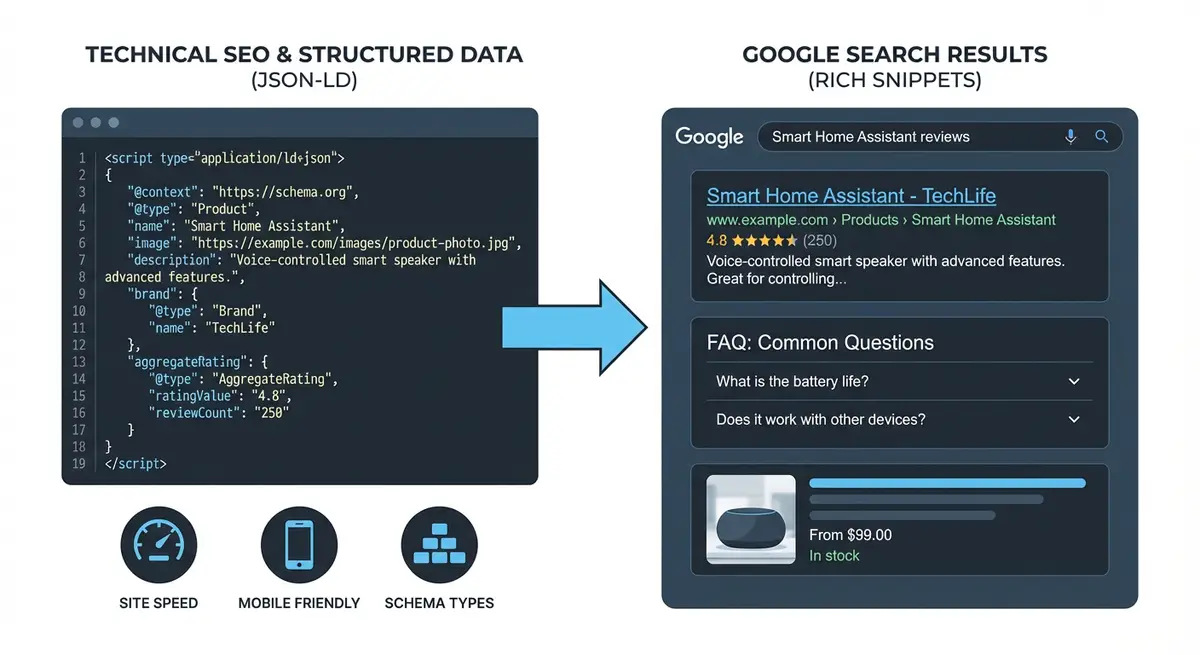
What Breadcrumb Rich Results Look Like
In standard Google search results, your listing shows the page URL below the title: "wixseo.co.uk/local-seo-services". With breadcrumb rich results, this is replaced with a clean path: "wixseo.co.uk > Services > Local SEO". Each segment can be clickable in the SERP, allowing users to navigate to parent sections directly from the search result.
- Cleaner, more professional appearance in search results.
- Users understand your site structure before clicking.
- Clickable parent categories create additional entry points to your site from the SERP.
- Signals clear site hierarchy to Google, supporting crawling and content categorisation.
- Works on both mobile and desktop search results.
- Complements other rich results: breadcrumbs can appear alongside star ratings and sitelinks.
Why Breadcrumbs Matter for Wix Sites Specifically
Wix sites use flat URL structures by default. A page URL like "yoursite.com/local-seo-services" gives Google no information about where this page sits in your site hierarchy. Is it a top-level page? A sub-service page? A category page? Without breadcrumbs, Google guesses based on internal linking patterns. BreadcrumbList schema removes the guessing and explicitly tells Google: this page is Home > Services > Local SEO.
Planning Your Breadcrumb Hierarchy
Before writing any code, map your entire site structure. Every page needs a clear path from the homepage.
Creating your site hierarchy map
- Open a spreadsheet with columns: Page Name, URL, Breadcrumb Path.
- Start with your homepage as the root: "Home".
- List all your main sections (Services, About, Blog, Contact, etc.).
- For each main section, list the sub-pages that belong under it.
- Create the full breadcrumb path for each page: Home > [Section] > [Sub-section] > [Page].
- Most pages should be 2-3 levels deep. Avoid paths deeper than 4 levels.
- Verify every parent page in the path actually exists and has a valid URL.
- Check for pages that could logically belong to multiple sections and pick the primary one.
Example Site Hierarchy
- Homepage: Home (yoursite.com)
- Services overview: Home > Services (yoursite.com/services)
- Local SEO service: Home > Services > Local SEO (yoursite.com/local-seo)
- Technical SEO service: Home > Services > Technical SEO (yoursite.com/technical-seo)
- About page: Home > About (yoursite.com/about)
- Blog index: Home > Blog (yoursite.com/blog)
- Blog post: Home > Blog > How to Improve Site Speed (yoursite.com/blog/improve-site-speed)
- Contact page: Home > Contact (yoursite.com/contact)
- Case studies: Home > Our Work (yoursite.com/our-work)
- Specific case study: Home > Our Work > Client Name (yoursite.com/our-work/client-name)
Adding Visible Breadcrumb Navigation to Wix
Google recommends that breadcrumb schema matches visible breadcrumb navigation on the page. While not strictly required, having visible breadcrumbs improves user experience and reinforces the schema signals.
Creating visible breadcrumbs in the Wix Editor
- Open the Wix Editor and go to the page you want to add breadcrumbs to.
- Add a container/strip near the top of the page, below the header but above the main content.
- Set the container background to transparent or a subtle light grey.
- Add a text element inside the container.
- Type your breadcrumb path using " > " as separators: Home > Services > Local SEO.
- Make "Home" a link to your homepage and each intermediate level a link to its page.
- Do not make the current page (last item) a link since the user is already on that page.
- Style the text: small font size (12-14px), muted colour for regular items, darker for the current page.
- Copy this pattern to all pages, adjusting the path and links for each page.
- On mobile, ensure breadcrumbs are visible and do not overflow: consider truncating to show only the parent level.
BreadcrumbList Schema Structure
BreadcrumbList schema uses an itemListElement array where each item represents one level in the breadcrumb path. Each item has a position (starting from 1), a name (display text), and an item (the URL).
<script type="application/ld+json">
{
  "@context": "https://schema.org",
  "@type": "BreadcrumbList",
  "itemListElement": [
    {
      "@type": "ListItem",
      "position": 1,
      "name": "Home",
      "item": "https://www.yoursite.com"
    },
    {
      "@type": "ListItem",
      "position": 2,
      "name": "Services",
      "item": "https://www.yoursite.com/services"
    },
    {
      "@type": "ListItem",
      "position": 3,
      "name": "Local SEO",
      "item": "https://www.yoursite.com/local-seo"
    }
  ]
}
</script>
Schema Rules and Best Practices
- Position numbers must start at 1 and increment sequentially.
- The first item should always be your homepage.
- The last item is the current page. Google says the item URL is optional for the last breadcrumb.
- Use full absolute URLs (https://www.yoursite.com/page), not relative URLs (/page).
- The name should match the visible breadcrumb text on the page.
- URLs must be canonical: use the same www/non-www version as your canonical URLs.
- Every URL in the breadcrumb path must be a real, accessible page (no 404s).
- Use consistent naming: if you call it "Services" in one breadcrumb, do not call it "Our Services" in another.
Templates for Common Page Types
Service Page Breadcrumb
{
  "@context": "https://schema.org",
  "@type": "BreadcrumbList",
  "itemListElement": [
    { "@type": "ListItem", "position": 1, "name": "Home", "item": "https://www.yoursite.com" },
    { "@type": "ListItem", "position": 2, "name": "Services", "item": "https://www.yoursite.com/services" },
    { "@type": "ListItem", "position": 3, "name": "Local SEO" }
  ]
}
Blog Post Breadcrumb
{
  "@context": "https://schema.org",
  "@type": "BreadcrumbList",
  "itemListElement": [
    { "@type": "ListItem", "position": 1, "name": "Home", "item": "https://www.yoursite.com" },
    { "@type": "ListItem", "position": 2, "name": "Blog", "item": "https://www.yoursite.com/blog" },
    { "@type": "ListItem", "position": 3, "name": "How to Improve Site Speed on Wix" }
  ]
}
Nested Category Page
{
  "@context": "https://schema.org",
  "@type": "BreadcrumbList",
  "itemListElement": [
    { "@type": "ListItem", "position": 1, "name": "Home", "item": "https://www.yoursite.com" },
    { "@type": "ListItem", "position": 2, "name": "Services", "item": "https://www.yoursite.com/services" },
    { "@type": "ListItem", "position": 3, "name": "Technical SEO", "item": "https://www.yoursite.com/technical-seo" },
    { "@type": "ListItem", "position": 4, "name": "Core Web Vitals Audit" }
  ]
}
Adding BreadcrumbList Schema to Wix: Step-by-Step
Complete implementation for your entire Wix site
- Complete your site hierarchy spreadsheet with the breadcrumb path for every page.
- Create the JSON-LD for your first page using the template above.
- Replace the placeholder names and URLs with your real page information.
- Validate at search.google.com/test/rich-results.
- In Wix Dashboard, go to Settings > Custom Code.
- Click "+ Add Custom Code" and paste the validated JSON-LD.
- Name it: "Breadcrumb Schema - [Page Name]".
- Set "Place Code in" to "Head".
- Set "Add Code to Pages" to the specific page.
- Click Apply.
- Repeat steps 2-10 for every page on your site.
- For the homepage, you typically do not need breadcrumb schema since it is the root.
- Publish your site and test 3-5 live page URLs in the Rich Results Test.
- Verify each test shows "BreadcrumbList" with the correct number of items.
- Check Google Search Console > Enhancements for BreadcrumbList detection across your site.
Combining Breadcrumbs with Other Schema
BreadcrumbList schema works alongside other schema types. On a service page you might have LocalBusiness, FAQPage, and BreadcrumbList schema all on the same page.
<script type="application/ld+json">
{
  "@context": "https://schema.org",
  "@graph": [
    {
      "@type": "BreadcrumbList",
      "itemListElement": [
        { "@type": "ListItem", "position": 1, "name": "Home", "item": "https://yoursite.com" },
        { "@type": "ListItem", "position": 2, "name": "Services", "item": "https://yoursite.com/services" },
        { "@type": "ListItem", "position": 3, "name": "SEO Audit" }
      ]
    },
    {
      "@type": "FAQPage",
      "mainEntity": [
        {
          "@type": "Question",
          "name": "How long does an SEO audit take?",
          "acceptedAnswer": { "@type": "Answer", "text": "A thorough SEO audit takes 3-5 business days." }
        }
      ]
    }
  ]
}
</script>Managing Breadcrumbs at Scale
For sites with 20+ pages, managing individual breadcrumb schema via Custom Code can become tedious. Here are strategies to make it manageable.
- Use a spreadsheet to generate JSON-LD for all pages: create a template formula that inserts page names and URLs.
- Group pages by section: add all service page breadcrumbs in one session, all blog post breadcrumbs in another.
- Use Wix Velo (if comfortable with code) to dynamically generate breadcrumb schema based on page URL.
- For blog posts, create a reusable template with just the blog post title changing.
- Name every Custom Code entry consistently: "Breadcrumb - Services - Local SEO" so you can find and update them easily.
- Maintain a master list that maps every URL to its breadcrumb schema status.
Wix Dynamic Pages and Breadcrumbs
If you use Wix dynamic pages (from CMS collections), adding breadcrumb schema requires either Wix Velo code or individual Custom Code entries for each dynamic page. For CMS-driven blog posts, Wix Velo can dynamically inject the correct breadcrumb path based on the post title and category.
Common Breadcrumb Schema Mistakes
- Using relative URLs instead of full absolute URLs.
- Position numbers not starting at 1 or not being sequential.
- Linking to pages that do not exist (404 errors in the breadcrumb chain).
- Inconsistent naming: "Services" on one page, "Our Services" on another.
- Not matching visible breadcrumb text to schema breadcrumb names.
- Adding breadcrumb schema to the homepage (unnecessary since it is the root).
- Using www in some URLs and non-www in others within the same breadcrumb.
- Having a breadcrumb path that does not reflect the actual site structure.
- Forgetting to update breadcrumb schema when page URLs or names change.
- Multiple BreadcrumbList schemas on the same page causing conflicts.
What to Do When URLs Change
If you rename a page or change a URL on your Wix site, you must update the breadcrumb schema on that page and on every page that references it as a parent. This is another reason to maintain a master breadcrumb spreadsheet.
Updating breadcrumbs after a URL change
- Set up a 301 redirect from the old URL to the new URL in Wix.
- Update the breadcrumb schema on the changed page with the new URL.
- Search your Custom Code entries for any other pages that reference the old URL as a parent breadcrumb.
- Update those references to use the new URL.
- Re-validate all affected pages with the Rich Results Test.
- Check Google Search Console for any new breadcrumb errors.
Monitoring Breadcrumb Rich Results
Ongoing breadcrumb monitoring
- Check Google Search Console > Enhancements > Breadcrumbs regularly.
- Look for any pages with errors or warnings.
- Search your brand name and key pages on Google to verify breadcrumb display.
- Note that breadcrumb rich results may take 2-4 weeks to appear after implementation.
- Not every page will show breadcrumbs in every search result: Google decides based on the query.
- Compare your SERP listings before and after implementation to see the visual difference.
E-Commerce Breadcrumbs
For Wix e-commerce stores, breadcrumbs are especially important because product pages often have deep hierarchies: Home > Shop > Category > Sub-category > Product. This gives Google clear category signals for product pages and can improve product search visibility.
- Use product category as the second breadcrumb level: Home > Shop > Clothing > Summer Dresses > Blue Floral Dress.
- Keep breadcrumb names concise but descriptive.
- Ensure category pages exist and are indexable.
- For products in multiple categories, choose the primary category for the breadcrumb path.
A simple win
Breadcrumbs are one of the quiet wins in this list, because the markup is simple and the payoff is visible. When you add BreadcrumbList, Google can replace the plain URL under your title with a proper trail, like Home then Services then Wix SEO, which reads better and tends to lift click through. It also helps Google understand where a page sits in your site.
The shape, and what to avoid
The markup is an itemListElement, which is just an ordered array of ListItem entries. Each one needs a position, starting at 1 and counting up with no gaps, a name, and an item that is the URL for that step. The last item, the current page, can leave the URL off. That is the whole shape of it.
The slips to avoid are all about matching what people actually see. The order in the markup should follow the real path through your site, so the positions cannot jump around. The breadcrumb you mark up should match the navigation on the page, not a made up path. And there is no point putting a breadcrumb on the homepage, since it is the top of the tree. One extra thing on Wix specifically: some page types already output their own breadcrumb, so check before you add your own, or you can end up with two. Test the page in the Rich Results Test to confirm the trail is picked up. Breadcrumbs work hand in hand with a sensible internal link structure, so if the path through your site is not clean yet, that is the place to start, in Internal linking architecture. They also sit close to how Google builds the site name and links under your result, which I cover in Structured data and sitelinks.
Was this lesson useful?
It takes 1 minute to tell me. The course is free and I want to keep it that way, and your feedback shows me what is working and helps other people find it.
This lesson on BreadcrumbList schema: how to implement breadcrumbs on Wix and get them in results is part of Module 6: Technical SEO, Structured Data & Rich Snippets for Wix in The Most Comprehensive Complete Wix SEO Course in the World (2026 Edition). Created by Michael Andrews, a Wix Marketplace Legend Partner with 14 years of hands-on experience, 800 completed Wix SEO projects and 456 verified five-star reviews.