Review and AggregateRating schema: star ratings in Google search results
Module 6: Technical SEO, Structured Data & Rich Snippets for Wix | Lesson 71 of 683 | 55 min read
By Michael Andrews, Wix SEO Expert UK
Star ratings in Google search results are one of the most attention-grabbing rich result types. Studies consistently show CTR improvements of 15-30% for listings with star ratings compared to plain results. However, Google has strict policies about which pages can display star ratings, and implementing review schema incorrectly can result in a manual action penalty that removes all structured data features from your search listings. This lesson covers everything from eligibility rules and Google's policies through implementation patterns, individual vs aggregate reviews, third-party review integration, and the critical mistakes that trigger manual actions.
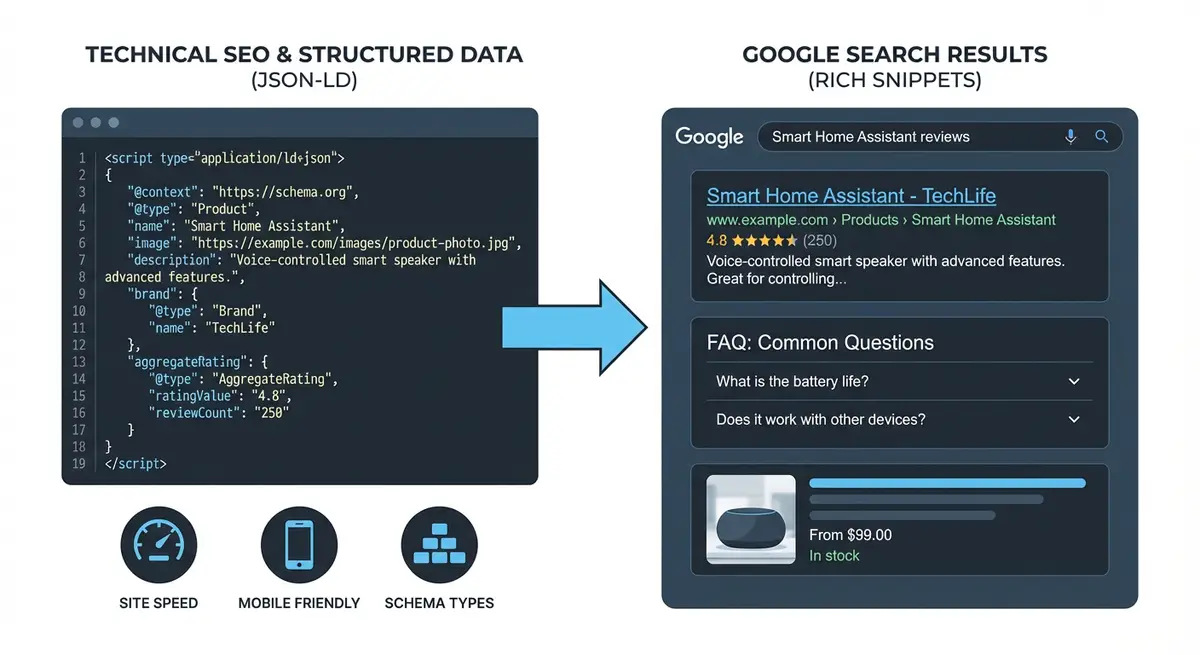
What Review Rich Results Look Like
When Google shows review rich results, your search listing gains gold star icons (typically showing something like "4.8 ★★★★★ (127 reviews)") below the page title. This visual element immediately draws the eye and signals quality and trust to searchers. On both mobile and desktop, star ratings are one of the most visually prominent SERP features.
- Gold/yellow star icons displayed below your page title.
- Aggregate rating number shown (e.g., 4.8 out of 5).
- Total review count displayed (e.g., "127 reviews").
- Available for specific content types only (not all pages qualify).
- Can significantly increase click-through rates.
- Builds trust before the user even clicks.
Google's Strict Eligibility Policies
Google has become increasingly strict about which pages can show star ratings. Understanding these policies is critical because violations can result in manual actions.
Eligible Content Types
- Products: physical or digital products with genuine customer reviews.
- Books: books with reader reviews or critic ratings.
- Courses: educational courses with student reviews.
- Events: events with attendee reviews.
- Recipes: recipes with user ratings.
- Software Applications: apps with user ratings.
- Local Businesses: businesses with customer reviews (via LocalBusiness schema).
- Movies: films with viewer or critic ratings.
Content Types That Are NOT Eligible
- Generic service pages: "Our SEO Services" cannot have star ratings.
- Homepage: your main business page is not eligible for AggregateRating.
- Blog posts or articles: editorial content cannot have star ratings.
- Portfolio/work examples pages.
- About pages or team pages.
- Category or index pages.
- Pages with only self-written testimonials (these are not independent reviews).
Understanding Review vs AggregateRating
Schema.org provides two related but distinct types for reviews. Understanding the difference is essential for correct implementation.
- Review: represents a single individual review by one person. Contains the review text, author, date, and individual rating.
- AggregateRating: represents the summary of multiple reviews. Contains the average rating value, total review count, best/worst rating scale.
- You can use AggregateRating alone (just the summary) or combine it with individual Review entries.
- For most Wix sites, AggregateRating with 3-5 individual Review entries is the ideal combination.
AggregateRating Schema Template
<script type="application/ld+json">
{
  "@context": "https://schema.org",
  "@type": "Product",
  "name": "Complete Wix SEO Course",
  "description": "A comprehensive course teaching Wix SEO from beginner to advanced level.",
  "image": "https://yoursite.com/images/course-thumbnail.jpg",
  "aggregateRating": {
    "@type": "AggregateRating",
    "ratingValue": "4.9",
    "bestRating": "5",
    "worstRating": "1",
    "ratingCount": "127",
    "reviewCount": "89"
  }
}
</script>
Key properties explained:
- ratingValue: your average rating, calculated from all individual ratings.
- bestRating: the highest possible rating on your scale (typically 5).
- worstRating: the lowest possible rating on your scale (typically 1).
- ratingCount: the total number of ratings received.
- reviewCount: the total number of written reviews (can be different from ratingCount if some people rate without writing a review).
Complete Review + AggregateRating Template
This template includes both the aggregate summary and individual review entries.
<script type="application/ld+json">
{
  "@context": "https://schema.org",
  "@type": "Product",
  "name": "Complete Wix SEO Course",
  "description": "A comprehensive course teaching Wix SEO from beginner to advanced.",
  "image": "https://yoursite.com/images/course.jpg",
  "aggregateRating": {
    "@type": "AggregateRating",
    "ratingValue": "4.9",
    "bestRating": "5",
    "worstRating": "1",
    "ratingCount": "127"
  },
  "review": [
    {
      "@type": "Review",
      "author": {
        "@type": "Person",
        "name": "Sarah Thompson"
      },
      "datePublished": "2025-11-15",
      "reviewBody": "This course transformed my understanding of Wix SEO. The step-by-step lessons are incredibly detailed and practical. My site traffic increased by 340% in 4 months.",
      "reviewRating": {
        "@type": "Rating",
        "ratingValue": "5",
        "bestRating": "5",
        "worstRating": "1"
      }
    },
    {
      "@type": "Review",
      "author": {
        "@type": "Person",
        "name": "James Mitchell"
      },
      "datePublished": "2025-10-22",
      "reviewBody": "Excellent resource for Wix site owners. The technical SEO module alone was worth the investment. I finally understand structured data and my pages are getting rich results.",
      "reviewRating": {
        "@type": "Rating",
        "ratingValue": "5",
        "bestRating": "5",
        "worstRating": "1"
      }
    }
  ]
}
</script>
Review Schema for LocalBusiness
For local businesses, review schema is nested within your LocalBusiness schema. This is one of the few ways local businesses can earn star ratings in organic results (not just in the Map Pack).
{
  "@context": "https://schema.org",
  "@type": "LocalBusiness",
  "name": "Your Business Name",
  "address": {
    "@type": "PostalAddress",
    "streetAddress": "123 High Street",
    "addressLocality": "Manchester",
    "postalCode": "M1 1AA",
    "addressCountry": "GB"
  },
  "aggregateRating": {
    "@type": "AggregateRating",
    "ratingValue": "4.8",
    "bestRating": "5",
    "worstRating": "1",
    "ratingCount": "52"
  },
  "review": [
    {
      "@type": "Review",
      "author": { "@type": "Person", "name": "Customer Name" },
      "datePublished": "2025-12-01",
      "reviewBody": "The actual review text that appears on your page.",
      "reviewRating": { "@type": "Rating", "ratingValue": "5", "bestRating": "5" }
    }
  ]
}
Critical Rules for Review Schema
- Reviews must be genuine: from real customers who actually used your product or service.
- Reviews must be visible on the page: Google requires content parity between schema and visible content.
- Never include self-written testimonials as reviews: these are not independent reviews.
- Never include reviews from people with a financial interest in the business.
- The ratingValue must be accurately calculated from real ratings.
- reviewCount must reflect the actual number of reviews, not be inflated.
- Individual Review entries in schema must match visible reviews on the page word-for-word.
- Do not add reviews from third-party platforms (Google Reviews, Trustpilot) unless you also display them on the page.
- Author names must be real: do not use initials, "Anonymous", or pseudonyms.
- datePublished must reflect when the review was actually written.
Self-Hosted vs Third-Party Reviews
There are two approaches to collecting reviews for schema implementation.
Self-Hosted Reviews
- Reviews collected directly on your website through a review form or widget.
- You have full control over the display and schema markup.
- Easier to implement exact content parity between schema and visible reviews.
- Google may view self-hosted reviews with more scrutiny than third-party verified reviews.
- Best for products and courses where on-site review collection is natural.
Third-Party Review Widgets
- Widgets from Trustpilot, Reviews.io, Feefo, or Google Reviews that embed on your page.
- These reviews are independently verified, which Google trusts more.
- Many widget providers add their own schema markup automatically.
- Check if your widget provider already adds review schema before adding your own (avoid duplicates).
- If using a Wix app for reviews, check whether it injects schema automatically.
Adding Review Schema to Wix: Step-by-Step
Complete implementation process
- Verify your page is eligible for review rich results based on content type (product, course, local business, etc.).
- Collect genuine customer reviews with explicit star ratings on a 1-5 scale.
- Display at least 3-5 reviews visibly on the page with author names, dates, ratings, and review text.
- Calculate your aggregate rating: total of all individual ratings divided by number of ratings.
- Check whether any existing Wix apps or widgets on the page already add review schema.
- If no existing schema, create the JSON-LD using the appropriate template above.
- Nest AggregateRating within the parent schema type (Product, Course, LocalBusiness, etc.).
- Add individual Review entries that match the visible reviews on the page exactly.
- Validate at search.google.com/test/rich-results.
- In Wix Dashboard, go to Settings > Custom Code.
- Click "+ Add Custom Code" and paste the validated JSON-LD.
- Set placement to Head and apply to the specific page with reviews.
- Publish and test the live URL in Rich Results Test.
- Verify "Review snippet" is detected with correct rating value and count.
- Monitor Google Search Console Enhancements > Review snippets for detection and any errors.
- Check GSC for any manual action notifications related to structured data.
Maintaining Review Schema
- Update AggregateRating values whenever new reviews are added.
- Add new Review entries to schema when new visible reviews are added to the page.
- Remove Review entries from schema when visible reviews are removed from the page.
- Re-validate after every change.
- Check monthly that the aggregate rating in schema matches the real calculated average.
- Monitor for manual action warnings in Google Search Console.
- If you receive a manual action, fix the issue immediately and submit a reconsideration request.
What to Do If You Cannot Use Review Schema
If your page type is not eligible for review rich results, there are alternative ways to showcase trust and quality in search results.
- Use a visible FAQ section to answer trust-related questions on the page.
- Implement Organization schema with strong entity signals for Knowledge Panel trust.
- Encourage Google Business Profile reviews for local pack star ratings.
- Use testimonials on the page (without Review schema) for on-page social proof.
- Focus on other rich result types Google still supports, such as BreadcrumbList, Product and Video.
- Build your author E-E-A-T through Article/BlogPosting schema with detailed author information.
How to Set Up On-Site Review Collection on Wix for Schema Eligibility
To use review schema, you must display genuine customer reviews visibly on the page. Use this process to implement a compliant on-site review system on Wix.
Setting up Google-compliant reviews on Wix
- Choose your review collection method: a Wix review app from the App Market, a third-party widget (Trustpilot, Reviews.io), or a custom form built with Wix Forms.
- Install your chosen review app or widget and configure it to collect: reviewer name, star rating (1-5), review text, and date.
- Collect at least 5-10 genuine reviews before adding review schema. Google will not show rich results for pages with very few reviews.
- Display the reviews visibly on the page: reviewer name, star rating, review text, and date must all be visible to users, not hidden or in a collapsed state.
- Calculate your aggregate rating: add all star ratings together and divide by the number of reviews. Round to one decimal place.
- Check whether your review widget already injects schema: right-click the page, select View Page Source, and search for "AggregateRating". If found, do not add duplicate schema.
- If no existing schema, create your AggregateRating JSON-LD using the template in this lesson, nested within your Product, Service, or LocalBusiness schema.
- Validate at search.google.com/test/rich-results and confirm "Review snippet" is detected with the correct rating and count.
- In Wix Dashboard, go to Settings > Custom Code, add the schema to the specific page with reviews, set placement to Head, and publish.
- Monitor Google Search Console > Enhancements > Review snippets for detection status and any errors or warnings.
The rule that catches everyone
This is the schema people most want and most often get wrong, so it is worth being straight about it. Yes, Google shows star ratings in the results from Review and AggregateRating markup. But there is a rule that catches nearly everyone: self serving reviews do not qualify. In Google's own words, if the thing being reviewed controls the reviews about itself, then a page using LocalBusiness or any Organization type is not eligible for the star feature. In plain terms, you cannot mark up your own testimonials about your own business and expect stars, and I have seen sites pick up warnings for trying.
Where it does work
Where it does work is on a specific thing you offer, using the type that fits it, so a Product, a Recipe, an Event, a Course and so on, or where the reviews actually come from a third party rather than from you. On those, the markup earns its keep.
If you are eligible, the properties are clear. A single Review needs an author and a reviewRating with a ratingValue. An AggregateRating needs the itemReviewed, a ratingValue, and at least one of ratingCount or reviewCount. One hard rule on top: the numbers have to be real. Do not invent a review count, and never use reviews you paid for or gave someone a discount for without disclosing it, because undisclosed incentivised reviews are against Google's guidelines outright. So the summary is: use this on the right item types with real numbers, and do not try to star up your own business page, because Google will not show it. If you want to get your business entity described properly instead, that is the job of Organisation and LocalBusiness schema.
Essential Tools for This Lesson
- SEO Fix in a Box: My Wix app. Free to install, it scans your site and shows what needs fixing, and paid plans write the fixes from your own Google searches
Was this lesson useful?
It takes 1 minute to tell me. The course is free and I want to keep it that way, and your feedback shows me what is working and helps other people find it.
This lesson on Review and AggregateRating schema: star ratings in Google search results is part of Module 6: Technical SEO, Structured Data & Rich Snippets for Wix in The Most Comprehensive Complete Wix SEO Course in the World (2026 Edition). Created by Michael Andrews, a Wix Marketplace Legend Partner with 14 years of hands-on experience, 800 completed Wix SEO projects and 456 verified five-star reviews.
