AI tools like ChatGPT, Claude, Gemini and Copilot have fundamentally changed how quickly you can generate accurate JSON-LD schema markup, redirect maps, and breadcrumb structured data. Instead of writing code from scratch or copying templates and editing by hand, you can now prompt an AI tool with your business details and receive production-ready structured data in seconds. This lesson shows you exactly how to do it with the exact prompts that work, covers every schema type you will need, teaches you how to validate AI output, and shows you advanced techniques like batch generation, schema auditing, and building a reusable prompt library for your Wix site.
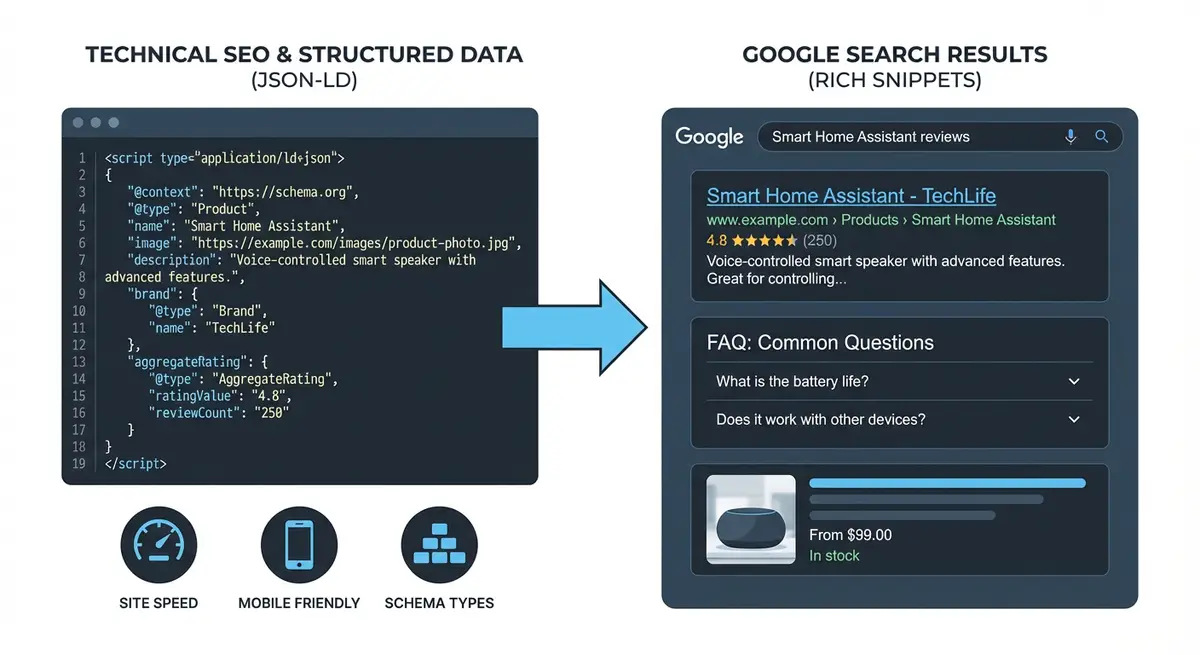
Technical SEO and structured data transform how Google displays your Wix site in search results with rich snippets and enhanced listings.
Why AI Tools Are Ideal for Schema Generation
Writing JSON-LD by hand is slow and error-prone. A missing comma, a wrong property name, or an incorrect nesting structure will silently break your schema and Google will ignore it entirely. AI tools understand the Schema.org vocabulary natively and can generate correctly formatted JSON-LD in seconds. The key advantage is not just speed: it is accuracy combined with completeness.
ChatGPT (GPT-4o or later): excellent at generating JSON-LD and understanding Schema.org types. Strong at following complex prompts with multiple requirements.
Claude (Anthropic): produces clean, well-structured schema code and explains its reasoning clearly. Particularly good at detailed, long-form structured data.
Google Gemini: strong knowledge of Google-specific rich result requirements. Can reference Google's documentation directly.
Microsoft Copilot: integrates with Bing Webmaster documentation for schema guidance.
All are free to use at basic levels, no subscription required to get started.
AI tools rarely make JSON syntax errors, which is the most common human mistake.
They know which properties are required vs recommended for each schema type.
They can generate multiple schema types simultaneously using @graph arrays.
The AI Schema Generation Workflow
From business details to live schema in 5 minutes
Gather your business details: name, address, phone, website, social profiles, opening hours.
Choose the appropriate schema type for the page (LocalBusiness, FAQPage, Product, etc.).
Copy the relevant prompt template from this lesson.
Replace all placeholder text with your real business details.
Paste into ChatGPT, Claude, or Gemini and generate the schema.
Review the output: verify every detail is correct.
Validate JSON syntax at jsonlint.com.
Validate schema at search.google.com/test/rich-results.
Fix any errors by asking the AI: "Fix this error: [paste error message]".
Add to Wix via Settings > Custom Code > Head.
Publish and test the live URL.
Prompt: LocalBusiness Schema
This is the most common schema type for Wix business websites. Copy this prompt, replace placeholders with your details, and paste into any AI tool.
Copy This Prompt: Generate a complete JSON-LD LocalBusiness schema for my business with ALL recommended properties. Here are my details:
Business name: [Your Business Name]
Business type: [e.g. Plumber, Hair Salon, Law Firm]
Address: [Full street address, city, postcode, country]
Phone: [Your phone number in international format]
Email: [Your email]
Website: [Your full URL]
Opening hours: [e.g. Mon-Fri 9am-5pm, Sat 10am-2pm]
Google Business Profile URL: [Your GBP URL]
Social media URLs: [List all your social profiles]
Founder/Owner name: [Your name]
Year founded: [Year]
Price range: [e.g. ££ or $$]
Use the most specific @type available (e.g. Plumber, HairSalon, LegalService, not just LocalBusiness). Include: name, description, url, telephone, email, logo (use my website URL + /logo.png), image, address with PostalAddress, geo coordinates, openingHoursSpecification, contactPoint, founder, foundingDate, priceRange, paymentAccepted, sameAs, and areaServed. Wrap in <script type="application/ld+json"> tags ready to paste into Wix Custom Code.
Prompt: Organization Schema
Copy This Prompt: Generate a complete JSON-LD Organization schema for my online business:
Company name: [Name]
Website: [URL]
Description: [1-2 sentence description]
Logo URL: [Full logo URL]
Email: [Contact email]
Phone: [Phone number]
Founder: [Name]
Founded: [Year]
Social profiles: [List all URLs]
Include: name, alternateName, url, logo as ImageObject, description, contactPoint, founder as Person, foundingDate, numberOfEmployees, and sameAs array. Wrap in script tags for Wix Custom Code.
Prompt: FAQPage Schema
Copy This Prompt: Generate FAQPage JSON-LD schema for these questions and answers. Format as valid JSON-LD wrapped in script tags for Wix Custom Code:
Q1: [Your first question]
A1: [Your first answer]
Q2: [Your second question]
A2: [Your second answer]
Q3: [Your third question]
A3: [Your third answer]
Q4: [Your fourth question]
A4: [Your fourth answer]
Q5: [Your fifth question]
A5: [Your fifth answer]
Ensure the output follows Google's FAQPage schema guidelines exactly. Include proper @context, @type, and mainEntity array structure.
AI-Generated FAQ Content: If you do not have FAQ content yet, add to your prompt: "First, suggest 6 frequently asked questions that customers of a [your business type] in [your location] would ask, then generate the FAQPage schema for them." The AI will write both the content and the schema.
Prompt: BreadcrumbList Schema
Copy This Prompt: Generate BreadcrumbList JSON-LD schema for this page on my Wix website:
Website URL: [https://www.yourdomain.com]
Breadcrumb path: Home > [Parent Section] > [Current Page]
Home URL: [https://www.yourdomain.com]
Parent section name: [e.g. Services]
Parent section URL: [Full URL]
Current page name: [e.g. Local SEO]
Use position numbers starting at 1. The last item (current page) should not include an item URL. Wrap in script tags for Wix Custom Code.
Prompt: Product Schema
Copy This Prompt: Generate Product JSON-LD schema for my Wix eCommerce product:
Product name: [Name]
Description: [Detailed product description]
Product URL: [Full URL]
Image URLs: [List 2-3 product image URLs]
Price: [Price]
Currency: [GBP/USD/EUR]
Availability: [InStock/OutOfStock/PreOrder]
Condition: [NewCondition/UsedCondition]
Brand: [Brand name]
SKU: [Product SKU]
GTIN/EAN: [If available]
Average rating: [e.g. 4.8 out of 5]
Number of reviews: [e.g. 47]
Shipping cost: [e.g. 4.99 GBP]
Include: name, description, image array, sku, gtin13, brand as Brand type, offers with Offer type (url, price, priceCurrency, availability, itemCondition, priceValidUntil), aggregateRating, and shippingDetails. Wrap in script tags for Wix Custom Code.
Prompt: BlogPosting/Article Schema
Copy This Prompt: Generate BlogPosting JSON-LD schema for my Wix blog post with full E-E-A-T optimisation:
Headline: [Article title]
Description: [1-2 sentence summary]
Author name: [Your name]
Author job title: [Your title]
Author URL: [Your about page URL]
Author LinkedIn: [LinkedIn URL]
Date published: [YYYY-MM-DD]
Date modified: [YYYY-MM-DD]
Featured image URL: [Image URL, min 1200px wide]
Word count: [Approximate word count]
Article section/category: [e.g. Technical SEO]
Publisher name: [Your business name]
Publisher logo URL: [Your logo URL, wide format]
Article URL: [Full canonical URL]
Include: headline, description, image as ImageObject with dimensions, datePublished, dateModified, wordCount, articleSection, author as Person with name, url, jobTitle, sameAs array, publisher as Organization with logo, and mainEntityOfPage. Wrap in script tags.
Prompt: HowTo Schema
Copy This Prompt: Generate HowTo JSON-LD schema for this tutorial:
Title: [Your tutorial title]
Description: [Brief description of what the guide teaches]
Total time: [e.g. 30 minutes]
Estimated cost: [e.g. 0 GBP or Free]
Steps:
1. [Step 1 title]: [Step 1 detailed instruction]
2. [Step 2 title]: [Step 2 detailed instruction]
3. [Step 3 title]: [Step 3 detailed instruction]
[Add all steps]
Tools needed: [List any tools required]
Include: name, description, totalTime in ISO 8601, estimatedCost, tool as HowToTool, step array with HowToStep objects (name, text, position). Wrap in script tags for Wix Custom Code.
Prompt: Event Schema
Copy This Prompt: Generate Event JSON-LD schema:
Event name: [Name]
Description: [Event description]
Start date and time: [YYYY-MM-DD HH:MM, timezone]
End date and time: [YYYY-MM-DD HH:MM, timezone]
Event type: [In-person / Online / Hybrid]
Venue name: [If in-person]
Venue address: [Full address if in-person]
Online link: [URL if online]
Organizer: [Business name and URL]
Ticket price: [Price and currency]
Ticket URL: [Where to buy tickets]
Event image URL: [Promotional image]
Include: name, description, image, startDate and endDate in ISO 8601 with timezone, eventStatus, eventAttendanceMode, location (Place or VirtualLocation), organizer, and offers. Wrap in script tags.
Using AI to Generate 301 Redirect Maps
When migrating a website to Wix or changing URL structures, AI tools can match old URLs to new destinations much faster than manual mapping.
Copy This Prompt: I am migrating my website to Wix and need 301 redirect mappings. Match each old URL to the most logical new URL based on content relevance.
Old URLs:
[Paste your list, one per line]
New Wix URLs:
[Paste your list, one per line]
Format as a table: Old URL | New URL | Confidence (High/Medium/Low) | Reason
Flag any old URLs without a clear match so I can decide manually.
Advanced: Batch Schema Generation
For sites with many pages, you can generate schema for multiple pages in a single prompt.
Batch BreadcrumbList Prompt: Generate separate BreadcrumbList JSON-LD schema for each of these pages on my Wix site (https://www.yourdomain.com). Each should be a complete, individual script tag:
1. Services page (Home > Services) at /services
2. Local SEO page (Home > Services > Local SEO) at /local-seo
3. Technical SEO page (Home > Services > Technical SEO) at /technical-seo
4. Blog (Home > Blog) at /blog
5. About (Home > About) at /about
6. Contact (Home > Contact) at /contact
Label each output clearly so I know which page it belongs to.
Advanced: AI Schema Auditing
AI tools can audit existing schema on your site and suggest improvements.
Schema Audit Prompt: Audit this JSON-LD schema markup for my Wix site. Check for:
1. JSON syntax errors
2. Missing required properties
3. Missing recommended properties for rich result eligibility
4. Deprecated types or properties
5. Schema.org best practice violations
6. Google-specific rich result requirements not met
Here is my current schema:
[Paste your JSON-LD here]
Provide the corrected and improved version with all issues fixed.
Validating AI-Generated Schema
AI tools are very good but not infallible. Always validate before deploying.
Mandatory validation workflow
Copy the JSON-LD from the AI output.
Paste into jsonlint.com to check JSON syntax.
Fix any syntax errors (ask the AI: "Fix this JSON error: [error message]").
Paste into search.google.com/test/rich-results using the Code Snippet option.
Check for errors (red) and warnings (yellow).
For any errors, go back to the AI: "The Rich Results Test shows this error: [error]. Fix it."
Re-validate until you get zero errors.
Only then add to your Wix site.
After publishing, test the live URL to confirm it works in context.
Always Validate: Never paste AI-generated code directly into your live Wix site without validation. AI tools occasionally hallucinate properties that do not exist in Schema.org, use deprecated types, or produce schema that passes syntax checks but does not qualify for rich results. The validation step is mandatory.
Common AI Schema Mistakes to Watch For
Hallucinated properties: the AI invents a property that does not exist in Schema.org.
Wrong nesting: properties placed at the wrong level in the schema hierarchy.
Missing required properties: the AI omits something Google requires for rich results.
Incorrect date formats: not using ISO 8601 properly.
Relative URLs: using /page instead of https://yourdomain.com/page.
Wrong availability URLs: using "InStock" instead of "https://schema.org/InStock".
Outdated types: using deprecated schema types that have been replaced.
Over-complex output: generating unnecessarily nested structures when simpler would work.
Building Your Prompt Library
Create a document with all your schema prompts pre-filled with your business details. This lets you generate and deploy correct schema for any new page in under 5 minutes.
Save each prompt template with your business details pre-filled.
For LocalBusiness: only change this once, deploy site-wide.
For FAQPage: only the questions and answers need updating per page.
For BreadcrumbList: only the page name and parent path need updating.
For BlogPosting: update headline, dates, and image for each post.
Keep your prompt library in a Google Doc or Notion page for easy access.
Share with team members so anyone can generate correct schema.
Final Checkpoint: Build your prompt library with pre-filled business details. Always validate AI output with JSONLint and Rich Results Test before deploying. Test live URLs after publishing. Use the audit prompt on existing schema quarterly. Schema generation for a new page should take under 5 minutes once your prompt library is set up.
Essential Tools for This Lesson
SEO Fix in a Box: My Wix app. Free to install, it scans your site and shows what needs fixing, and paid plans write the fixes from your own Google searches
Was this lesson useful?
It takes 1 minute to tell me. The course is free and I want to keep it that way, and your feedback shows me what is working and helps other people find it.
This lesson on Using ChatGPT, Claude and AI tools to generate schema, redirects and structured data for Wix is part of Module 6: Technical SEO, Structured Data & Rich Snippets for Wix in The Most Comprehensive Complete Wix SEO Course in the World (2026 Edition). Created by Michael Andrews, a Wix Marketplace Legend Partner with 14 years of hands-on experience, 800 completed Wix SEO projects and 456 verified five-star reviews.