Event schema: show dates and event details directly in Google
Module 6: Technical SEO, Structured Data & Rich Snippets for Wix | Lesson 74 of 683 | 50 min read
By Michael Andrews, Wix SEO Expert UK
Event schema displays your events directly in Google Search with dates, times, locations, and ticket information. If you run events, workshops, classes, webinars, or any time-bound gatherings, Event schema is one of the easiest and most impactful structured data wins available. Your event listings gain prominent rich results that immediately stand out from competitors, and Google can surface your events in dedicated event search features, Google Maps, and the Events carousel. This lesson covers every Event schema property, the differences between in-person, online, and hybrid events, recurring event handling, Wix Events integration, and lifecycle management.
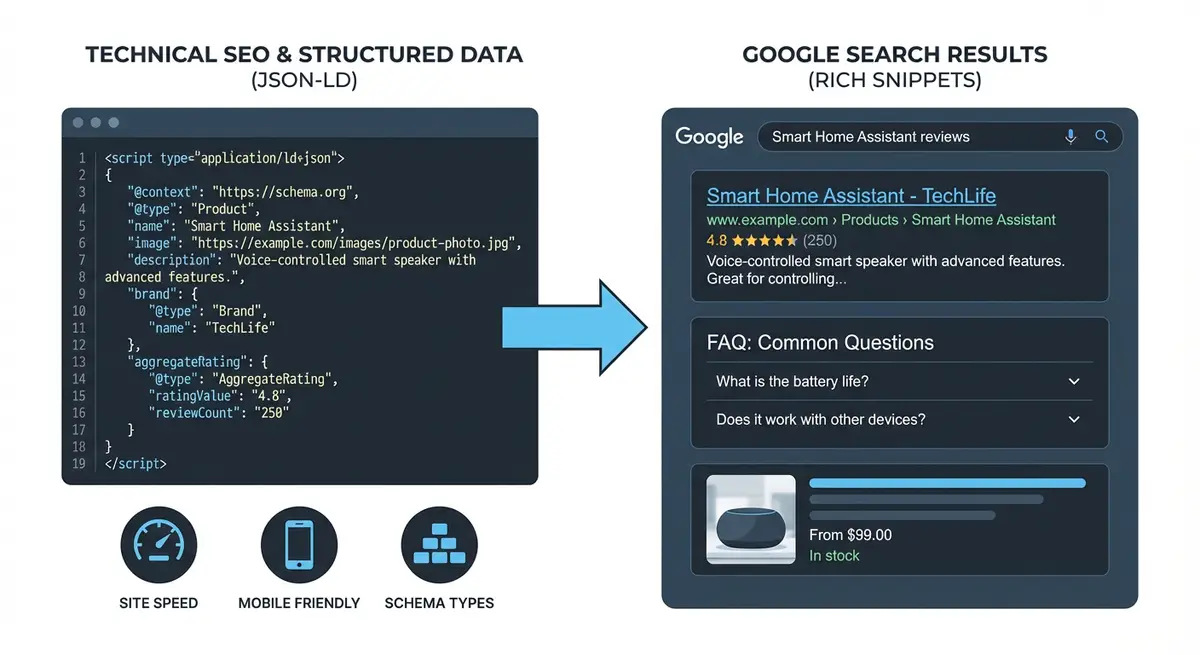
What Event Rich Results Look Like
- Event carousel: a horizontally scrollable set of event cards showing name, date, time, and venue.
- Event Knowledge Panel: detailed event information including description, tickets, and map.
- Google Maps integration: events appear in Google Maps for location-based searches.
- Google Search event section: dedicated "Events" section in search results for event-related queries.
- Mobile event cards: prominent event display with one-tap ticket links on mobile.
- Google Discover: events can surface in Google Discover based on user interests.
Types of Events You Can Mark Up
- Workshops and masterclasses.
- Webinars and online presentations.
- Conferences and trade shows.
- Meetups and networking events.
- Classes and training sessions.
- Concerts and performances.
- Exhibitions and gallery openings.
- Fitness classes and sports events.
- Community events and fundraisers.
- Product launches and demonstrations.
Essential Event Schema Properties
- name (required): the event title. Must match the visible event name on the page.
- startDate (required): when the event begins, in ISO 8601 format with timezone.
- endDate (recommended): when the event ends.
- location (required): where the event takes place (physical, virtual, or both).
- description (recommended): a clear description of the event.
- image (recommended): promotional image for the event. At least 1200px wide.
- eventStatus (recommended): whether the event is scheduled, cancelled, postponed, or moved online.
- eventAttendanceMode (recommended): in-person, online, or mixed.
- organizer (recommended): who is organising the event.
- offers (recommended): ticket pricing and purchase information.
- performer (optional): for events with speakers or performers.
Date and Time Formatting
Event dates must use ISO 8601 format with timezone offset. Getting this wrong is the most common Event schema error.
- Format: YYYY-MM-DDTHH:MM:SS+HH:MM
- Example UK time (GMT): "2026-05-15T14:00:00+00:00"
- Example UK time (BST): "2026-07-20T14:00:00+01:00"
- Example US Eastern: "2026-05-15T14:00:00-05:00"
- Example US Pacific: "2026-05-15T14:00:00-08:00"
- Always include the timezone offset to avoid ambiguity.
- For all-day events, you can use just the date: "2026-05-15".
Location Types: In-Person, Online, and Hybrid
In-Person Event
"eventAttendanceMode": "https://schema.org/OfflineEventAttendanceMode",
"location": {
  "@type": "Place",
  "name": "Manchester Conference Centre",
  "address": {
    "@type": "PostalAddress",
    "streetAddress": "123 Deansgate",
    "addressLocality": "Manchester",
    "addressRegion": "Greater Manchester",
    "postalCode": "M3 4PB",
    "addressCountry": "GB"
  },
  "geo": {
    "@type": "GeoCoordinates",
    "latitude": "53.4808",
    "longitude": "-2.2426"
  }
}
Online Event
"eventAttendanceMode": "https://schema.org/OnlineEventAttendanceMode",
"location": {
  "@type": "VirtualLocation",
  "url": "https://zoom.us/j/1234567890"
}
Hybrid Event (Both In-Person and Online)
"eventAttendanceMode": "https://schema.org/MixedEventAttendanceMode",
"location": [
  {
    "@type": "Place",
    "name": "Conference Centre",
    "address": {
      "@type": "PostalAddress",
      "streetAddress": "123 High Street",
      "addressLocality": "Manchester",
      "postalCode": "M1 1AA",
      "addressCountry": "GB"
    }
  },
  {
    "@type": "VirtualLocation",
    "url": "https://zoom.us/j/1234567890"
  }
]
Event Status Values
Google uses eventStatus to display the current state of your event, which is especially important for cancelled or rescheduled events.
- https://schema.org/EventScheduled: the event is confirmed and happening as planned (default).
- https://schema.org/EventCancelled: the event has been cancelled. Google will display "Cancelled" prominently.
- https://schema.org/EventPostponed: the event has been postponed to a future date. Use when new dates are not yet confirmed.
- https://schema.org/EventMovedOnline: an in-person event that has moved to an online format.
- https://schema.org/EventRescheduled: the event has been moved to new dates. Update startDate and endDate with the new dates.
Offers and Ticket Information
"offers": [
  {
    "@type": "Offer",
    "name": "Early Bird Ticket",
    "url": "https://yoursite.com/events/workshop/tickets",
    "price": "79",
    "priceCurrency": "GBP",
    "availability": "https://schema.org/InStock",
    "validFrom": "2026-01-01T00:00:00+00:00"
  },
  {
    "@type": "Offer",
    "name": "Standard Ticket",
    "url": "https://yoursite.com/events/workshop/tickets",
    "price": "99",
    "priceCurrency": "GBP",
    "availability": "https://schema.org/InStock",
    "validFrom": "2026-03-01T00:00:00+00:00"
  }
]- For free events: set price to "0" and include the registration URL.
- validFrom: the date tickets become available for purchase.
- Multiple offer objects for different ticket tiers (early bird, standard, VIP).
- Update availability to SoldOut when tickets sell out.
Complete Event Schema Template
<script type="application/ld+json">
{
  "@context": "https://schema.org",
  "@type": "Event",
  "name": "Wix SEO Masterclass Workshop",
  "description": "A hands-on workshop teaching you how to optimise your Wix website for search engines, covering technical SEO, content strategy, and structured data implementation.",
  "image": "https://yoursite.com/images/workshop-banner.jpg",
  "startDate": "2026-05-15T14:00:00+01:00",
  "endDate": "2026-05-15T17:00:00+01:00",
  "eventStatus": "https://schema.org/EventScheduled",
  "eventAttendanceMode": "https://schema.org/OfflineEventAttendanceMode",
  "location": {
    "@type": "Place",
    "name": "Manchester Conference Centre",
    "address": {
      "@type": "PostalAddress",
      "streetAddress": "123 Deansgate",
      "addressLocality": "Manchester",
      "postalCode": "M3 4PB",
      "addressCountry": "GB"
    }
  },
  "organizer": {
    "@type": "Organization",
    "name": "Wix SEO Expert UK",
    "url": "https://wixseo.co.uk"
  },
  "performer": {
    "@type": "Person",
    "name": "Michael Andrews"
  },
  "offers": {
    "@type": "Offer",
    "url": "https://wixseo.co.uk/events/workshop/tickets",
    "price": "99",
    "priceCurrency": "GBP",
    "availability": "https://schema.org/InStock",
    "validFrom": "2026-01-01T00:00:00+00:00"
  }
}
</script>
Recurring Events
For events that happen regularly (weekly classes, monthly meetups), create separate Event schema for each occurrence rather than trying to represent the entire series in one schema.
- Each occurrence needs its own Event schema with unique startDate and endDate.
- Keep the name and description consistent across occurrences.
- Use Wix Events if available, which can help manage recurring event pages.
- For very frequent events (daily or multiple times per week), mark up the next 3-5 occurrences rather than all future dates.
- Update schema to remove past event occurrences and add new future ones.
Wix Events Integration
If you use the Wix Events app, it may generate some Event schema automatically. As with product pages, check what Wix adds before creating custom schema.
Working with Wix Events
- Create your event in Wix Events with all details filled in.
- Publish the event page.
- Run the live URL through the Rich Results Test.
- Check what Event properties Wix generates automatically.
- Identify missing recommended properties.
- Create supplementary JSON-LD for any missing properties.
- Add via Custom Code to the specific event page.
- Avoid duplicating properties that Wix already generates.
Event Schema Lifecycle Management
Managing events through their lifecycle
- Create Event schema when the event is announced.
- Set eventStatus to EventScheduled.
- Update offers availability as tickets sell.
- If the event is rescheduled, change eventStatus to EventRescheduled and update dates.
- If cancelled, change eventStatus to EventCancelled.
- After the event ends, either remove the schema or create a new Event for the next occurrence.
- Do not leave past Event schema on pages as it creates stale structured data.
- Consider adding a recap page after events with Article schema instead.
Common Event Schema Mistakes
- Missing timezone offset on dates.
- Not updating eventStatus when events are cancelled or rescheduled.
- Leaving past event schema on pages after events have ended.
- Using location type without matching eventAttendanceMode.
- Price in schema not matching the visible ticket price.
- Missing organizer property.
- Not providing an offers URL where tickets can actually be purchased.
- Using a generic image instead of event-specific promotional image.
What actually earns you the listing
Here is what actually earns you the event listing, and what quietly stops it. Google still shows event rich results, so this one is well worth doing, but it is fussy about the details. The properties Google needs on every event are the name, the startDate, and the location. For a venue event the location is a Place with a name and a full postal address. For anything online you use a VirtualLocation with the URL people join at, and you set eventAttendanceMode to match. On top of the required three, add the endDate, the eventStatus, so you can mark a date as rescheduled or cancelled and Google will show that, an image, a description, and an offers block with the ticket url, price, priceCurrency and availability. Those extras are what fill out the listing and make it look complete.
The mistakes that lose it
The mistakes I see most often on Wix sites are all avoidable. Leaving the time zone off the startDate is the big one, because Google then guesses and can show the wrong time. Marking a whole 'what's on' page as a single event when it lists ten of them is another, each event needs its own markup. And putting a date in the markup that does not match the date shown on the page will get the whole thing ignored, so the markup and the visible page have to agree.
Once it is on, test the exact page URL in Google's Rich Results Test before you move on, then keep an eye on the Events report in Search Console. If you want the full step by step for building the JSON, I cover it in Event structured data on Wix, and the general how-to for adding any schema to Wix is in Adding JSON-LD schema on Wix.
Essential Tools for This Lesson
- SEO Fix in a Box: My Wix app. Free to install, it scans your site and shows what needs fixing, and paid plans write the fixes from your own Google searches
Was this lesson useful?
It takes 1 minute to tell me. The course is free and I want to keep it that way, and your feedback shows me what is working and helps other people find it.
This lesson on Event schema: show dates and event details directly in Google is part of Module 6: Technical SEO, Structured Data & Rich Snippets for Wix in The Most Comprehensive Complete Wix SEO Course in the World (2026 Edition). Created by Michael Andrews, a Wix Marketplace Legend Partner with 14 years of hands-on experience, 800 completed Wix SEO projects and 456 verified five-star reviews.