What 687 Lessons on Wix SEO Taught Me About Wix SEO

By Michael Andrews | Published: 2026-08-14 | Updated: 2026-08-14 | 14 min read
I wrote 68 modules and 687 lessons documenting 14 years of Wix SEO. Here is what the process revealed about the platform, about teaching, and about what most Wix advice gets wrong.
The Complete Wix SEO Course is a free 68-module course with 687 step-by-step lessons and over 400 hours of material. There is no payment, no sign-up paywall and no time limit.
Fourteen years of optimising Wix websites taught me a lot. Writing it all down taught me more. Over 18 months I turned everything I know about Wix SEO into 68 modules and 687 lessons, and the process of structuring, explaining and pressure-testing every technique changed how I think about the platform. This post is about what that process revealed.
Why Write 687 Lessons in the First Place?
By 2024 I had optimised 800 Wix websites across more than 30 industries and 20 countries. I held six Wix platform certifications. I had a process that worked. But the same questions kept arriving in my inbox: how do I set up redirects? What are canonical tags? Is Wix actually good for SEO? I was answering them one client at a time, and the answers were always the same. A course was the obvious solution, and once I started writing it I realised how much I had been taking for granted.
Most Wix SEO Advice Is Recycled WordPress Guidance
The first thing the writing process exposed was how much Wix-specific advice online is actually WordPress advice with a different screenshot. Telling someone to "edit your .htaccess file" or "install Yoast" is meaningless on Wix. The platform handles routing, rendering and caching in its own way, and the techniques that move the needle are platform-specific. The lesson on how the Wix SEO Panel controls every page-level setting exists because most generic guides skip the single most important interface a Wix site owner interacts with.
The Platform Is Not the Problem, and the Course Made That Undeniable
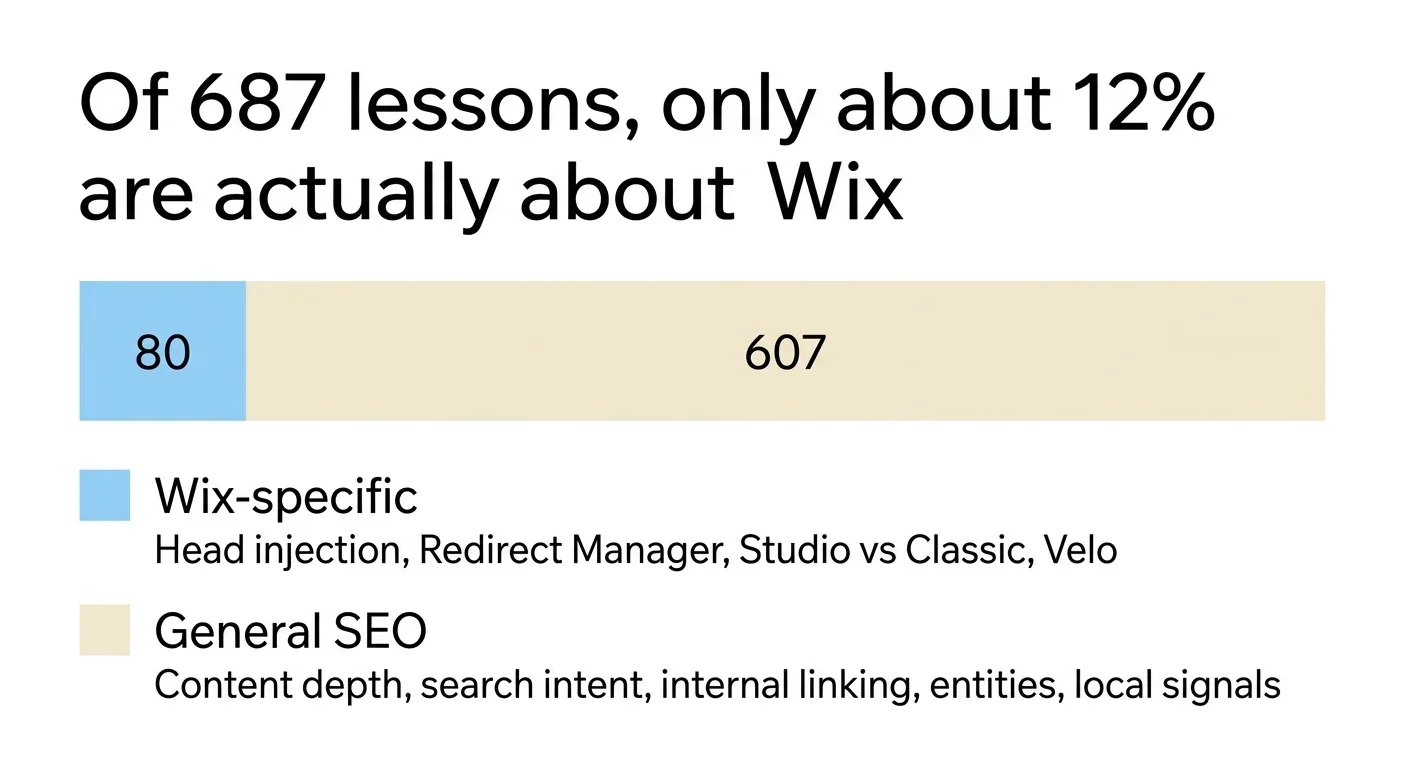
Out of 687 lessons, roughly 80 are genuinely Wix-specific. The head injection mechanics, the URL Redirect Manager, the Studio versus Classic distinctions, Velo, the automatic schema and its limits.
The other 607 are SEO. Content depth, search intent, internal linking, entity building, local signals, technical crawlability. They would be almost identical for a WordPress course.
That ratio is the answer to the question everyone asks. Roughly 12% of Wix SEO is about Wix. The rest is SEO that happens to be executed on Wix. When a Wix site is not ranking, the odds are heavily against the platform being the cause.
The Lessons That Surprised Me
Some topics I expected to cover in a single lesson expanded into entire modules. Structured data was one. I had been adding JSON-LD to Wix sites for years using the Custom Code feature in Wix Settings, but writing a lesson that explains the difference between JSON-LD, Microdata and RDFa forced me to articulate why JSON-LD is the right choice for Wix in a way I had never needed to before. The answer is not just "Google prefers it." It is that Wix's rendering pipeline makes Microdata unreliable in ways most site owners will never debug.
Internal linking was another. I knew it mattered. I had been building link architectures for clients for over a decade. But the discipline of writing a lesson on how internal linking lifts every page on your site made me formalise patterns I had been applying intuitively. Hub-and-spoke, silo structures, contextual deep links from blog posts to service pages: once you name the patterns, you can teach them. Once you can teach them, you can audit them. That lesson changed how I run my own audits. The dual-layer schema approach to structured data went through the same evolution.
Heading Hierarchy Sounds Simple Until You Teach It
Every SEO guide mentions H1 tags. Few explain what happens when Wix's drag-and-drop editor lets you place headings in any order, at any nesting level, with no validation. The lesson on H1, H2 and H3 heading hierarchy on Wix took three drafts because the first two assumed readers understood the DOM. They do not, and they should not have to. The final version uses the analogy of a book's table of contents: the H1 is the title, H2s are chapters, H3s are sections within chapters. If your table of contents does not make sense on its own, neither does your heading structure.
Wix Studio Changed the Conversation
When I started the course, Wix Studio was new and most site owners were on the classic editor. By the time Module 20 was complete, Studio had matured enough to warrant a dedicated comparison. The lesson on Wix Studio versus the classic Wix Editor is one of the most-visited in the course because the question "should I switch?" has real SEO implications. Studio offers CSS Grid, better responsive control and cleaner markup. The classic editor offers familiarity and a larger app ecosystem. Neither is universally better; the answer depends on what you are building and how much control you need.
For developers, the story extends further. Velo by Wix opens up programmatic control over meta tags, canonical URLs and Open Graph data that the visual editor cannot match. Writing those lessons meant building working examples, testing edge cases in the Velo API, and documenting behaviour that is not covered in Wix's own documentation. That research fed directly back into client projects.
Local SEO Is Where Wix Sites Win or Lose
More than half the Wix sites I have optimised serve a local area: a town, a city, a region. Local SEO on Wix is not just about Google Business Profile. It is about NAP consistency across every platform where your business appears, from directories to social profiles to citation aggregators. Writing that lesson involved cataloguing every platform where NAP data propagates, and the result was a checklist I now use on every local SEO project. The course made my own process better.
Generative Engine Optimisation Was Not in the Original Plan
When I outlined the course in early 2024, GEO was not a term most SEOs used. By mid-2025, AI-powered search engines were citing websites in their responses and the rules for getting cited were different from the rules for ranking in traditional search. Module 23 on Generative Engine Optimisation was added because the landscape shifted beneath the course while I was writing it. That module covers entity signals, structured data for AI crawlers, and the specific markup patterns that make a Wix site citable by ChatGPT, Gemini and Perplexity. It is one of the newest modules and one of the most important.
Redirects and the Mistakes That Keep Repeating
If I had to name the single most common technical SEO mistake on Wix sites, it would be mismanaged redirects. Site owners change URLs without setting up 301s. They migrate from one Wix template to another and lose hundreds of indexed pages. The lesson on the Wix URL Redirect Manager covers the built-in tool, bulk redirect workflows and the broken links checker. Writing it meant documenting every edge case I had encountered over 14 years, and there were more than I expected.
What a Brand New Site Needs Versus an Existing One
One of the most common questions I receive is "where do I start?" The answer depends entirely on whether you are building from scratch or trying to fix a site that is not ranking. For new sites, the lesson on the Wix Harmony Editor SEO checklist walks through every setting from first login to a search-ready foundation. For existing sites that are struggling, 5 quick wins to fix today covers the first things I do on every new Wix SEO project: the fixes that produce measurable movement within weeks, not months.
The Gap Between Knowing and Teaching
Writing 687 lessons forced me to close gaps I did not know existed. I could configure a canonical tag in my sleep, but explaining why canonical tags matter, when Wix sets them automatically, and when you need to override them required a different kind of understanding. The same was true for crawl budget, for log file analysis, for every topic where practitioner knowledge diverges from teachable knowledge. The course is better because of that gap, and so is my consulting work.
Every lesson was written, tested on a live Wix site, reviewed against current platform behaviour, and updated when Wix shipped changes. Some lessons have been revised three or four times since initial publication. That ongoing maintenance is as much a part of the course as the original writing. The same principle applies to security: I found a vulnerability on my own site during a routine audit and published a full disclosure, because maintenance means catching what breaks, not just updating content.
Why the Course Is Free
People ask why a course this comprehensive is free. The honest answer is that the course drives the consulting business. Site owners who complete the course and want expert help with implementation become clients. Site owners who complete the course and handle everything themselves still benefit, and they refer others. The economics work precisely because there is no paywall. Removing the barrier to entry means more people learn Wix SEO properly, and that is good for everyone building on the platform.
The Complete Wix SEO Course is 68 modules, 687 lessons and over 400 hours of material. It covers everything from SEO foundations to advanced GEO strategy. It is free, it is updated regularly, and it is open to anyone with a browser. If you have a Wix website and want to understand SEO at a level most agencies do not offer, start with the course. For the ranking fundamentals in one place, how to rank a Wix website on Google covers the full process. If you want hands-on help, get in touch.
Fix your Wix SEO from your dashboard
SEO Fix in a Box scans every page, writes your fixes from your own Google searches and puts them on in one click, with undo. Start on the free plan.

Want this sorted on your own Wix site?
I have worked only on Wix for 14 years. Get SEO Fix in a Box on the Wix App Market to find and fix what is holding your site back, or see my packages and prices if you would rather I did it all for you.
Frequently Asked Questions
How long did it take to write 687 lessons?
The initial writing took approximately 18 months of concentrated work alongside active client projects. Ongoing updates, revisions and new modules continue as the platform and search landscape evolve.
Is the Complete Wix SEO Course really free?
Yes. All 68 modules and 687 lessons are completely free with no payment, no sign-up paywall and no time limit. Lifetime access to all content and future updates is included at no cost.
What changed most about your own SEO practice from writing the course?
Internal linking strategy and structured data implementation changed the most. Writing lessons on these topics forced a level of rigour that improved both the documentation and the real-world application on client sites.
Does the course cover Wix Studio and Velo?
Yes. Module 20 is dedicated to Wix Studio and Velo advanced SEO, including a comparison of Studio versus the classic editor, programmatic meta tags, canonical URLs and dynamic schema markup.
Where should I start if my Wix site is not ranking?
Start with the Module 1 lesson on 5 quick wins to fix today. It covers the first actions taken on every new Wix SEO project and produces measurable results within weeks.