H1, H2, H3 heading hierarchy on Wix, the full guide
Module 4: On-Page SEO Optimisation for Wix | Lesson 34 of 683 | 45 min read
By Michael Andrews, Wix SEO Expert UK
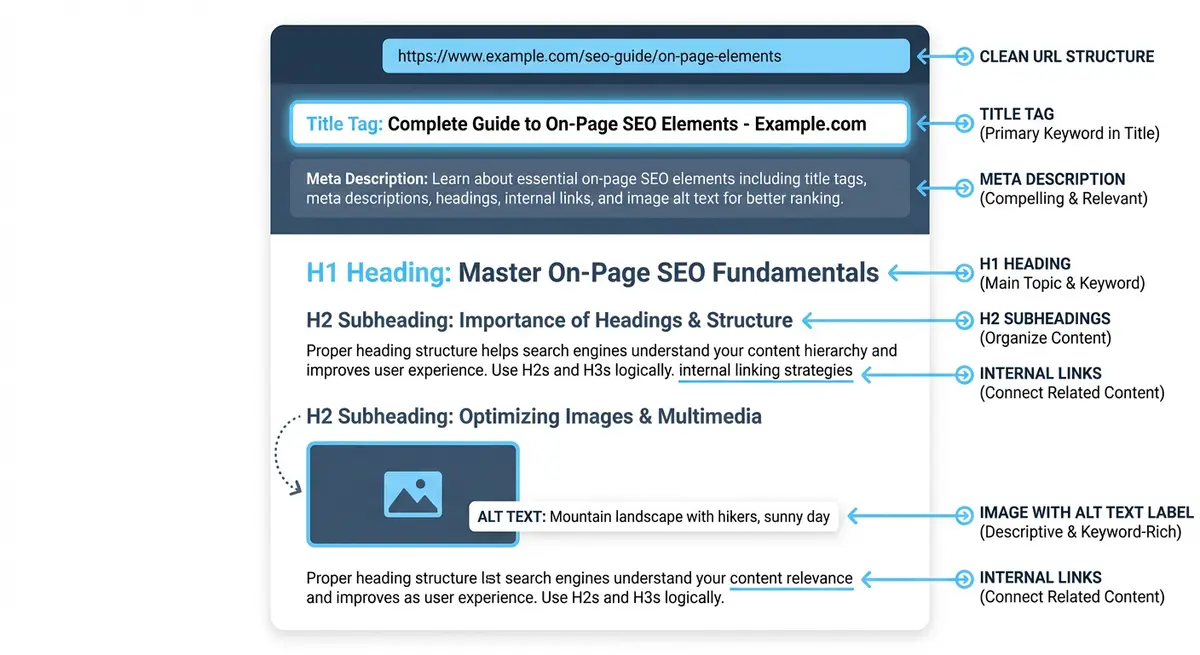
Heading tags (H1 through H6) serve two critical purposes: they tell Google the structure and topic hierarchy of your page, and they help users navigate longer content. Getting heading hierarchy wrong is a surprisingly common issue on Wix sites, partly because the Wix editor uses "Heading 1/2/3" in a way that does not always align with semantic HTML. A properly structured heading hierarchy is one of the most fundamental on-page SEO requirements, yet I find heading errors on over 80% of the Wix sites I audit. This lesson covers everything you need to know about heading structure, from the basics through advanced strategies for using headings to capture featured snippets and improve keyword targeting.
What Heading Tags Tell Google
Heading tags create a content outline that Google uses to understand the structure and topics of your page. The H1 is the page title and primary topic. H2s are major sections. H3s are subsections within H2s. This hierarchy tells Google not only what topics your page covers but how those topics relate to each other and which are most important.
- H1 sends the strongest topic signal. Google treats the H1 as a close second to the title tag in terms of keyword relevance.
- H2 headings define the main sections of your content. Google uses these to understand the breadth of your page.
- H3 headings provide detail within sections. They signal subtopic depth to Google.
- Heading structure affects featured snippets. Google often pulls content from well-structured H2/H3 sections for snippet display.
- Heading hierarchy improves accessibility. Screen readers use heading levels to navigate pages, which is both a legal requirement and an SEO quality signal.
- Well-structured headings reduce bounce rate. Users can scan headings to find the information they need, keeping them on the page longer.
The One H1 Rule
Every page should have exactly one H1 tag. The H1 is the primary heading of the page. It should contain your primary keyword and clearly state what the page is about. Google has stated that multiple H1s are technically acceptable, but best practice (and every SEO test I have seen) confirms that one H1 performs best.
H1 Best Practices
- Include your primary keyword naturally in the H1. It does not need to be an exact match with the title tag, but should reinforce the same topic.
- Keep the H1 concise: 20-70 characters is the sweet spot. Long, rambling H1s dilute the keyword signal.
- The H1 should be the first heading visible on the page. Do not place H2s or H3s above the H1.
- Do not use the same text for the title tag and H1. Use a variation. Title tag: "Wix SEO Expert UK | Frontline Web". H1: "Expert Wix SEO Services for UK Businesses".
- Style the H1 to be visually the largest heading on the page, reinforcing its hierarchical importance.
H2 Headings: Your Major Section Markers
H2 headings break your content into major sections. Each H2 should introduce a distinct topic or aspect of the overall page subject. Think of H2s as chapter titles in a book. Google uses H2 content to understand the breadth of your page and to match it against related search queries.
- Include secondary keywords in H2 headings where natural. Each H2 is an opportunity to target a related keyword.
- Use H2s as questions to capture People Also Ask featured snippets. "How Long Does Wix SEO Take?" as an H2 with a direct answer below it.
- Aim for 3-8 H2 sections on a typical page. Fewer than 3 suggests thin content. More than 10 may indicate the page is trying to cover too many topics.
- Each H2 section should contain enough content to stand alone as a useful answer to the H2 heading.
- Do not use H2 styling for visual effect. If you want large text that is not a section heading, use a different text style.
H3 Headings: Subsection Depth
H3 headings create subsections within H2 sections. They add detail and depth. For example, if your H2 is "Image Optimisation for Wix", your H3s might be "Alt Text Best Practices", "Image Compression Tools", and "WebP Format on Wix".
- H3s must be nested under an H2. Never place an H3 directly after an H1 or directly after another H3 without an H2 parent.
- Use H3s for long-tail keyword variations and specific sub-topics.
- H3 sections are particularly effective for FAQ content. Each question as an H3 under an "FAQ" H2.
- Limit H3s to 2-5 per H2 section. If you need more, consider splitting the H2 into two separate sections.
Correct vs Incorrect Heading Hierarchy
CORRECT HIERARCHY:
H1: Wix SEO Services Manchester
  H2: What Our Wix SEO Service Includes
    H3: Technical SEO Audit
    H3: On-Page Optimisation
    H3: Link Building
  H2: Wix SEO Pricing
    H3: Monthly SEO Packages
    H3: One-Off SEO Audit
  H2: Our Wix SEO Results
  H2: Frequently Asked Questions
    H3: How long does SEO take?
    H3: How much does Wix SEO cost?

INCORRECT HIERARCHY (common Wix mistakes):
H2: Welcome to Our Website        <- Missing H1
  H3: Our Services                 <- H3 without H2 parent
H1: About Us                      <- Second H1 (should not exist)
  H4: Contact Information          <- Skipped H2 and H3
H2: Footer Heading                 <- H2 used for decorative footer text
Setting Heading Levels in the Wix Editor
How to set heading levels correctly in Wix
- Click on any text element in the Wix Editor
- In the text formatting toolbar at the top, click the text style dropdown (it usually shows "Paragraph" or a heading level)
- Choose "Heading 1", "Heading 2", or "Heading 3" as appropriate for that text element
- IMPORTANT: "Title" in Wix is NOT an H1 tag. It is styled text. Always use "Heading 1" for your main page heading.
- "Paragraph" is a <p> tag. Use it for body text, not headings.
- The visual size of the heading in the editor may not match the HTML tag. A "Heading 2" that you style to be very large is still semantically an H2.
- After setting headings, use the HeadingsMap Chrome extension to verify the HTML heading structure matches your intent.
Wix Blog Heading Gotchas
The Wix Blog editor handles headings differently from the main Wix Editor. By default, the blog post title is rendered as an H1. Inside the blog editor, you have "Heading 2" and "Heading 3" options for section headings. Do NOT add an additional H1 inside the blog post content, as the title is already the H1.
- Blog post title = H1 (automatic)
- Use "Heading 2" for major sections within the blog post
- Use "Heading 3" for subsections within H2 sections
- Do not add a "Heading 1" inside the blog content. This creates a duplicate H1.
- The "Title" and "Subtitle" text options in the Wix Blog editor are styled text, not heading tags. Avoid them for section headings.
Using Headings to Target Keywords
Your heading hierarchy is a powerful keyword targeting tool. Each heading level provides an opportunity to reinforce topic relevance with different keyword variations.
- H1: Primary keyword. "Wix SEO Services Manchester"
- H2s: Secondary keywords and topic breadth. "What Does Wix SEO Include", "Wix SEO Pricing and Packages", "Manchester Wix SEO Results"
- H3s: Long-tail keywords and specific sub-topics. "Technical SEO Audit for Wix", "Monthly Wix SEO Packages", "How Long Does Wix SEO Take to Work"
- Do not force keywords into every heading. If a heading reads unnaturally, it hurts user experience and Google can detect over-optimisation.
- Vary your keyword usage. Do not repeat the exact same keyword in every heading. Use semantic variations.
Headings and Featured Snippets
Google frequently pulls featured snippet content from well-structured heading sections. To maximise your chances of winning featured snippets, format your H2 headings as questions (matching People Also Ask queries) and provide a direct, concise answer in the first paragraph below the heading.
Optimising headings for featured snippets
- Search your target keyword and check if a featured snippet appears
- If it does, note the question and the format (paragraph, list, or table)
- Create an H2 heading that matches the featured snippet question
- Immediately below the H2, write a 40-60 word direct answer to the question
- Then expand with more detail in subsequent paragraphs
- If the snippet is a list, use an ordered or unordered list immediately after the H2
- Add FAQPage schema markup to reinforce the Q&A structure for Google
Heading Audit Checklist
- Every page has exactly one H1 tag containing the primary keyword
- The H1 is the first heading on the page (no H2 or H3 before it)
- No heading levels are skipped (no H1 > H3 without an H2 between)
- H2 headings contain secondary keywords where natural
- H3 headings are properly nested under H2 sections
- No heading tags are used for decorative purposes (footers, sidebars, buttons)
- The "Title" text style is not used where "Heading 1" is needed
- Blog post content uses H2 and H3 only (the blog title is the H1)
- The heading structure creates a logical content outline
- HeadingsMap extension shows a clean, properly nested hierarchy
Complete How-To Guide: Setting Up Correct Heading Hierarchy on Every Wix Page
Follow these steps to audit and fix heading hierarchy across your entire Wix site
- Install the free HeadingsMap browser extension for Chrome to visualise heading structure on any page
- Open your Wix site and run HeadingsMap on your homepage to see your current heading hierarchy
- Verify your homepage has exactly one H1 tag that includes your primary keyword
- In the Wix Editor, select your main page title text, click the text style dropdown, and set it to "Heading 1" (NOT "Title")
- Ensure all major section headings use "Heading 2" and include secondary or related keywords where natural
- Use "Heading 3" tags for subsections within H2 sections, maintaining logical nesting (H1 > H2 > H3, never H1 > H3)
- Check that no heading level is skipped (never jump from H2 to H4 or H1 to H3)
- Run HeadingsMap on every page of your site and fix any page with multiple H1 tags, missing H1, or skipped heading levels
- For Wix Blog posts, verify the post title renders as H1 and all content headings use H2 and H3 only
- Avoid using heading tags for decorative purposes such as making text large in footers, sidebars, or buttons
- For question-based H2 headings, ensure a direct answer follows immediately in the first paragraph (featured snippet optimisation)
- After fixing all headings, crawl your site with Screaming Frog and verify the "H1" column shows exactly one H1 per page
- Submit key pages for re-indexing in GSC after fixing heading structure
Heading Audit Tools
- HeadingsMap Chrome Extension: Visual tree of all heading levels on any page. Essential for Wix heading audits.
- Web Developer Chrome Extension: View Document Outline to check heading structure on any Wix page
- Screaming Frog: Crawl your entire site and check H1 tags across all pages (free up to 500 URLs)
- WAVE Accessibility Checker: Checks heading hierarchy as part of a broader accessibility audit
Was this lesson useful?
It takes 1 minute to tell me. The course is free and I want to keep it that way, and your feedback shows me what is working and helps other people find it.
This lesson on H1, H2, H3 heading hierarchy on Wix, the full guide is part of Module 4: On-Page SEO Optimisation for Wix in The Most Comprehensive Complete Wix SEO Course in the World (2026 Edition). Created by Michael Andrews, a Wix Marketplace Legend Partner with 14 years of hands-on experience, 800 completed Wix SEO projects and 456 verified five-star reviews.