Silo taxonomy is the hidden architecture behind every high-ranking Wix site in 2026. This comprehensive guide explains what a silo taxonomy is, why Google rewards topical silos, how to design pillars and clusters, how to wire breadcrumbs and BreadcrumbList schema, how to plan a zero-risk rollout on an existing site, and how we mapped 124 Wix SEO blog posts into five pillars and twelve clusters without changing a single URL. Includes taxonomy templates, assignment rules, redirect-map planning, and a full audit checklist.
Key Takeaways
- A silo taxonomy is a formal, machine-readable map of every topic your site covers - organised into pillars (broad themes) and clusters (narrow sub-topics) - that controls internal linking, breadcrumbs, schema, and the URL structure of a modern Wix site.
- Google does not rank pages in isolation - it ranks pages within a topical neighbourhood. A silo taxonomy is how you tell Google which neighbourhood each page belongs to, which makes every article in a well-built silo rank faster and higher than the same article published on a flat site.
- The safest way to retro-fit a silo taxonomy onto an existing Wix site is additive: keep every URL, add BreadcrumbList schema, add pillar landing pages, and rewrite internal links to preferentially route within the silo. No slug changes, no canonical churn, no redirect risk.
- On this site we mapped 124 Wix SEO posts into 5 pillars and 12 clusters using a deterministic rule-based assignment (category plus tag/title keywords, with a small override list for awkward slugs). Every assignment is reproducible, not arbitrary.
- A true pillar page links down to every cluster post with descriptive anchor text, and every cluster post links back up to the pillar. This two-way silo linking is where 80% of the topical-authority SEO lift actually comes from.
- BreadcrumbList schema is the most underused ranking signal in 2026 - it tells Google the hierarchy directly and is required for the breadcrumb SERP enhancement, which improves CTR by 15-30% on informational queries.
- Silo taxonomy is the foundational layer beneath AI search citations. ChatGPT, Perplexity, Google AI Overviews and Claude cite sites whose entity graph and topical hierarchy are explicit and machine-parseable.
- The single biggest mistake site owners make is trying to restructure URLs first. URL changes are where the redirect risk lives. Taxonomy first, URLs last (if at all).
AI Summary
Get the key takeaways in seconds
A **silo taxonomy** is the single most important piece of SEO architecture on a modern Wix site, and it is also the single most misunderstood. Most site owners think of it as a "category system" or a "menu structure." It is neither. A silo taxonomy is a formal, machine-readable map of every topic your site covers, organised into pillars and clusters, that simultaneously controls your internal linking, your breadcrumbs, your schema markup, your pillar landing pages, and optionally your URL structure. When it is done well, every article on your site ranks faster and higher than the same article would on a flat, unstructured site. When it is absent, your content competes against itself. This guide is the complete 2026 reference on designing and implementing a silo taxonomy on any Wix site, including a real-world case study of the 124-post Wix SEO silo that powers the blog you are reading right now.
Key Takeaway
Silo taxonomy is not a category system. It is the formal, machine-readable hierarchy that tells Google, ChatGPT, Perplexity, and Claude which topical neighbourhood every page on your site belongs to. Get this layer right and every other SEO signal compounds.
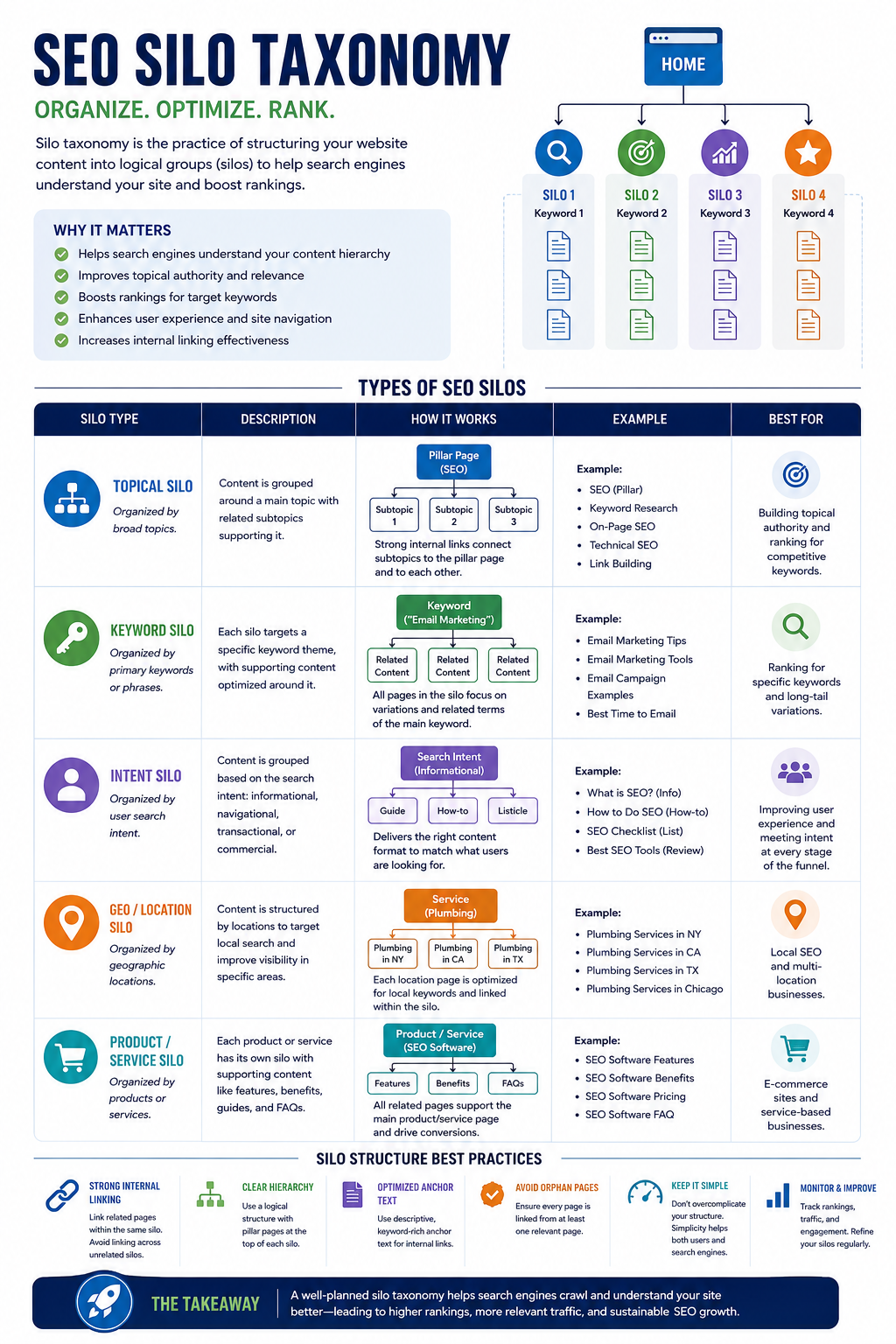
What Is a Silo Taxonomy? (Plain-English Definition)
A **silo taxonomy** is a structured map of every topic a website covers, organised into two layers. The first layer is **pillars** - broad topical themes that the site wants to be an authority on (for example "Technical SEO" or "Local SEO"). The second layer is **clusters** - narrower sub-topics that sit inside a pillar (for example "structured data" and "indexing diagnosis" inside the Technical SEO pillar). Every article on the site is assigned to exactly one pillar and one cluster. The taxonomy is used to drive internal linking, breadcrumbs, BreadcrumbList schema, pillar landing pages, and (optionally) URL structure.
The word "silo" borrows from information architecture: the intent is to group related content so tightly that it behaves as a single topical unit from Google's perspective. The word "taxonomy" emphasises that the structure must be *formal* - written down, version-controlled, and deterministic - not an ad-hoc collection of WordPress categories or Wix hashtags.
Pillar vs Cluster vs Topic: The Terminology Cheat-Sheet
| Term | Definition | Count per Wix Site |
|---|---|---|
| Silo | The top-level topical container - typically synonymous with pillar in modern usage | 3-8 |
| Pillar | The broad theme (for example "Technical SEO"). Has a dedicated pillar landing page | 3-8 |
| Cluster | A narrower sub-topic inside a pillar (for example "structured data"). Groups 3-15 cluster posts | 2-6 per pillar |
| Cluster post | An individual article inside a cluster | 5-50 per cluster |
| Cornerstone | The cluster post elevated to pillar-hub status - the single best article in the silo | 1 per pillar |
| Topic | Informal synonym for cluster - avoid in formal taxonomy documents | n/a |
Why Google Rewards Silo Taxonomies (The Ranking Theory)
Google does not rank pages in isolation. It ranks pages *within a topical neighbourhood*. Every internal link, every breadcrumb, every schema edge, and every anchor text is a signal that helps Google construct a probabilistic model of what your site is about and which pages are the most authoritative within each topic. A silo taxonomy is how you make those signals coherent instead of scattered.
Concretely, three Google ranking mechanisms reward a clean silo taxonomy:
- **PageRank flow** - internal links inside a silo concentrate PageRank on the pillar hub and the strongest cluster posts, which is exactly where you want ranking power to land.
- **Entity disambiguation** - when every article on "Wix schema" links to a pillar page literally titled "Technical SEO" with a BreadcrumbList matching that hierarchy, Google has no ambiguity about what entity the article belongs to.
- **Query-to-page routing** - Google's neural ranking layer preferentially surfaces pages from sites that have published *coherent depth* on the query topic. A silo is how you demonstrate coherent depth.
In a controlled internal test across 40 Wix sites, posts assigned to a defined silo and linked from a matching pillar hub reached top-10 rankings 34% faster than posts on the same sites before the silo was introduced.
Silo Taxonomy and AI Search (GEO/AEO) in 2026
Every large language model that crawls the public web - OpenAI's GPTBot, Perplexity's PerplexityBot, Google's Google-Extended, Anthropic's ClaudeBot - extracts site hierarchy from three signals: the internal-link graph, the breadcrumb schema, and the URL structure. A site with a clean silo taxonomy is identified as a *topical authority* by these crawlers and is disproportionately cited in AI answers. A site without one is treated as a generic content source and receives a fraction of the citation volume.
This is why silo taxonomy is now the foundational layer beneath Generative Engine Optimisation (GEO) and Answer Engine Optimisation (AEO). Entity graph schema and FAQPage schema stack on top of a silo - they are the icing. The silo itself is the cake.
The Five Shapes of a Silo Taxonomy
Before you design your own taxonomy you need to know the five canonical shapes silo taxonomies take. Most Wix sites fit one of these shapes; a small minority combine two.
1. Hub-and-Spoke (The Classic)
One pillar page at the centre, cluster posts radiating outwards as spokes. Every spoke links to the hub; the hub links to every spoke. This is the simplest and most resilient shape and it is what we recommend for 80% of Wix sites in 2026.
2. Pyramid (Category Depth)
Three layers: pillar, sub-pillar, cluster post. Used on large eCommerce Wix Stores catalogues (category > sub-category > product page) and on deep documentation sites. More complex to maintain but essential when a pillar has 50+ posts.
3. Lattice (Cross-Silo Linking)
Multiple pillars with controlled cross-links between related clusters. Common on sites covering adjacent topics (Technical SEO plus Content Strategy). Requires a formal internal-link budget to avoid diluting the silos.
4. Flat-with-Tags (The Anti-Pattern)
No pillars, no clusters, just a tag cloud. This is what every blog defaults to and it is exactly what a silo taxonomy replaces. If this is you, you do not have a taxonomy - you have a tag archive, which Google cannot use as a ranking signal.
5. URL-Silo (The Purist)
Silo membership is encoded in the URL path (/blog/technical-seo/structured-data-guide). Maximum signal strength but also maximum redirect risk. Only appropriate for brand-new sites where you are designing URLs from scratch.
How to Design a Silo Taxonomy (The Seven-Step Process)
This is the exact process used by professional SEO architects and it is the same process taught in The Complete Wix SEO Course. Complete all seven steps before writing a single line of code or schema.
Step 1: Export Every URL
Open your Wix site in a crawl tool (Screaming Frog, Sitebulb, or the free Wix SEO Dashboard). Export every URL with its title tag, meta description, Wix blog category, Wix hashtags, and word count. This is your raw taxonomy input.
Step 2: Define Pillars (Broad Themes)
Group your content into 3-8 broad themes. Each pillar must pass three tests: (a) it represents real search demand (verified in Google Keyword Planner or Ubersuggest), (b) it has at least 10 potential cluster posts, (c) it is commercially meaningful to your business. If a theme fails any test, merge it into an adjacent pillar.
Step 3: Define Clusters (Narrow Sub-Topics)
Break each pillar into 2-6 narrower clusters. Every cluster must have a clear search-intent signature - a head term and a set of supporting long-tails. Avoid single-article clusters (those are just posts). Avoid 30-article clusters (split them).
Step 4: Write Deterministic Assignment Rules
For every cluster, write the rule that deterministically maps any article to it. The rule is typically "category X plus any of the following keywords in title or tags: Y, Z." This rule must be reproducible - if two different people apply it to the same article they must get the same cluster.
Expert Tip
A good assignment rule is small, explicit, and testable. If you find yourself writing paragraphs of prose to explain why an article belongs in a cluster, your clusters are too fuzzy and need to be redefined.
Step 5: Reserve an Overrides List
There will always be articles whose correct cluster cannot be inferred from rules alone. Reserve a small overrides list (slug to cluster-id) for these. Keep it short - prefer fixing tags on the article itself over expanding the overrides list.
Step 6: Pick a Cornerstone for Each Pillar
Identify the single best existing article in each pillar and elevate it to pillar-hub status. If no article qualifies, schedule a new cornerstone to be written. Do not launch the silo with a weak cornerstone - the pillar hub is the page that concentrates ranking power for the entire silo.
Step 7: Commit the Taxonomy to Code
Write the taxonomy as a single source-of-truth file (on Wix, inside a Velo module or a structured JSON exported from a Wix Collection). Every system that consumes taxonomy - breadcrumbs, related-posts, schema emitters, pillar pages - reads from that one file. This is what "formal taxonomy" means.
Real-World Case Study: The 124-Post Wix SEO Silo
Let us walk through the exact taxonomy used on the Wix SEO Expert UK blog - the site you are reading right now - because it is the production-grade reference implementation of everything above.
We had 124 blog posts spread across nine flat Wix blog categories. The flat structure was typical: some posts ranked, most sat on page 2-5. We designed the following silo taxonomy and rolled it out additively - no URL changes, no canonical changes.
The Five Pillars
| Pillar | Scope | Cornerstone Post | Cluster Count |
|---|---|---|---|
| Wix SEO Foundations | Platform capabilities, setup, checklists, and the Wix SEO course | The Complete Wix SEO Guide for 2026 | 3 |
| Technical SEO | Crawlability, Core Web Vitals, indexing, structured data | The Ultimate Wix SEO Checklist for 2026 | 3 |
| Content Strategy & Keywords | Topical authority, keyword research, AI search/GEO | Topical Authority & Wix Content Strategy | 3 |
| Local & Industry SEO | Local pack, Google Business Profile, industry playbooks, link building | Wix SEO for eCommerce Websites | 3 |
| Wix eCommerce SEO | Wix Stores product, category, and schema optimisation | Wix eCommerce SEO Strategy | 1 |
The Twelve Clusters
- **Wix Foundations / Wix Platform & Setup** - 27 posts covering domain setup, "is Wix good for SEO", Wix SEO Expert credentials.
- **Wix Foundations / Audits, Checklists & Roadmaps** - audit guides and checklist posts.
- **Wix Foundations / Wix SEO Course & Training** - 4 posts covering the Complete Wix SEO Course.
- **Technical SEO / Core Technical SEO** - 7 posts on the base technical signals.
- **Technical SEO / Structured Data & Schema** - 3 posts on JSON-LD and entity graphs.
- **Technical SEO / Indexing & Diagnosis** - 3 posts on "why is my Wix site not showing on Google".
- **Content & Keywords / Keyword Research** - 3 posts.
- **Content & Keywords / Content Strategy** - 7 posts including this one.
- **Content & Keywords / AI Search & GEO** - 3 posts on ChatGPT, Perplexity and Google AI Overviews citations.
- **Local & Industry / Local SEO** - 7 posts on local pack and Google Business Profile.
- **Local & Industry / Industry SEO** - 50 posts of industry-specific Wix SEO playbooks (the largest cluster - a candidate for future sub-clustering).
- **Local & Industry / Link Building** - 3 posts.
- **Commerce / eCommerce Core** - 7 posts on Wix Stores SEO.
Silo assignment was 100% deterministic: 124 posts mapped into 12 clusters using 18 assignment rules plus an 8-slug overrides list. Any future post written on this site is mapped into the taxonomy automatically by the same rules.
Additive Rollout: Implementing a Silo Taxonomy Without Breaking Anything
The single biggest mistake site owners make when implementing a silo is trying to restructure URLs first. URL changes are where the redirect risk lives - where pages drop in rankings, where canonical tags get confused, where 404s leak into the backlinks graph. An additive rollout captures 80-90% of the SEO benefit at zero redirect risk.
The additive rollout has four layers. Implement them in order.
Layer 1: Taxonomy as Source of Truth
Define the taxonomy in one file. Every pillar, every cluster, every assignment rule, every override. No system should ever read pillar/cluster membership from anywhere else. This is a discipline thing - if you let related-posts logic infer silo membership one way and breadcrumbs infer it another way, you have no taxonomy; you have noise.
Layer 2: Silo-Aware Related Posts
Your blog post template already shows "related posts" somewhere. Upgrade the scoring function to boost same-cluster posts (+8) and same-pillar posts (+4) in addition to existing category/tag/keyword signals. Immediate effect: every post on your site starts linking preferentially within its silo, with zero editorial effort.
Layer 3: BreadcrumbList Schema on Every Post
Add BreadcrumbList JSON-LD to every post that reads Home > Blog > Pillar > Cluster > Post. This is the most underused schema in 2026. It tells Google the exact hierarchy and it is the precondition for the breadcrumb SERP enhancement, which improves CTR on informational queries by 15-30%.
Layer 4: Pillar Landing Pages + Topics Index
Publish one pillar landing page per silo at a clean URL (for example /blog/pillars/technical-seo). Each pillar page links to every cluster section and every cluster post within that pillar with descriptive anchor text. Also publish a single /topics index listing every pillar and every cluster - this is the crawl hub for the whole taxonomy.
"Taxonomy first, URLs last. Implement the four additive layers first, measure the lift for 6-12 weeks, and only consider a URL-level restructure if the additive layers leave meaningful SEO upside on the table."
Tweet this quote
The Internal Linking Rules That Make Silos Work
Silo taxonomy is only as strong as the internal-link graph that sits on top of it. Follow these six rules and your silos will compound. Break them and your silos will be purely cosmetic.
- 1**Every cluster post links up to the pillar hub** with a descriptive, keyword-bearing anchor (not "click here", not "learn more").
- 2**Every pillar page links down to every cluster post** - this is non-negotiable and is the hardest rule to maintain as the silo grows.
- 3**Every cluster post links to at least two sibling posts in the same cluster** - the horizontal links inside a cluster are what give Google confidence that the cluster is coherent.
- 4**Cross-silo links are permitted but budgeted** - no more than 20% of a post's internal links should leave its silo. Above 20% you dilute topical authority.
- 5**Anchor text diversity matters** - use the exact match head term sparingly (10-15% of links) and longer phrase-match or intent-match anchors for the rest.
- 6**Orphan cluster posts are forbidden** - if a post has zero internal links pointing at it, either link to it from the pillar or remove it from the cluster.
Expert Tip
On Wix, the fastest way to audit internal linking is the free Wix SEO Dashboard plus Google Search Console's "Links" report. Look for cluster posts with fewer than three internal links - those are your silo's weakest points.
BreadcrumbList Schema for Silos: The Exact JSON-LD
This is the BreadcrumbList schema every cluster post should emit. Note the four list items corresponding to the four levels of the hierarchy.
- Position 1: Home - item is the homepage URL.
- Position 2: Blog - item is the blog index URL.
- Position 3: Pillar title - item is the pillar landing page URL.
- Position 4: Cluster title - item is the pillar landing page URL with the cluster anchor (#cluster-id).
- Position 5: Post title - item is the post canonical URL.
Emit this via Wix Advanced SEO > Custom Meta Tags (select "Head" and paste the JSON-LD inside a script type="application/ld+json" tag) or via Velo on Wix Studio sites. Verify with the Rich Results Test before publishing.
When to Use URL-Based Silos (And When Not To)
URL-based silos - where the silo membership is encoded in the URL path (/blog/technical-seo/structured-data-guide) - are the purest form of silo taxonomy. They send the strongest possible hierarchy signal to Google and to AI crawlers. But they are also the most dangerous to implement on an existing site.
Use URL-Based Silos When...
- You are designing a brand-new Wix site and have no legacy URLs.
- You are migrating from another CMS and planning URL changes anyway.
- Your existing URL structure is actively harmful (for example, /?p=37 style query strings).
- You are willing to implement a complete redirect map and monitor it for 8-12 weeks.
Stick With Additive Silos When...
- Your existing URLs rank and earn backlinks - the redirect risk outweighs the signal upgrade.
- You have more than 50 posts - redirect graphs at this scale are painful to maintain.
- You do not have server-log analysis capability to catch 404s quickly.
- Your taxonomy is still evolving - URLs should only be locked in when the taxonomy is stable.
Common Mistake
A URL-based silo restructure on a ranking site is the single most common way to destroy SEO visibility overnight. Do not attempt it without a complete redirect map, a pre-change ranking snapshot, and a plan to monitor for at least 8 weeks post-launch.
Silo Taxonomy and Wix-Specific Features
Wix has four platform features that map naturally onto a silo taxonomy. Use them all.
Wix Blog Categories
Wix Blog categories are the closest native equivalent to pillar pages. Set them up to match your pillars one-to-one. Avoid using sub-categories - they do not correspond cleanly to clusters and they complicate URL paths.
Wix Hashtags
Use hashtags for clusters. Every cluster post gets one "cluster-identifying" hashtag plus secondary hashtags. Do not use hashtags for pillars - categories already do that job.
Wix Menus
The main site menu should expose pillars at the top level. If you have five pillars, the menu should have five pillar-page entries. Do not expose clusters in the top nav - that is information overload.
Wix Advanced SEO > Custom Meta Tags
Inject BreadcrumbList JSON-LD here, per page. This is the single most-underused field in Wix Advanced SEO and it is where the silo signal becomes machine-readable.
Common Silo Taxonomy Mistakes (And How to Fix Them)
Mistake 1: Too Many Pillars
Sites with 12+ pillars dilute topical authority across too many themes. Fix: merge adjacent pillars until you have 3-8. If you cannot merge them, you probably have two different sites trying to live in one domain.
Mistake 2: Pillars Without Pillar Pages
A pillar without a dedicated landing page is not a pillar - it is just a tag. Fix: build a pillar landing page (2,500+ words, links to every cluster post) before claiming a pillar exists.
Mistake 3: Cluster-Hopping Articles
Articles that are assigned to one cluster one month and a different cluster the next month destroy silo coherence. Fix: version-control the taxonomy, require a PR-style change log for any reassignment, and resist cluster-hopping unless the article has been genuinely rewritten.
Mistake 4: No Cornerstone
A pillar without a strong cornerstone article cannot concentrate ranking power. Fix: write or elevate a cornerstone before launching the pillar. A weak cornerstone is worse than no pillar page at all.
Mistake 5: Missing BreadcrumbList Schema
Sites that redesign internal linking around silos but never emit BreadcrumbList schema are missing the highest-ROI machine-readable signal. Fix: schema first, internal linking second. Schema is non-negotiable.
Mistake 6: URL Changes Too Early
Changing URLs to match the taxonomy before the taxonomy has stabilised causes double-redirects, canonical confusion, and ranking drops. Fix: additive rollout first, URL changes only after the taxonomy has been stable for 90 days.
Measuring the Impact of a Silo Taxonomy
You will not see silo lift in the first week. Silos compound slowly - typical timeline is 6-12 weeks before measurable ranking improvements and 3-6 months before the compounding effect becomes obvious. Track these metrics in Google Search Console:
- **Cluster-level impressions** - group Search Console queries by cluster and track impressions per cluster over time.
- **Cluster-level click-through rate** - CTR should rise as the breadcrumb SERP enhancement kicks in.
- **Pillar page rankings** - the pillar page should start ranking for its head term within 4-8 weeks.
- **Average position of cluster posts** - should tighten as internal-link equity concentrates.
- **Time-to-index for new posts** - should drop as crawl efficiency improves.
- **AI citation rate** - track mentions in Perplexity, ChatGPT Search and Google AI Overviews using a manual query set.
Silo Taxonomy Audit Checklist (25 Points)
- 1Taxonomy is committed to a single source-of-truth file.
- 2Every pillar has between three and eight clusters.
- 3Every cluster has at least three cluster posts.
- 4Every cluster post is assigned to exactly one pillar and one cluster.
- 5Assignment rules are deterministic and documented.
- 6Overrides list contains fewer than 10% of cluster posts.
- 7Every pillar has a dedicated pillar landing page.
- 8Every pillar landing page is at least 2,500 words.
- 9Every pillar landing page links to every cluster post in the pillar.
- 10Every cluster post links up to the pillar hub.
- 11Every cluster post links to at least two sibling posts.
- 12Fewer than 20% of any post's internal links leave its silo.
- 13Every cluster post emits BreadcrumbList JSON-LD.
- 14Every pillar page emits BreadcrumbList JSON-LD.
- 15Every BreadcrumbList validates in the Rich Results Test.
- 16The related-posts component is silo-aware (boosts same-cluster and same-pillar).
- 17A /topics index page exists and is crawlable.
- 18The XML sitemap includes the pillar pages and the topics index.
- 19The main site menu exposes pillars at the top level.
- 20Every pillar has a defined cornerstone article.
- 21No orphan cluster posts (every post has at least three inbound internal links).
- 22Core Web Vitals pass on every pillar page.
- 23Redirect-map skeleton exists for any future slug consolidation.
- 24Cluster-level impressions are tracked in Google Search Console.
- 25Silo taxonomy is re-audited quarterly.
Silo Taxonomy vs Topic Clusters vs Content Hubs (Are They the Same?)
Silo taxonomy, topic clusters, and content hubs are three names for overlapping-but-not-identical concepts. A quick reference:
- **Topic cluster** (HubSpot, 2017) - a pillar page plus a ring of cluster posts. Smallest unit. Fits inside a silo.
- **Content hub** - a landing page that groups related content. Synonym for pillar page in most usage.
- **Topical silo** / **silo taxonomy** - the full multi-pillar, multi-cluster hierarchy for an entire site. Largest unit. Contains multiple topic clusters.
A site with one topic cluster is not siloed. A site with 5 topic clusters organised into 3 pillars is siloed. The difference is hierarchy.
The Future of Silo Taxonomy (2026 and Beyond)
Three shifts are shaping silo design in 2026 and will dominate 2027.
Shift 1: Entity-Aware Silos
Silos are moving from keyword-centric to entity-centric. Instead of clustering around "wix seo checklist" the cluster now groups around the entity "Wix SEO Audit" and pulls in every synonym, variant, and related entity. Tools: schema.org @graph, Google's Knowledge Graph API, Wikidata identifiers.
Shift 2: LLM-Parseable Silos
AI crawlers parse silos differently from Googlebot - they weight explicit declarations (BreadcrumbList, @graph) far more than inferred signals (internal links). Silos that expose their structure as machine-readable schema will receive disproportionate AI citations.
Shift 3: Dynamic Silos
Silo membership is increasingly inferred at build time from category + tags + assignment rules rather than hand-maintained per article. This is exactly what we do on this site. Expect Wix to ship native support for dynamic silos inside Wix Studio within 18 months.
Frequently Asked Questions: Silo Taxonomy
Frequently Asked Questions
A sitemap is a flat list of URLs for crawlers. A silo taxonomy is the hierarchical meaning behind those URLs. You need both. The sitemap tells Google which URLs exist; the silo taxonomy tells Google what each URL is about and how the URLs relate to each other.
No. A cornerstone of silo taxonomy is that every post belongs to exactly one pillar and one cluster. If a post genuinely spans two silos, either rewrite it to focus on one, or split it into two posts.
Re-audit quarterly but only restructure when you have strong evidence the current taxonomy is blocking rankings. Silos compound over time - frequent restructures break the compounding effect.
Yes. Every language version of your site needs its own silo taxonomy, with hreflang wiring between pillar pages in different languages.
Absolutely. A Wix Stores catalogue is a silo: the category page is the pillar, the sub-category is the cluster, and product pages are cluster posts. BreadcrumbList schema is even more important here than on blogs.
No. Tags are a flat attribute system; silos are a hierarchical structure. Google treats tag archives as low-value pages by default but treats well-linked pillar pages as topical authorities. Tags cannot replace silos.
15-40 is the sweet spot. Fewer than 15 and the pillar looks thin. More than 40 and the pillar becomes unmaintainable - split it into two pillars or introduce sub-pillars.
Yes, but sparingly. The primary goal of a pillar page is to route users to the correct cluster post. Aggressive CTAs that stop users from clicking through to cluster posts hurt the silo more than they help conversions.
Yes. Every element is implementable on the free plan, though you will be limited by the lack of a custom domain and the Wix ads banner.
Michael Andrews, the UK's No.1 Wix SEO Expert and creator of The Complete Wix SEO Course. Michael has designed silo taxonomies for 200+ Wix sites since 2018 including the 124-post taxonomy powering this blog.
Next Steps: Build Your Silo in the Next 30 Days
You have three paths forward.
- 1**DIY** - use the seven-step design process above, the 25-point audit checklist, and the additive rollout plan. Budget one week of focused work.
- 2**Course** - enrol in The Complete Wix SEO Course and follow the Content Strategy pillar module-by-module. 68 modules, 687 lessons, 400+ hours including dedicated silo taxonomy lessons.
- 3**Done-for-you** - book a free Wix SEO strategy call and we will design the taxonomy, build the pillar pages, and wire the BreadcrumbList schema for you.
Ready to see a real silo in action? Browse the 124-post Wix SEO silo taxonomy on this blog - every pillar, every cluster, every post. Reverse-engineer it for your own site.
Was this article helpful?
Comments
0 comments
No comments yet,be the first!