Understanding search intent: informational, commercial, transactional
Module 3: Keyword Research Masterclass | Lesson 24 of 683 | 50 min read
By Michael Andrews, Wix SEO Expert UK
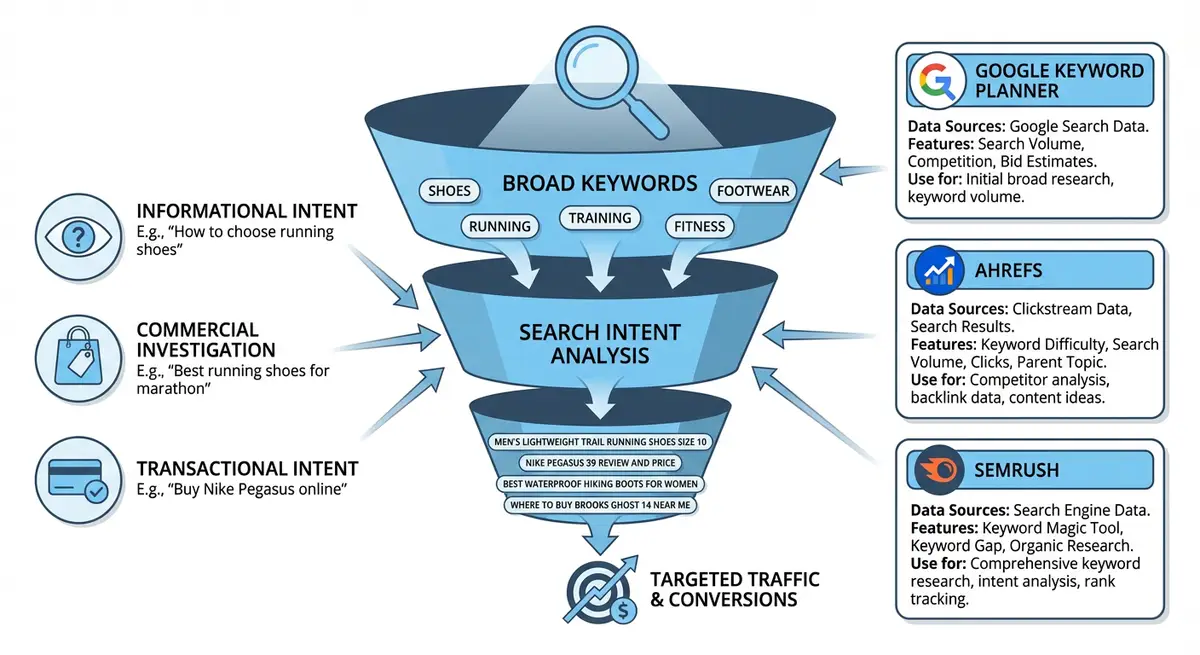
Search intent is the single most important concept in modern SEO. You can have the best-written page on the internet, but if the intent does not match what the searcher wants, you will not rank, and even if you do, you will not convert. Google has invested billions of dollars in understanding intent through machine learning systems like RankBrain, BERT, and MUM. These systems analyse user behaviour signals, click patterns, dwell time, and pogo-sticking to determine whether a page satisfies the intent behind a query. If your page does not match intent, Google will demote it regardless of how many backlinks you have or how well your on-page SEO is optimised. This lesson gives you the complete framework for identifying, classifying, and matching search intent on every page of your Wix site.
Why Search Intent Matters More Than Keywords
Before Google developed intent-matching algorithms, SEO was primarily about keywords. You found a keyword, stuffed it into your page, and hoped for the best. That era ended permanently in 2015 with RankBrain and was further reinforced by BERT in 2019 and MUM in 2021. Today, Google does not simply match keywords to pages. It matches the meaning and purpose behind a query to the page that best satisfies that purpose.
Consider the keyword "apple". Without understanding intent, a search engine would return a random mix of results about the fruit, the tech company, and the record label. Google uses context signals, previous searches, trending topics, and the vast majority of user behaviour to determine that most people searching "apple" want the tech company. This same intent-matching logic applies to every keyword in your niche.
- Google measures user satisfaction signals: if searchers click your result and immediately hit back (pogo-sticking), Google interprets this as an intent mismatch and demotes your page.
- Dwell time matters: pages that satisfy intent keep users engaged for longer. If your Wix blog post ranks for a transactional keyword and users leave within 5 seconds because they wanted a service page, your rankings will drop.
- Click-through rate from SERPs is an indirect ranking signal. If your result appears in position 3 but nobody clicks because the title and description do not match what the searcher expects, Google will test other results in that position.
- Google A/B tests its own results constantly. It will temporarily promote or demote pages and measure user satisfaction to find the best intent match.
- The "helpful content system" launched in 2022 and updated through 2024 explicitly targets content that fails to satisfy search intent.
The Four Types of Search Intent
Every search query falls into one of four intent categories. Some queries blend categories, but understanding these four types gives you the foundation to classify any keyword and match it with the right Wix page type.
1. Informational Intent
The searcher wants to learn something. They are not ready to buy, they are not looking for a specific website, and they do not want to be sold to. They want knowledge, answers, or understanding. Informational queries represent approximately 80% of all Google searches, making them the largest intent category by far.
- Examples: "how does SEO work", "what is a canonical tag", "wix seo tips", "how to add alt text to images", "what is keyword density"
- SERP indicators: Featured snippets, People Also Ask boxes, knowledge panels, video results, Wikipedia results, educational blog posts ranking in top 10
- Content format Google rewards: Long-form blog posts, how-to guides, pillar content, video tutorials, infographics, step-by-step instructions
- Wix page type to use: Blog posts, knowledge base articles, guide pages, resource pages
- Monetisation approach: Do NOT sell directly. Build trust and authority. Capture email addresses. Link to relevant service pages naturally within the content.
- Common mistake: Creating thin 300-word blog posts for informational queries. Google increasingly rewards comprehensive, expert content that thoroughly answers the question.
2. Navigational Intent
The searcher wants to find a specific website, brand, or page. They already know what they are looking for and are using Google as a navigation tool rather than a discovery tool. Navigational searches are the second most common intent type.
- Examples: "Wix login", "Google Search Console", "Michael Andrews Wix SEO", "Facebook", "Amazon prime"
- SERP indicators: Sitelinks appearing under the top result, brand knowledge panel on the right side, official website appearing as position 1
- Content format Google rewards: The official brand page itself, specific product or feature pages that the searcher is looking for
- Wix page type to use: Your homepage, about page, or specific branded landing pages
- Optimisation approach: Ensure your Wix site ranks #1 for your own brand name and all brand variations. Claim your Google Business Profile. Build consistent brand mentions across directories.
- Common mistake: Ignoring navigational queries for your own brand. If someone searches your business name and a directory listing or social media profile appears above your actual website, you have a problem.
3. Commercial Investigation Intent
The searcher is researching before making a purchase decision. They are comparing options, reading reviews, and evaluating alternatives. They are close to buying but not yet committed. This is the most valuable intent type for service businesses because the searcher is actively considering hiring someone like you.
- Examples: "best Wix SEO course", "Wix vs WordPress SEO", "wix seo expert reviews", "top seo agencies uk", "is wix good for seo 2025"
- SERP indicators: Comparison articles in top positions, review roundups, "best of" listicles, product comparison tables, affiliate review sites
- Content format Google rewards: Comparison pages, detailed reviews, case studies with results, buyers guides, pros and cons analyses, alternatives pages
- Wix page type to use: Comparison pages, case study pages, testimonials/reviews page, "why choose us" page, detailed service pages with social proof
- Monetisation approach: Present evidence, not pitches. Show case studies with real numbers. Include testimonials. Provide transparent pricing. Make it easy to take the next step without being pushy.
- Common mistake: Missing this intent category entirely. Most Wix sites have service pages (transactional) and blog posts (informational) but no comparison or social proof content for commercial investigation searches.
4. Transactional Intent
The searcher is ready to take action. They want to buy, book, hire, download, or sign up for something. They have already done their research and are looking for the right place to complete their transaction. These keywords typically have the highest commercial value but also the highest competition.
- Examples: "hire wix seo expert", "wix seo services price", "buy wix seo course", "book seo consultation", "seo audit cost"
- SERP indicators: Google Ads appearing above organic results, Google Shopping results, local pack with map, service pages with pricing ranking in top positions
- Content format Google rewards: Service pages with clear CTAs, product pages with buy buttons, pricing pages, booking pages, landing pages with conversion-focused design
- Wix page type to use: Service pages, pricing page, booking/contact pages, product pages (Wix Stores), dedicated landing pages
- Optimisation approach: Include pricing or price ranges, clear calls to action, trust signals (testimonials, certifications, guarantees), and make the conversion process as frictionless as possible.
- Common mistake: Using blog posts to target transactional keywords. If someone searches "hire seo expert" and lands on a blog post about what SEO is, they will leave immediately.
The Fifth Intent: Local Intent
While technically a subset of the four main types, local intent deserves special attention for Wix site owners because it behaves differently in search results and requires specific optimisation.
- Local intent signals: "near me" in the query, city or neighbourhood name, Google showing a local map pack, directions appearing in results
- Examples: "seo expert near me", "wix designer london", "plumber manchester", "coffee shop open now"
- Google prioritises proximity, relevance, and prominence for local results. Your Wix site needs a Google Business Profile, local schema markup, and location-specific content to compete.
- Wix page type: Dedicated location pages for each area you serve, with unique content per page (not just swapping the city name).
How to Identify Intent from Any Keyword
There are three reliable methods for determining the intent behind any keyword. Use all three together for the most accurate classification.
Method 1: SERP Analysis (The Gold Standard)
How to determine intent by analysing Google results
- Search the exact keyword in Google using an incognito or private browsing window to avoid personalised results
- Look at the top 5 organic results (ignore ads for now): What type of pages are they? Blog posts indicate informational intent. Service pages indicate transactional. Comparison articles indicate commercial investigation.
- Check for SERP features: Featured snippets almost always indicate informational intent. Google Ads indicate commercial or transactional. Local pack indicates local intent. Shopping results indicate transactional product searches.
- Look at the People Also Ask questions. These reveal the sub-intents and related queries that Google associates with the keyword.
- Check the Related Searches at the bottom of the page. These show you what other queries searchers are making in the same session.
- Note the dominant page FORMAT: Are top results long-form guides (3000+ words)? Listicles? Short answer pages? Product pages? Video results? This tells you what format Google expects.
- Check whether the results are predominantly from large authority sites or if smaller niche sites are ranking. This indicates the competitive landscape for this intent.
Method 2: Keyword Modifier Analysis
Certain words within a keyword strongly indicate intent. Learning these modifiers lets you quickly classify keywords without even checking Google.
- Informational modifiers: "how to", "what is", "why", "guide", "tutorial", "tips", "examples", "explained", "meaning", "definition", "vs" (sometimes commercial)
- Navigational modifiers: brand names, product names, "login", "sign in", "official site", "contact"
- Commercial investigation modifiers: "best", "top", "review", "comparison", "vs", "alternative to", "pros and cons", "worth it", "should I"
- Transactional modifiers: "buy", "hire", "book", "price", "cost", "discount", "deal", "near me", "free shipping", "order", "subscribe", "download"
Method 3: User Journey Mapping
Place each keyword on a buyer journey timeline. This helps you understand not just the current intent but where the searcher is likely to go next, which informs your internal linking strategy.
Map keywords to the buyer journey
- Awareness stage (top of funnel): Informational queries where the searcher is just discovering a problem or topic. Example: "why is my website not showing up on google"
- Consideration stage (middle of funnel): Commercial investigation queries where the searcher is evaluating solutions. Example: "best wix seo services reviewed"
- Decision stage (bottom of funnel): Transactional queries where the searcher is ready to act. Example: "hire wix seo expert pricing"
- Map each keyword to its buyer journey stage and ensure you have Wix pages targeting each stage
- Create internal links that guide users from awareness content through consideration to decision pages
Intent Matching: Assigning the Right Wix Page Type to Each Intent
The most common reason Wix sites fail to rank is an intent mismatch: the wrong page type targeting the wrong intent. Here is the definitive matching guide.
Informational Intent Page Strategy
- Primary page type: Wix Blog posts (1500-3000+ words)
- Structure: Clear H1 with question or topic, H2 sections covering sub-topics, step-by-step instructions where applicable, FAQ section at the bottom
- Content approach: Be the most comprehensive, helpful resource on the topic. Answer the main question in the first paragraph, then go deep.
- Internal linking: Link from informational posts to relevant service pages (commercial/transactional). This builds the bridge between education and conversion.
- Schema markup: Add Article or BlogPosting schema, FAQ schema for the FAQ section, HowTo schema for step-by-step content
- CTA approach: Soft CTAs only. "Want help implementing this? Learn about our SEO services." Never hard-sell on informational content.
Commercial Investigation Page Strategy
- Primary page type: Comparison pages, case study pages, reviews/testimonials pages
- Structure: Clear H1 with comparison or review angle, pros/cons sections, data-driven comparison tables, real client results, testimonials with specifics
- Content approach: Be balanced and evidence-based. Even when comparing yourself to competitors, acknowledge their strengths. Readers will trust you more.
- Internal linking: Link to your transactional service or pricing pages as the natural next step
- Schema markup: Add Review schema, Product schema for service comparisons, FAQ schema
- CTA approach: Medium-soft CTAs. "See how we achieved these results for [client]. Book a free consultation to discuss your site."
Transactional Intent Page Strategy
- Primary page type: Service pages, pricing page, booking page, product pages
- Structure: Clear H1 with service name and location (if local), benefits section, social proof, pricing, FAQ addressing objections, prominent CTA
- Content approach: Be conversion-focused. Every element on the page should move the visitor toward taking action. Remove distractions.
- Internal linking: Link to supporting informational content for visitors who need more research. Link to case studies as social proof.
- Schema markup: Add Service schema, LocalBusiness schema, FAQ schema, AggregateRating schema
- CTA approach: Strong, clear CTAs. "Get Your Free SEO Audit", "Book a Consultation", "Start Your SEO Campaign". Place CTAs above the fold and after every major section.
Advanced: Mixed Intent and Intent Shifts
Not every keyword fits neatly into one intent category. Some queries have mixed intent, and Google may show different page types in the same SERP to satisfy different user groups.
- Mixed intent example: "wix seo" could be informational (learning about Wix SEO), navigational (looking for Wix SEO settings), or transactional (looking for a Wix SEO service). Google shows a mix of blog posts, Wix official pages, and service pages for this query.
- When you encounter mixed intent, look at the RATIO of page types in the top 10. If 7 out of 10 results are blog posts, the dominant intent is informational.
- Intent shifts: Google periodically re-evaluates the dominant intent for a keyword. A keyword that was informational two years ago may have shifted to transactional as more users searching it are ready to buy. Check SERPs regularly.
- Fractured intent: Some keywords have truly split intent. For these, you may need multiple pages on your Wix site, one informational and one transactional, each targeting the same keyword but satisfying different intent.
Intent-Based Content Audit for Your Wix Site
Before creating new content, audit your existing Wix pages for intent alignment. This often reveals quick wins where a simple page restructure can significantly improve rankings.
How to audit your existing Wix pages for intent alignment
- Export your page list from Wix Dashboard or compile it manually
- For each page, identify its current target keyword (check the title tag and H1)
- Search each target keyword in Google and determine the dominant intent
- Compare your page type against the dominant intent. Is your blog post targeting a transactional keyword? Is your service page targeting an informational keyword?
- Create an "Intent Mismatch" column in your spreadsheet and flag every page where the page type does not match the intent
- Prioritise fixes by traffic potential: fix the highest-volume mismatches first
- For each mismatch, decide whether to restructure the existing page or create a new page of the correct type
- After restructuring, monitor rankings in GSC for 4-8 weeks to measure improvement
Common Intent Mistakes on Wix Sites
Mistake 1: Blog Posts Targeting Transactional Keywords
This is the most common intent mismatch on Wix sites. A blog post titled "Best SEO Services for Small Business" targeting the transactional keyword "seo services small business" will be outranked by dedicated service pages. If you have a blog post targeting a transactional keyword, either convert it to a service page or create a new service page and change the blog post to target a related informational keyword.
Mistake 2: Service Pages Competing with Blog Posts
If you have both a service page and a blog post targeting the same keyword, Google has to choose which one to show. This is keyword cannibalisation combined with intent confusion. The fix is to ensure each page targets a distinct keyword with distinct intent, and use 301 redirects or canonical tags if you need to consolidate.
Mistake 3: Ignoring Commercial Investigation Intent
Most Wix sites have service pages (transactional) and blog posts (informational) but nothing for commercial investigation queries. This means you are invisible to searchers who are actively comparing options and ready to choose a provider. Create comparison pages, case study pages, and review/testimonial pages to capture this high-value traffic.
Mistake 4: Creating One Page Per Service Without Enough Content
A transactional service page with 200 words, no testimonials, no pricing, and no FAQ will not rank against competitors with comprehensive service pages. Google needs enough content to understand what your page offers and to confirm it satisfies transactional intent.
Measuring Intent Alignment Success
After implementing intent-aligned content changes, track these metrics in Google Search Console and Google Analytics to confirm improvement.
- Click-through rate (CTR) in GSC: If intent alignment is correct, your CTR should increase because your title and description better match what searchers expect.
- Average position in GSC: Intent-aligned pages typically see position improvements within 4-8 weeks.
- Bounce rate in GA4: Correctly matched intent should reduce bounce rate because visitors find what they expected.
- Time on page in GA4: Intent-aligned content keeps visitors engaged longer.
- Conversion rate: The ultimate measure. Are more visitors from organic search taking your desired action?
- Pogo-sticking reduction: Monitor in GSC whether users are clicking your result and immediately returning to search results less frequently.
Intent Classification Cheat Sheet
Use this quick-reference table when classifying keywords. Print it out or bookmark it for reference during keyword research sessions.
- INFORMATIONAL: Modifiers = how, what, why, guide, tips, tutorial. Page type = Blog post. SERP signals = Featured snippets, PAA, Wikipedia. Example = "how to do seo on wix"
- NAVIGATIONAL: Modifiers = brand name, login, official. Page type = Homepage or brand page. SERP signals = Sitelinks, knowledge panel. Example = "wix seo dashboard"
- COMMERCIAL: Modifiers = best, review, vs, comparison, top. Page type = Comparison or case study. SERP signals = Review articles, listicles. Example = "best wix seo plugins reviewed"
- TRANSACTIONAL: Modifiers = buy, hire, price, book, near me. Page type = Service or pricing page. SERP signals = Ads, local pack, shopping. Example = "hire wix seo expert uk"
- LOCAL: Modifiers = near me, [city name], directions. Page type = Location page. SERP signals = Map pack, directions, local businesses. Example = "wix designer manchester"
Complete How-To Guide: Classifying Search Intent for Every Keyword on Your List
This guide walks you through the practical process of determining the search intent behind every keyword you are targeting, and matching the right Wix page type to each intent.
Follow these steps to classify search intent for your entire keyword list
- Open your keyword research spreadsheet and add a new column labelled "Search Intent"
- For each keyword, search it in Google in an incognito window and examine the top 5 results carefully
- If the results are primarily blog posts, guides, wikis, or educational content, label the intent as "Informational"
- If the results show comparison pages, review articles, best-of lists, or product roundups, label the intent as "Commercial Investigation"
- If the results show product pages, pricing pages, service pages with booking buttons, or ecommerce listings, label the intent as "Transactional"
- If the results show maps, local business listings, directions, or contact pages, label the intent as "Local"
- If the results show a mix of page types, label it as "Mixed" and note the dominant intent (the page type appearing most frequently in the top 5)
- Add a column for "Content Format" and note what Google is rewarding: long-form guide, listicle, video, short answer, comparison table, etc.
- Add a column for "Wix Page Type" and assign the matching page type: blog post for informational, comparison page for commercial, service page for transactional, location page for local
- Flag any keywords where you have the wrong page type targeting them. These are your highest-priority fixes.
- Create a separate tab called "Intent Mismatches" listing every keyword where your existing Wix page does not match the intent Google is rewarding
- For each mismatch, decide whether to: (a) restructure the existing page, (b) create a new page of the correct type, or (c) redirect the existing page and create a replacement
- Prioritise the highest-traffic mismatches first based on search volume and current impressions in GSC
- Re-check your intent classifications every 6 months as Google can shift what it rewards for certain keywords over time
- After making changes, track position changes and CTR improvements in GSC for each modified page
Frequently Asked Questions
Can one page target multiple intent types?
Technically yes, but it is not recommended. A page trying to be both informational and transactional will be outperformed by a dedicated informational page and a dedicated transactional page. The exception is very long pillar content that naturally covers the informational angle and includes a transactional CTA at the end.
How often does Google change the intent behind a keyword?
More often than most people realise. Intent can shift seasonally (gift-related keywords become transactional in December), after major events, or as user behaviour evolves. Check your highest-value keywords quarterly by re-analysing the SERP.
What if my competitor ranks with the wrong intent?
This is actually an opportunity. If a competitor ranks with a blog post for a transactional keyword and the majority of other results are service pages, creating a proper service page gives you a strong chance of outranking them because Google is already signalling that it prefers transactional content for that query.
Does intent matter for local SEO on Wix?
Absolutely. Local searches have their own intent signals. "Plumber near me" is transactional with local intent. "How to fix a leaky tap" is informational. "Best plumber reviews Manchester" is commercial investigation with local intent. Each requires a different Wix page type.
How does intent affect my Wix blog strategy?
Your Wix blog should primarily target informational intent keywords. Do not use blog posts for transactional keywords because Google will favour service pages. Use your blog to build topical authority and internal link to your transactional pages.
Was this lesson useful?
It takes 1 minute to tell me. The course is free and I want to keep it that way, and your feedback shows me what is working and helps other people find it.
This lesson on Understanding search intent: informational, commercial, transactional is part of Module 3: Keyword Research Masterclass in The Most Comprehensive Complete Wix SEO Course in the World (2026 Edition). Created by Michael Andrews, a Wix Marketplace Legend Partner with 14 years of hands-on experience, 800 completed Wix SEO projects and 456 verified five-star reviews.