How Google crawls, indexes and ranks websites
Module 1: SEO Foundations & How Search Works | Lesson 1 of 683 | 55 min read
By Michael Andrews, Wix SEO Expert UK
Before you can improve your Wix site's rankings, you need to understand the three-stage process Google uses to bring your pages into search results. Every SEO decision you make on your Wix site is ultimately about helping Google crawl your pages efficiently, index them correctly, and rank them for the right queries. Most SEO mistakes happen because people try to optimise without understanding this foundation. This lesson is the single most important foundation of the entire course.
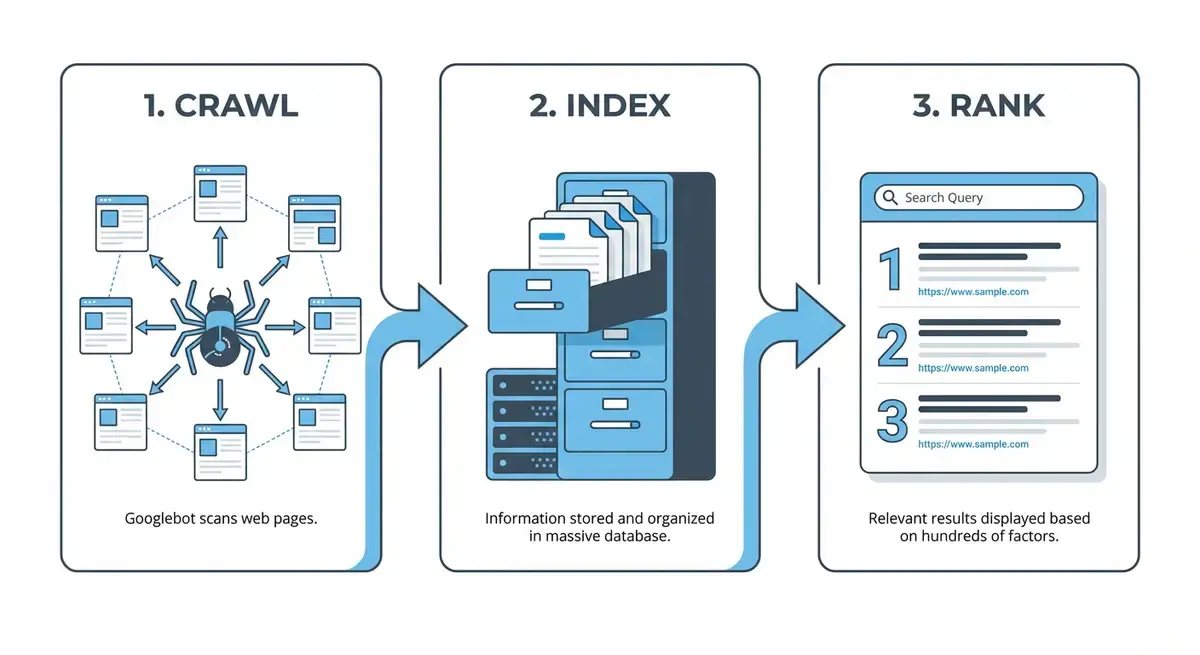
The Three Stages of Google Search: The Complete Pipeline
Google Search operates as a three-stage pipeline: Crawl, Index, Rank. Each stage must complete successfully before the next one can work. If Google cannot crawl your page, it will never be indexed. If it is never indexed, it will never rank. This sequential dependency is why technical SEO matters so much, particularly on Wix where some technical elements are managed by the platform rather than by you.
Stage 1: Crawling, How Googlebot Discovers Your Pages
Google uses software called Googlebot, a web crawler (also called a spider or bot), to systematically browse the internet and discover web pages. Googlebot follows links from page to page, building a map of the web. For your Wix site, this means every internal link you create is a potential pathway for Googlebot to find more of your content. Crawling is where everything begins.

How Googlebot Actually Works
Googlebot is not a single program. It is a distributed fleet of servers running thousands of simultaneous crawling instances across Google's global infrastructure. When Googlebot visits your Wix site, it sends an HTTP request to your server (which Wix handles), receives the HTML response, parses the content, extracts all links, and adds those links to its crawl queue for future visits. This process happens continuously, 24 hours a day.
- Googlebot Desktop: Simulates a desktop Chrome browser. Used for sites where the desktop version is the primary version
- Googlebot Smartphone: Simulates a mobile Chrome browser. This is now the PRIMARY crawler for all websites due to mobile-first indexing
- Googlebot Image: Specifically crawls images for Google Image Search results
- Googlebot Video: Crawls video content for Google Video Search
- Googlebot News: Crawls news content for Google News (requires Google News Publisher Centre registration)
- AdsBot: Crawls landing pages for Google Ads quality checks (separate from organic search)
How Google Discovers New Wix Pages
There are four main ways Googlebot discovers pages on your Wix site, and understanding all four helps you ensure nothing gets missed:
- XML Sitemap: Wix automatically generates and updates your sitemap at yoursite.com/sitemap.xml. When you submit this to Google Search Console, Google checks it regularly for new and updated URLs. This is the most reliable discovery method.
- Internal Links: When Googlebot crawls one of your pages, it follows every link on that page. Strong internal linking ensures every page on your site is reachable from at least one other page.
- External Backlinks: When another website links to one of your pages, Googlebot follows that link during its crawl of the external site. This is why backlinks accelerate indexing of new content.
- URL Inspection Tool: You can manually request Google to crawl a specific URL using the URL Inspection tool in Google Search Console. This is useful for new pages you want indexed quickly.
Crawl Budget: Why It Matters for Wix Sites
Crawl budget is the number of pages Googlebot will crawl on your site within a given time period. For most small Wix sites (under 500 pages), crawl budget is rarely a concern because Googlebot can crawl the entire site easily. However, understanding crawl budget matters when you have blog tag pages, empty category pages, or duplicate content that wastes Googlebot's limited attention.
Crawl budget is determined by two factors: crawl rate limit (how fast Googlebot can crawl without overloading your server, handled by Wix's infrastructure) and crawl demand (how much Google wants to crawl your site based on its perceived importance and freshness). A site that publishes new content regularly and earns backlinks gets crawled more frequently.
JavaScript Rendering: The Critical Wix Factor
Wix builds websites using JavaScript, which means the HTML that Googlebot initially receives is largely empty. The actual content is rendered by executing JavaScript in a browser-like environment. Google handles this through a two-stage process: first, Googlebot fetches the raw HTML; then, the page enters a rendering queue where Google's Web Rendering Service (WRS) executes the JavaScript and generates the final HTML with all content visible.
Wix has invested heavily in server-side rendering (SSR) to mitigate this issue. Most Wix pages now deliver pre-rendered HTML to Googlebot, meaning the content is immediately visible without waiting for JavaScript execution. However, some Wix features, particularly dynamic pages using Wix Data Collections and certain Wix apps, may still rely on client-side rendering.
How to verify Google can render your Wix pages correctly
- Open Google Search Console and navigate to the URL Inspection tool
- Enter the full URL of any important Wix page
- Wait for the inspection to complete
- Click "View Tested Page" in the results panel
- Click the "Screenshot" tab to see exactly what Googlebot sees
- Compare the screenshot to your actual page, every piece of text, image, and link should be visible
- Click the "HTML" tab to see the rendered HTML code and verify your content is present in the source
- If content is missing, the page may rely on client-side JavaScript that Google cannot execute properly
- Repeat this process for your homepage, top service pages, and 3-5 blog posts
Wix Server-Side Rendering (SSR) Explained
Wix implemented server-side rendering (SSR) to solve the JavaScript rendering problem. When Googlebot (or any visitor) requests a Wix page, Wix's servers execute the JavaScript on the server side and send back fully-rendered HTML. This means Googlebot receives a complete page with all content visible, rather than an empty shell that requires JavaScript execution.
SSR on Wix works automatically for most standard page types: static pages, blog posts, product pages, and booking pages. However, certain dynamic content loaded via third-party apps, custom Wix Data Collections with complex queries, or client-side-only components may not benefit from SSR. This is why the URL Inspection verification step is critical.
Essential Crawling & Indexing Tools
- Google Search Console: Verify site ownership, submit your sitemap, monitor indexing status, and use URL Inspection
- Google Search Console URL Inspection: Check whether any specific URL is indexed, see rendered screenshots, and request indexing
- Screaming Frog SEO Spider: Crawl up to 500 URLs free. Finds broken links, orphan pages, redirect chains, and crawl issues
- Google Rich Results Test: Test if Google can render your Wix page and see its structured data
Stage 2: Indexing, How Google Stores and Understands Your Pages
Once Googlebot crawls a page, Google's systems process and analyse the content. This is far more than just "storing" the page. Google reads all text content, assesses image relevance through alt text and surrounding context, parses structured data markup, evaluates content quality and uniqueness, identifies the language and geographic targeting, and determines the canonical version if duplicate URLs exist.
If the page passes Google's quality threshold, it gets added to the Google Index: a massive database of hundreds of billions of web pages stored across Google's global data centres. The index is essentially a giant catalogue that maps every word and concept to the pages that contain it, allowing near-instant retrieval during a search query.
Why Pages Get Crawled But Not Indexed
Not every crawled page gets indexed. Google explicitly states that indexing is not guaranteed. Understanding why pages are excluded helps you fix issues on your Wix site:
- Thin Content: Pages with very little unique text content. Common on Wix sites with tag pages, empty portfolio categories, or placeholder pages
- Duplicate Content: Pages that are substantially identical to another page on your site or elsewhere. Wix can create duplicates through www/non-www variations, tag pages, and pagination
- Noindex Tag: Pages explicitly marked with a noindex directive in the Wix SEO panel, telling Google not to index them
- Canonical Tag Issues: When the canonical URL points to a different page, Google may index the canonical version instead
- Crawl Errors: Server errors (5xx) or access problems that prevent Google from fully loading the page
- Quality Threshold: Google may choose not to index pages it deems low quality, even without explicit noindex directives. This is the "Discovered - currently not indexed" status in GSC
- Soft 404: Pages that return a 200 status code but display error-like content (empty pages, "no results found" pages)
Understanding GSC Index Coverage Statuses
Google Search Console's Pages report (formerly Coverage report) shows exactly what is happening with every URL Google knows about on your Wix site. Here is what each key status means and how to fix it:
- Indexed: The page is in Google's index and can appear in search results. This is the status you want for every important page.
- Discovered - currently not indexed: Google knows about the URL but has not yet crawled it, or crawled it but decided not to index it. Often indicates low perceived quality or importance. Fix by improving content depth and adding internal links to the page.
- Crawled - currently not indexed: Google has crawled the page but chose not to add it to the index. This typically means the content did not meet Google's quality threshold. Fix by substantially improving the page content, making it more comprehensive and unique.
- Excluded by noindex tag: You or a Wix setting has told Google not to index this page. Check the Wix SEO (Google) panel for the page and ensure "Hide from search engines" is not enabled.
- Duplicate without user-selected canonical: Google found duplicate content and chose a canonical URL itself. Check if the page has unique content or is genuinely duplicating another page.
- Blocked by robots.txt: The robots.txt file is preventing Google from crawling the URL. On Wix, you cannot edit robots.txt directly, so check if a Wix app or setting is causing the block.
- Redirect: The URL redirects to another page. This is expected for URLs you have intentionally redirected.
Canonical Tags: How Google Handles Duplicate Content on Wix
A canonical tag (rel="canonical") tells Google which version of a page is the "official" version when multiple URLs contain similar or identical content. Wix automatically adds canonical tags to all pages, typically pointing each page to its own URL. This is correct behaviour and prevents most duplicate content issues.
However, problems can arise when Wix creates multiple URL variations for the same content, for example through blog tag pages, pagination, or URL parameters from marketing campaigns. If you notice pages in GSC marked as "Duplicate, Google chose different canonical than user", it means Google disagrees with the canonical tag and has chosen a different URL as the primary version.
Stage 3: Ranking, How Google Decides Which Pages Appear First
Ranking is the process of determining which indexed pages should appear for a given search query, and in what order. When someone types a query into Google, the search engine must evaluate potentially millions of relevant pages in its index and return the most useful results in under half a second. Google's ranking systems use hundreds of signals, weighted differently depending on the type of query.
The Five Core Ranking Signal Categories
While Google uses hundreds of individual ranking signals, they broadly fall into five categories. Understanding these helps you prioritise your SEO efforts on Wix:
- Relevance: How well your page content matches the search query. This includes keyword usage in title tags, headings, body content, URL, and meta descriptions. Also includes semantic relevance, where Google understands related concepts beyond exact keyword matches.
- Authority: How trustworthy and authoritative your website and specific page are. Primarily measured through backlinks from other websites, but also includes brand mentions, domain age, and overall site quality.
- Content Quality: How comprehensive, accurate, and useful your content is. Google's Helpful Content System evaluates whether content is written for humans or primarily for search engines. First-hand experience, expertise, and original insights score highly.
- Page Experience: User experience metrics including Core Web Vitals (LCP, CLS, INP), mobile-friendliness, HTTPS security, and absence of intrusive interstitials. Wix handles many of these at the platform level.
- User Engagement Signals: While Google denies using direct click-through rate as a ranking signal, patterns in user behaviour (pogo-sticking, long clicks vs short clicks) are widely believed to influence rankings indirectly through feedback loops.
How Google Matches Search Intent
Google's ranking algorithm does not simply match keywords. It attempts to understand the intent behind a search query and match it with the most appropriate type of content. There are four primary intent types:
- Informational Intent: The searcher wants to learn something. Example: "what is Wix SEO". Google tends to rank blog posts, guides, and educational content.
- Navigational Intent: The searcher wants to find a specific website or page. Example: "Wix SEO dashboard login". Google ranks the exact page the user is looking for.
- Commercial Investigation: The searcher is researching before a purchase. Example: "best Wix SEO expert UK". Google ranks comparison pages, reviews, and service listings.
- Transactional Intent: The searcher wants to buy or take an action. Example: "hire Wix SEO consultant". Google ranks service pages, pricing pages, and booking pages.
SERP Features and How They Affect Wix Rankings
Modern Google search results are far more than ten blue links. Understanding SERP features helps you optimise your Wix content for maximum visibility:
- Featured Snippets: A highlighted answer box at the top of results. Optimise by answering questions concisely in your content with clear H2/H3 headings.
- People Also Ask: Expandable question boxes. Each question you answer on your page is an opportunity to appear here.
- Local Pack: Map results with three business listings. Critical for local Wix businesses, requires Google Business Profile optimisation.
- Image Pack: A row of images within search results. Properly optimised images with descriptive alt text on your Wix site can appear here.
- Knowledge Panel: An information box about an entity (person, business, topic). Built through structured data, Wikipedia presence, and consistent NAP across the web.
- AI Overviews: Google's AI-generated summary at the top of some results. Pages cited in AI Overviews need comprehensive, well-structured content.
- Sitelinks: Additional links beneath your main search result, showing key pages on your site. Earned through clear site structure and strong internal linking.
Common Wix Crawlability and Indexing Issues
After auditing hundreds of Wix sites, these are the most common crawling and indexing problems I find, listed in order of how frequently they occur:
- Pages accidentally set to "noindex" in the Wix SEO panel. This happens when testing and forgetting to toggle it back. Check Settings > SEO (Google) for every important page.
- Orphan pages with no internal links pointing to them. Google cannot discover pages that are not linked from anywhere on your site.
- Blog tag pages and empty category pages creating crawl waste. Wix auto-generates these, and they often have thin or duplicate content.
- Slow page load speed reducing Googlebot's willingness to fully crawl the site. Heavy images and too many Wix apps are the usual culprits.
- Password-protected pages that Googlebot cannot access. If a page requires a login, Google cannot crawl it.
- Content hidden behind "click to expand" or accordion elements. While Google can usually process hidden content, it may give it less weight.
- Dynamic content from Wix Data Collections not rendering for Googlebot. Always verify with URL Inspection.
- Redirect chains where one redirect leads to another redirect, slowing crawling and wasting crawl budget.
- Mixed content warnings from HTTP resources loaded on HTTPS pages, though Wix largely handles this automatically.
How Often Does Google Re-Crawl Wix Pages?
Google does not crawl every page on the internet every day. It allocates crawl resources based on several factors. Understanding this helps you set realistic expectations for how quickly changes you make in the Wix editor will be reflected in Google's index.
- Homepage: Typically re-crawled every 1-7 days for established sites. New sites may wait 1-2 weeks between crawls.
- Key Service Pages: Usually re-crawled every 1-4 weeks, depending on how often you update them.
- Blog Posts: New posts are typically discovered within 1-3 days if your sitemap is submitted. Older posts may be re-crawled monthly or less frequently.
- Low-Priority Pages: Contact, privacy policy, terms pages may be re-crawled monthly or less.
Practical Exercise: Full Crawl and Index Audit of Your Wix Site
This is the most important practical exercise in the entire course. Set aside 60-90 minutes and work through every step. By the end, you will know exactly how Google sees your Wix site and will have fixed every crawling and indexing issue.
Complete Wix crawl and index audit walkthrough
- Open Google Search Console at search.google.com/search-console and verify your Wix site ownership using the HTML tag method via Wix Settings > Marketing & SEO > Site Verification
- Navigate to the Sitemaps section in GSC and submit your Wix sitemap URL (yoursite.com/sitemap.xml) if not already submitted. Verify it shows "Success" status.
- Go to the Pages report (formerly Coverage) and note the total number of indexed pages, not indexed pages, and any errors
- Click on each error or exclusion category and review the specific URLs affected. Create a spreadsheet with columns: URL, Status, Issue, Action Required
- For pages showing "Excluded by noindex tag": Open the Wix editor, navigate to each page, click the three dots > SEO (Google), and verify "Hide from search engines" is toggled OFF
- For pages showing "Crawled - currently not indexed": These pages need better content. Note them for content improvement in Module 4 of this course
- For pages showing "Discovered - currently not indexed": Add 3-5 internal links from other pages to each of these URLs to increase their perceived importance
- Use the URL Inspection tool to individually check your 10 most important pages (homepage, top services, top blog posts). Each should show "URL is on Google"
- For each inspected page, click "View Tested Page" and check both the HTML and Screenshot tabs to verify Google can see all your content
- Open your sitemap directly in a browser (yoursite.com/sitemap.xml) and verify all important pages are listed. Note any missing pages.
- Run a free Screaming Frog crawl (up to 500 URLs free) of your Wix site. Export the results and check for: broken links (4xx status codes), redirect chains, orphan pages, pages with missing title tags or meta descriptions
- Cross-reference the Screaming Frog results with your GSC data to identify any pages that are crawlable but not indexed, or indexed but with errors
- Fix all broken internal links by updating the link destinations in the Wix editor
- For any orphan pages (found by Screaming Frog but not linked from any other page), add at least 2-3 internal links from relevant existing pages
- Remove or noindex any genuinely thin pages that provide no value (empty tag pages, test pages, placeholder pages) to stop them wasting crawl budget
- After making all fixes, request re-indexing of your top 10 pages in GSC using URL Inspection
- Set a calendar reminder for 14 days to re-check the Pages report in GSC and verify improvements
- Set a monthly recurring reminder to repeat this audit, as new issues can emerge as you add content and Wix updates its platform
Advanced Concepts: Log File Analysis for Wix
Log file analysis involves examining your server's access logs to see exactly which pages Googlebot visited, when it visited them, and what HTTP response it received. This is the gold standard for understanding how Google crawls your site. However, Wix does not provide direct access to server logs.
Workaround: You can use Google Tag Manager (covered in Module 2) with a custom JavaScript tag that fires when Googlebot visits a page, sending data to Google Analytics. This is an advanced technique but provides invaluable crawl data for larger Wix sites. Tools like JetOctopus and OnCrawl offer cloud-based log analysis, but they require log file access that Wix does not provide natively.
Frequently Asked Questions
How long does it take Google to index a new Wix page?
With a submitted sitemap and Request Indexing in GSC, most new Wix pages are indexed within 24 hours to 7 days. Without these, it can take 2-6 weeks for Google to naturally discover and index a new page. Pages with strong internal links and high-quality content are indexed faster.
Can Google read content inside Wix accordions and tabs?
Yes, Google can usually render and index content inside Wix accordions, tabs, and expandable sections because it executes the JavaScript. However, some SEO studies suggest Google may give slightly less weight to content that is hidden by default. For your most important keyword-targeted content, keep it visible on page load.
Does Google crawl Wix mobile and desktop versions separately?
Since Wix uses responsive design (the same URL serves both mobile and desktop), Google only needs to crawl each URL once. Googlebot Smartphone is the primary crawler, so it sees the mobile version. Make sure all important content is visible and accessible on the mobile layout in the Wix Mobile Editor.
Will too many 301 redirects slow down Google crawling my Wix site?
Redirect chains (one redirect leading to another) do waste crawl budget and slow Googlebot. Individual 301 redirects are fine and expected when you change URLs. In Wix, check your Redirect Manager (Dashboard > SEO > URL Redirect Manager) for chains and update them to point directly to the final destination URL.
The crawl-index-rank pipeline is the foundation of everything in SEO. If you understand this lesson deeply, every other lesson in this course will make immediate sense. If you skip it, you will constantly wonder why your optimisations are not working.
Was this lesson useful?
It takes 1 minute to tell me. The course is free and I want to keep it that way, and your feedback shows me what is working and helps other people find it.
This lesson on How Google crawls, indexes and ranks websites is part of Module 1: SEO Foundations & How Search Works in The Most Comprehensive Complete Wix SEO Course in the World (2026 Edition). Created by Michael Andrews, a Wix Marketplace Legend Partner with 14 years of hands-on experience, 800 completed Wix SEO projects and 456 verified five-star reviews.