Writing title tags that rank AND drive click-throughs
Module 4: On-Page SEO Optimisation for Wix | Lesson 32 of 683 | 45 min read
By Michael Andrews, Wix SEO Expert UK
Your title tag is the first thing both Google and searchers see. It is simultaneously the most important on-page SEO element and one of the most underoptimised parts of most Wix sites. A well-written title tag can double your click-through rate without changing your position. In Google search results, the title tag appears as the blue clickable link. It is the first impression, your 60-character sales pitch to convince a searcher to choose your page over every other result on the page. Google also uses the title tag as a primary relevance signal, making it one of the few elements that directly affects both rankings AND clicks. This lesson gives you the complete framework for writing title tags that satisfy Google's algorithms and persuade humans to click.
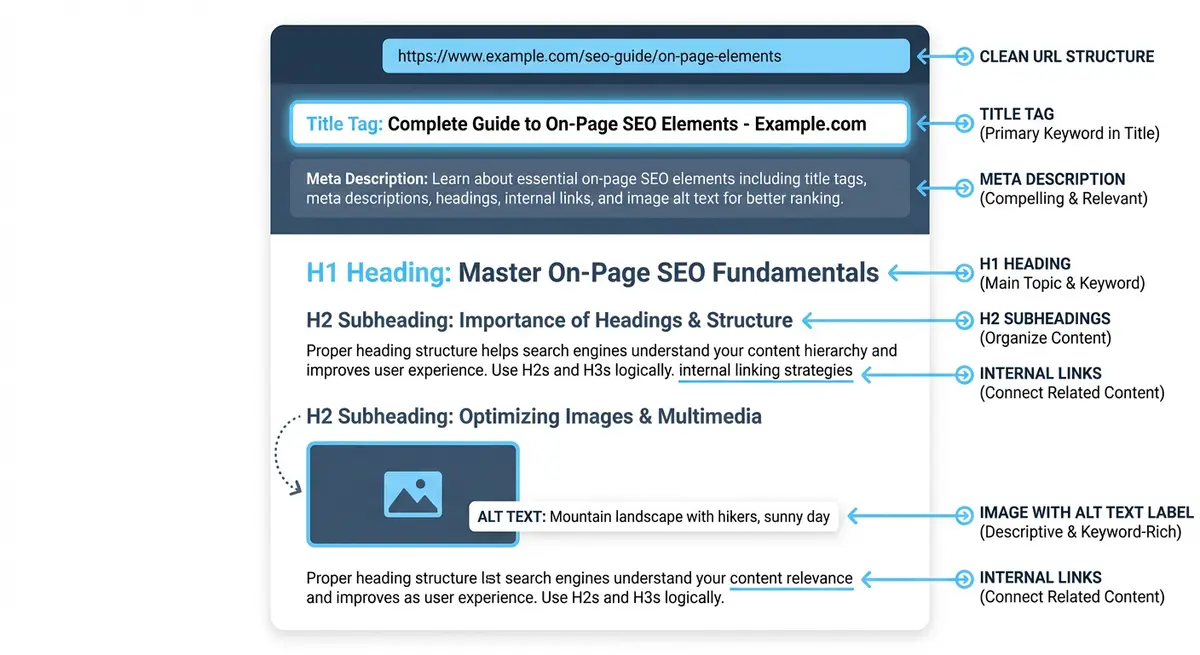
Why Title Tags Are the Highest-ROI SEO Element
- Direct ranking signal: Google has confirmed that title tags are one of the most important on-page ranking factors. The primary keyword in your title tag sends the strongest relevance signal available.
- Click-through rate influence: Even at the same ranking position, a compelling title tag can increase CTR by 30-100%. Higher CTR sends positive engagement signals back to Google.
- SERP real estate: Your title tag is the largest, most prominent element of your search result. It is what searchers read first, before the URL and meta description.
- Brand impression: Every search result impression is a brand touchpoint. Even searchers who do not click see your title tag and form an impression of your business.
- Compound effect: Improving title tags across 50 pages can increase total organic traffic by 15-25% without any other changes. No other single optimisation delivers this kind of return.
The Anatomy of a Perfect Title Tag
An effective title tag has three components: the primary keyword (as early as possible), a value proposition or differentiator, and optionally the brand name at the end. The ideal length is 50-60 characters. Wix shows a character count in the SEO panel, but you should also verify with a SERP simulator tool.
Formula: [Primary Keyword] | [Differentiator] | [Brand Name]
Example: Wix SEO Expert UK | 14 Years Experience | Frontline Web

Alternative formulas:
[Primary Keyword]: [Benefit Statement]
Wix SEO Services: Double Your Organic Traffic in 6 Months

[Number] [Topic] [Year/Modifier]
11 Wix SEO Tips That Actually Work in 2026

How to [Achieve Result] [Context]
How to Add Schema Markup to Wix in 10 Minutes
Component 1: Primary Keyword Placement
Place your primary keyword as close to the beginning of the title tag as naturally possible. Google gives more weight to words that appear earlier in the title. "Wix SEO Expert London | Trusted Agency" is stronger than "Trusted Agency | Wix SEO Expert London" because the primary keyword appears first.
Component 2: The Differentiator
The differentiator is what makes your result stand out from the other 9 results on the page. It should communicate unique value in as few words as possible. Effective differentiators include: years of experience, number of clients served, specific certifications, a unique benefit, or a compelling offer.
- "14 Years Experience" - establishes authority and trust
- "50+ Clients Ranked Page 1" - provides social proof with specific numbers
- "Free SEO Audit Included" - offers immediate value
- "Step-by-Step Guide" - sets content format expectations
- "2026 Updated" - signals freshness and relevance
- "With Real Examples" - promises practical, actionable content
Component 3: Brand Name
Adding your brand name to the end of the title tag builds brand recognition over time. As searchers see your brand name repeatedly in results, they begin to recognise and trust it, increasing CTR on future searches. Use a pipe (|) or dash (-) to separate the brand name from the rest of the title.
Title Tag Length: The 60-Character Rule
Google typically displays 50-60 characters of a title tag in desktop results and slightly less on mobile. Titles longer than 60 characters get truncated with an ellipsis (...), which looks unprofessional and may cut off important information. However, Google measures title length in pixels (approximately 600 pixels), not characters, so wider characters like "W" and "M" take up more space than "i" and "l".
- Target 50-60 characters as your baseline. Use a SERP simulator to verify the visual appearance.
- Put the most important information in the first 50 characters in case of truncation.
- Avoid ALL CAPS, which take up more pixel width and look spammy.
- Use a pipe (|) instead of a dash (-) as a separator. Pipes are narrower, giving you 1-2 extra characters.
- If your title is too long, shorten the differentiator or remove the brand name (keyword is more important).
Title Tag Templates by Page Type
Homepage Title Tags
Your homepage title should include your primary keyword and your brand name. For local businesses, include your location. For broader businesses, include your main value proposition.
Format: [Primary Keyword] [Location] | [Brand Name]
Examples:
Wix SEO Expert UK | Michael Andrews - Frontline Web
Plumber Manchester | 24/7 Emergency Service | City Plumbing
Handmade Wedding Confetti | Free UK Delivery | Ezra's Confetti
Service Page Title Tags
Service pages target transactional keywords. The title should clearly state the service, include a compelling differentiator, and optionally include location.
Format: [Service] in [Location] | [USP] | [Brand]
Examples:
Wix SEO Audit | 50-Point Technical Analysis | Frontline Web
Emergency Plumber Birmingham | 24/7 Fast Response | City Plumbing
Wedding Photography Surrey | Natural, Unposed Moments | Jane Smith
Blog Post Title Tags
Blog titles should be informational, engaging, and include the target keyword. Numbers, years, and action words significantly improve CTR on blog content.
Formats that perform well:
[Number] [Topic] [Year]
11 Wix SEO Tips That Actually Work in 2026

How to [Achieve Result] [Context]
How to Add Schema Markup to Any Wix Page in 10 Minutes

[Topic]: [Comprehensive Descriptor]
Wix Site Speed: The Complete Optimisation Guide

[Question Format]
Is Wix Good for SEO? The Data-Backed Answer
Location Page Title Tags
Format: [Service] [Location] | [Keyword Variation]
Examples:
Wix SEO Expert Manchester | Wix SEO Services Manchester
Plumber Didsbury | Fast Local Plumbing Service
Dentist Harley Street | Private & NHS Dental Care
Category/Collection Page Title Tags
Format: [Category] | [Value Prop] | [Brand]
Examples:
SEO Services | Proven Rankings for Wix Sites | Frontline Web
Women's Running Shoes | Free Returns | SportShop UK
How to Edit Title Tags in Wix
Editing title tags in the Wix Editor
- Open the Wix Editor and navigate to the page you want to edit
- Click the three dots next to the page name in the Pages panel on the left
- Select "SEO (Google)" from the dropdown menu
- Edit the "Page Title" field. This is your title tag.
- You will see a live preview of how it appears in search results. Check for truncation.
- Click "Apply" and publish the page
- For blog posts: edit the title tag in the Blog Manager under each post's SEO settings
- For Wix Stores products: edit in the product SEO settings panel
Using Wix SEO Patterns for Blog Posts
Wix SEO Patterns let you create templates that automatically generate title tags for blog posts, products, and dynamic pages. This saves time and ensures consistency across hundreds of pages.
Setting up SEO Patterns in Wix
- Go to your Wix Dashboard > SEO > SEO Settings
- Click "SEO Patterns" in the left sidebar
- Select the page type you want to set patterns for (e.g., Blog Posts)
- Edit the title tag pattern using variables like {page title}, {site name}, {category}
- A good blog pattern: {page title} | {site name}
- Preview the result to ensure it looks correct
- Apply the pattern. All blog posts without a custom title tag will use this format.
Title Tag Mistakes That Kill Rankings and CTR
Mistake 1: Duplicate Title Tags
Every page on your Wix site must have a unique title tag. Duplicate titles confuse Google about which page to show for a query and are flagged as errors in Google Search Console. Common causes: using the same template for service pages without customising, or leaving the default Wix title tag unchanged.
Mistake 2: Keyword Stuffing
"SEO Expert | SEO Services | SEO Agency | Best SEO" is keyword stuffing. Google will either ignore the title entirely or show a rewritten version. Use your keyword once, naturally, and use the remaining space for differentiation.
Mistake 3: Generic, Non-Descriptive Titles
"Home", "Services", "About Us", "Blog" are wasted title tags. Every character should work toward ranking and clicks. "About Us" should be "About Michael Andrews | 14 Years Wix SEO Experience".
Mistake 4: Missing Primary Keyword
A beautifully written title that does not include the target keyword will struggle to rank. "Transform Your Online Presence with Our Expert Team" sounds nice but contains no searchable keyword. Rewrite to: "Wix SEO Expert | Transform Your Online Presence".
Mistake 5: Title Too Long or Too Short
Titles under 30 characters waste valuable SERP space. Titles over 60 characters get truncated. Both hurt CTR. Use the full 50-60 character range for maximum impact.
When Google Rewrites Your Title Tag
Since August 2021, Google has been more aggressive about rewriting title tags it considers suboptimal. Google may pull text from your H1, content, or anchor text of links pointing to the page. This happens when Google believes its version better matches the search query.
- Check if Google is rewriting your titles by searching "site:yourdomain.com" and comparing displayed titles to your actual title tags.
- Common triggers for rewriting: title is too long, title does not match the page content, title is keyword-stuffed, title is identical to other page titles.
- To prevent rewriting: ensure your title tag accurately describes the page content, matches the H1 heading, and is the correct length.
- If Google rewrites your title with something better, consider adopting Google's version as your actual title tag.
Advanced Title Tag Strategies
Power Words That Increase CTR
- Numbers: "11 Tips", "7 Steps", "2026". Titles with numbers get 36% more clicks than titles without.
- Brackets: "[Guide]", "(2026)", "[Case Study]". Brackets increase CTR by up to 38%.
- Action words: "How to", "Complete Guide", "Step-by-Step", "Quick", "Easy", "Free".
- Emotional triggers: "Essential", "Proven", "Surprising", "Critical", "Ultimate".
- Specificity: "in 10 Minutes" is more compelling than "Quickly". "50+ Clients" is better than "Many Clients".
A/B Testing Title Tags
You can A/B test title tags manually by changing a title, monitoring CTR in GSC for 2-4 weeks, then changing to a different version and comparing. Focus on pages with high impressions (1000+/month) for statistically meaningful results. A small CTR improvement on a high-impression page can drive significant traffic gains.
Auditing All Title Tags on Your Wix Site
How to run a complete title tag audit
- Use Screaming Frog (free up to 500 URLs) to crawl your site and export all title tags
- Alternatively, use Google Search Console > Pages report and check each page's title tag in the HTML
- Create a spreadsheet with columns: Page URL, Current Title, Character Count, Primary Keyword, Issues, New Title
- Flag these issues: missing title, duplicate title, over 60 characters, under 30 characters, missing primary keyword, keyword stuffing, generic text
- Write improved titles for every flagged page following the templates above
- Implement changes in the Wix Editor one page at a time
- After updating all titles, monitor CTR changes in GSC Performance over the next 4-8 weeks
Complete How-To Guide: Writing and Implementing Title Tags on Every Wix Page
Follow these steps to write and implement title tags on every Wix page
- Open a spreadsheet and list every page on your Wix site with its current title tag (use Screaming Frog or manually review each page)
- For each page, identify the primary keyword from your keyword map
- Write a new title tag following the formula: Primary Keyword + Benefit or Modifier + Brand Name, keeping it under 60 characters
- Place the primary keyword as close to the beginning of the title as possible while maintaining natural readability
- Include a compelling modifier that encourages clicks: a year, the word Guide, a number, or a specific benefit
- Add your brand name at the end separated by a pipe character (|) or dash (-)
- Preview each title in a SERP simulator tool to check for truncation on both desktop and mobile
- In the Wix Editor, open each page, click the SEO (Google) panel, and paste the new title tag in the Title Tag field
- Check each title does not exceed 60 characters using the Wix preview or a character counter
- Verify no two pages share the same or very similar title tag. Every title must be unique.
- For blog posts, set up Wix SEO Patterns to auto-generate title tags in a consistent format
- After updating all titles, request re-indexing of your top 10 pages in GSC URL Inspection
- Monitor CTR changes in GSC Performance report over the next 4-8 weeks for each page
- If CTR improves by less than 10%, test a new title variation on that page
Title Tag Tools
- SERP Simulator: Preview exactly how your title tag and meta description appear in Google search results
- Google Search Console: Check your current average CTR to measure if your title tags are compelling enough
- Screaming Frog: Crawl your entire Wix site and export all title tags for auditing (free up to 500 URLs)
- Mangools SERP Simulator: Alternative SERP preview tool with mobile and desktop views
Was this lesson useful?
It takes 1 minute to tell me. The course is free and I want to keep it that way, and your feedback shows me what is working and helps other people find it.
This lesson on Writing title tags that rank AND drive click-throughs is part of Module 4: On-Page SEO Optimisation for Wix in The Most Comprehensive Complete Wix SEO Course in the World (2026 Edition). Created by Michael Andrews, a Wix Marketplace Legend Partner with 14 years of hands-on experience, 800 completed Wix SEO projects and 456 verified five-star reviews.