The hub and spoke content model that builds topical authority
Module 5: Content Strategy & Blog SEO | Lesson 47 of 683 | 55 min read
By Michael Andrews, Wix SEO Expert UK
Google's algorithms increasingly reward websites that demonstrate comprehensive expertise in a specific topic area, what SEOs call topical authority. The hub and spoke content model is the most systematic way to build that authority on your Wix site. Instead of publishing random blog posts and hoping they rank, you create a deliberate architecture where a central pillar page connects to supporting articles, each reinforcing the other's relevance. This lesson teaches you how to plan, build, and maintain hub and spoke structures that transform your Wix site from a collection of pages into an interconnected knowledge base that Google recognises as authoritative.
What Is Topical Authority and Why Does It Matter
Topical authority is Google's assessment of whether your website is a credible, comprehensive source on a given subject. It is not a single metric you can look up, but rather a cumulative signal built through consistent, interconnected content that covers a topic from every meaningful angle. Sites with strong topical authority rank faster for new content in their niche, maintain rankings more stably during algorithm updates, and tend to earn featured snippets and sitelinks more frequently.
- Google's Helpful Content system explicitly evaluates whether a site has a "primary purpose or focus" and whether it demonstrates "depth and breadth of knowledge."
- Sites that cover a topic comprehensively rank individual pages higher than sites with isolated articles on the same topic.
- Topical authority compounds over time: each new piece of content in your cluster strengthens every existing piece.
- Algorithm updates like the March 2024 core update disproportionately rewarded sites with clear topical focus.
- Topical authority reduces reliance on backlinks. A site with 50 interlinked articles on one topic can outrank a site with 5 articles and more backlinks.
How the Hub and Spoke Model Works
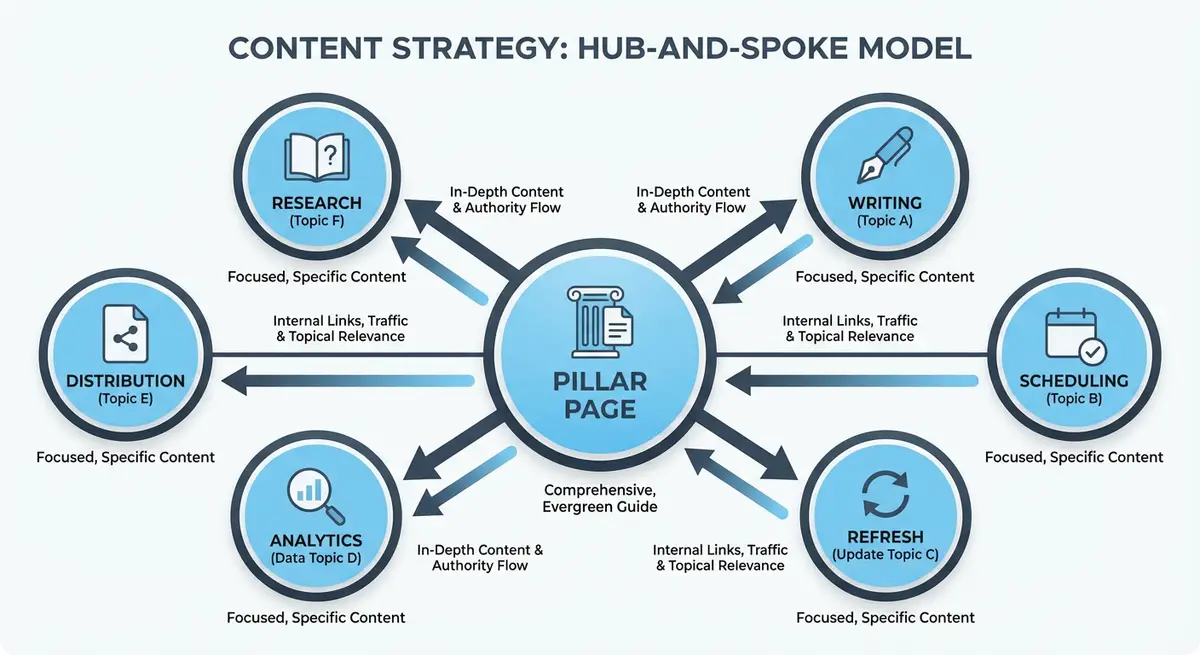
A hub page is a comprehensive, authoritative piece of content that covers a broad topic. Spoke pages are detailed, specific pieces that explore individual subtopics in depth. Every spoke links back to the hub, and the hub links out to all its spokes. This creates a tightly interconnected content cluster that signals deep expertise to Google.
The model works because of how Google evaluates internal link structures. When multiple topically related pages all link to a central hub, that hub accumulates topic-specific PageRank and relevance signals. The hub becomes the strongest page for the broad keyword, while each spoke targets a specific long-tail variation. Together, they cover the full spectrum of search intent around a topic.
Hub Page Characteristics
- Covers the broad topic comprehensively in 2,500-5,000 words.
- Targets a competitive head keyword with high search volume.
- Acts as a table of contents, linking to every spoke page from within the content.
- Includes a structured table of contents with anchor links for easy navigation.
- Is regularly updated as new spoke content is added.
- Often serves as a main navigation item or is prominently linked from the homepage.
- Uses Article or WebPage schema with comprehensive structured data.
Spoke Page Characteristics
- Focuses on a single subtopic in depth, typically 1,500-3,000 words.
- Targets a specific long-tail keyword within the broader topic.
- Links back to the hub page using relevant, varied anchor text.
- Cross-links to 2-3 related spoke pages where natural.
- Provides deeper coverage than the corresponding section in the hub page.
- Can be blog posts, guides, case studies, or FAQ pages depending on the subtopic.
Planning Your Content Clusters
Planning is the most important phase. A poorly planned cluster wastes months of content creation effort. Take time to map every keyword, identify the ideal hub topic, and ensure each spoke has a clear, distinct purpose.
Step 1: Identify Your Core Topic Areas
Start by listing the 3-5 broad topics your business should be known for. These become your potential hub topics. For a Wix web design agency, core topics might be "Wix SEO", "Wix Website Design", "Wix E-commerce", and "Local SEO for Small Businesses". Each will become a separate hub and spoke cluster.
Step 2: Keyword Research for Each Cluster
Finding spoke keywords for your hub
- Search your hub topic in Google Keyword Planner, Ubersuggest, or Ahrefs.
- Export all related keywords with search volume and difficulty data.
- Group related keywords that could be answered by a single page.
- Check "People Also Ask" in Google for your hub keyword. Each question is a potential spoke.
- Use AnswerThePublic to find every question people ask about your topic.
- Check competitor sites: what subtopics do they cover that you do not?
- Aim for 8-15 spoke topics per hub. Fewer than 8 is too thin; more than 20 is hard to manage.
Step 3: Map the Internal Link Structure
Before writing a single word, create a visual map of your cluster showing exactly how every page connects. This prevents orphan pages and ensures consistent linking.
- Draw the hub at the centre with lines connecting to each spoke.
- Add cross-links between related spokes (not every spoke links to every other spoke, only where naturally relevant).
- Identify which existing pages on your site should link to the hub or spokes.
- Note the anchor text you plan to use for each link (vary it).
- Use Whimsical, Miro, or even pen and paper for your cluster map.
Building the Hub Page on Wix
The hub page is the foundation of your cluster. It should be the most comprehensive single page on your site for the target topic.
Creating your hub page
- Create a new Wix page (not a blog post) for your hub. This gives it a cleaner URL like /wix-seo-guide instead of /blog/wix-seo-guide.
- Write a compelling H1 that includes your primary keyword and signals comprehensive coverage (e.g., "The Complete Guide to Wix SEO in 2026").
- Add a table of contents at the top with anchor links to each major section.
- Write 8-12 H2 sections, each covering a major aspect of the topic.
- Under each H2, provide a solid overview (200-400 words) plus a contextual link to the deeper spoke page.
- Include images, screenshots, or diagrams every 500-800 words.
- Add a "Related Guides" or "Deep Dives" section linking to all spoke pages.
- Implement Article schema with author, datePublished, and dateModified.
- Add the hub page to your main navigation or a prominent position on the homepage.
Hub Page Table of Contents Best Practice
A table of contents improves user experience and increases the chance of Google showing jump-to links in search results. On Wix, you can create anchor links by adding IDs to your heading elements. In the Wix Editor, click on a text element, select the heading, and add an anchor (also called a bookmark). Then link the table of contents entries to those anchors.
Building Spoke Pages
Spoke pages should go deeper than the hub page's corresponding section. If the hub has a 300-word overview of "Wix Title Tags", the spoke page should be a 2,000+ word definitive guide to Wix title tags.
Creating effective spoke pages
- Decide whether each spoke works best as a blog post or a standalone page. Blog posts are better for informational queries; standalone pages are better for commercial queries.
- Write a specific H1 targeting the long-tail keyword (e.g., "How to Write Title Tags for Wix Pages That Rank and Get Clicks").
- Open with the answer or key takeaway within the first paragraph (BLUF principle).
- Include a contextual link back to the hub page within the first 2-3 paragraphs.
- Add 2-3 cross-links to related spoke pages where naturally relevant.
- Provide actionable content: step-by-step guides, checklists, templates, or tools.
- Include an FAQ section targeting "People Also Ask" questions for the spoke keyword.
- Add appropriate schema markup (HowTo, FAQ, or Article schema).
The Cross-Linking Strategy
Cross-links between spoke pages are what transform a star topology (all spokes pointing only to hub) into a web topology that Google can crawl more efficiently.
- Link between spokes only when genuinely relevant. Forced cross-links look unnatural.
- Use "Related Reading" or "You May Also Like" sections at the bottom of spoke pages.
- Add contextual links within the body text where one spoke naturally references another.
- Do not link every spoke to every other spoke. A hub with 12 spokes should have each spoke linking to 2-4 other spokes, not all 11.
- Vary anchor text for cross-links just as you would for hub links.
Real-World Hub and Spoke Examples for Wix Sites
Example 1: Wix SEO Agency
Hub: "The Complete Guide to Wix SEO" (targeting "Wix SEO"). Spokes: Title Tag Optimisation, Meta Descriptions, Heading Hierarchy, Image SEO, Site Speed, Structured Data, Internal Linking, Blog SEO Strategy, Local SEO on Wix, Technical SEO Audit Checklist.
Example 2: Local Plumber on Wix
Hub: "Complete Plumbing Guide for London Homeowners" (targeting "plumber London"). Spokes: Emergency Plumber Services, Boiler Repairs and Installation, Bathroom Fitting Guide, Kitchen Plumbing, Blocked Drains, Water Heater Maintenance, Pipe Repairs, Plumbing Costs and Pricing.
Example 3: Fitness Trainer on Wix
Hub: "Complete Guide to Weight Loss for Beginners" (targeting "weight loss guide"). Spokes: Nutrition for Weight Loss, Cardio vs Strength Training, Meal Planning Templates, Exercise Plans by Fitness Level, Tracking Progress, Common Mistakes, Supplements, Mental Health and Motivation.
Measuring Hub and Spoke Performance
Topical authority builds gradually. Expect 2-4 months before seeing significant ranking improvements from a new cluster.
- Track rankings for both the hub keyword and all spoke keywords in Google Search Console.
- Monitor the number of keywords each hub page ranks for. As you add spokes, the hub should rank for increasingly more keywords.
- Watch for "topical authority" signals: does the hub page start ranking for keywords you did not explicitly target?
- Check internal link counts for the hub page in Screaming Frog. It should have the most internal links of any page in the cluster.
- Monitor featured snippet wins: well-structured clusters frequently earn featured snippets.
- Track total cluster traffic (hub + all spokes) as a single metric.
Expanding and Maintaining Your Clusters
Ongoing cluster maintenance
- Add new spoke pages quarterly as you identify additional subtopics from keyword research and People Also Ask.
- Update the hub page to link to each new spoke as it is published.
- Refresh existing spoke content annually with updated data and examples.
- Monitor for content decay: if a spoke's traffic drops, refresh it before it pulls down the cluster.
- Consolidate underperforming spokes: if two spokes cover overlapping topics, merge them into one stronger page.
- Check for broken internal links quarterly using Screaming Frog.
- Update the hub's dateModified schema whenever you add new spokes or refresh content.
Common Hub and Spoke Mistakes on Wix Sites
- Creating a hub page that is just a list of links with no substantive content. The hub must be a comprehensive resource in its own right.
- Writing spoke pages that are too similar to each other, causing keyword cannibalisation.
- Forgetting to link spokes back to the hub. Every spoke must have at least one contextual link to the hub.
- Never updating the hub after initial publication. The hub should evolve as you add spokes.
- Making the hub a blog post instead of a standalone page. Blog posts are harder to feature in navigation.
- Creating too many clusters simultaneously. Build one cluster completely before starting the next.
- Not cross-linking between related spokes, missing opportunities to strengthen the cluster web.
- Using identical anchor text for every spoke-to-hub link instead of varying the phrases.
Hub and Spoke for Wix E-Commerce Sites
E-commerce sites can use hub and spoke with buying guides as hubs and product category pages or comparison articles as spokes. Example: Hub = "Complete Guide to Choosing Running Shoes" with spokes for "Best Running Shoes for Flat Feet", "Running Shoes for Beginners", "Trail Running Shoes vs Road Running Shoes", and product category pages.
Essential Tools for This Lesson
- Whimsical: Visual mind mapping tool for planning your hub and spoke cluster structure
- AnswerThePublic: Find every question people ask about your hub topic to identify spoke opportunities
- Screaming Frog SEO Spider: Verify internal linking between hub and spoke pages after publishing
- Google Search Console: Track keyword rankings and traffic for your entire content cluster
- Ahrefs Content Explorer: Research what subtopics competitors cover to identify content gaps
Was this lesson useful?
It takes 1 minute to tell me. The course is free and I want to keep it that way, and your feedback shows me what is working and helps other people find it.
This lesson on The hub and spoke content model that builds topical authority is part of Module 5: Content Strategy & Blog SEO in The Most Comprehensive Complete Wix SEO Course in the World (2026 Edition). Created by Michael Andrews, a Wix Marketplace Legend Partner with 14 years of hands-on experience, 800 completed Wix SEO projects and 456 verified five-star reviews.