What is crawl budget and why it matters for Wix sites
Module 8: Crawl Budget, Log Files & Advanced Site Health on Wix | Lesson 102 of 683 | 22 min read
By Michael Andrews, Wix SEO Expert UK
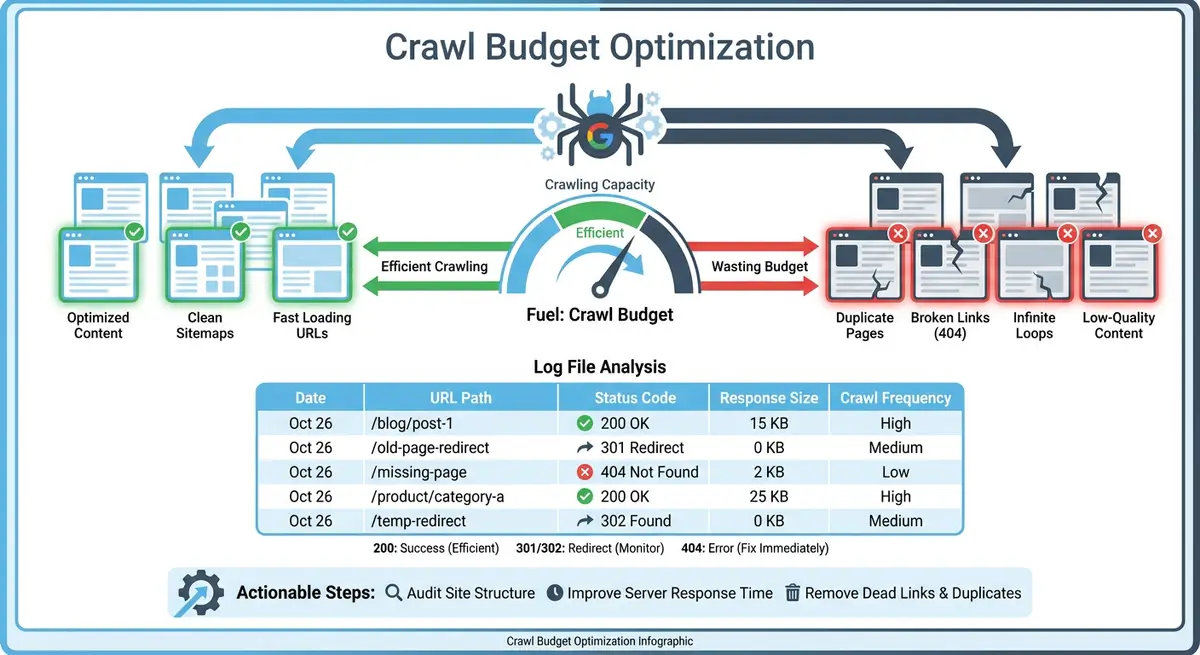
Every time Googlebot visits your Wix site, it has a limited amount of resources it is willing to spend crawling your pages. This allocation is called crawl budget. For small Wix sites with fewer than a hundred pages, crawl budget is rarely a concern. But once your site grows beyond a few hundred pages, or if dynamic pages, member areas and app-generated URLs start multiplying, crawl budget becomes a real factor in whether your important content gets discovered and indexed.
What Crawl Budget Actually Means
Crawl budget is not a single number you can look up in a dashboard. It is the combination of two factors: crawl rate limit and crawl demand. Crawl rate limit is the maximum number of simultaneous connections Googlebot will use to crawl your site without overloading your server. Crawl demand is how much Google wants to crawl your site based on its popularity, freshness and size. Together, these determine how many pages Googlebot will actually crawl during any given visit.
Crawl Demand vs Crawl Rate Limit
- Crawl rate limit: controlled by your server's ability to handle requests without slowing down. Wix handles server infrastructure for you, so you cannot directly adjust this, but slow page responses can reduce it.
- Crawl demand: driven by how popular and frequently updated your content is. Pages that earn backlinks, get shared and receive traffic generate higher crawl demand.
- Stale or unchanged pages: if Google crawls a page and finds nothing has changed multiple times in a row, it reduces crawl demand for that URL.
- New content signals: publishing new blog posts, updating existing pages or adding new products all increase crawl demand.
When Crawl Budget Genuinely Matters on Wix
Google has stated that crawl budget is not something most site owners need to worry about. For sites with fewer than a few thousand pages that are regularly updated, Googlebot will typically crawl everything without issue. However, crawl budget becomes a genuine concern on Wix sites in specific scenarios: large eCommerce stores with thousands of product pages, sites with extensive dynamic pages from Wix databases, blogs with hundreds of tag and category combination pages, or sites using Wix Members that generate unique profile and content URLs for every member.
Wix-Specific Factors That Affect Crawl Budget
- Dynamic pages: Wix dynamic pages connected to databases can create hundreds or thousands of URLs from a single template. Each URL consumes crawl budget.
- Member areas: Wix Members and Spaces generate unique URLs for profiles, posts, comments and activity feeds that Googlebot may try to crawl.
- Wix Stores filter URLs: product filtering by size, colour, category and price creates parameterised URLs that multiply exponentially.
- Blog tag pages: every tag you create generates a tag archive page. Sites with 50+ tags can have dozens of thin, duplicate-content pages consuming crawl resources.
- Wix Apps: some third-party Wix apps create their own page structures and URLs that add to your total URL count without adding SEO value.
- Multilingual sites: Wix Multilingual duplicates every page for each language, doubling or tripling your total page count.
Signs Your Wix Site Has a Crawl Budget Problem
Warning signs to watch for
- New blog posts or product pages take more than two weeks to appear in Google Search Console as indexed
- Google Search Console Coverage report shows a growing number of discovered but not indexed pages
- Crawl stats in Search Console show declining crawl requests over time despite adding new content
- Important pages deep in your site architecture are not being indexed while shallow pages are
- Your XML sitemap contains significantly more URLs than the number of indexed pages reported in GSC
- Google is crawling low-value pages like tag archives and filter URLs instead of your core content
Essential Tools for This Lesson
- Google Search Console: Check crawl stats, indexing status and coverage reports to understand how Google crawls your Wix site
- Wix SEO Analytics: Access bot traffic reports to see which bots crawl your Wix site and how often
Complete How-To Guide: Diagnosing Crawl Budget Issues on Your Wix Site
This step-by-step guide walks you through the exact process of determining whether your Wix site has a crawl budget problem and identifying the specific causes so you can take targeted action.
How to diagnose crawl budget issues on your Wix site
- Step 1: Open Google Search Console and navigate to Settings > Crawl Stats. Review the total crawl requests over the past 90 days. Note whether the trend is stable, increasing or declining. A declining trend on a growing site suggests crawl budget pressure.
- Step 2: In the Crawl Stats report, check the average response time. If your Wix pages are consistently responding in over 500 milliseconds, Googlebot may be throttling its crawl rate. Note any spikes in response time that correlate with reduced crawl activity.
- Step 3: Navigate to the Pages report (formerly Coverage) in Google Search Console. Record the total number of indexed pages and the total number of pages that are discovered but not yet indexed. A large gap between these numbers is a crawl budget warning sign.
- Step 4: Click into the "Discovered - currently not indexed" category and review the specific URLs listed. Identify whether they are important content pages or low-value pages like tag archives, filter URLs or member profiles.
- Step 5: Open your Wix sitemap at yoursite.com/sitemap.xml in a browser. Count the total number of URLs listed across all sitemap files. Compare this number to the indexed page count in GSC. If your sitemap has significantly more URLs than are indexed, crawl budget may be a factor.
- Step 6: Go to your Wix Dashboard and navigate to Analytics > SEO > Bot Traffic Over Time. Review the Googlebot crawl frequency over the past 30 days. Note any drops in crawl activity that coincide with periods when you published new content.
- Step 7: Open the Bot Traffic by Page report in Wix SEO Analytics. Sort by most crawled pages. Identify whether Googlebot is spending its time on your important pages or wasting crawl budget on low-value URLs like tag pages, filter combinations or app-generated pages.
- Step 8: Check for dynamic page bloat by going to your Wix Dashboard > CMS Collections. For each collection connected to dynamic pages, note the number of items. Multiply by the number of dynamic page templates to estimate total dynamic URLs. If this exceeds 500, dynamic pages may be consuming significant crawl budget.
- Step 9: Review your Wix Blog tags by going to the Blog Manager. Count the total number of tags. Each tag creates an archive page. If you have more than 30 tags, many of these pages likely have thin content and are consuming crawl budget unnecessarily.
- Step 10: Check for Wix Stores filter URL proliferation by browsing your store category pages and applying different filter combinations. Note how many unique URL variations are created. If filters generate parameterised URLs that Googlebot can discover, they multiply your crawlable URL count.
- Step 11: Open your robots.txt at yoursite.com/robots.txt and verify that you are not accidentally blocking important pages or, conversely, that you are not leaving low-value URL patterns open for Googlebot to crawl.
- Step 12: Create a simple spreadsheet with four columns: URL pattern, estimated URL count, SEO value (high, medium or low), and action needed. List every URL pattern on your site and categorise them. This becomes your crawl budget audit document.
- Step 13: Based on your audit, identify the top three crawl budget waste sources on your Wix site. These are typically dynamic page variants, blog tag archives, store filter URLs or member-generated content.
- Step 14: Set a baseline by recording today's crawl stats, indexed page count and discovered-not-indexed count. Schedule a monthly check-in to monitor whether your optimisation efforts are improving these numbers over the coming weeks.
New to how this works? Start with what Google indexing is and how Google crawls your Wix site.
To see how Google is actually spending that budget on your site, read the Wix Bot Traffic dashboards.
Was this lesson useful?
It takes 1 minute to tell me. The course is free and I want to keep it that way, and your feedback shows me what is working and helps other people find it.
This lesson on What is crawl budget and why it matters for Wix sites is part of Module 8: Crawl Budget, Log Files & Advanced Site Health on Wix in The Most Comprehensive Complete Wix SEO Course in the World (2026 Edition). Created by Michael Andrews, a Wix Marketplace Legend Partner with 14 years of hands-on experience, 800 completed Wix SEO projects and 456 verified five-star reviews.