Wix AI Visibility Overview: tracking your brand across ChatGPT, Gemini, Perplexity and Claude
Module 16: Wix Native SEO Tools & AI Visibility | Lesson 180 of 683 | 30 min read
By Michael Andrews, Wix SEO Expert UK
AI search is no longer a future concern. ChatGPT, Google Gemini, Perplexity and Claude are answering millions of queries daily, and when they mention your business, they drive real traffic and trust. Wix AI Visibility Overview is the first native CMS tool that tracks how your brand appears across these AI platforms, giving you data that was previously impossible to obtain without manual checking.
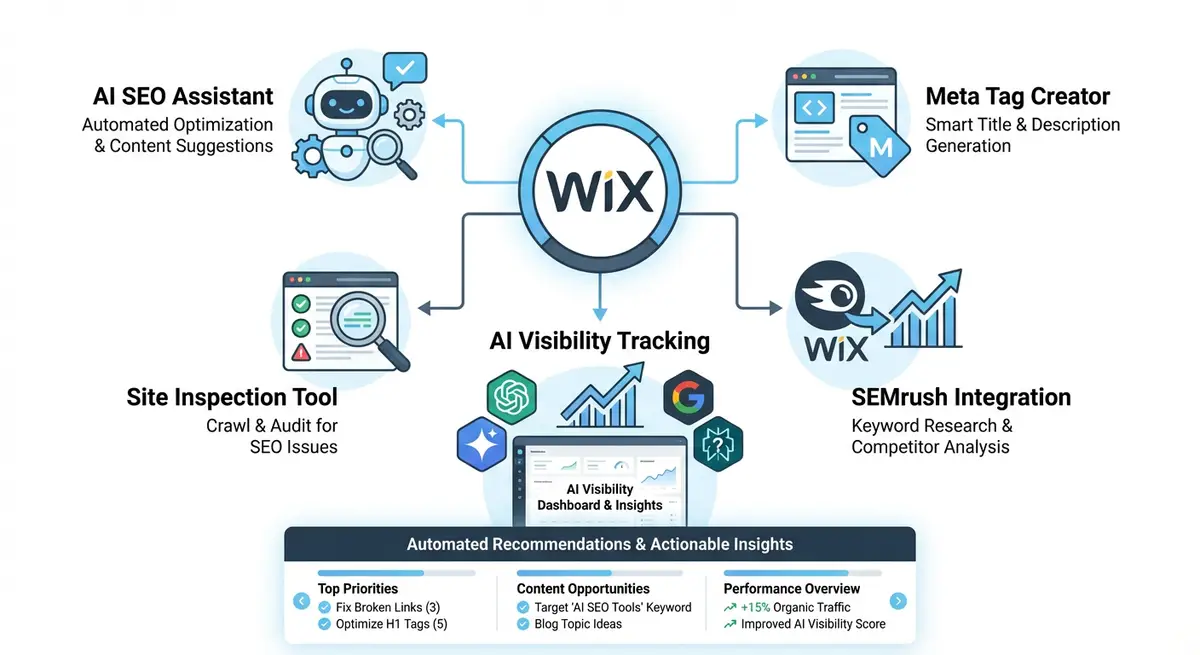
What the AI Visibility Overview Tracks
- Citation frequency: how often AI platforms mention your brand when answering relevant queries.
- Brand sentiment: whether AI responses about your business are positive, neutral or negative.
- Competitor comparison: how your AI visibility stacks up against competitors in your niche.
- Platform breakdown: which AI platforms mention you most frequently (ChatGPT, Gemini, Perplexity, Claude).
- Query coverage: which types of questions trigger AI mentions of your business.
How AI Visibility Data Differs from Traditional SEO Data
Traditional SEO tracks clicks and rankings in Google. AI Visibility tracks mentions and citations in conversational AI responses. You cannot rank number one in ChatGPT the way you rank number one in Google. Instead, you aim to be cited as a trusted source when AI answers queries related to your business. The AI Visibility Overview quantifies this citation presence for the first time.
Customising the Questions AI Is Asked About Your Business
The tool allows you to define custom queries that AI platforms should be tested against. These should mirror the questions your potential customers ask. For a plumber, this might include "best plumber in Manchester" or "how to fix a leaking tap." For a law firm, it might include "employment lawyer near me" or "unfair dismissal advice UK." The more relevant your custom queries, the more actionable your AI visibility data becomes.
Complete How-To Guide: Setting Up Wix AI Visibility Overview
This guide walks you through the complete setup, configuration and ongoing use of the Wix AI Visibility Overview tool to track and improve your brand presence across AI platforms.
How to set up and use Wix AI Visibility Overview
- Step 1: Log in to your Wix Dashboard and navigate to Marketing & SEO > SEO Tools. Look for the AI Visibility Overview section. If it is not visible, ensure your Wix site is on a Premium plan that includes this feature.
- Step 2: Activate the AI Visibility Overview by clicking Enable. The tool will begin its initial scan across ChatGPT, Gemini, Perplexity and Claude to establish your baseline AI presence.
- Step 3: Enter your business name exactly as it appears on your website, Google Business Profile and social media. Consistency is critical because the tool matches AI responses against this exact business name.
- Step 4: Add 10-15 custom queries that your target audience would ask AI platforms. Include a mix of branded queries (your business name), service queries (what you offer), and location queries (where you operate).
- Step 5: Add 3-5 competitor business names so the tool can compare your AI visibility against theirs. Choose competitors who rank for similar keywords and serve the same geographic area.
- Step 6: Wait 24-48 hours for the initial data collection to complete. The tool queries each AI platform multiple times to build a statistically meaningful baseline of your AI visibility.
- Step 7: Review the Citation Frequency dashboard. Note which AI platforms mention you most and least. If a platform consistently ignores your business, your content may not be structured in a way that platform can easily reference.
- Step 8: Check the Brand Sentiment analysis. If any AI platform describes your business negatively or inaccurately, note the specific queries and responses. You will need to improve the content on your Wix site that these AI platforms are drawing from.
- Step 9: Review the Competitor Comparison view. Identify competitors with higher AI visibility and analyse what content on their sites might be earning more AI citations than yours.
- Step 10: Based on your findings, update your Wix site content to be more citation-friendly. Use clear, factual statements about your business, services and expertise that AI platforms can easily quote.
- Step 11: Set up weekly or monthly email alerts for AI visibility changes. The tool can notify you when your citation frequency changes significantly, allowing you to respond to drops quickly.
- Step 12: Re-run the full AI visibility scan monthly and track trends over time. Build a log of your AI visibility score alongside your Google organic traffic to identify correlations between AI presence and traditional SEO performance.
How to Improve Your AI Visibility Score on Wix
Improving AI visibility requires structuring your Wix content so AI platforms can easily cite it. These steps walk you through the specific content and technical changes that increase citation frequency.
How to optimise your Wix site content to increase AI platform citations
- Step 1: Log in to your Wix Dashboard and navigate to Marketing & SEO > SEO Tools > AI Visibility Overview. Review the Citation Frequency breakdown by platform. Note which platform cites you least frequently.
- Step 2: Open your Wix site homepage in the Wix Editor. Review the first 300 words of body content. AI platforms prioritise factual, specific statements. Replace vague claims ("we are the best") with specific data ("we have served over 500 clients in London since 2018").
- Step 3: Create or update an About page on your Wix site. Include your business founding date, specific expertise, geographic service area, key achievements with numbers, and team credentials. This factual summary is highly citation-friendly.
- Step 4: Add a dedicated FAQ page or FAQ sections to your key service pages. Structure FAQs using clear questions followed by direct, factual answers. AI platforms frequently cite FAQ-format content when answering user queries.
- Step 5: Update your homepage schema markup to include comprehensive Organization or LocalBusiness JSON-LD. In the Wix Editor, go to the page SEO settings > Advanced SEO > Structured Data and add schema with your business name, description, address, founding date, and sameAs links to your social profiles.
- Step 6: Navigate to Settings > Business Info in your Wix Dashboard. Ensure your business description is detailed, factual, and includes your primary service keywords. This information feeds into your site's entity signals.
- Step 7: Review your top 5 service or product pages. Add specific, data-backed statements to each: pricing ranges, turnaround times, specific technologies used, service areas covered, and qualifications held. AI platforms prefer specific facts over generic descriptions.
- Step 8: Create an industry resource page on your Wix site that provides genuinely useful reference information for your field. Original research, industry statistics, and educational content make your site a citable source for AI platforms.
- Step 9: Ensure your Wix blog posts have author bylines with credentials. Navigate to Blog > Authors and complete each author profile with their qualifications, experience, and area of expertise. This E-E-A-T information increases citation trustworthiness.
- Step 10: Check that your Wix site is linked from your Google Business Profile, LinkedIn company page, and other authoritative platforms. AI platforms cross-reference multiple sources to verify business information.
- Step 11: Re-run the AI Visibility Overview scan after making content updates. Compare new citation frequency against your baseline from the initial setup. Track which content updates correlate with improved AI citation rates.
- Step 12: Build a monthly AI content review into your SEO routine. Each month, identify the query where your AI citation frequency is lowest and update one Wix page specifically to answer that query more directly and factually.
Essential Resources
- Wix SEO Help Centre: Official Wix SEO documentation and feature guides
- Wix SEO Learning Hub: Free SEO courses and tutorials from Wix
- Google Search Console: Monitor your site indexing and search performance
- Semrush: Comprehensive SEO platform for keyword research and competitor analysis
Essential Resources
- Wix SEO Learning Hub: Official Wix resources on SEO tools and AI visibility features
- Google Search Console: Compare traditional organic performance with AI visibility data
- Schema.org Organization: Structured data reference for improving AI entity recognition
Was this lesson useful?
It takes 1 minute to tell me. The course is free and I want to keep it that way, and your feedback shows me what is working and helps other people find it.
This lesson on Wix AI Visibility Overview: tracking your brand across ChatGPT, Gemini, Perplexity and Claude is part of Module 16: Wix Native SEO Tools & AI Visibility in The Most Comprehensive Complete Wix SEO Course in the World (2026 Edition). Created by Michael Andrews, a Wix Marketplace Legend Partner with 14 years of hands-on experience, 800 completed Wix SEO projects and 456 verified five-star reviews.