Wix AI SEO Assistant: automated recommendations and issue detection
Module 16: Wix Native SEO Tools & AI Visibility | Lesson 181 of 683 | 25 min read
By Michael Andrews, Wix SEO Expert UK
The Wix AI SEO Assistant continuously monitors your site for SEO issues and surfaces recommendations without you having to run manual audits. It flags missing meta tags, declining pages, keyword opportunities, and technical errors. But not all recommendations are equal. Knowing which to prioritise and which to ignore is critical for efficient SEO management.
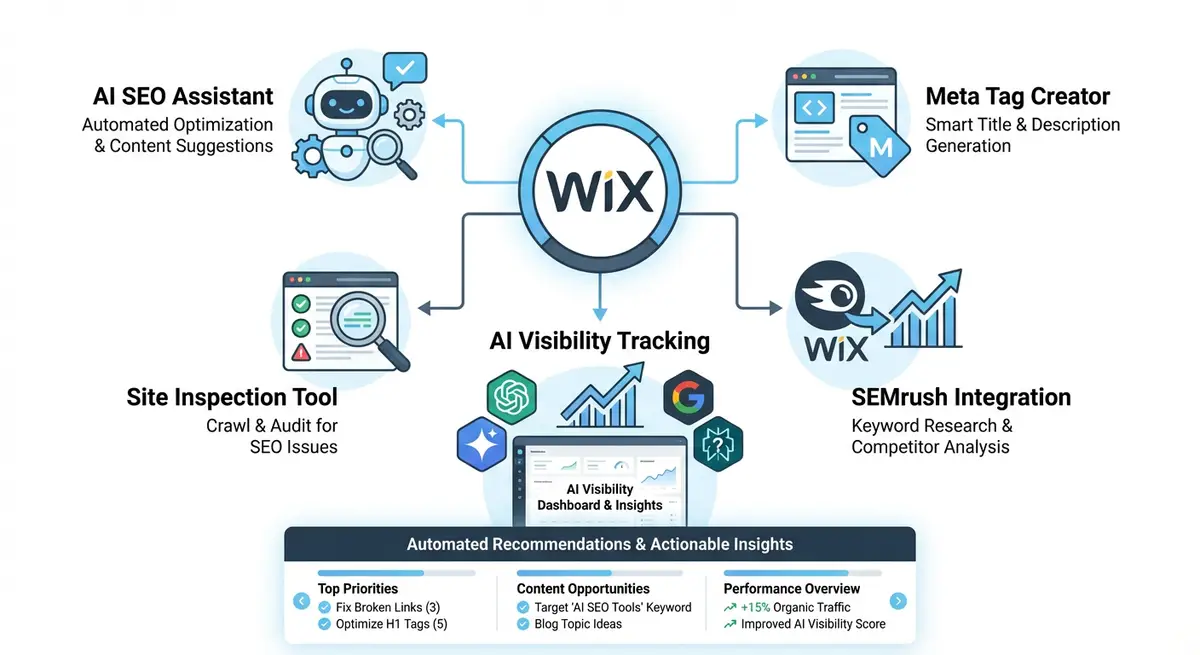
How the AI SEO Assistant Scans Your Site
The assistant runs periodic scans of all indexed pages on your Wix site. It checks title tags, meta descriptions, heading structure, image alt text, internal links, page speed indicators and structured data. When it detects issues or opportunities, they appear in your Wix Dashboard under the SEO section as actionable cards with priority levels.
Understanding Priority Levels
- Critical errors: issues that prevent indexing or severely harm rankings. Fix these immediately. Examples include noindex tags on important pages, broken canonical URLs, and missing title tags.
- Warnings: issues that hurt performance but do not block indexing. Fix within a week. Examples include duplicate meta descriptions, missing alt text on key images, and thin content alerts.
- Opportunities: suggestions for improvement rather than fixes. Review and implement selectively. Examples include keyword suggestions, content length recommendations, and internal linking ideas.
- Informational: status updates that require no action. Examples include indexing confirmations, crawl activity reports, and performance trend notifications.
What the AI Assistant Gets Right
The assistant is excellent at catching technical issues that humans miss: duplicate title tags across pages, missing meta descriptions on new content, orphaned pages with no internal links, and structured data validation errors. It also catches declining page performance faster than manual monitoring because it analyses trends automatically.
What the AI Assistant Misses
The assistant cannot evaluate content quality, search intent alignment, or competitive positioning. It will not tell you that your page ranks for the wrong keywords or that a competitor has published better content on the same topic. It also cannot assess E-E-A-T signals, brand authority, or the strategic value of specific keywords. These require human judgement.
Complete How-To Guide: Using the Wix AI SEO Assistant Effectively
This guide walks you through setting up a weekly workflow around the Wix AI SEO Assistant to catch issues early and act on the highest-value recommendations.
How to build a workflow around the Wix AI SEO Assistant
- Step 1: Access the AI SEO Assistant from your Wix Dashboard > Marketing & SEO > SEO Tools. Review the overview dashboard showing total issues found, categorised by priority level.
- Step 2: Start with Critical Errors. Click into each critical error and read the detailed explanation. These are blocking issues that should be fixed the same day they appear.
- Step 3: For each critical error, follow the assistant's recommended fix. If it says a page has a missing title tag, go to that page in the Wix Editor, open SEO settings, and add a keyword-optimised title tag immediately.
- Step 4: Move to Warnings. Review each warning and assess whether it applies to an important page. A missing alt text warning on your homepage hero image is more urgent than the same warning on a minor blog post image.
- Step 5: Create a prioritised fix list from the warnings. Sort by page importance (homepage and service pages first, older blog posts last) and fix the top 10 warnings each week.
- Step 6: Review the Opportunities section. These are keyword suggestions and content ideas. Do not implement all of them blindly. Cross-reference each keyword suggestion with actual search volume in Google Search Console or Semrush before acting.
- Step 7: Check the Declining Pages alerts. When the assistant flags a page losing traffic, investigate the cause in Google Search Console. Compare the page's performance over the last 3 months versus the previous 3 months to confirm the decline.
- Step 8: For confirmed declining pages, analyse whether the decline is due to seasonal changes, a Google algorithm update, or a content freshness issue. Update the content if the page is genuinely stale or no longer competitive.
- Step 9: Review internal linking recommendations. The assistant identifies pages with few or no internal links. Add relevant internal links from related pages to improve crawlability and link equity distribution.
- Step 10: Check structured data validation alerts. If the assistant flags schema errors, use Google's Rich Results Test to verify the issue, then fix the markup in your Wix page settings or custom code.
- Step 11: Set up a weekly 30-minute calendar block specifically for reviewing AI SEO Assistant alerts. Consistency is more important than spending hours on a single session.
- Step 12: Track the total number of open issues monthly. A decreasing trend means your SEO hygiene is improving. An increasing trend means new content is being published without proper SEO settings, which requires a process fix.
How to Resolve SEO Issues Flagged by the Wix AI SEO Assistant
The Wix AI SEO Assistant identifies issues but you must know how to fix each type. These steps walk you through resolving the most common issue categories flagged by the assistant.
How to fix common SEO issues identified by the Wix AI SEO Assistant
- Step 1: Log in to your Wix Dashboard and navigate to Marketing & SEO > SEO Tools. Open the AI SEO Assistant and filter the issues to show Critical Errors only. Address these before any other category.
- Step 2: For a Critical Error flagging a missing title tag: click the affected page link, then open the Wix Editor. Click the three dots next to the page, select SEO (Google), and enter a keyword-focused title under 60 characters.
- Step 3: For a Critical Error flagging a noindex setting on an important page: open the page in the Wix Editor, go to SEO settings, and change the indexing option from Do not index to Index this page. Publish the change.
- Step 4: For a Critical Error flagging a broken canonical URL: open the page SEO settings and navigate to the Advanced SEO section. Check the Canonical URL field. If it is pointing to an incorrect or non-existent URL, clear the field to let Wix set it automatically.
- Step 5: For a Warning about a duplicate meta description: identify which pages share the same description. Open each page in the Wix Editor > SEO settings and write a unique, specific meta description for each page (under 160 characters).
- Step 6: For a Warning about missing alt text on key images: click the affected image in the Wix Editor, select Settings, and enter descriptive alt text. Include the page keyword naturally within a descriptive sentence.
- Step 7: For a Warning about thin content (pages under 300 words): open the page in the Wix Editor and expand the content. Add relevant details about your service or topic until the page reaches at least 600 words. Use headings to structure the additional content.
- Step 8: For an Opportunity suggesting internal linking: navigate to the pages identified as having few internal links. Add 2-3 contextual links from related pages pointing to these under-linked pages. Use descriptive anchor text containing relevant keywords.
- Step 9: For a Declining Page alert: open Google Search Console and check the specific page's performance over the last 3 months. If organic clicks have dropped consistently, review whether a competitor has published better content on the same topic.
- Step 10: For a structured data validation alert: copy the page URL and paste it into the Google Rich Results Test at search.google.com/test/rich-results. Review the specific errors shown and fix the schema markup in the page SEO settings > Advanced SEO.
- Step 11: After fixing a batch of issues, re-run the AI SEO Assistant scan. Confirm the issues you fixed no longer appear. If any persist, the fix may not have published correctly. Verify the page is published and wait 24 hours.
- Step 12: Set a weekly 30-minute calendar block each Monday specifically for reviewing and fixing AI SEO Assistant alerts. Consistent weekly maintenance prevents issues from accumulating into a large backlog.
Essential Resources
- Wix SEO Help Centre: Official Wix documentation on SEO tools and AI assistant features
- Google Search Console: Cross-reference AI assistant alerts with actual Google indexing data
- Google Rich Results Test: Validate structured data errors flagged by the AI assistant
- SEO Fix in a Box: My Wix app. Free to install, it scans your site and shows what needs fixing, and paid plans write the fixes from your own Google searches
Was this lesson useful?
It takes 1 minute to tell me. The course is free and I want to keep it that way, and your feedback shows me what is working and helps other people find it.
This lesson on Wix AI SEO Assistant: automated recommendations and issue detection is part of Module 16: Wix Native SEO Tools & AI Visibility in The Most Comprehensive Complete Wix SEO Course in the World (2026 Edition). Created by Michael Andrews, a Wix Marketplace Legend Partner with 14 years of hands-on experience, 800 completed Wix SEO projects and 456 verified five-star reviews.