The World's Most Comprehensive Wix SEO Training Programme

The Most ComprehensiveComplete Wix SEO Coursein the World

The only Wix SEO course that covers every ranking factor, every Wix-specific feature and every modern search strategy in one structured programme. 26 expert-led modules. 215+ step-by-step lessons. 95+ hours of in-depth Wix SEO training, from keyword research, technical SEO and structured data to rich snippets, local SEO, eCommerce, Wix Studio, AI search optimisation, Generative Engine Optimisation (GEO), crawl budget analysis, privacy compliance, AI visibility and SEM integration. Built by a 14-year Wix SEO specialist with 750+ successful projects. Designed to rank your Wix website on page 1 of Google and get cited by AI search engines worldwide.

0
Modules
0+
Lessons
0+
Hours
0+
Projects Done
Lifetime accessAll future updates14-day money-back guaranteeWix-specific,not generic SEO
400+ five-star reviews750+ successful Wix SEO projects14 years experience6x Wix Certified
By The End of This Course

What You Will Be Able to Do

26 modules covering every aspect of Wix SEO. You will have the knowledge, tools and confidence to rank any Wix website.

Rank your Wix website on Page 1 of Google for competitive keywords

Dominate local search and win customers in your town or city

Fix technical SEO issues that are silently blocking your rankings

Identify the exact keywords your ideal customers are searching for

Write content that ranks, converts and builds long-term authority

Build high-quality backlinks without risking a Google penalty

Read Google Analytics and Search Console like an expert

Track, measure and prove your SEO results in real terms

Future-proof your SEO against algorithm updates

Optimise for AI Overviews, SGE and the next generation of search

Rank your Wix Store products in Google Shopping and organic search

Use Wix Studio and Velo for advanced dynamic SEO at scale

Confidently audit any Wix site and create an action plan

Turn your SEO knowledge into freelance income or career growth

Free Lesson Preview

Try before you buy,see the quality for yourself

Module 1, Lesson 1

How Google Crawls, Indexes and Ranks Websites

Understand the full journey from Googlebot discovering your Wix site to it appearing in search results. This lesson covers crawling budgets, the indexing pipeline, and the ranking signals that matter most in 2026.

18 min read Beginner Friendly
Your Transformation

From Zero to Wix SEO Expert

A clear, structured path that takes you from "Where do I even start?" to confidently auditing and ranking any Wix website.

Phase 1: Foundation
Modules 1-5|Weeks 1-3
  • Understand how Google works
  • Set up your Wix site for SEO
  • Master keyword research
  • Optimise every on-page element
  • Create content that ranks
Phase 2: Authority
Modules 6-13|Weeks 4-7
  • Fix technical SEO issues
  • Master crawl budget & log files
  • Dominate local search results
  • Build quality backlinks
  • Social signals & accessibility
  • Privacy compliance & analytics
Phase 3: Mastery
Modules 14-26|Weeks 8-12
  • Wix AI tools & visibility
  • eCommerce & Bookings SEO
  • Wix Studio & Velo advanced SEO
  • Brand SERP & GEO mastery
  • SEO & paid search integration
  • Professional audits & going pro
Full Curriculum

Every Lesson, Every Module

Browse all 26 modules and 215+ lessons. Search for any topic. See exactly what you will learn.

26 Modules215 Lessons97+ Hours
  • How Google crawls, indexes and ranks websites

    Understand the full journey from Googlebot discovering your Wix site to it appearing in search results. We cover crawling budgets, the indexing pipeline, and the ranking signals that matter most in 2026.

    18 min
  • E-E-A-T explained: Experience, Expertise, Authority, Trust

    Google's Quality Rater Guidelines place E-E-A-T at the heart of how human evaluators assess websites. In this lesson you will learn what each component means, how Google signals your site demonstrates it, and exactly how to build it on a Wix website.

    22 min
  • Core Web Vitals: LCP, FID, CLS and INP in plain English

    Core Web Vitals are Google's user experience ranking signals. This lesson explains what each metric measures, how Wix performs by default, and what you can do to improve your scores without a developer.

    20 min
  • The Wix advantage, and disadvantages, for SEO

    Wix is a serious SEO platform in 2026, but it has genuine strengths and real limitations. This lesson gives you an honest, experienced overview so you know exactly what you are working with.

    15 min
  • Setting realistic SEO timelines and expectations

    One of the most valuable things you can do is set accurate expectations, for yourself and for clients. This lesson covers how long SEO typically takes, what factors affect the timeline, and how to identify early wins.

    12 min
  • 5 quick wins to fix today for better rankings

    Five high-impact, low-effort changes you can make to your Wix site today that will have a measurable effect on your rankings. These are the first things Michael does on every new Wix SEO project.

    25 min
  • Choosing the right Wix template for SEO success

    The template you choose on Wix affects page speed, mobile responsiveness, heading structure and how easily Google can crawl your site. This lesson walks through exactly what to look for in a Wix template, which templates to avoid, and how to evaluate any template from an SEO perspective before committing.

    22 min
  • Domain setup, HTTPS and SSL configuration on Wix

    A properly configured domain is the foundation of every SEO strategy. In this lesson we walk through domain connection, forcing HTTPS, resolving www vs non-www, and checking your SSL certificate is active.

    14 min
  • Google Search Console: complete Wix connection walkthrough

    Google Search Console is your most important free SEO tool. This full walkthrough covers connecting GSC to your Wix site, verifying ownership, submitting your sitemap, and the reports you need to check every week.

    28 min
  • Google Analytics 4: setting it up correctly on Wix

    GA4 looks different to Universal Analytics, and many Wix users have it set up incorrectly. This lesson covers the full setup process, key reports for SEO decisions, and how to link GA4 with Search Console.

    30 min
  • Wix SEO Wiz and the built-in SEO dashboard

    Wix's built-in SEO tools have improved dramatically. This lesson shows you how to use the SEO Dashboard, interpret the recommendations, and distinguish between genuinely useful suggestions and noise.

    20 min
  • XML sitemaps and robots.txt on Wix, what you need to know

    Wix auto-generates your sitemap and robots.txt, but they are not always optimal. This lesson covers what Wix includes by default, how to customise them, and common mistakes that block important pages from Google.

    16 min
  • The Wix app ecosystem: what to install for SEO

    The Wix App Market has hundreds of options, most of which add bloat without adding SEO value. This lesson covers the exact apps Michael installs on every Wix SEO project, and the ones to avoid.

    18 min
  • Google Tag Manager setup on Wix: advanced tracking without code

    Google Tag Manager lets you add conversion pixels, remarketing tags, heatmaps and custom event tracking to your Wix site without editing code every time. This lesson covers the full setup process, essential tags for SEO, and common mistakes.

    32 min
  • Understanding search intent: informational, commercial, transactional

    Before you write a single word of content, you need to understand why people search. This lesson covers the four types of search intent, how to identify them, and how to match your Wix pages to the right intent.

    20 min
  • Free keyword tools: Google Keyword Planner, Ubersuggest, AnswerThePublic

    You do not need to spend money on keyword research tools. This lesson shows you how to use three of the best free tools to build a complete keyword list for any Wix website.

    35 min
  • Ahrefs and SEMrush for Wix users, the essential features

    Ahrefs and SEMrush are the industry-standard keyword research tools. This lesson shows you the specific features that matter for Wix SEO, how to get maximum value, and how to use free trials intelligently.

    40 min
  • Long-tail keyword strategy for faster, easier rankings

    Long-tail keywords are where most Wix websites should start. Lower competition, higher intent, faster to rank, this lesson shows you how to find and exploit them systematically.

    22 min
  • Keyword mapping: assigning the right keywords to every page

    Keyword mapping is the process of assigning a primary keyword (and supporting keywords) to every page on your Wix site. This lesson shows you how to create a keyword map that prevents keyword cannibalisation and guides your entire content strategy.

    25 min
  • Competitor keyword gap analysis, steal what is already working

    Your competitors have already done the research. This lesson shows you how to identify every keyword they rank for that you do not, and how to build a content plan to close the gap.

    28 min
  • Writing title tags that rank AND drive click-throughs

    Your title tag is the single most important on-page SEO element. This lesson shows you the exact formula for writing title tags that include your target keyword, appeal to searchers, and fit within Google's display limits.

    22 min
  • Meta descriptions: the art of the perfect preview snippet

    Meta descriptions do not directly affect rankings, but they dramatically affect click-through rates. This lesson shows you how to write compelling descriptions that make searchers choose your result over competitors.

    18 min
  • H1, H2, H3 heading hierarchy on Wix, the full guide

    Heading structure tells Google what your page is about and helps users navigate long content. This lesson covers the rules of heading hierarchy, how to set heading styles in Wix, and common mistakes that hurt rankings.

    20 min
  • Image optimisation: alt text, file names, WebP and compression

    Images are one of the biggest performance drains on Wix sites, and they are also a ranking opportunity. This lesson shows you how to optimise every image for SEO, speed and accessibility.

    25 min
  • URL structure best practices for Wix pages

    A clean, keyword-rich URL is an underrated ranking signal. This lesson shows you how to set and edit URLs in Wix, what the ideal URL structure looks like, and how to safely change existing URLs without losing rankings.

    15 min
  • Internal linking: the architecture that lifts every page

    Internal links distribute authority, help Google discover pages, and keep users on your site longer. This lesson teaches you how to build a deliberate internal linking structure that lifts your most important pages.

    30 min
  • Content length strategy: how long should your pages really be?

    There is no single answer to content length, it depends entirely on the keyword and what Google is already rewarding. This lesson teaches you how to determine the right length for every page you create.

    20 min
  • Anchor text strategy: writing link text that ranks without over-optimisation

    The words you use as clickable link text send direct ranking signals to Google. Get it right and you lift the target page. Get it wrong and you trigger an over-optimisation filter. This lesson gives you the exact anchor text ratios and techniques that work on Wix.

    20 min
  • Navigation structure and UX: building menus that help SEO and users

    Your site navigation is one of the most important on-page elements for both SEO and user experience. This lesson covers how to structure your main menu, footer links, mobile navigation and breadcrumbs on Wix so that Google can crawl efficiently and visitors find what they need in seconds.

    24 min
  • The hub and spoke content model that builds topical authority

    Google rewards websites that demonstrate deep expertise in a topic. The hub and spoke model is how you build that expertise systematically. This lesson shows you how to plan and implement it on your Wix site.

    25 min
  • Creating content pillars: what they are and how to build them

    Content pillars are the comprehensive, authoritative pages at the centre of your topic clusters. This lesson shows you how to plan, structure and write pillar pages that rank for competitive head terms and pull in links.

    30 min
  • How to write SEO content that humans actually want to read

    Content that ranks must satisfy both search engines and human readers. This lesson bridges the gap between technical SEO writing and genuinely compelling content, so you get traffic that converts.

    35 min
  • Using AI tools to scale your Wix content without penalties

    AI content tools can dramatically accelerate content production, but used incorrectly, they create content that is penalised by Google. This lesson shows you how to use AI responsibly to scale output without sacrificing quality.

    28 min
  • How to set up a Wix Blog for SEO: the complete step-by-step guide

    Setting up the Wix Blog correctly from the start is critical for SEO success. This lesson walks you through every step, from adding the Wix Blog app to configuring SEO settings, URL structure, categories, tags, author profiles, featured images, Open Graph tags, and the technical settings that most Wix users miss. Get this right from day one and every post you publish will have the strongest possible foundation for ranking on Google.

    38 min
  • Wix Blog SEO: strategy, frequency and what to write about

    The Wix Blog is a powerful SEO tool when used with a clear strategy. This lesson covers how to set up your Wix Blog for maximum SEO, how often to publish, how to choose topics, and how to structure every post.

    32 min
  • Repurposing content across platforms for maximum traffic

    Every piece of content you create can work harder by being repurposed across multiple channels. This lesson shows you how to extend the reach of your Wix content into video, social, email and more.

    20 min
  • Content refresh and update strategy: keeping pages ranking year after year

    Content decay is real. Pages that ranked well last year lose positions if they are not updated. This lesson gives you a systematic content refresh process, from identifying which pages to update to the exact changes that signal freshness to Google.

    25 min
  • Topical map creation: planning an entire topic cluster before writing a word

    A topical map is the blueprint for dominating a subject in search. Before writing a single page, you plan every article, every angle, every internal link. This lesson shows you how to build a topical map that guides months of content creation on your Wix site.

    28 min
  • Content pruning: removing pages that are hurting your rankings

    Not all content is equal, and some pages actively drag down the performance of your entire Wix site. This lesson shows you how to identify underperforming content and decide whether to improve, consolidate, redirect or delete it.

    22 min
  • AI content detection: creating AI-assisted content that Google rewards

    Google does not penalise AI content by default, but it does penalise low-quality, unoriginal content regardless of how it was created. This lesson covers how AI detection works, what Google actually penalises, and how to use AI tools safely for your Wix content.

    25 min
  • Content for YMYL niches on Wix: health, finance and legal compliance

    Your Money or Your Life content is held to the highest quality standards by Google. If you operate in health, finance, legal or safety niches, this lesson covers the extra steps needed to rank with a Wix website.

    30 min
  • Wix site speed optimisation: a step-by-step Core Web Vitals guide

    Site speed directly affects rankings and user experience. This deep-dive lesson covers every speed optimisation available on Wix, what Wix handles automatically, and what you need to do manually.

    45 min
  • Mobile SEO on Wix: common pitfalls and exactly how to fix them

    Google uses mobile-first indexing, meaning it ranks your site based on the mobile version. This lesson covers the most common mobile SEO issues on Wix and exactly how to resolve each one.

    30 min
  • What is structured data? JSON-LD vs Microdata vs RDFa, which to use on Wix

    Structured data is code that tells Google exactly what your content means, not just what it says. This lesson explains the three formats, why JSON-LD is the only one that works easily on Wix, and what rich results you can unlock.

    20 min
  • How to add JSON-LD schema markup to any Wix page using Custom Code

    Wix does not have a built-in schema editor, so you need to use the Custom Code feature in Wix Settings. This step-by-step lesson shows you exactly how to add any JSON-LD schema to any page or site-wide.

    35 min
  • Organisation and LocalBusiness schema: tell Google exactly who you are

    Organization and LocalBusiness schema help Google understand your business, display your details correctly in Knowledge Panel, and build trust signals. This lesson includes full code examples you can copy and customise.

    30 min
  • BreadcrumbList schema: how to implement breadcrumbs on Wix and get them in results

    Breadcrumb rich results show your site structure directly in Google, replacing the URL with a readable path. This lesson shows you how to add both visual breadcrumb navigation and the corresponding BreadcrumbList schema to Wix.

    28 min
  • FAQ schema on Wix: earn expanded FAQ rich results and dominate more SERP space

    FAQ rich results expand your Google listing with questions and answers, massively increasing your SERP real estate. This lesson shows you how to implement FAQPage schema on any Wix page and maximise your chances of earning these results.

    32 min
  • HowTo schema on Wix: step-by-step rich results for tutorial and guide content

    HowTo schema can display your step-by-step guides as rich results in Google, with numbered steps visible directly in the SERP. This lesson shows you how to implement it on Wix tutorial and guide pages.

    30 min
  • Review and AggregateRating schema: star ratings in Google search results

    Star ratings in Google search results dramatically increase click-through rates. This lesson covers the correct implementation of Review and AggregateRating schema on Wix, and Google's strict eligibility policies you must follow.

    28 min
  • Article and BlogPosting schema: author, datePublished and E-E-A-T signals

    Article and BlogPosting schema send strong E-E-A-T signals to Google, connecting content to verified authors and establishing publication dates. This lesson shows you how to implement these on every Wix blog post.

    25 min
  • Product schema for Wix eCommerce: price, availability and rich product listings

    Product schema unlocks rich product results in Google Search and Google Shopping. This lesson covers the full implementation for Wix eCommerce stores, including price, availability, reviews and offers.

    35 min
  • Event schema: show dates and event details directly in Google

    Event schema displays your events directly in Google Search with dates, times, location and ticket information. This lesson shows you how to implement it on any Wix event or booking page.

    20 min
  • VideoObject schema: get your videos indexed and appearing in video rich results

    If you have video content on your Wix site, VideoObject schema can get it appearing in Google's video carousel and video rich results. This lesson shows you how to implement it for both hosted and embedded videos.

    22 min
  • Testing and validating schema with Google's Rich Results Test and Schema.org validator

    Before your schema can earn rich results, it must pass validation. This lesson shows you how to use Google's Rich Results Test and the Schema.org validator to find and fix errors in your Wix schema implementation.

    18 min
  • Duplicate content, canonical tags and Wix pagination

    Duplicate content confuses Google and dilutes your ranking power. This lesson explains what causes duplicate content on Wix, how canonical tags solve it, and how to handle paginated content correctly.

    25 min
  • Wix JavaScript rendering: how Googlebot processes your Wix site differently

    Wix renders pages using JavaScript in a way no other platform does. This lesson explains how Googlebot handles Wix's client-side framework, what gets rendered and what does not, and the specific steps to ensure all your content is visible to search engines.

    28 min
  • Service, ProfessionalService and SameAs schema for Wix businesses

    Service and ProfessionalService schema types tell Google exactly what your business offers. SameAs links your business entity across the web. This lesson covers the full implementation for service businesses on Wix.

    25 min
  • 301 redirects, crawl errors, hreflang and robots.txt on Wix

    Technical SEO housekeeping is essential for maintaining ranking power. This lesson covers the four most important technical issues Michael finds on Wix sites during audits, and exactly how to fix them.

    30 min
  • Using ChatGPT, Claude and AI tools to generate schema, redirects and structured data for Wix

    AI tools like ChatGPT, Claude, Gemini and Copilot can generate accurate JSON-LD schema markup, redirect maps and breadcrumb structured data in seconds. This lesson teaches you exactly how to prompt AI tools for every schema type covered in this module, validate the output, and paste it into Wix Custom Code with confidence.

    35 min
  • What is crawl budget and why it matters for Wix sites

    Search engines allocate a limited crawl budget to every website. If Googlebot wastes its budget on low-value pages, your important content may never get indexed. This lesson explains crawl budget, how it applies to Wix specifically, and when it becomes a genuine concern.

    22 min
  • Wix log file analysis: Bot Traffic Over Time and Bot Traffic by Page reports

    Wix provides native log file analysis in its SEO Analytics reports. This lesson walks you through the Bot Traffic Over Time and Bot Traffic by Page reports, showing you exactly how to interpret crawl data and identify issues.

    30 min
  • AI bot traffic monitoring: understanding which AI crawlers visit your Wix site

    AI bots from OpenAI, Anthropic, Google and others now crawl websites for training data and real-time search answers. Wix provides specific reports for AI bot traffic. This lesson covers how to monitor, understand and manage AI crawler activity on your Wix site.

    25 min
  • Response status codes on Wix: finding and fixing 404s, 500s and redirect chains

    Every time a bot or user visits a page, your server returns a status code. 404 errors, 500 server errors and redirect chains all waste crawl budget and damage user experience. This lesson shows you how to find and fix status code issues on Wix.

    28 min
  • Crawl budget optimisation techniques specific to Wix

    Once you understand your crawl data, you can take action to ensure Googlebot focuses on your most valuable pages. This lesson covers every crawl budget optimisation technique available on Wix.

    25 min
  • Using Screaming Frog to audit a Wix website

    Screaming Frog is the industry-standard crawl tool used by SEO professionals worldwide. This lesson shows you exactly how to crawl a Wix site with Screaming Frog, interpret the results, and extract actionable SEO data that Wix native tools cannot provide.

    40 min
  • Sitebulb, Ahrefs Site Audit and other crawl tools for Wix

    Beyond Screaming Frog, several other tools provide valuable crawl and site health data for Wix websites. This lesson compares the top alternatives and shows you how to get the most from each one.

    25 min
  • Google Business Profile: the complete optimisation guide for 2026

    Your Google Business Profile is the most powerful local SEO asset you have. This comprehensive lesson covers every section of GBP, how to optimise each one, and the ongoing management practices that keep you at the top of the Map Pack.

    50 min
  • NAP consistency: Name, Address, Phone across every platform

    Google cross-references your business details across hundreds of websites. Inconsistencies in your Name, Address and Phone number send mixed signals that can suppress your local rankings. This lesson shows you how to audit and fix your NAP.

    20 min
  • Local landing pages that dominate city and town searches

    Local landing pages let you rank in multiple locations without a separate website. This lesson shows you how to create genuinely useful, non-duplicate local pages on Wix that rank for "[service] + [location]" searches.

    35 min
  • Citation building: the 50 directories every local business needs

    Citations are mentions of your business name, address and phone number on other websites. Building citations on authoritative directories is a foundational local SEO tactic. This lesson gives you the full list and the process.

    30 min
  • Review generation: ethical, scalable tactics that work

    Google reviews are one of the most powerful local ranking and conversion factors. This lesson gives you a complete, ethical review generation system that you can start using today.

    28 min
  • Local schema markup on your Wix site, full code walkthrough

    Local schema markup reinforces your physical presence in Google's Knowledge Graph. This lesson gives you complete, copy-and-paste code for LocalBusiness schema, GeoCoordinates, OpeningHours and more, all implemented on Wix.

    35 min
  • Service area business SEO: ranking without a physical storefront on Wix

    Plumbers, mobile hairdressers, cleaners and consultants who travel to clients face unique local SEO challenges. This lesson covers how to set up your Wix site and Google Business Profile for service area businesses that have no walk-in location.

    30 min
  • Google Maps embedding and optimisation on Wix pages

    Embedding a Google Map on your Wix site sends local signals to Google and helps customers find you. But a poorly implemented map can hurt page speed. This lesson covers the optimal way to add, configure and optimise Google Maps on Wix.

    18 min
  • How to beat big brands in local search with a Wix site

    Local SEO is the great leveller, a well-optimised small business can outrank national chains in their own backyard. This lesson shows you exactly how to position your Wix site to dominate local search even against bigger competitors.

    22 min
  • Google Business Profile advanced: Posts, Q&A, Products and Services

    Beyond the basics, GBP has powerful features that most businesses never use. This lesson covers Google Posts, Q&A management, adding Products and Services, and the advanced GBP features that give you an edge in local search.

    30 min
  • Apple Business Connect and Bing Places: beyond Google for local SEO

    Google is not the only map and search platform your customers use. Apple Maps, Bing and other platforms drive meaningful local traffic. This lesson covers claiming and optimising your listings beyond Google.

    20 min
  • Why backlinks still matter enormously in 2026

    Despite years of Google claiming otherwise, backlinks remain one of the strongest ranking signals. This lesson explains the science behind why links matter, how Google values different types, and how Wix sites can compete in link-heavy niches.

    18 min
  • Local link building: 10 proven tactics in your town

    Local links are often the most valuable and the most achievable. This lesson covers 10 link-building tactics specifically designed for local businesses using Wix, from sponsorships to community pages.

    35 min
  • Guest posting: the right way (and pitfalls to avoid)

    Guest posting on quality websites remains one of the most effective link-building strategies, but the wrong approach can trigger a Google penalty. This lesson shows you how to do it correctly.

    30 min
  • Digital PR and earning brand mention links at scale

    Digital PR is the process of creating genuinely newsworthy content that earns links and coverage from journalists and bloggers. This lesson shows you how to plan and execute a simple digital PR campaign from a Wix website.

    25 min
  • Competitor backlink analysis with free tools

    Your competitors' backlink profiles show you exactly which links are helping them rank. This lesson shows you how to reverse-engineer their link strategies using free tools and prioritise the most achievable opportunities.

    30 min
  • Toxic links, the disavow file and recovering from Google Penguin

    If your site has a history of aggressive link building, or if competitors are pointing spam at your site, you may have toxic links. This lesson explains how to identify them, create a disavow file, and submit it to Google.

    25 min
  • Resource page link building: getting listed on curated "useful links" pages

    Resource pages are curated lists of useful links on authoritative websites. Getting your Wix site listed on these pages earns high-quality, contextual backlinks. This lesson shows you how to find resource pages in your niche and craft outreach that gets results.

    25 min
  • Broken link building: replacing dead links with your Wix content

    Broken link building is one of the most reliable link-building tactics. You find dead links on other websites, create better content on your Wix site, then ask the webmaster to replace the broken link with yours. This lesson gives you the full process.

    28 min
  • Internal vs external links: getting the balance exactly right

    Both internal and external links are important, but the ratio and quality matter. This lesson covers how to balance outbound linking to authoritative sources with internal linking that strengthens your own site architecture.

    20 min
  • Reddit, Quora and community-driven link building strategies

    Reddit and Quora now appear prominently in Google search results. This lesson covers how to build a genuine presence on these platforms that drives referral traffic, earns natural links, and supports your Wix site SEO.

    25 min
  • YouTube SEO: using video to drive traffic and links to your Wix site

    YouTube is the second largest search engine. This lesson shows you how to create and optimise YouTube content that drives traffic back to your Wix website, earns backlinks, and strengthens your overall SEO profile.

    30 min
  • Podcast SEO: show notes, transcripts and cross-promotion with Wix

    Podcasts are an untapped SEO opportunity. The audio itself is not indexable, but show notes, transcripts and cross-promotion create powerful content assets. This lesson covers how to leverage a podcast for your Wix site SEO.

    22 min
  • How social signals influence SEO and brand authority

    Google says social signals are not a direct ranking factor. The reality is more nuanced. Social shares drive traffic, earn backlinks, build brand awareness and increase branded search volume, all of which do affect rankings. This lesson gives you the honest picture.

    22 min
  • Open Graph tags: complete implementation on Wix

    Open Graph tags control exactly how your Wix pages appear when shared on Facebook, LinkedIn, WhatsApp and other platforms. A compelling social preview dramatically increases click-through rates from social shares. This lesson covers the full OG tag implementation on Wix.

    30 min
  • Twitter Cards, Pinterest Rich Pins and LinkedIn optimisation

    Each social platform has its own meta tag format for rich previews. This lesson covers Twitter Cards, Pinterest Rich Pins and LinkedIn article tags, how to implement all of them on Wix, and which ones matter for your specific business.

    25 min
  • Social sharing optimisation for Wix blog posts and pages

    Making your Wix content easy and appealing to share amplifies your reach organically. This lesson covers adding share buttons, creating shareable content formats, and the copy and image strategies that maximise social sharing from your Wix blog.

    22 min
  • Building a cross-platform brand presence that strengthens SEO

    Your SEO is not just what happens on your Wix site. Your presence across social platforms, directories, review sites and industry communities all contribute to your brand entity signals. This lesson shows you how to build a consistent, authoritative cross-platform presence.

    28 min
  • Measuring social SEO impact with analytics

    How do you know if your social media efforts are actually helping SEO? This lesson covers tracking social referral traffic in GA4, measuring the correlation between social activity and organic rankings, and building a social SEO dashboard.

    24 min
  • Why web accessibility matters for SEO in 2026

    Web accessibility and SEO share the same goal: making content available to everyone. Google increasingly rewards accessible websites with better rankings. This lesson explains the overlap between WCAG compliance and SEO performance, and why accessibility is no longer optional.

    20 min
  • WCAG 2.2 compliance audit for Wix sites

    WCAG 2.2 is the current web accessibility standard. This lesson walks you through auditing your Wix site against the key WCAG criteria, using free tools to identify issues, and understanding which violations have the biggest SEO impact.

    35 min
  • Alt text, ARIA labels and semantic HTML on Wix

    Alt text helps Google understand images. ARIA labels help screen readers navigate. Semantic HTML helps both. This lesson covers how to implement all three correctly on Wix, where many of these settings are hidden in non-obvious places.

    28 min
  • Colour contrast, font sizing and readability for SEO

    Poor colour contrast and tiny fonts do not just fail accessibility standards, they increase bounce rates and reduce engagement, both of which hurt SEO. This lesson covers the specific contrast ratios and typography rules that satisfy both WCAG and Google.

    22 min
  • Keyboard navigation and focus management on Wix

    Many users navigate websites using only a keyboard. If your Wix site cannot be navigated without a mouse, you fail accessibility requirements and create a poor user experience. This lesson covers keyboard navigation testing and fixes on Wix.

    24 min
  • Accessibility testing tools and ongoing compliance on Wix

    Accessibility is not a one-time fix. This lesson covers the tools and processes for ongoing accessibility monitoring, how to integrate accessibility checks into your regular SEO audits, and Wix's built-in accessibility features.

    26 min
  • GDPR, CCPA and global privacy laws: what Wix site owners must know

    Privacy regulations affect every Wix website that collects data from visitors. GDPR in Europe, CCPA in California, and similar laws worldwide impose strict requirements. This lesson explains what applies to you, what the penalties are, and how to stay compliant.

    25 min
  • Wix Cookie Consent banner: setup, configuration and best practices

    Wix provides a built-in Cookie Consent banner that manages visitor consent for tracking cookies. This lesson covers the complete setup process, configuration options, and the design best practices that maintain compliance without destroying user experience or SEO metrics.

    22 min
  • How cookie consent affects Google Analytics 4 data accuracy

    When visitors decline cookies, GA4 stops tracking them. This creates data gaps that distort your SEO reporting. This lesson explains the impact, how to interpret incomplete data, and strategies to maintain useful analytics despite consent restrictions.

    20 min
  • Google Consent Mode v2: implementation on Wix

    Google Consent Mode v2 is now required for Google Ads and recommended for GA4. It sends anonymised pings even when users decline consent, allowing Google to model conversions. This lesson covers the complete implementation on Wix.

    28 min
  • Privacy policy and terms pages as SEO trust signals

    Privacy policy, terms of service and cookie policy pages are more than legal requirements. They are trust signals that Google evaluates as part of your site quality. This lesson covers creating effective policy pages on Wix that serve both legal compliance and SEO purposes.

    18 min
  • Third-party tracking scripts: managing privacy compliance on Wix

    Every third-party script you add to your Wix site collects personal data and requires consent. This lesson covers auditing, managing and controlling third-party scripts for privacy compliance.

    22 min
  • Google Search Console: 10 features every Wix user must know

    Most Wix users barely scratch the surface of Google Search Console. This lesson covers the 10 most powerful features, from the Performance report to Core Web Vitals monitoring, and exactly how to use each one to improve rankings.

    40 min
  • Google Analytics 4: the reports that matter for SEO decisions

    GA4 has a completely different data model to Universal Analytics. This lesson shows you the specific reports that provide actionable SEO insights, and how to interpret them correctly.

    35 min
  • Wix analytics dashboard: what to track and what to ignore

    Wix has its own built-in analytics dashboard. This lesson gives you an honest assessment of what it tracks accurately, what it misattributes, and which metrics you should rely on from Wix vs GA4.

    20 min
  • Rank tracking setup with free and paid tools

    Knowing where your pages rank for target keywords is fundamental to measuring SEO progress. This lesson covers the best free and paid rank tracking options for Wix sites, and how to interpret ranking data correctly.

    25 min
  • Building monthly SEO reports that impress (and get results)

    A great SEO report tells a story, not just a list of metrics. This lesson walks you through the exact monthly SEO report template Michael uses with clients, covering organic traffic, rankings, conversions and next actions.

    30 min
  • ROI tracking: proving SEO in pounds, leads and revenue

    The ultimate measure of SEO is not rankings or traffic, it is revenue. This lesson shows you how to connect organic search performance to actual business outcomes, so you can prove the value of every pound spent on SEO.

    28 min
  • Google Looker Studio: building automated SEO dashboards for Wix

    Looker Studio (formerly Data Studio) lets you build beautiful, automated SEO dashboards that pull data from GSC, GA4 and third-party tools. This lesson walks you through building a complete Wix SEO dashboard from scratch.

    35 min
  • Bing Webmaster Tools: setup, optimisation and why it matters for Wix

    Bing has grown significantly thanks to AI integration and Microsoft Edge defaults. This lesson covers setting up Bing Webmaster Tools for your Wix site, submitting your sitemap, and the Bing-specific optimisation opportunities most people miss.

    20 min
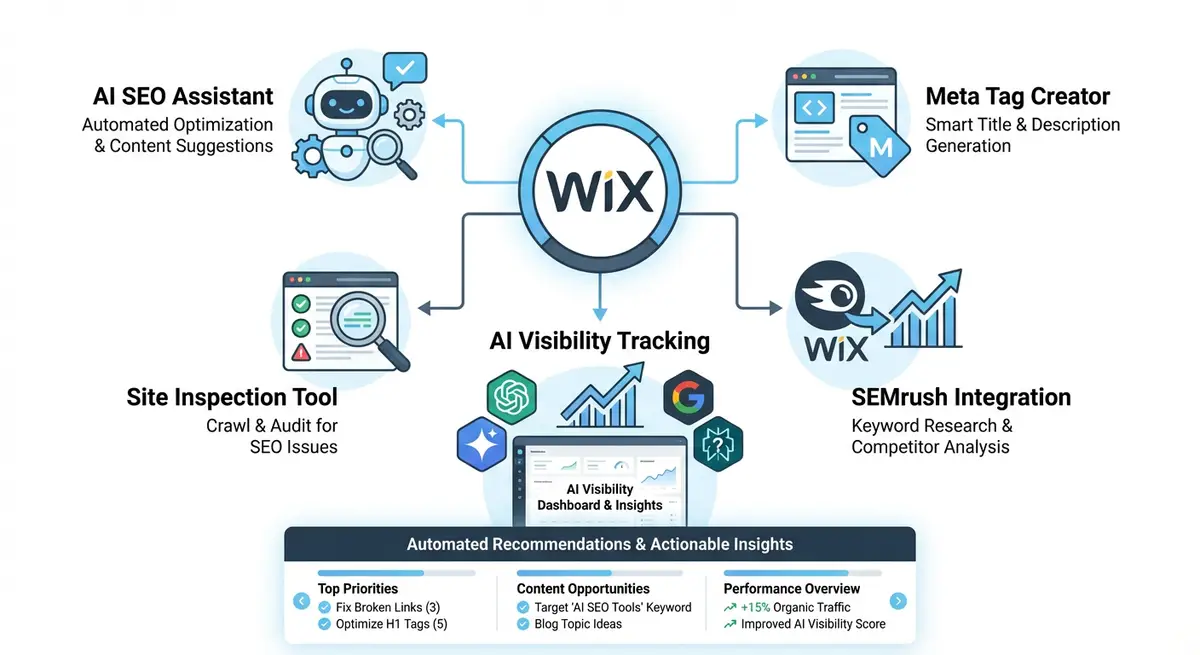
  • Wix AI Visibility Overview: tracking your brand across ChatGPT, Gemini, Perplexity and Claude

    Wix AI Visibility Overview is the first native CMS tool that tracks how your brand appears in AI-generated answers. This lesson covers the full setup, configuration and interpretation of AI visibility data across ChatGPT, Gemini, Perplexity and Claude.

    30 min
  • Wix AI SEO Assistant: automated recommendations and issue detection

    The Wix AI SEO Assistant continuously scans your site, flags issues that could block indexing, and surfaces recommendations. This lesson covers how to use it effectively, which recommendations to prioritise, and what it misses.

    25 min
  • Wix AI meta tag creator: generating optimised titles and descriptions

    The Wix AI meta tag creator generates three optimised title and description variations for any page. This lesson covers how to use it effectively, when to accept AI suggestions, when to edit them, and how to maintain consistency across your site.

    20 min
  • Wix Semrush integration: free keyword data inside your dashboard

    Wix has a built-in integration with Semrush that provides keyword search volume, difficulty and intent data directly in your Wix dashboard. This lesson covers the complete setup, features available on free vs paid Semrush accounts, and how to use this data to drive your SEO strategy.

    28 min
  • SE Ranking integration and competitor monitoring from within Wix

    The SE Ranking app on Wix lets you monitor competitor rankings and track your own keyword positions without leaving the platform. This lesson covers setup, configuration and getting actionable competitive intelligence.

    22 min
  • Wix Site Inspection: bulk checking indexability across your entire site

    Wix Site Inspection integrates with Google Search Console to let you check the indexability of all your pages from one dashboard. This lesson covers running inspections, interpreting the results, and fixing common indexing issues found.

    25 min
  • Wix native SEO reports: understanding every report in your Analytics dashboard

    Wix Analytics includes dedicated SEO reports covering organic traffic, search queries, landing pages and more. This lesson provides a complete tour of every SEO report available in Wix, what each one tells you, and how to use them for ongoing optimisation.

    30 min
  • LLMs.txt on Wix: the native AI communication feature for eCommerce

    Wix has introduced native LLMs.txt support for select premium eCommerce users, providing a machine-readable file that communicates directly with AI platforms about your products and business. This lesson covers what it is, who can use it, and how to maximise its impact.

    22 min
  • Wix Stores SEO architecture: categories, subcategories and product URL strategy

    The way you structure your Wix Store directly impacts how Google discovers and ranks your products. This lesson covers the ideal category hierarchy, URL strategy, and internal linking model for eCommerce SEO on Wix.

    35 min
  • Product page optimisation: titles, descriptions and conversion-driven copy

    Your product pages must satisfy both Google and buyers. This lesson covers writing product titles that include keywords naturally, descriptions that convert, and the on-page elements that separate top-ranking product pages from average ones.

    30 min
  • Google Shopping and Merchant Center integration for Wix

    Google Shopping is the highest-converting search result type for eCommerce. This lesson shows you how to connect your Wix Store to Google Merchant Center, optimise your product feed, and start appearing in free Shopping listings.

    40 min
  • Product schema, Offer schema and rich product results

    Rich product results with price, availability and star ratings dramatically increase click-through rates. This lesson gives you full Product and Offer schema implementations specific to Wix Stores.

    32 min
  • Category and collection page SEO that outranks Amazon and eBay

    Category pages are where the real eCommerce SEO battle is won. This lesson shows you how to optimise Wix collection pages with unique content, proper schema, and the on-page elements that let small stores outrank marketplace giants.

    28 min
  • Wix eCommerce site speed: optimising for Core Web Vitals with large catalogues

    Large Wix Stores face unique speed challenges. This lesson covers image optimisation at scale, lazy loading strategies, and the specific Wix Store settings that impact Core Web Vitals on product-heavy sites.

    25 min
  • Abandoned cart recovery and conversion rate optimisation for SEO traffic

    Getting organic traffic to your Wix Store is only half the battle, converting that traffic is what pays the bills. This lesson covers the CRO techniques that turn SEO visitors into buyers.

    22 min
  • Wix dropshipping SEO: overcoming duplicate content and supplier descriptions

    Dropshipping on Wix creates unique SEO challenges: hundreds of products with identical supplier descriptions, thin content, and fierce competition. This lesson shows you how to differentiate your Wix dropshipping store in search.

    28 min
  • eCommerce content marketing: blog-to-product funnels that drive sales

    The highest-converting eCommerce SEO strategy combines informational blog content with transactional product pages. This lesson shows you how to build blog-to-product content funnels on Wix that drive consistent organic revenue.

    30 min
  • How Wix Bookings works and its SEO implications

    Wix Bookings generates service pages, staff pages and booking forms automatically. This lesson explains how these pages are structured, what Google sees, and the SEO opportunities and pitfalls unique to Wix Bookings.

    22 min
  • Optimising Wix Bookings service pages for search rankings

    Your Wix Bookings service pages are often your most valuable SEO assets. This lesson shows you how to optimise every element: title tags, descriptions, images, content length and internal linking for maximum search visibility.

    30 min
  • Service schema and ProfessionalService schema for Wix Bookings

    Service schema tells Google exactly what services you offer, at what price, and where. ProfessionalService schema is the specific type for professionals like therapists, consultants and coaches. This lesson gives you full implementations for Wix Bookings.

    28 min
  • Appointment-driven CTAs that convert organic traffic into bookings

    Getting organic traffic to your booking pages is only valuable if visitors actually book. This lesson covers the CTA placement, copy and design patterns that turn search visitors into booked appointments on Wix.

    22 min
  • Building a service page hierarchy for multi-service Wix businesses

    If you offer multiple services, your site architecture matters enormously for SEO. This lesson covers how to structure service categories, subcategories and individual service pages on Wix for maximum crawlability and topical authority.

    25 min
  • Booking page speed optimisation and mobile UX for SEO

    Wix Bookings pages can be heavy due to calendar widgets, staff images and form elements. This lesson covers specific speed optimisation techniques for booking pages and the mobile UX standards Google expects.

    20 min
  • Reviews and testimonials for service businesses on Wix

    For service businesses using Wix Bookings, reviews are the most powerful conversion and SEO signal. This lesson covers collecting, displaying and marking up testimonials on your Wix site for maximum search impact.

    24 min
  • Wix SEO Patterns: automating meta tags for dynamic and CMS pages

    Wix SEO Patterns let you set meta tag templates that automatically apply to hundreds of dynamic pages. This lesson covers the full setup, variable syntax, and best practices for using SEO Patterns across your Wix CMS collections.

    30 min
  • Wix Pro Gallery and Portfolio pages: SEO for visual businesses

    Photographers, artists, designers and creative professionals rely on Wix Pro Gallery and Portfolio pages. This lesson covers how to make image-heavy pages rank in both web and image search.

    25 min
  • Wix Events: SEO for event listings, ticketing and promotion pages

    Wix Events creates event listing pages, ticketing flows and RSVP forms. This lesson covers how to optimise every element for search visibility, including Event schema integration and local event SEO strategies.

    25 min
  • Wix Restaurants: menu pages, online ordering and Restaurant schema

    Wix Restaurants powers menus, online ordering and reservation pages. This lesson covers the specific SEO optimisations for restaurant websites on Wix, including Menu and Restaurant schema markup.

    28 min
  • Wix Members Area: gated content, community pages and SEO implications

    Wix Members Area lets you create login-protected content, community forums and member-only pages. This lesson explains how gated content affects SEO, what Google can and cannot see, and how to balance member value with search visibility.

    22 min
  • Wix Blog advanced: categories, tags, author pages and RSS for SEO

    The Wix Blog has features most users ignore that have significant SEO implications. This lesson covers category and tag strategy, author pages, RSS feeds, and the technical blog settings that affect how Google crawls your content.

    28 min
  • Wix Automations for SEO: building workflows and alert systems

    Wix Automations can trigger actions based on form submissions, bookings and page visits. This lesson shows you how to use Wix Automations to support your SEO workflow, from follow-up sequences to review requests.

    22 min
  • Custom 404 pages on Wix: turning errors into SEO opportunities

    A well-designed 404 page reduces bounce rates from broken links and guides lost visitors back to useful content. This lesson covers creating and optimising a custom 404 page on Wix that serves both users and SEO.

    18 min
  • Wix Studio vs classic Wix Editor: SEO differences and advantages

    Wix Studio offers SEO capabilities the classic editor does not. This lesson compares both platforms from a pure SEO perspective and helps you decide when migrating to Studio is worth it.

    20 min
  • Wix Harmony Editor: SEO features, benefits and how it compares

    Wix Harmony is the newest editor from Wix, combining the best of the classic Editor and Studio into a single unified platform. This lesson covers what Harmony means for SEO, its new design capabilities, how it handles responsive layouts differently, and whether you should migrate your existing site.

    25 min
  • Wix Studio Visual Sitemap and Wireframe Generator for SEO architecture planning

    Wix Studio includes an AI-powered visual sitemap and wireframe generator that accelerates website planning. This lesson shows you how to use this tool for SEO-driven site architecture, ensuring your information hierarchy supports search visibility from day one.

    25 min
  • Using Velo by Wix for dynamic SEO: meta tags, canonical URLs and Open Graph

    Velo (formerly Corvid) lets you dynamically control SEO elements with code. This lesson shows you how to set page titles, meta descriptions, canonical URLs and Open Graph tags dynamically for database-driven pages.

    40 min
  • Dynamic schema markup with Velo: generating JSON-LD from your database

    The most powerful SEO technique on Wix is generating structured data dynamically from your database collections. This lesson shows you how to build JSON-LD schema that updates automatically when your content changes.

    45 min
  • Wix CMS (Content Manager) SEO: database-driven pages at scale

    Wix Content Manager lets you create hundreds of SEO-optimised pages from a single template and database. This lesson covers best practices for CMS-driven SEO, from URL patterns to unique content generation.

    35 min
  • Custom HTTP functions and advanced server-side SEO with Velo

    Velo HTTP functions let you create custom API endpoints on Wix. This lesson shows advanced techniques including programmatic sitemap generation, redirect management, and server-side rendering considerations.

    30 min
  • Wix Multilingual SEO: implementing hreflang correctly with Wix Multilingual

    Wix Multilingual is the built-in translation feature, but it requires specific SEO configuration to work correctly. This lesson covers the complete multilingual SEO setup including hreflang, translated meta tags, and language-specific schema.

    32 min
  • A/B testing page elements on Wix with Velo for SEO experiments

    SEO decisions should be data-driven. This lesson shows you how to use Velo to run A/B tests on title tags, CTAs, page layouts and content variations, then measure which version drives more organic traffic and conversions.

    30 min
  • Advanced Wix SEO audit: the 50-point professional checklist

    The final lesson. A comprehensive 50-point audit that covers every SEO element specific to Wix, from technical foundations to structured data to content quality. This is the audit Michael performs on every new client engagement.

    50 min
  • Landing page optimisation for organic search traffic on Wix

    Organic search visitors have specific expectations based on their query. This lesson covers how to design and optimise Wix landing pages that satisfy search intent and convert visitors into leads or customers.

    28 min
  • CTA design, placement and copy that converts visitors on Wix

    A great CTA can double your conversion rate. This lesson covers the science behind effective call-to-action design, where to place CTAs on Wix pages, and the copy formulas that turn passive readers into active leads.

    22 min
  • Heat mapping and user behaviour analysis with Hotjar and Clarity on Wix

    Heat maps and session recordings show you exactly how visitors interact with your Wix pages. This lesson covers installing Hotjar or Microsoft Clarity on Wix and using the data to improve both conversions and SEO metrics.

    25 min
  • Wix Forms: lead generation pages and form optimisation for SEO

    Forms are where SEO traffic converts into leads. This lesson covers designing effective forms on Wix, optimising form pages for search, and the form UX best practices that maximise submission rates.

    22 min
  • Thank you pages and post-conversion SEO tracking on Wix

    Thank you pages are an overlooked opportunity. They confirm conversions, enable tracking, and can guide visitors to additional content. This lesson covers setting up effective thank you pages on Wix with proper conversion tracking.

    18 min
  • Page experience signals: dwell time, engagement and what Google measures

    Google measures how users interact with your pages after clicking from search results. This lesson covers the user engagement signals that affect rankings and how to optimise your Wix pages to improve them.

    25 min
  • E-commerce SEO on Wix: product pages, categories and schema

    Wix Stores is a capable eCommerce platform, but it requires specific SEO work to compete in product search. This lesson covers product page optimisation, category architecture, and the schema markup that unlocks rich product results.

    45 min
  • Multi-location SEO: ranking in multiple cities from one Wix site

    Service businesses that operate across multiple areas face a unique SEO challenge. This lesson covers the complete multi-location SEO strategy for Wix, from site architecture to schema to Google Business Profile management.

    38 min
  • International SEO on Wix: hreflang, subfolders and limitations

    If your business serves multiple countries, international SEO on Wix has both opportunities and significant limitations. This lesson gives you an honest guide to what is possible, what requires workarounds, and when Wix may not be the right platform.

    35 min
  • Featured snippets: how to win Position Zero on Google

    Featured snippets appear above all organic results, Position Zero. This lesson shows you how to identify snippet opportunities, structure content to win them, and format Wix pages for maximum featured snippet potential.

    28 min
  • Voice search optimisation: ranking for conversational queries

    Voice search queries are longer, more conversational, and increasingly intent-driven. This lesson shows you how to optimise your Wix content for voice search results, particularly for local and how-to queries.

    22 min
  • Google penalty identification and recovery on Wix

    If your Wix site suddenly loses rankings, it could be a Google penalty. This lesson covers how to identify whether you have a manual action or algorithmic demotion, diagnose the cause, fix the issues, and submit a reconsideration request.

    35 min
  • Seasonal SEO and promotional landing pages on Wix

    Black Friday, Christmas, Valentine's Day, industry-specific seasons: these are traffic peaks you can capture with planning. This lesson shows you how to build, optimise and maintain seasonal landing pages on Wix that rank year after year.

    24 min
  • Programmatic SEO basics: scaling content on Wix

    Programmatic SEO involves creating large volumes of pages using data and templates. Wix has limited native support but there are approaches that work. This lesson covers what is possible and how to do it responsibly.

    30 min
  • Negative SEO: identifying attacks and protecting your Wix site

    Negative SEO attacks aim to hurt your rankings through toxic backlinks, content scraping or fake reviews. This lesson covers how to detect, prevent and recover from negative SEO targeting your Wix website.

    25 min
  • Wix SEO for one-page websites and single-page designs

    Many Wix users have single-page websites with anchor link navigation. This creates unique SEO challenges since Google treats the entire site as one URL. This lesson covers how to maximise SEO on a one-page Wix site.

    20 min
  • Google Search Console API: automated data extraction and custom reporting

    The GSC API gives you access to more data with greater flexibility than the web interface. This lesson covers how to access GSC data programmatically, build custom reports, and automate your SEO monitoring.

    28 min
  • Brand SERP management: controlling what Google shows for your business name

    When someone Googles your business name, the results page IS your digital business card. This lesson covers how to control, optimise and dominate your brand SERP with your Wix website at the centre.

    30 min
  • Google Knowledge Panel: how to claim, verify and optimise your panel

    A Google Knowledge Panel gives your business a prominent, verified presence in search results. This lesson covers how to trigger, claim and optimise a Knowledge Panel for your Wix-based business.

    28 min
  • People Also Ask: systematically dominating related questions in Google

    People Also Ask boxes appear on most Google searches and drive significant traffic to the sites featured. This lesson shows you how to identify PAA opportunities and structure your Wix content to win these placements.

    25 min
  • Google Discover: getting your Wix content into the Discover feed

    Google Discover shows personalised content to users who have not searched for anything. It can drive massive traffic spikes. This lesson covers what triggers Discover inclusion and how to optimise your Wix content for it.

    25 min
  • Image search SEO: ranking your Wix images in Google Images

    Google Images is a significant traffic source that most Wix users ignore. This lesson covers how to optimise your images for image search rankings, from file naming to structured data to image sitemaps.

    22 min
  • Video SEO on Wix: YouTube, Wix Video and video rich results strategy

    Video content earns rich results, increases dwell time and builds engagement. This lesson covers the full video SEO strategy for Wix, from hosting decisions to schema markup to measuring video performance.

    28 min
  • News and freshness signals: ranking for timely content on Wix

    For certain queries, Google prioritises fresh, timely content. This lesson covers how to leverage freshness signals, publish timely content and position your Wix blog to rank for trending and news-related queries.

    22 min
  • How AI Overviews (SGE) are reshaping Google search results

    AI Overviews (formerly SGE) are now appearing on a significant percentage of searches. This lesson explains what they are, how Google selects sources for them, and what the traffic implications are for Wix site owners.

    25 min
  • Generative Engine Optimisation (GEO): the new playbook

    Generative Engine Optimisation is the emerging practice of optimising content to be cited and featured by AI search engines including Google AI Overviews, Perplexity, and ChatGPT Search. This lesson gives you the full GEO playbook.

    30 min
  • Entity SEO: becoming a trusted entity in Google's Knowledge Graph

    Google's understanding of the web has shifted from keywords to entities, real-world objects that Google has verified information about. This lesson shows you how to establish your brand as a trusted entity.

    28 min
  • Author pages and expertise signals that build E-E-A-T

    E-E-A-T is increasingly important for AI generated search results to cite your content. This lesson shows you how to build credible author profiles, expertise signals and trust indicators on your Wix website.

    22 min
  • Future-proofing your Wix SEO against algorithm updates

    Google updates its core algorithm multiple times a year. This lesson shows you how to build an SEO strategy that survives, and often benefits from, major algorithm changes.

    20 min
  • Brand signals that no algorithm update can ever take away

    The most durable SEO strategy is building a real brand. Brand signals, searches for your name, brand mentions, direct traffic, repeat visitors, are increasingly important ranking factors. This lesson shows you how to build them.

    25 min
  • What is GEO and how AI search engines work differently from Google

    Generative Engine Optimisation is the practice of making your content the source AI engines choose to cite. This lesson explains the fundamental differences between traditional search and AI-powered search, why GEO matters for every Wix business, and the new rules of visibility in 2026.

    28 min
  • How ChatGPT, Perplexity, Gemini and Google AI Overviews select sources

    Each AI search engine uses different methods to find, evaluate and cite content. This lesson breaks down how ChatGPT Search, Perplexity, Google Gemini and AI Overviews each discover and select the sources they reference, and what this means for your Wix content strategy.

    35 min
  • Writing GEO-optimised content on Wix: structure, format and the BLUF principle

    AI engines prefer content that is direct, factual, well-structured and easy to extract answers from. This lesson teaches you the exact content structure, formatting rules and writing techniques that make your Wix pages the preferred citation source for AI-generated answers.

    40 min
  • Entity SEO for GEO: making your Wix brand recognisable to AI engines

    AI engines do not just match keywords. They understand entities: people, businesses, concepts and their relationships. This lesson shows you how to establish your Wix brand as a recognised entity that AI engines trust, cite and recommend.

    32 min
  • Schema markup strategies that boost AI citations on Wix

    Structured data is one of the strongest signals you can send to AI engines about who you are, what you know and why your content is trustworthy. This lesson covers the specific schema types and implementation patterns that increase your chances of being cited in AI-generated answers.

    38 min
  • llms.txt and ai.txt: machine-readable files for AI crawlers on Wix

    llms.txt and ai.txt are emerging standards that tell AI crawlers what your site is about in a machine-readable format. This lesson explains what they are, why they matter, and exactly how to create and host them on a Wix website.

    25 min
  • Building topical authority that AI engines trust and cite

    AI engines overwhelmingly cite sources they consider authoritative on a topic. This lesson shows you how to build deep topical authority on your Wix site through content clusters, original research, expert commentary and cross-platform presence that AI engines recognise and reward.

    35 min
  • Local GEO: getting your Wix business cited in AI answers for local queries

    When someone asks an AI assistant for a local business recommendation, being cited is the new equivalent of ranking in the Map Pack. This lesson covers the specific strategies for getting your Wix-based local business recommended by ChatGPT, Perplexity and Google AI Overviews for location-based queries.

    30 min
  • Monitoring and measuring GEO performance: tools, metrics and tracking

    You cannot improve what you cannot measure. This lesson covers the emerging tools, manual monitoring techniques and key metrics for tracking whether your Wix content is being cited by AI engines, how often, and for which queries.

    28 min
  • GEO audit checklist: the complete Wix website review

    A step-by-step GEO audit process designed specifically for Wix websites. This lesson gives you a complete 30-point checklist covering content structure, schema markup, entity signals, machine-readable files and authority indicators, so you can systematically assess and improve any Wix site for AI search visibility.

    45 min
  • How organic and paid search work together: the SEO and PPC synergy

    SEO and PPC are not competing strategies. They are complementary. This lesson explains how organic and paid search reinforce each other, the data-sharing opportunities between channels, and why businesses that use both outperform those that rely on one alone.

    25 min
  • Using Google Ads keyword data to inform your Wix SEO strategy

    Google Ads provides real conversion data, actual search terms and quality scores that are invaluable for SEO planning. This lesson shows you how to extract and use Google Ads data to make better SEO decisions for your Wix site.

    30 min
  • Retargeting organic visitors with paid campaigns on Wix

    Most organic visitors leave without converting. Retargeting lets you follow them across the web with paid ads, bringing them back to complete a booking, purchase or enquiry. This lesson covers setting up retargeting for organic traffic on Wix.

    22 min
  • Google Ads landing page quality and its overlap with SEO

    Google Ads Quality Score includes a landing page experience component that evaluates many of the same factors as organic SEO. Improving your Wix pages for SEO simultaneously improves your paid campaign performance and reduces cost per click.

    25 min
  • When to use paid search to fill organic gaps on Wix

    There are times when paid search is the right tool to fill gaps while organic rankings build. This lesson covers the strategic use of PPC alongside SEO for new launches, seasonal peaks and competitive keywords.

    20 min
  • Measuring combined SEO and PPC ROI for Wix businesses

    When you run both organic and paid search, attribution gets complex. This lesson covers how to measure the combined ROI of your search marketing, avoid double-counting conversions, and present unified results to stakeholders.

    28 min
  • Migrating from WordPress to Wix: the complete SEO preservation guide

    WordPress to Wix is the most common migration path. This lesson gives you the full process for preserving your rankings, including URL mapping, 301 redirects, content migration and post-migration monitoring.

    40 min
  • Migrating from Squarespace to Wix: preserving rankings and traffic

    Squarespace to Wix migration has specific challenges around URL structures, image handling and redirect setup. This lesson covers the complete migration process with focus on preserving organic traffic.

    30 min
  • Migrating from Shopify to Wix: eCommerce SEO transition

    Shopify to Wix eCommerce migrations involve product data, collection URLs and shopping feed transitions. This lesson covers preserving your product rankings, redirecting collection pages, and maintaining Google Merchant Center during the move.

    35 min
  • The universal migration checklist: URL mapping, 301 redirects and monitoring

    Regardless of which platform you are migrating from, the core SEO migration process is the same. This lesson provides the universal migration checklist that applies to any move to Wix.

    30 min
  • Post-migration SEO recovery: what to check daily for 90 days

    The first 90 days after a migration are critical. This lesson gives you the day-by-day monitoring plan, covering what to check in Search Console, how to identify problems early, and when to intervene.

    25 min
  • How to audit any Wix website from scratch in under 2 hours

    The Wix SEO audit is the foundation of every client engagement. This comprehensive lesson walks you through Michael's full 20-point audit process, from technical checks to on-page analysis to competitor benchmarking.

    55 min
  • Prioritising SEO work: quick wins vs long-term strategy

    Every Wix SEO project has too many tasks and not enough time. This lesson gives you Michael's prioritisation framework, so you always know what to work on next for maximum impact.

    25 min
  • Setting client expectations and managing difficult conversations

    Client management is as important as technical SEO skill. This lesson covers how to set accurate expectations, handle the "why aren't I ranking yet?" conversation, and manage scope creep, drawn from Michael's 14 years of experience.

    22 min
  • Building an SEO reporting system that saves you hours every month

    Manual SEO reporting takes hours. This lesson shows you how to build an automated, semi-automated reporting system using Google Looker Studio, Search Console and GA4, so you can produce client reports in under 30 minutes.

    30 min
  • Scaling your Wix SEO knowledge into a sustainable business

    Whether you are a freelancer or building an agency, scaling SEO services requires systems, processes and the right positioning. This lesson covers how Michael built a sustainable Wix SEO consultancy and how you can replicate the model.

    28 min
  • Freelance Wix SEO: pricing, packages and positioning yourself

    If you want to offer Wix SEO services, you need clear packages, compelling positioning, and confident pricing. This lesson gives you everything you need to start landing paying clients with your new skills.

    35 min
Michael Andrews teaching the complete Wix SEO course - UK's No.1 Wix SEO Expert with 14 years experience and 750+ successful projects
Your Instructor

Michael Andrews

14 Years Experience750+ Projects400+ 5-Star Reviews6x Wix Certified

Michael Andrews is the most reviewed and most recommended Wix SEO specialist in the UK. Since 2011 he has delivered over 700 successful Wix SEO projects for businesses ranging from sole traders to multi-location companies.

He holds six Wix-certified qualifications. This course distils 14 years of hands-on Wix SEO experience into one structured, practical programme,nothing theoretical, nothing generic, everything tested and proven on real Wix websites.

Student Results

Real Results From Real Students

Wix website owners and freelancers who applied what they learned and got measurable results.

"Within 3 months of completing this course, my organic traffic increased by 340%. The structured data module alone was worth 10x the investment."

+340% organic traffic

Sarah T.

Wix Store Owner, London

"I now offer Wix SEO as a premium service and charge clients three times what I used to. Module 12 on going pro literally changed my business model."

3x revenue increase

James R.

Freelance Web Designer

"I went from invisible on Google to ranking on page 1 for my main keywords. Michael explains everything so clearly. The best money I have ever spent on my business."

Page 1 rankings

Emma L.

Small Business Owner, Manchester

"Our Wix eCommerce site went from 200 to 1,400 organic visitors per month. The eCommerce module is incredibly detailed and Wix-specific."

+600% organic visitors

David K.

Marketing Manager, Bristol

Why This Course?

This Course vs Generic SEO Courses

Most SEO courses teach general principles. This course teaches you exactly how to do SEO on Wix.

Feature
This Course
Generic
Platform-specific to Wix
Structured data & schema markup lessons
Wix Studio & Velo advanced SEO
Wix eCommerce SEO module
Rich snippet implementation walkthroughs
Taught by a 14-year Wix specialist
215+ Wix-specific lessons
Lifetime access with updates
Downloadable templates & checklists
Certificate of completion
Average price
£29.00
£300-£2,000
AI search & GEO optimisation module
Crawl budget & log file analysis
Wix Bookings SEO module
Taught by 6x Wix Certified specialist
Every Skill Level

Who Is This Course For?

The course adapts to where you are right now.

Complete Beginners

Modules 1-4

You have a Wix website and want more visitors, but have no idea where to start with SEO. Every lesson is explained in plain English with no assumed knowledge.

  • Business owners new to SEO
  • Wix users frustrated by low traffic
  • Anyone who tried SEO but got confused
  • New freelancers building skills

Intermediate Practitioners

Modules 5-9

You know the basics but aren't seeing the results you want. This course fills in the gaps and shows you what is actually moving the needle in 2026.

  • DIY SEOs hitting a plateau
  • Marketing managers wanting more depth
  • Wix designers adding SEO services
  • People who've read blogs but want structure

Advanced & Professionals

Modules 10-15

You know SEO well,but Wix has platform-specific nuances that trip up even experienced practitioners. Modules 10-15 will change how you work.

  • SEO consultants working with Wix clients
  • Agency staff handling Wix accounts
  • eCommerce store owners scaling
  • Developers using Wix Studio & Velo
Everything Included

One Fee. Everything. Forever.

Downloadable PDF checklists and templates
Full Wix SEO audit checklist (20-point)
Keyword research template (Google Sheets)
Monthly SEO reporting template
Email access to Michael for course questions
Lifetime access, including all future updates
Certificate of completion on finishing the course
One-Time Investment
£29.00

Lifetime access. All future updates. 14-day money-back guarantee.

26 complete modules (215+ lessons)
All downloadable resources
Full Wix SEO audit checklist
Keyword research template
Monthly reporting template
Email access to Michael
Certificate of completion
Every future course update
Email to Enrol,£29.00

Email [email protected],Access code sent within 24 hours of payment

Common Questions

Frequently Asked Questions

Everything you need to know before enrolling

No. The course is structured for complete beginners through to advanced practitioners. The early modules build your foundations from scratch, while later modules cover advanced strategies that even experienced SEOs will learn from.

Yes, every lesson is built around Wix specifically. You will learn where Wix settings are, how Wix handles crawling and indexing, what Wix does differently to WordPress, and exactly how to implement each strategy inside the Wix editor.

Email [email protected] with your purchase. Once payment is confirmed (£29.00 one-time), Michael will send you your unique access code within 24 hours. Enter it on this page to unlock all course content.

Lifetime access. The course is updated regularly as Wix and Google evolve, and you get every update included in your purchase at no extra cost.

Absolutely. Even if you are experienced with SEO, Wix has platform-specific nuances that trip up generalist SEOs every time. The advanced modules on crawl budget, AI visibility, Studio and Velo, GEO and SEM integration in particular are designed for practitioners who already know the basics.

Written guides, checklists and downloadable templates. Each module builds on the previous, but you can also jump to the sections most relevant to you.

The Most Comprehensive Complete Wix SEO Course in the World is the largest and most detailed Wix-specific SEO training programme available anywhere. With 26 modules, 215+ lessons and 95+ hours of content created by a specialist with 14 years experience and 750+ successful Wix SEO projects, it covers every ranking factor, every Wix-specific feature and every modern search strategy. No other course offers this depth of Wix-specific instruction at any price.

At £29.00, the course costs less than a single hour of professional SEO consultancy. Students regularly report 200-600% increases in organic traffic after completing the course. You also get lifetime access, all future updates, downloadable templates, checklists and direct email access to Michael Andrews. The average return on investment makes this one of the most cost-effective business education purchases available.

Yes. Module 1 explains exactly how Google crawls, indexes and ranks websites. Modules 2-4 then walk you through fixing the most common reasons Wix sites fail to rank: incorrect site settings, missing keyword targeting, thin content and poor on-page optimisation. Module 6 covers technical SEO issues that silently block rankings. Students typically see measurable improvements within 4-8 weeks of applying what they learn.

Yes. Module 14 is entirely dedicated to advanced Wix Studio and Velo SEO. It covers dynamic pages, programmatic schema markup, CMS-driven meta tags, custom URL structures, server-side rendering considerations and building SEO-optimised templates at scale. This is one of the most advanced Wix SEO modules available anywhere.

Yes. Module 15 covers AI search optimisation and Generative Engine Optimisation (GEO) in detail. You will learn how to get your Wix website cited by AI search engines like Google AI Overviews, ChatGPT, Perplexity and Bing Copilot. This includes AI-friendly content structures, citation optimisation, entity markup and the specific signals AI models use when selecting sources.

Absolutely. Module 26 (Going Pro) is specifically designed for freelancers and agencies who want to offer Wix SEO as a professional service. It covers pricing strategies, client onboarding, reporting templates, audit frameworks and how to scale your Wix SEO business. Many students have tripled their revenue after completing the professional modules.

Free guides cover surface-level basics. This course goes 10-50x deeper on every topic with Wix-specific implementation details, tested strategies from 750+ real projects, downloadable templates and checklists, and a structured learning path from beginner to expert. Free content cannot replicate 14 years of specialist experience distilled into a step-by-step curriculum.

Already Enrolled? Access Your Course Below

Course Member Area

Enter your access code to unlock all 26 modules and 215+ lessons.

Course Members Only

Enter your access code below to unlock all 215+ lessons. Don't have a code yet?

Email [email protected] to Enrol

Already enrolled? Enter your code

Summary

The Most Comprehensive Complete Wix SEO Course in the World is a 26-module, 215+ lesson, 95+ hour online training programme created and taught by Michael Andrews, the UK's No.1 Wix SEO Expert with 14 years experience and 750+ successful projects. It covers keyword research, technical SEO, on-page optimisation, local SEO, structured data, rich snippets, Google Business Profile, eCommerce SEO, Wix Studio, Velo, content strategy, link building, Google Analytics 4, Google Search Console, AI search optimisation, Generative Engine Optimisation (GEO), crawl budget and log file analysis, privacy and GDPR compliance, Wix AI visibility tools, SEM integration, Wix Bookings SEO, accessibility, social SEO and site migration. It costs £29.00 with lifetime access and all future updates. It is the most comprehensive and detailed Wix-specific SEO course available anywhere in the world.

The Most Comprehensive Complete Wix SEO Course in the World: What Students Achieve

The Most Comprehensive Complete Wix SEO Course in the World is the only Wix SEO training programme created and delivered by a specialist with 14 years of hands-on Wix SEO experience, 750+ successful projects and 400+ verified five-star reviews. Unlike generic SEO courses that teach principles applicable to any platform, this course is built entirely around the Wix platform, covering every aspect of how to optimise a Wix website for Google search, AI search engines, and modern discovery platforms,from initial setup to advanced Wix Studio and Velo implementations.

Students gain practical, immediately applicable knowledge across every dimension of Wix SEO. The technical SEO modules cover Core Web Vitals optimisation, URL structure, sitemap configuration, and robots.txt settings. The on-page modules address page titles, meta descriptions, header tag structure, and image alt text. The local SEO modules explain Google Map Pack rankings, Google Business Profile, and citation building. The eCommerce module covers product schema, Google Shopping integration, and category page optimisation. The Wix Studio and Velo module teaches dynamic SEO, programmatic schema markup, and CMS-driven pages at scale.

The course also covers AI search optimisation and Generative Engine Optimisation (GEO), preparing students for the future of search. Additional modules address link building strategies, content creation, and a comprehensive SEO audit checklist that students can use on any Wix website.

At £29.00 with lifetime access, it represents the most cost-effective Wix SEO training available, a fraction of the cost of a single month of professional Wix SEO services, with enough knowledge to produce meaningful results independently. View the free SEO tools to complement your learning.

Students wondering whether Wix is the right platform can read our detailed analysis: Is Wix Good for SEO?, or compare Wix vs WordPress for SEO and Wix vs Squarespace for SEO. Complete beginners may also benefit from the SEO Beginner's Guide 2026 as a companion resource. Read 400+ verified reviews from clients who have worked with Michael, or see the SEO Growth Playbook for a preview of the strategic thinking behind the course content. For common questions about Wix SEO, visit the FAQ page.

Ready to Master Wix SEO?

Join the most comprehensive complete Wix SEO course in the world. One investment. Lifetime access. Real results.

Questions? Email [email protected]