Meta descriptions: the art of the perfect preview snippet
Module 4: On-Page SEO Optimisation for Wix | Lesson 33 of 683 | 40 min read
By Michael Andrews, Wix SEO Expert UK
Meta descriptions do not directly affect rankings, but they are your single best opportunity to influence whether someone clicks your result or your competitor's. A well-written meta description can improve CTR by 30% or more on the same ranking position. Think of the meta description as your search result's sales copy. You have approximately 155 characters to convince a searcher that your page has exactly what they are looking for. Every word must earn its place. This lesson teaches you the exact formula for writing meta descriptions that maximise clicks for every page type on your Wix site.
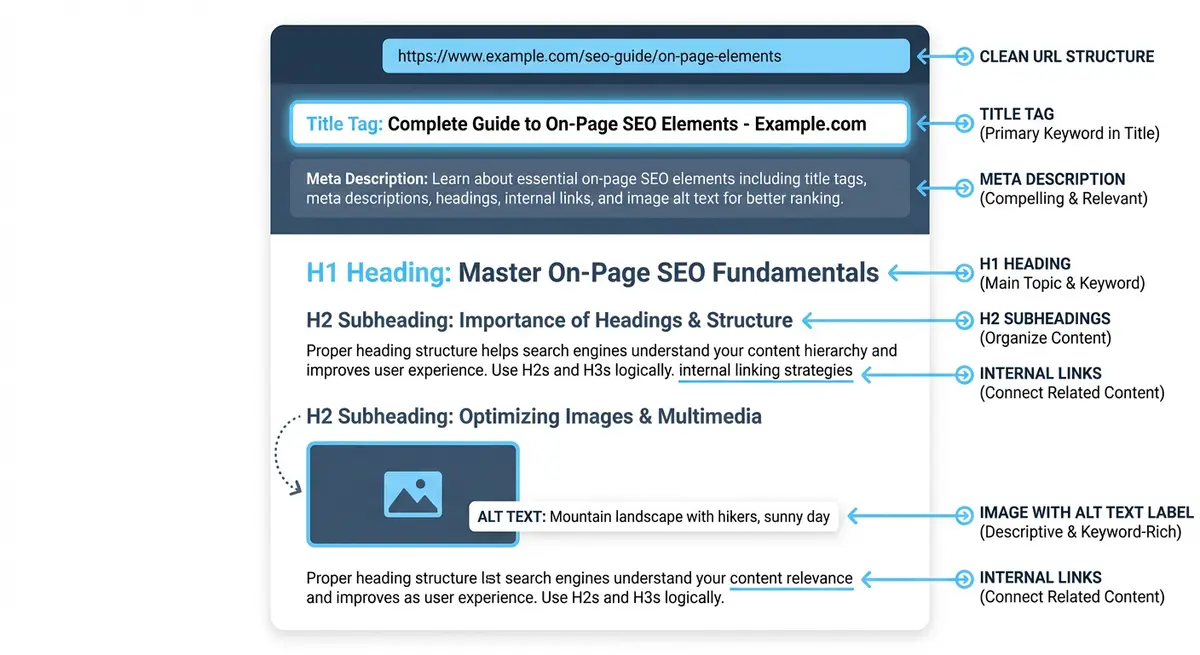
How Meta Descriptions Affect Your Traffic
While Google has confirmed that meta descriptions are not a direct ranking factor, their indirect impact on rankings through CTR is significant. If your page consistently gets more clicks than competitors at the same position, Google interprets this as a quality signal and may promote your result. Conversely, a poor meta description that gets low clicks can cause your page to drop, even if the content is excellent.
- CTR multiplier: A compelling meta description at position 5 can generate more clicks than a generic one at position 3.
- Keyword bolding: When a searcher's query appears in your meta description, Google bolds those words, making your result visually stand out.
- User expectations: The meta description sets expectations. If it accurately previews the page content, users stay longer and bounce less.
- Competitive advantage: Most Wix sites either have no custom meta description or use generic, uninspiring text. Writing good meta descriptions is an easy win against lazy competitors.
The Meta Description Formula
An effective meta description has four elements: the primary keyword (naturally placed), a clear value proposition, social proof (if possible in the character limit), and a call to action.
Formula: [Value Prop with Primary Keyword]. [Social Proof]. [Call to Action].

Example:
"Expert Wix SEO services that move rankings fast. 14 years experience,
50+ UK clients ranked on page 1. Get your free SEO audit today."

Breaking it down:
- Value prop with keyword: "Expert Wix SEO services that move rankings fast"
- Social proof: "14 years experience, 50+ UK clients ranked on page 1"
- Call to action: "Get your free SEO audit today"
Meta Description Length in 2026
Google typically displays 150-160 characters of a meta description in desktop results. Mobile results may show slightly more or slightly less depending on the device. Write to 155 characters as your target, with the most important information in the first 120 characters in case Google truncates.
- Desktop: approximately 155-160 characters displayed
- Mobile: approximately 120-130 characters displayed (varies by device)
- Put the most compelling information and the primary keyword in the first 120 characters
- Use a SERP simulator to preview the actual display on both desktop and mobile
- Google measures in pixels, not characters. Wider characters take more space.
Meta Description Templates by Page Type
Service Page Meta Descriptions
Template: [Service + keyword] for [audience]. [Social proof/USP]. [CTA].

Examples:
Professional Wix SEO services for UK businesses. 50+ clients ranked page 1
in 6 months. Book your free SEO audit today.

24/7 emergency plumber in Birmingham. Arrive within 1 hour, fixed-price
quotes, no call-out charge. Call now for immediate help.
Blog Post Meta Descriptions
Template: Learn [topic with keyword]. [Specific benefit]. [Content format].

Examples:
Learn how to add schema markup to your Wix site in 10 minutes. Step-by-step
guide with code examples you can copy and paste.

11 proven Wix SEO tips that actually move rankings in 2026. Based on 50+
client campaigns. Includes free checklist download.
Homepage Meta Descriptions
Template: [Brand] offers [primary service]. [Key differentiator]. [CTA].

Examples:
Frontline Web offers expert Wix SEO services for UK businesses. 14 years
experience, proven page 1 rankings. Get your free site audit.

City Plumbing provides 24/7 emergency plumbing across Manchester. Gas Safe
registered, 5-star rated. Call for same-day service.
Location Page Meta Descriptions
Template: [Service] in [location]. [Local USP]. [CTA].

Examples:
Wix SEO expert in Manchester. Local clients include Entrytech Security and
Bolton Bookkeeping. Book your free Manchester SEO consultation.

Emergency plumber Didsbury. Local family business, arrive within 30 minutes.
No call-out fee. Call now.
When Google Overwrites Your Meta Description
Google rewrites meta descriptions approximately 30-70% of the time when it believes its automated description better matches the specific search query. Google pulls replacement text from your page content, usually the section most relevant to the query. Understanding why Google rewrites helps you prevent it.
- Reason 1: Your meta description does not match the search query. If someone searches "wix seo pricing" and your meta description does not mention pricing, Google will pull a sentence from your page that does.
- Reason 2: Your meta description is too generic. "We offer great services. Contact us today." gives Google nothing query-specific to work with.
- Reason 3: Your meta description is stuffed with keywords. Google penalises unnatural descriptions by replacing them.
- Reason 4: You have no meta description at all. Google will auto-generate one from page content.
- Prevention: Write meta descriptions that naturally include the primary keyword and closely match the intent of the queries you are targeting.
Writing Compelling Calls to Action
The call to action at the end of your meta description is what converts an impression into a click. Different page types need different CTAs.
- Service pages: "Book your free consultation", "Get your free audit", "Call now for a quote", "Request a callback"
- Blog posts: "Read the complete guide", "Download the free checklist", "Learn how in 10 minutes"
- Product pages: "Shop now with free delivery", "View the full collection", "Order today, ships tomorrow"
- Comparison pages: "See the full comparison", "Find out which is best for you"
- Location pages: "Contact our [location] team", "Visit our [location] showroom"
How to Edit Meta Descriptions in Wix
Editing meta descriptions in Wix
- Open the Wix Editor and navigate to the page
- Click the three dots next to the page name in the Pages panel
- Select "SEO (Google)" from the dropdown
- Edit the "Page Description" field. This is your meta description.
- You will see a live preview of how it appears in Google results
- Check the character count stays under 155 characters
- Click Apply and publish the page
- For blog posts: edit in the Blog Manager under each post's SEO settings
- For Wix Stores products: edit in the product SEO settings panel
Using Wix SEO Patterns for Meta Descriptions
For blog posts and products, Wix SEO Patterns can auto-generate meta descriptions from the first sentences of the content. While this is better than having no meta description, manually written descriptions almost always outperform auto-generated ones. Use patterns as a fallback, not a primary strategy.
Auditing All Meta Descriptions on Your Wix Site
How to audit your meta descriptions
- Use Screaming Frog to crawl your site and export all meta descriptions
- Create a spreadsheet with: Page URL, Current Meta Description, Character Count, Issues, New Meta Description
- Flag: missing descriptions, duplicate descriptions, over 160 characters, under 70 characters, no keyword, no CTA, keyword stuffing
- Write improved descriptions for every flagged page using the templates above
- Implement changes in the Wix Editor
- Monitor CTR changes in GSC over 4-8 weeks
Common Meta Description Mistakes
- No meta description at all: Wix does not auto-generate meta descriptions from page content like WordPress does. If you leave it blank, Google will pull random text from your page.
- Duplicate meta descriptions: Using the same description across multiple pages. Every page needs a unique description.
- Keyword stuffing: "SEO services, SEO expert, SEO agency, SEO consultant" is not a meta description. It is spam.
- No call to action: Describing the page without telling the searcher what to do next wastes conversion opportunity.
- Too short: "We do SEO." wastes 140 characters of valuable sales copy space.
- Generic text: "Welcome to our website. We offer a range of services." tells the searcher nothing useful.
- Including the brand name twice: If your brand is already in the title tag, you do not need it again in the meta description.
Complete How-To Guide: Writing Meta Descriptions for Every Wix Page
Follow these steps to write meta descriptions for every Wix page
- Export a list of all pages and their current meta descriptions from Screaming Frog or manually review each page in the Wix Editor
- For each page, identify the primary keyword and search intent from your keyword map
- Write a new meta description of 120-155 characters that includes the primary keyword naturally within the first sentence
- Start with a clear value proposition explaining what the visitor will find on this page and why it matters
- Include specific social proof where possible: numbers, years of experience, client count, star ratings
- End with a call to action phrase appropriate for the page type: "Book your free audit", "Read the full guide", "Shop now"
- Avoid keyword stuffing and write in a natural, conversational tone as if describing the page to a friend
- Preview each description in a SERP simulator to check length on desktop and mobile
- In the Wix Editor, open each page and paste the new meta description in the SEO (Google) panel
- Set up SEO Patterns for blog posts as a fallback auto-generation method
- Check Google search results for your pages after 2-4 weeks to see if Google is using your description or rewriting it
- If Google rewrites your description, make it more specific to the primary search query the page targets
- Ensure no two pages have identical or near-identical meta descriptions
- Track click-through rate changes in GSC after updating descriptions. Pages with improved CTR confirm effective descriptions.
Your meta description works alongside your title. See how to write SEO title tags that get clicks for the simple formula I use.
Meta Description Tools
- SERP Snippet Preview: Preview your meta description in a real Google search result before you publish
- Google Search Console: See your current CTR per page. Low CTR often points to a weak meta description.
- Screaming Frog: Crawl your site to export and audit all meta descriptions (free up to 500 URLs)
- SEO Fix in a Box: My Wix app. Free to install, it scans your site and shows what needs fixing, and paid plans write the fixes from your own Google searches
Was this lesson useful?
It takes 1 minute to tell me. The course is free and I want to keep it that way, and your feedback shows me what is working and helps other people find it.
This lesson on Meta descriptions: the art of the perfect preview snippet is part of Module 4: On-Page SEO Optimisation for Wix in The Most Comprehensive Complete Wix SEO Course in the World (2026 Edition). Created by Michael Andrews, a Wix Marketplace Legend Partner with 14 years of hands-on experience, 800 completed Wix SEO projects and 456 verified five-star reviews.