Optimising Wix Bookings service pages for search rankings
Module 18: Wix Bookings, Hotels & Service Business SEO | Lesson 208 of 683 | 30 min read
By Michael Andrews, Wix SEO Expert UK
Your Wix Bookings service pages are the pages that will rank for your most valuable commercial keywords: "physiotherapy in Manchester", "life coaching sessions online", "personal training near me". Optimising these pages correctly is the highest-ROI SEO work you can do for a Wix service business.
Service Page Title Tags
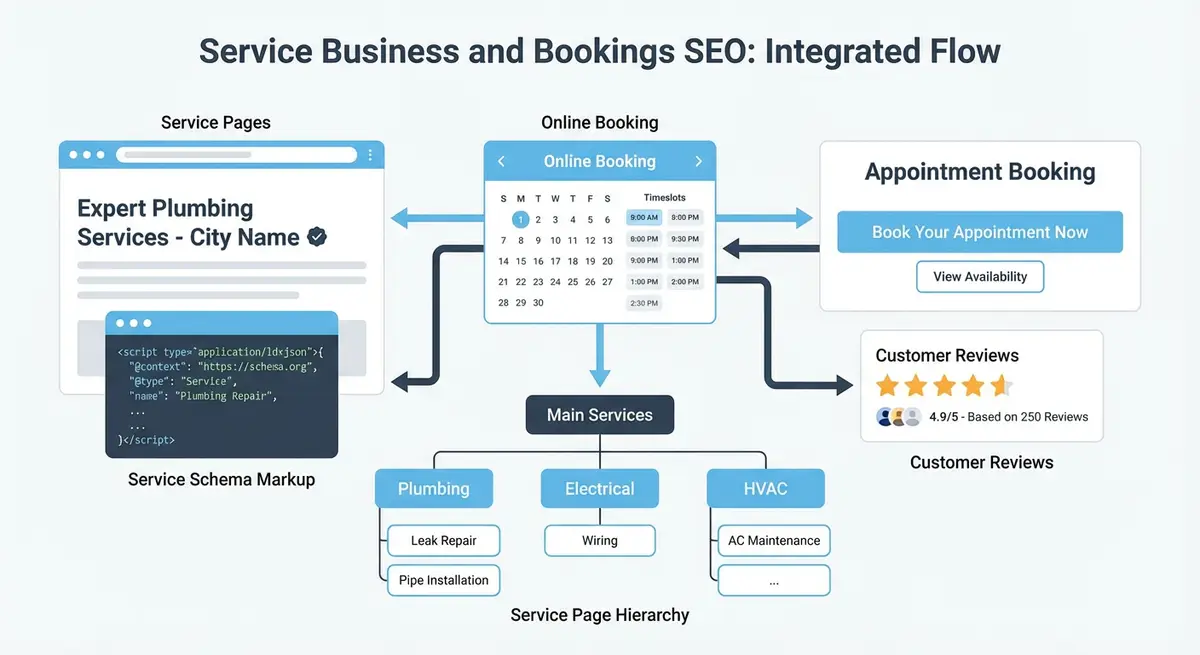
Each Wix Bookings service page has its own title tag that you can edit in the SEO panel. The optimal format is: [Service Name] | [Location if applicable] | [Brand Name]. For example: "Sports Massage Therapy | Manchester | Your Clinic Name". Include your primary keyword and keep it under 60 characters.
Adding Substantial Content to Service Pages
By default, Wix Bookings service pages only show the service description you entered in the booking setup. This is often 2-3 sentences, far too thin for SEO. You need to add substantial content using the Wix editor: a detailed description of the service, who it is for, what to expect, benefits, FAQs, and testimonials.
Content to add to every Wix Bookings service page
- Expanded service description (300-500 words minimum) targeting your primary keyword
- A "What to Expect" section that answers common pre-booking questions
- A benefits section with clear, specific outcomes
- At least 2-3 testimonials from clients who used this specific service
- A FAQ section with 3-5 questions (also mark up with FAQ schema)
- Credentials and qualifications relevant to this service
Internal Linking from Blog to Service Pages
Your blog content should link to your service pages with keyword-rich anchor text. A blog post about "5 Signs You Need Sports Massage" should link to your Sports Massage service page. This passes authority from your informational content to your commercial booking pages, which is where conversions happen.
Complete How-To Guide
This step-by-step guide covers the full process of optimising every Wix Bookings service page for search rankings, from writing title tags and meta descriptions to adding rich content, internal links and tracking performance improvements.
How to Fully Optimise Each Wix Bookings Service Page for Search
- Step 1: Open your Wix Bookings dashboard and list every active service. For each service, research the primary keyword it should target using a tool like Google Keyword Planner, Ubersuggest or Ahrefs. Record the keyword, monthly search volume and current ranking position.
- Step 2: Edit the title tag for each service page by opening the page in the Wix Editor, clicking the page menu, selecting "SEO Basics", and entering a title in the format: [Primary Keyword] | [Location] | [Brand Name]. Keep it under 60 characters.
- Step 3: Write a compelling meta description for each service page (150-160 characters) that includes the primary keyword, a benefit statement and a call to action such as "Book online today" or "Free consultation available".
- Step 4: Rewrite the service description in the Wix Bookings settings to be at least 300-500 words. Include your primary keyword in the first paragraph, describe who the service is for, what happens during the session and what outcomes clients can expect.
- Step 5: Add a "What to Expect" section to each service page using the Wix Editor. Describe the booking process, what happens on the day, session duration and any preparation the client needs to do. This content answers search queries like "what to expect from [service]".
- Step 6: Create a benefits section with 4-6 specific, measurable outcomes. Replace vague claims like "you will feel better" with specific ones like "clients report a 40% reduction in lower back pain after 4 sessions".
- Step 7: Add 2-3 testimonials to each service page, ideally from clients who used that specific service. Include the client's first name and the service they booked. Format these as blockquotes or a dedicated testimonial strip.
- Step 8: Build a FAQ section with 3-5 questions at the bottom of each service page. Use real questions from clients, such as "How many sessions will I need?" or "Is this service covered by insurance?". Mark these up with FAQ schema for improved AI citation visibility.
- Step 9: Add relevant credentials, certifications and professional memberships to each service page. If you are a qualified physiotherapist, display your HCPC registration. This directly supports E-E-A-T.
- Step 10: Identify 3-5 existing blog posts that relate to each service and add contextual internal links from those posts to the service page using keyword-rich anchor text. For example, link the phrase "sports massage therapy" in a blog post to your Sports Massage service page.
Essential Resources
- Wix Bookings Help Centre: Official Wix Bookings documentation and setup guides
- Google Business Profile Help: Manage your business listing for local search visibility
- Schema.org Service Type: Service schema reference for structured data markup
- Google Search Console: Monitor your site performance and indexing in Google Search
Completing your Wix Bookings service page optimisation
- Step 11: Add an optimised image to each service page with a descriptive file name (e.g., deep-tissue-massage-manchester.webp) and alt text that includes the service keyword and location.
- Step 12: Customise the URL slug for each service page in the Wix SEO panel. Remove unnecessary words and parameters, creating a clean structure like /deep-tissue-massage instead of /bookings-checkout/deep-tissue-massage-therapy-session.
- Step 13: Set up Google Search Console and submit each service page URL for indexing. After two weeks, check the Performance report filtered by page to see impressions, clicks and average position for each service page.
- Step 14: Install Wix Analytics or connect Google Analytics 4, then create a custom report tracking organic traffic to each service page alongside booking conversion rate. Review this monthly to identify which pages need further optimisation.
Essential Resources
- Wix Bookings Help Centre: Official documentation for managing Wix Bookings service pages
- Google Keyword Planner: Research keyword volume for your service page titles and descriptions
- Google Search Console: Track organic performance of your Wix Bookings service pages
Was this lesson useful?
It takes 1 minute to tell me. The course is free and I want to keep it that way, and your feedback shows me what is working and helps other people find it.
This lesson on Optimising Wix Bookings service pages for search rankings is part of Module 18: Wix Bookings, Hotels & Service Business SEO in The Most Comprehensive Complete Wix SEO Course in the World (2026 Edition). Created by Michael Andrews, a Wix Marketplace Legend Partner with 14 years of hands-on experience, 800 completed Wix SEO projects and 456 verified five-star reviews.