Appointment-driven CTAs that convert organic traffic into bookings
Module 18: Wix Bookings, Hotels & Service Business SEO | Lesson 210 of 683 | 22 min read
By Michael Andrews, Wix SEO Expert UK
Organic traffic to your Wix Bookings pages has zero value until someone actually books. The conversion rate difference between a well-designed booking page and a poorly designed one can be 300-500%. This lesson focuses on the specific CTA placements, copy and design patterns that turn search visitors into booked appointments.
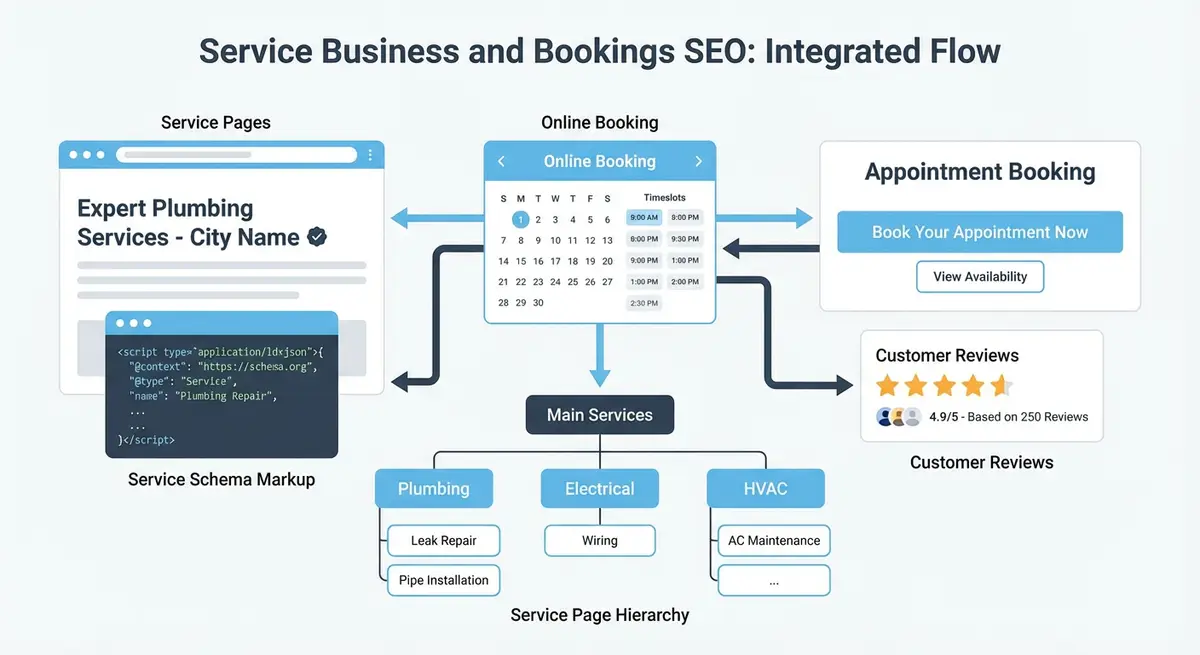
CTA Placement Strategy
- Above the fold: a prominent "Book Now" button visible without scrolling on both desktop and mobile
- After the service description: a CTA immediately after you have explained the value
- After testimonials: a CTA after social proof when trust is highest
- Sticky mobile CTA: a fixed "Book" button at the bottom of the screen on mobile devices
- End of page: a final CTA for visitors who read all the way through
CTA Copy That Converts
Generic "Book Now" buttons work, but specific copy converts better. "Book Your Free Consultation" outperforms "Book Now" for high-consideration services. "Reserve Your Spot - Only 3 Slots Left This Week" adds urgency without being dishonest if it is true. The CTA should reflect the next step the visitor is comfortable taking.
Mobile Booking Experience
Over 60% of local service searches happen on mobile. If your Wix Bookings form is difficult to complete on a phone, your tiny buttons and date pickers that require precision tapping, you are losing the majority of your potential bookings. Test the entire booking flow on a real phone, not just the desktop view in the Wix editor.
How to Place and Test High-Converting Booking CTAs on Wix Service Pages
How to Place and Test High-Converting Booking CTAs on Wix Service Pages
- Step 1: Open your most-visited service page in Wix Editor to begin reviewing and improving CTA placement.
- Step 2: Add a sticky header CTA using Wix Editor > Add > Button. Set button text to an action phrase like "Book Your [Service] Today" and link it directly to the Wix Bookings booking widget anchor on the same page.
- Step 3: Add a second CTA button in the hero section (above the fold) with the same booking link so visitors see a prompt immediately upon landing.
- Step 4: Scroll down the page and add a third CTA button after your social proof or testimonials section to capture visitors at the point of highest trust.
- Step 5: For mobile view (click the mobile icon in the Wix Editor toolbar), add a sticky bottom bar with a full-width booking button visible at all times.
- Step 6: Edit button copy to test urgency variants such as "Book This Week (Limited Slots)", "Reserve Your Spot", and "Book a Free Consultation" to identify which drives the most clicks.
- Step 7: Go to Wix Dashboard > Analytics & Reports and check which service pages have the highest bounce rate. These are the pages that most need CTA placement improvements.
- Step 8: Add a WhatsApp or phone call CTA alongside the booking button for visitors who prefer not to book online.
- Step 9: Test the complete booking journey in incognito mode from clicking the CTA all the way through to the confirmation page to identify any friction points.
- Step 10: Set up a GA4 Event tracking the booking confirmation page view as a conversion so you can measure the impact of each CTA change.
Complete How-To Guide
Essential Resources
- Wix Bookings Help Centre: Official Wix Bookings documentation and setup guides
- Google Business Profile Help: Manage your business listing for local search visibility
- Schema.org Service Type: Service schema reference for structured data markup
- Google Search Console: Monitor your site performance and indexing in Google Search
This step-by-step guide shows you how to design, place and optimise appointment-driven CTAs across your Wix Bookings pages so that organic traffic converts into actual booked appointments at the highest possible rate.
How to Build High-Converting Booking CTAs on Wix Service Pages
- Step 1: Audit your current booking flow by opening each Wix Bookings service page on both desktop and mobile. Count the number of CTA buttons visible, note their exact wording, and record how many clicks it takes from landing on the page to completing a booking.
- Step 2: Add an above-the-fold CTA to every service page. In the Wix Editor, place a prominent "Book Now" or "Book Your Appointment" button in the hero section so it is visible without scrolling on both desktop (within the first 600px) and mobile (within the first 500px).
- Step 3: Write specific CTA copy for each service page rather than using generic text. Replace "Book Now" with action-specific text such as "Book Your Free Consultation", "Reserve Your Massage Slot" or "Schedule Your First Session". Test at least two variations per page.
- Step 4: Add a second CTA immediately after your service description section. After the visitor has read what the service involves and its benefits, present a button that links directly to the Wix Bookings calendar for that specific service.
- Step 5: Place a third CTA directly after your testimonials section. This is the highest-trust point on the page. Use copy that reinforces confidence, such as "Join 200+ Happy Clients - Book Today" paired with a star rating or review count.
- Step 6: Implement a sticky mobile CTA by adding a fixed strip at the bottom of the mobile view containing a "Book" button. In the Wix Editor, switch to mobile view, add a strip pinned to the bottom, set it to appear on scroll, and ensure it does not overlap with critical content.
- Step 7: Add urgency elements near your CTAs where they are truthful. Display real availability information such as "Next Available: Tuesday 14th" or "3 Slots Remaining This Week" using dynamic text or manually updated content that reflects actual availability.
- Step 8: Place a micro-testimonial (one sentence plus reviewer name and star rating) directly adjacent to each major CTA. In the Wix Editor, position a small text element with a review quote either above or beside the booking button.
- Step 9: Reduce booking form friction by reviewing the Wix Bookings form settings. Remove any fields that are not essential for the initial booking. Every additional form field reduces completion rates by approximately 10%. Name, email, phone and preferred date is usually sufficient.
- Step 10: Add a final CTA at the bottom of each service page for visitors who scroll through all content. Use copy that acknowledges their research: "Ready to Get Started? Book Your First Appointment" with a direct link to the booking calendar.
- Step 11: Set up conversion tracking by adding a Google Analytics 4 event trigger on the Wix Bookings confirmation page. Go to Settings > Custom Code and add a GA4 event snippet that fires on the confirmation page URL to track completed bookings as conversions.
- Step 12: A/B test your CTA copy and placement by running two versions of your highest-traffic service page for two weeks each. Compare the booking conversion rate between versions. Focus on testing one element at a time: button text, button colour, placement or surrounding copy.
- Step 13: Review your booking conversion data monthly in Google Analytics, filtering by organic traffic source. Calculate the conversion rate for each service page and identify underperforming pages that need CTA improvements.
Essential Resources
- Google Analytics 4: Track booking conversion rates and CTA performance on your service pages
- Hotjar: Heatmaps and session recordings to understand how visitors interact with your booking CTAs
- Wix Bookings Help Centre: Official Wix Bookings documentation and setup guides
- Google Business Profile Help: Manage your business listing for local search visibility
- Schema.org Service Type: Service schema reference for structured data markup
- Google Search Console: Monitor your site performance and indexing in Google Search
- Google Business Profile: Drive bookings from local search with an optimised business listing
Was this lesson useful?
It takes 1 minute to tell me. The course is free and I want to keep it that way, and your feedback shows me what is working and helps other people find it.
This lesson on Appointment-driven CTAs that convert organic traffic into bookings is part of Module 18: Wix Bookings, Hotels & Service Business SEO in The Most Comprehensive Complete Wix SEO Course in the World (2026 Edition). Created by Michael Andrews, a Wix Marketplace Legend Partner with 14 years of hands-on experience, 800 completed Wix SEO projects and 456 verified five-star reviews.