How Wix Bookings works and its SEO implications
Module 18: Wix Bookings, Hotels & Service Business SEO | Lesson 207 of 683 | 22 min read
By Michael Andrews, Wix SEO Expert UK
Wix Bookings is one of the most popular Wix apps, used by therapists, coaches, fitness instructors, consultants, salons and hundreds of other service-based businesses. When you install Wix Bookings, it generates a set of pages automatically: a services list page, individual service pages, a staff page, and a booking form. Understanding how these pages are structured from an SEO perspective is the first step to optimising them.
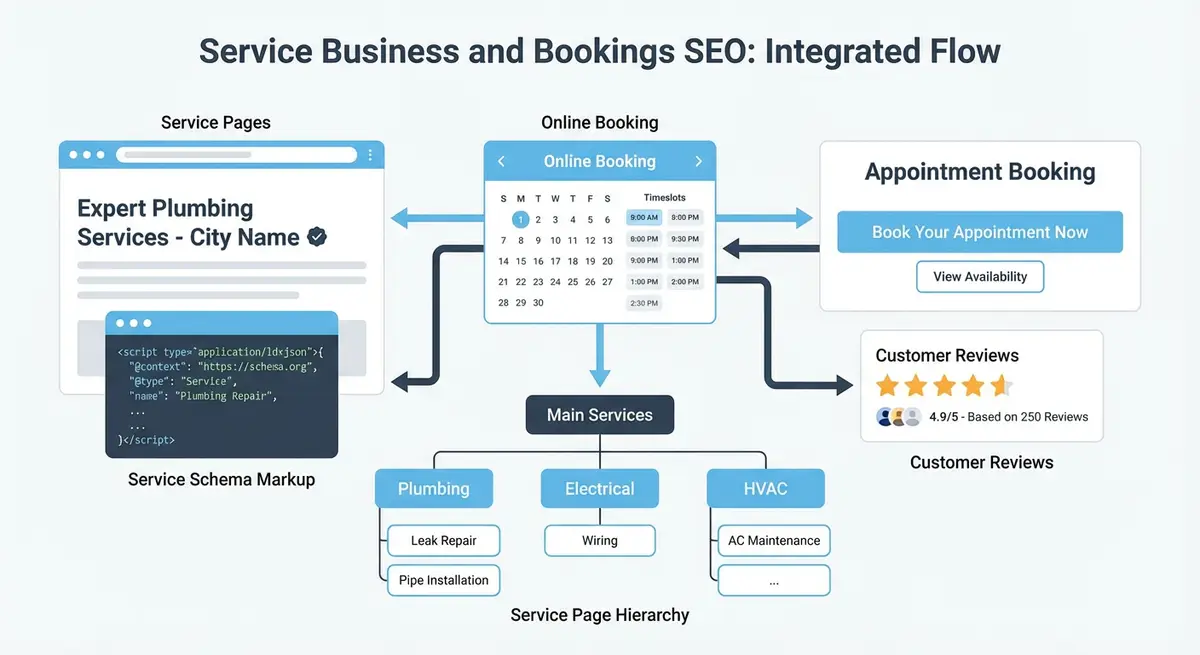
Pages Wix Bookings Creates Automatically
- Service List page: displays all your services in a grid or list layout. This is often the highest-traffic page.
- Individual Service pages: one page per service with description, price, duration and a booking button.
- Staff page: lists your team members with photos and bios (if you have multiple staff).
- Booking form: the actual calendar and form where customers select a date and book. This is typically low SEO value.
- Confirmation page: shown after booking. No SEO value but important for conversion tracking.
What Googlebot Sees on Wix Bookings Pages
Wix Bookings service pages are rendered using JavaScript, but Wix provides server-side rendered content for the core elements. Google can typically see the service title, description, price and images. However, the interactive booking calendar and real-time availability are not visible to Google, nor do they need to be. Your SEO focus should be on the static content elements.
Common Wix Bookings SEO Mistakes
- Using generic service names like "60 Minute Session" instead of keyword-rich names like "Deep Tissue Massage - 60 Minutes"
- Writing one-sentence service descriptions instead of substantial, keyword-rich content
- Not customising the URL slug for each service page
- Leaving the Service List page with a default title tag
- Not adding structured data to booking pages
How to Fix Wix Bookings SEO Settings in the Dashboard
Before running the full audit, complete these quick foundational Wix Bookings SEO fixes that can be done entirely within the Wix Dashboard without entering the Editor.
Fix Wix Bookings SEO settings from the Wix Dashboard
- Go to Wix Dashboard > Bookings > Services. For each service, click the three-dot menu > Edit Service. In the service editor, rename the service to include your target keyword and location if it is a local business (e.g. "Swedish Massage London" instead of "Massage").
- In the same service editor, expand the "Service Info" section and write a description of at least 200 words. Include: what the service involves, who it is for, what benefits clients can expect, how long the session lasts, what to bring or prepare, and your practitioner qualifications.
- In the service editor, click "Advanced Info" and set the URL slug to a keyword-rich path. Replace any auto-generated slug like /my-service with a clean descriptive slug like /swedish-massage-london. Click Save.
- Back in the Services list (Dashboard > Bookings > Services), verify each service has a thumbnail image. Click any service without an image and add a high-quality photo. The image file name should be keyword-relevant before uploading (e.g. swedish-massage-london.jpg).
- Go to Dashboard > Bookings > Settings > Booking Page. Check the booking page URL is set to a clean slug (e.g. /book not /bookings-abc123). If not, update it here.
- In Dashboard > Bookings > Services, click "Service Pages" at the top to open all service pages in a list. For each page, click the pencil icon to access SEO settings and write a unique title tag (50-60 chars with service + location) and meta description (140-155 chars with booking CTA).
- Go to Dashboard > Bookings > Staff. For any staff members listed, click each staff profile and ensure it has: a professional photo, a bio of at least 100 words with qualifications, and the correct service assignments.
- Go to Dashboard > Bookings > Settings and check whether you have "Online Booking" enabled. Ensure your booking confirmation emails are set up under Notifications. These emails should include your business name, address, and phone number for NAP consistency.
- In Dashboard > Bookings > Services, review your service categories. Each category should have a descriptive name that doubles as an SEO keyword group (e.g. "Massage Treatments", "Facial Treatments", "Body Wraps") rather than generic labels like "Category 1".
- After completing all changes, go to Dashboard > Marketing & SEO > SEO Tools > Site Inspection and run a fresh scan. Check that all updated service pages are indexed and that there are no title tag or meta description warnings on booking pages.
Complete How-To Guide
This step-by-step guide walks you through auditing your Wix Bookings setup, understanding each auto-generated page, and fixing the most common SEO issues so that Google can properly index and rank your service pages.
How to Audit and Fix Your Wix Bookings SEO Foundation
- Step 1: Log in to your Wix Dashboard, click "Bookings" in the left menu, and open "Booking Services" to see every service you have created. Note down each service name, URL slug and whether it has a custom description.
- Step 2: Open each auto-generated Wix Bookings page in the Wix Editor (Service List, individual service pages, Staff page, Booking Form and Confirmation page) and identify which ones are currently indexed by checking Google Search Console under Pages > Indexed.
- Step 3: For the Service List page, navigate to the SEO panel in the Wix Editor and set a unique title tag that includes your primary keyword and location, such as "Therapy Services in Manchester | Your Business Name".
- Step 4: Review every individual service name in the Bookings dashboard. Replace generic names like "60 Minute Session" with keyword-rich names like "Deep Tissue Massage - 60 Minutes" since the service name becomes the H1 tag and default URL slug.
- Step 5: For each service, click "Edit" in the Bookings dashboard and expand the description field. Write at least 150-200 words of unique, keyword-rich content describing the service, its benefits and who it is for.
- Step 6: Customise the URL slug for every service page by opening the page in the Wix Editor, clicking "SEO Basics" in the page settings, and replacing the default slug with a clean, keyword-rich path such as /deep-tissue-massage-manchester.
- Step 7: Check the Staff page and ensure each staff member has a professional photo, a bio of at least 100 words, and their qualifications listed. This content supports E-E-A-T signals.
- Step 8: Set the Booking Form page and Confirmation page to noindex by going to their SEO settings in the Wix Editor and toggling off "Let search engines index this page", as these pages have no SEO value.
- Step 9: Use Google Search Console's URL Inspection tool to check what Googlebot actually sees on your service pages. Confirm the service title, description, price and images are visible in the rendered HTML.
- Step 10: Install a site crawl tool such as Screaming Frog or use the free version of Sitebulb to crawl your Wix site. Check that all service pages are discoverable, have unique title tags, and return 200 status codes.
- Step 11: Review your Wix site navigation menu and ensure your main Service List page is linked from the primary navigation. Individual high-value services should also be accessible within two clicks from the homepage.
- Step 12: Create a spreadsheet tracking every Wix Bookings page with columns for URL, title tag, meta description, H1, word count and target keyword. Use this as your ongoing SEO audit document.
Essential Resources
- Wix Bookings Help Centre: Official Wix Bookings documentation and setup guides
- Google Business Profile Help: Manage your business listing for local search visibility
- Schema.org Service Type: Service schema reference for structured data markup
- Google Search Console: Monitor your site performance and indexing in Google Search
Essential Resources
- Wix Bookings Help Centre: Official Wix Bookings documentation and setup guides
- Google Business Profile Help: Manage your business listing for local search visibility
- Schema.org Service Type: Service schema reference for structured data markup
- Google Search Console: Monitor your site performance and indexing in Google Search
Essential Resources
- Wix Bookings Help Centre: Official Wix support documentation for Bookings setup and configuration
- Google Search Console: Monitor how Google crawls and indexes your Wix Bookings pages
- Google Rich Results Test: Validate structured data on your service pages
- Schema.org Service Type: Reference for Service schema markup on booking pages
Was this lesson useful?
It takes 1 minute to tell me. The course is free and I want to keep it that way, and your feedback shows me what is working and helps other people find it.
This lesson on How Wix Bookings works and its SEO implications is part of Module 18: Wix Bookings, Hotels & Service Business SEO in The Most Comprehensive Complete Wix SEO Course in the World (2026 Edition). Created by Michael Andrews, a Wix Marketplace Legend Partner with 14 years of hands-on experience, 800 completed Wix SEO projects and 456 verified five-star reviews.