Building a service page hierarchy for multi-service Wix businesses
Module 18: Wix Bookings, Hotels & Service Business SEO | Lesson 211 of 683 | 25 min read
By Michael Andrews, Wix SEO Expert UK
If your Wix business offers more than 5-6 services, site architecture becomes critical. Without a clear hierarchy, your services compete with each other for rankings, Google struggles to understand which pages are most important, and users cannot find what they need. This lesson shows you how to structure multi-service Wix sites for maximum SEO impact.
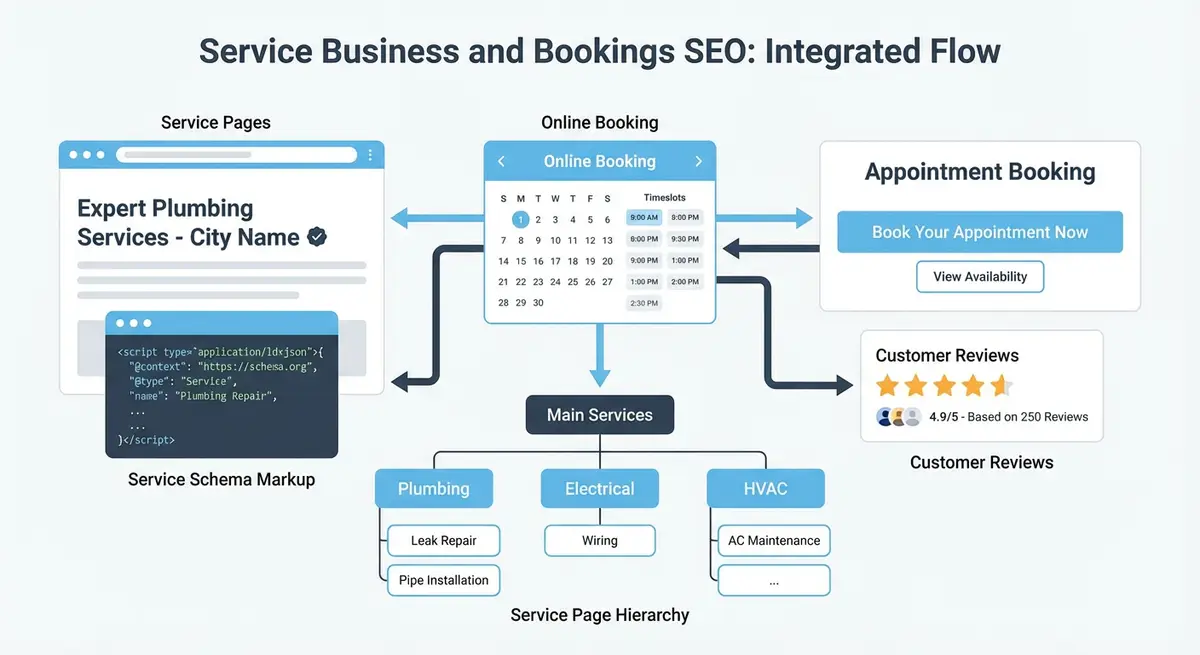
The Pyramid Structure
The ideal structure for multi-service Wix sites is a pyramid. At the top is your main services overview page (targeting your broadest keyword). Below that are category pages grouping related services. At the base are individual service pages targeting specific keywords. Authority flows down from the top, and specificity increases as you go deeper.
URL Structure Example
- /services (overview page: "Therapy Services in Manchester")
- /services/massage-therapy (category: "Massage Therapy Services")
- /services/massage-therapy/deep-tissue-massage (individual service page)
- /services/massage-therapy/sports-massage (individual service page)
- /services/counselling (category: "Counselling Services")
- /services/counselling/cbt-therapy (individual service page)
Internal Linking Between Service Pages
Essential Resources
- Wix Bookings Help Centre: Official Wix Bookings documentation and setup guides
- Google Business Profile Help: Manage your business listing for local search visibility
- Schema.org Service Type: Service schema reference for structured data markup
- Google Search Console: Monitor your site performance and indexing in Google Search
Every individual service page should link up to its category page and across to related services. The category page should link down to all its services and up to the main services overview. This creates a clear crawl path and distributes authority throughout your service pages.
How to Build a Service Page Hierarchy on Wix Using Pages and Navigation
How to Build a Service Page Hierarchy on Wix Using Pages and Navigation
- Step 1: In Wix Dashboard > Bookings > Services, group your services by category (e.g. "Massage Therapy", "Facial Treatments", "Body Treatments") so you have a clear structure before building any pages.
- Step 2: Create a parent overview page in Wix Editor for each category: in the Pages panel add a new Blank Page named after the category with a clean URL like /massage-therapy.
- Step 3: On each category overview page add: an H1 with the category keyword, a 300-word introduction to the category, a grid of service cards each linking to the individual Wix Bookings service page, and an FAQ section targeting category-level questions.
- Step 4: Go to your main navigation in Wix Editor > Menus & Pages and add each category overview page as a top-level menu item with the individual service pages as dropdown submenu items.
- Step 5: Add breadcrumb navigation to each service page using a Wix text element at the top of the page showing Home > Category > Service Name with internal links on each breadcrumb segment.
- Step 6: Add internal links from each category page to the 2-3 most popular services in that category using keyword-rich anchor text such as "book a deep tissue massage in [city]".
- Step 7: Add internal links from each individual service page back up to its parent category page using anchor text like "View all Massage Therapy services".
- Step 8: Submit your updated sitemap to Google Search Console after completing the hierarchy so Google can discover the new URL structure promptly.
- Step 9: Verify the new URL structure by checking that each service page URL follows the pattern /[category]/[service-name] or is clearly linked internally from its category page.
- Step 10: Audit for keyword cannibalisation in Google Search Console by checking which pages appear for each target keyword and consolidating any pages that compete with each other.
Complete How-To Guide
This step-by-step guide walks you through planning, building and optimising a service page hierarchy on your Wix site so that multiple services are logically organised, keyword cannibalisation is eliminated and authority flows correctly through your site architecture.
How to Build a Service Page Hierarchy for a Multi-Service Wix Business
- Step 1: List every service you offer in Wix Bookings and group them into logical categories. For example, a wellness clinic might group services into "Massage Therapy", "Physiotherapy", "Counselling" and "Nutrition". Aim for 3-6 categories depending on how many services you offer.
- Step 2: Perform keyword research for each category and individual service. Assign one primary keyword to each page: broad terms to category pages (e.g., "massage therapy Manchester") and specific terms to individual service pages (e.g., "deep tissue massage Manchester"). Ensure no two pages share the same primary keyword.
- Step 3: Plan your URL structure on paper before building anything. Follow the pyramid pattern: /services as the top-level overview, /services/massage-therapy as a category, and /services/massage-therapy/deep-tissue-massage as individual services. Write out every URL.
- Step 4: Create your main Services overview page in the Wix Editor. This page should target your broadest keyword (e.g., "therapy services Manchester"), provide a brief introduction to your business, and link to each category page with descriptive anchor text and a thumbnail image.
- Step 5: Build each category page as a separate Wix page. Include a 200-300 word introduction about that category of services, list all individual services within the category with short descriptions and "Learn More" links, and add relevant testimonials from clients who used services in that category.
- Step 6: Set the URL slug for each category page in the Wix SEO panel to match your planned hierarchy: /services/massage-therapy, /services/counselling, etc. Wix does not natively support nested URL structures for Bookings pages, so you may need to create these as regular Wix pages that link to the Bookings service pages.
- Step 7: Optimise each individual Wix Bookings service page with its specific primary keyword in the title tag, H1, meta description, first paragraph and image alt text. Ensure the content is distinct from the category page and focuses on the specific service.
- Step 8: Add internal links from each individual service page back up to its parent category page. Use anchor text like "View all Massage Therapy services" or "Back to Counselling Services". This establishes the hierarchical relationship for both users and search engines.
- Step 9: Add cross-links between related services on individual service pages. On the Deep Tissue Massage page, include a "You might also be interested in" section linking to Sports Massage and Swedish Massage. This keeps users engaged and distributes link equity.
- Step 10: Update your Wix site navigation to reflect the hierarchy. Add the main Services page to the primary menu with category pages as dropdown items. Ensure users can reach any individual service page within three clicks from the homepage.
- Step 11: Create breadcrumb navigation on each service page showing the full path: Home > Services > Massage Therapy > Deep Tissue Massage. Add BreadcrumbList schema to each page to help Google understand and display the hierarchy in search results.
- Step 12: Add an XML sitemap priority hint by ensuring your most important service pages have the most internal links pointing to them. While Wix auto-generates your sitemap, the number of internal links signals relative importance to Google.
- Step 13: Audit for keyword cannibalisation using Google Search Console. Go to Performance, filter by query for each of your target keywords, and check which pages are appearing. If two pages compete for the same keyword, consolidate content or differentiate their targeting.
- Step 14: Review and update the hierarchy quarterly as you add or remove services. Every new service needs to be slotted into the correct category, given a unique primary keyword and linked from its category page. Remove pages for discontinued services and set up 301 redirects.
Essential Resources
- Wix Bookings Help Centre: Official guidance on managing multiple services and categories in Wix Bookings
- Google Search Console: Monitor indexing and keyword cannibalisation across service pages
- Schema.org BreadcrumbList: Structured data for breadcrumb navigation in service hierarchies
Was this lesson useful?
It takes 1 minute to tell me. The course is free and I want to keep it that way, and your feedback shows me what is working and helps other people find it.
This lesson on Building a service page hierarchy for multi-service Wix businesses is part of Module 18: Wix Bookings, Hotels & Service Business SEO in The Most Comprehensive Complete Wix SEO Course in the World (2026 Edition). Created by Michael Andrews, a Wix Marketplace Legend Partner with 14 years of hands-on experience, 800 completed Wix SEO projects and 456 verified five-star reviews.