Topical map creation: planning an entire topic cluster before writing a word
Module 5: Content Strategy & Blog SEO | Lesson 55 of 683 | 28 min read
By Michael Andrews, Wix SEO Expert UK
A topical map is a visual plan of every piece of content you need to create to comprehensively cover a subject. Instead of writing random blog posts and hoping they rank, a topical map ensures every article has a purpose, every internal link is planned, and your Wix site builds genuine topical authority in the eyes of Google.
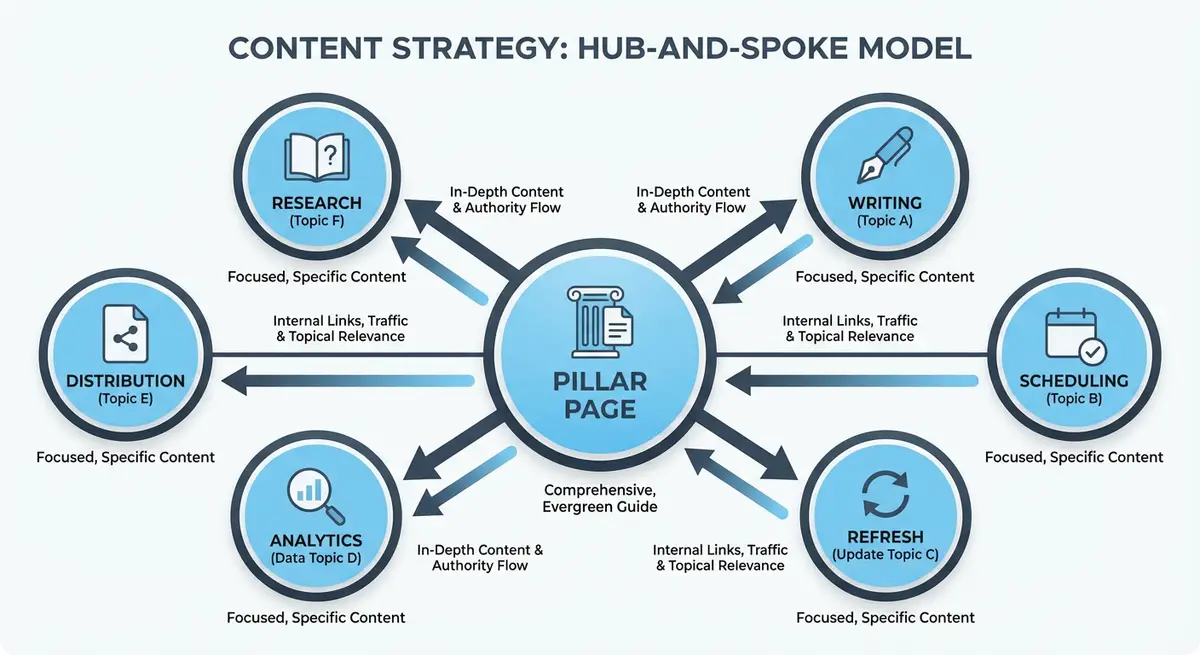
What a Topical Map Looks Like
A topical map starts with your core topic at the centre, branches out into main subtopics, and then breaks each subtopic into specific articles or pages. For example, if your core topic is "Wix SEO", your subtopics might be "Technical SEO on Wix", "Content Strategy for Wix", "Local SEO for Wix Businesses". Each subtopic then has 5-15 specific article topics that you will create over time.
Building Your Topical Map
Step-by-step topical map creation
- Define your core topic: the one subject your Wix site should be the authority on
- Use keyword research to identify all related subtopics and questions
- Group keywords into logical clusters of 5-15 related topics
- Identify the pillar page for each cluster (the broad overview page)
- Plan the supporting articles for each cluster (specific questions and subtopics)
- Map the internal links: every cluster article links to its pillar, and related articles link to each other
- Prioritise creation order: start with pillar pages, then fill in high-volume cluster articles first
Tools for Topical Mapping
- Google Sheets or Airtable: simple spreadsheet with columns for topic, cluster, target keyword, status
- Whimsical or Miro: visual mind mapping for seeing the full topical structure
- AnswerThePublic: finding all the questions people ask about your topic
- Ahrefs Content Explorer: identifying content gaps in your topic coverage
- Google People Also Ask: discovering related questions to include in your map
Complete How-To Guide: Creating a Topical Map for Your Wix Site
Follow this step-by-step guide to plan a complete topic cluster from keyword research through to publishing and ongoing optimisation on your Wix site.
Follow these steps to build a comprehensive topical map
- Choose your core topic (the broad subject your business is an authority on)
- Use Google Keyword Planner or Ubersuggest to find every keyword variation related to your core topic
- Export all keywords into a spreadsheet with search volume and difficulty data
- Group related keywords into logical subtopics (aim for 8-15 subtopics per core topic)
- Identify one pillar page topic that covers the core subject comprehensively
- Assign each subtopic group as a supporting cluster page
- For each cluster page identify a primary keyword and 3-5 secondary keywords
- Map out the internal linking plan showing which cluster pages link to the pillar and to each other
- Prioritise the writing order by starting with the pillar page then high-volume cluster pages
- Create a content brief for each page including target keywords heading structure and word count target
- Build all pages on your Wix site following the briefs and add internal links as planned
- After publishing submit all new URLs to Google Search Console
- Review the topic cluster performance monthly and identify content gaps to fill with additional cluster pages
Essential Resources
- Google Keyword Planner: Research subtopics and keyword clusters for your topical map
- Google Search Console: Monitor cluster page indexing and track topical authority growth
- Screaming Frog: Visualise internal link structure and verify cluster page interlinking
- SEO Fix in a Box: My Wix app. Free to install, it scans your site and shows what needs fixing, and paid plans write the fixes from your own Google searches
Was this lesson useful?
It takes 1 minute to tell me. The course is free and I want to keep it that way, and your feedback shows me what is working and helps other people find it.
This lesson on Topical map creation: planning an entire topic cluster before writing a word is part of Module 5: Content Strategy & Blog SEO in The Most Comprehensive Complete Wix SEO Course in the World (2026 Edition). Created by Michael Andrews, a Wix Marketplace Legend Partner with 14 years of hands-on experience, 800 completed Wix SEO projects and 456 verified five-star reviews.