Creating content pillars: what they are and how to build them
Module 5: Content Strategy & Blog SEO | Lesson 48 of 683 | 55 min read
By Michael Andrews, Wix SEO Expert UK
A content pillar is a comprehensive, authoritative page that covers a broad topic in depth, acting as the central hub that all your related blog posts and supporting content link back to. Well-executed pillar pages rank for competitive head terms that cluster pages alone cannot reach. They are the single most effective page type for building topical authority on a Wix site. This lesson teaches you how to plan, write, optimise, and maintain pillar pages that become the definitive resources in your niche.
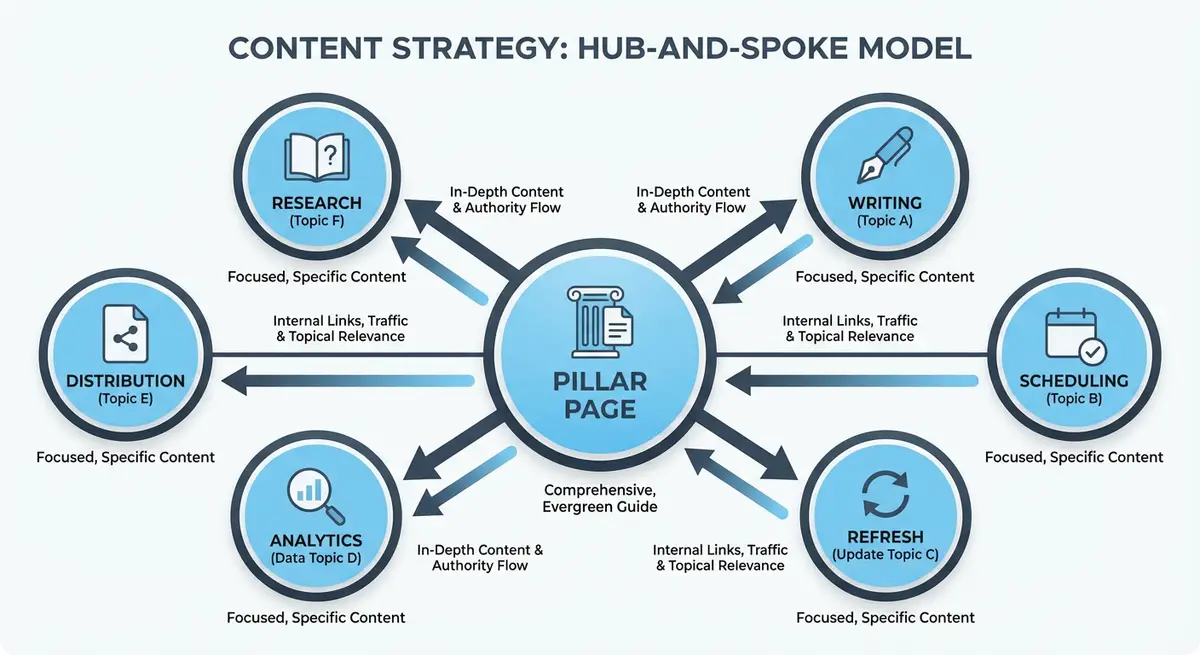
What Makes a Pillar Page Different from a Regular Page
A pillar page is not just a long blog post. It is architecturally different in how it is structured, linked, and maintained.
- Scope: a pillar covers a broad topic comprehensively. A blog post covers a narrow subtopic deeply.
- Length: pillar pages are typically 2,500-5,000+ words. Blog posts are 1,000-2,500 words.
- Target keyword: pillars target competitive head terms. Blog posts target long-tail variations.
- Link role: pillars link OUT to all cluster content. Blog posts link BACK to the pillar.
- Update frequency: pillars are maintained and updated quarterly. Blog posts are updated annually at most.
- Page type: pillars are often standalone Wix pages. Blog posts live in the Wix Blog.
- Navigation position: pillars are often featured in the main menu. Blog posts are not.
- Schema: pillars use WebPage or Article schema with comprehensive metadata. Blog posts use BlogPosting schema.
Types of Pillar Pages
The Ultimate Guide Pillar
A comprehensive guide that covers every aspect of a topic. Example: "The Complete Guide to Wix SEO". This is the most common pillar type. It works best for informational topics where searchers want a single, authoritative resource. Structure it as a long-form guide with a table of contents, 8-12 major sections, and links to deeper content for each section.
The What-Is Pillar
A definitional pillar that explains a concept and its implications. Example: "What Is Local SEO and Why Does It Matter for Small Businesses". Best for topics where the audience needs education before they can engage with more specific content. These tend to be shorter (2,000-3,500 words) but link to extensive supporting content.
The How-To Pillar
A process-oriented pillar that walks through a complete workflow. Example: "How to Build a Wix Website That Ranks on Google: Complete Process". Ideal for practical topics where the audience wants to follow a step-by-step process. Each major step can link to a dedicated spoke page with more detail.
The Resource Hub Pillar
A curated collection of resources, tools, and references on a topic. Example: "Essential SEO Tools and Resources for Wix Users". Works well for topics with many tools, references, or external resources. Can be combined with original commentary and recommendations.
Planning Your First Pillar Page
Pillar page planning process
- Choose a head keyword that represents a broad topic you want to own (search volume 1,000+/month ideal).
- Verify the keyword has informational or commercial investigation intent, not transactional.
- Research the top 10 ranking pages: what topics do they all cover? What do they miss?
- Use "People Also Ask" in Google to find every related question.
- Export related keywords from your keyword research tool.
- Group all keywords into 8-12 logical subtopic sections for the pillar page.
- For each subtopic section, identify a spoke page keyword for a dedicated supporting article.
- Create a detailed outline showing the H1, all H2s, H3s, and key points for each section.
- Identify 3-5 unique value-adds you can include that no competitor has (case studies, data, tools).
- Plan the visual elements: images, diagrams, tables, or embedded tools.
Writing the Pillar Page
The Opening Section (300-500 words)
The opening must immediately establish relevance and authority. Start with the answer to the head keyword query in the first 2-3 sentences (BLUF principle). Follow with context that demonstrates why this topic matters. Include your primary keyword within the first 100 words. End the opening with a table of contents that links to each major section.
Body Sections (200-500 words each)
Each H2 section covers a major subtopic. Write enough to provide real value, but not so much that the pillar duplicates the spoke page. The pillar should give a solid overview; the spoke should give the deep dive. Include a contextual link to the spoke page within each section, inviting readers to "learn more" about the subtopic.
Unique Value Sections
Include 2-3 sections that provide unique value not found on competitor pillar pages. These are your competitive advantage. Examples: an original case study showing results, a proprietary framework or methodology, original research data, an embedded tool or calculator, expert quotes from industry professionals.
The FAQ Section
End the pillar page with an FAQ section targeting "People Also Ask" questions. Implement FAQPage schema for AI citation visibility. Include 5-10 questions with concise, direct answers. Each answer should be 2-4 sentences for featured snippet optimisation.
Creating the Pillar Page on Wix
Building the pillar in the Wix Editor
- Create a new page (not a blog post) in the Wix Editor.
- Set a clean URL slug: /wix-seo-guide rather than /page-1 or auto-generated text.
- Use the Wix text editor to structure content with proper H1, H2, and H3 tags.
- Add anchor IDs to each H2 heading for the table of contents links.
- Insert images with descriptive alt text every 500-800 words.
- Add internal links to every spoke page from within the relevant section.
- Create a sticky sidebar or floating table of contents if your template supports it.
- Add the page to your main navigation or feature it prominently on the homepage.
- Configure the SEO title, meta description, and Open Graph settings.
- Add Article or WebPage schema with author, datePublished, and dateModified.
Optimising Pillar Pages for Featured Snippets
Pillar pages are prime candidates for featured snippets because they cover multiple subtopics with structured content.
- Use H2 headings that match common search queries (e.g., "What is Wix SEO?" as an H2).
- Follow each question-style heading with a 40-60 word direct answer in paragraph form.
- Include numbered and bulleted lists for process-based and list-based queries.
- Add comparison tables where relevant (e.g., "Wix SEO vs WordPress SEO").
- Use definition-style formatting: bold the term, then provide a clear definition.
- Use clear question headings with a direct answer underneath to improve featured snippet eligibility.
Internal Linking Strategy for Pillar Pages
The internal linking to and from your pillar page is what makes the hub and spoke model work.
- Hub to spoke: every section of the pillar should link to its corresponding spoke page with descriptive anchor text.
- Spoke to hub: every spoke page should link back to the pillar from within the first 3 paragraphs.
- Existing pages to hub: audit your existing content and add links to the pillar from any relevant page.
- Navigation links: add the pillar to your main menu or a prominent submenu.
- Footer links: include the pillar in your footer navigation under a relevant heading.
- Homepage link: feature the pillar on your homepage with a compelling description and CTA.
- Cross-cluster links: link between pillar pages if you have multiple clusters on related topics.
Pillar Page SEO Checklist
- Primary keyword in H1, title tag, meta description, first 100 words, and URL slug.
- Table of contents with anchor links at the top of the page.
- 8-12 H2 sections covering all major subtopics.
- Each H2 section links to a dedicated spoke page.
- At least 3 unique value elements not found on competitor pages.
- FAQ section with 5-10 questions and FAQPage schema.
- Author bio with credentials and E-E-A-T signals.
- Article or WebPage schema with datePublished and dateModified.
- All images compressed and given descriptive alt text.
- Mobile-responsive layout tested on real devices.
- Page added to main navigation and linked from 5+ existing pages.
- URL submitted for indexing in Google Search Console.
Maintaining and Updating Pillar Pages
Pillar pages are living documents. They should be updated quarterly at minimum to maintain ranking relevance.
Quarterly pillar page maintenance
- Check Google Search Console for the pillar's ranking keywords. Are there new keywords you could target with additional sections?
- Update any statistics, data, or examples with current year information.
- Add links to any new spoke pages created since the last update.
- Check all internal and external links for broken URLs.
- Review competitor pillar pages: have they added sections you should also cover?
- Update the dateModified in your schema markup to today's date.
- Add a visible "Last Updated" date near the top of the page.
- Resubmit the URL for indexing in Google Search Console after significant updates.
Common Pillar Page Mistakes
- Writing 10,000 words when 3,000 would cover the topic. Pillars should be comprehensive, not exhaustive.
- Duplicating spoke content in the pillar. The pillar overview should tease the topic; the spoke should go deep.
- Not linking to spoke pages from within the body content. A list of links at the bottom is not enough.
- Creating a pillar for a topic you only have 2-3 spoke pages for. Wait until you have at least 5 spokes planned.
- Choosing a topic that is too narrow for a pillar. "How to Write a Wix Title Tag" is a spoke, not a pillar.
- Publishing the pillar and never updating it. Pillar pages need quarterly maintenance.
- Using a blog post URL for the pillar instead of a standalone page URL.
Essential Tools for This Lesson
- Surfer SEO: Analyse top-ranking pillar pages for content structure and keyword recommendations
- Clearscope: Content optimisation tool that ensures your pillar covers all relevant subtopics
- MarketMuse: AI-powered topic modelling to identify content gaps in your pillar page
- Google Search Console: Track keyword rankings and discover new subtopics your pillar ranks for
- Screaming Frog SEO Spider: Verify all internal links between pillar and cluster pages are working
- SEO Fix in a Box: My Wix app. Free to install, it scans your site and shows what needs fixing, and paid plans write the fixes from your own Google searches
Was this lesson useful?
It takes 1 minute to tell me. The course is free and I want to keep it that way, and your feedback shows me what is working and helps other people find it.
This lesson on Creating content pillars: what they are and how to build them is part of Module 5: Content Strategy & Blog SEO in The Most Comprehensive Complete Wix SEO Course in the World (2026 Edition). Created by Michael Andrews, a Wix Marketplace Legend Partner with 14 years of hands-on experience, 800 completed Wix SEO projects and 456 verified five-star reviews.