How to set up a Wix Blog for SEO: the complete step-by-step guide
Module 5: Content Strategy & Blog SEO | Lesson 51 of 683 | 38 min read
By Michael Andrews, Wix SEO Expert UK
The Wix Blog is one of the most powerful built-in tools for driving organic traffic to your website, but only if it is set up correctly from the start. Most Wix users add the blog app and start publishing immediately without configuring the dozens of settings that determine how Google crawls, indexes and ranks their content. This lesson walks you through every single setup step so that every blog post you publish has the strongest possible SEO foundation.
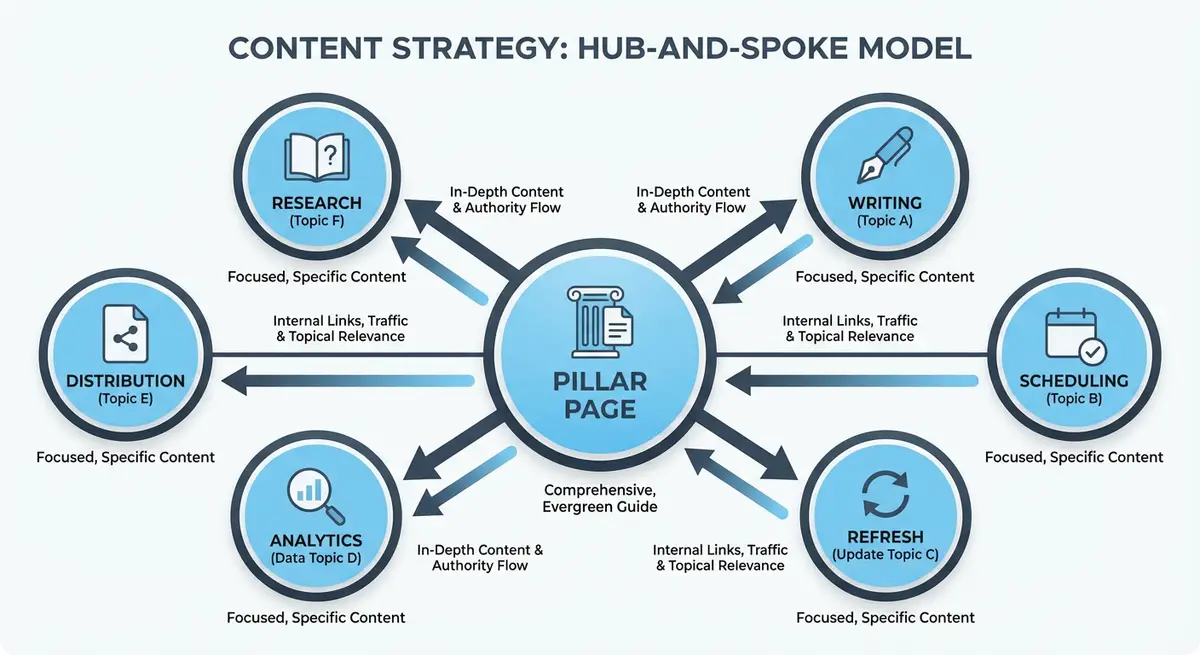
Adding the Wix Blog App to Your Site
The Wix Blog is a free, built-in application available from the Wix App Market. If your site does not already have a blog, you can add it directly from the Wix Editor or Wix Studio Editor. Go to Add Apps, search for Wix Blog, and click Add to Site. Once installed, you will see a Blog section appear in your site dashboard and a new Blog page added to your site pages.
Installing the Wix Blog app
- Open your Wix Editor and click Add Apps in the left sidebar (or go to Wix App Market from your dashboard)
- Search for "Wix Blog" and click the official Wix Blog app by Wix
- Click Add to Site and wait for the installation to complete
- Navigate to your site Dashboard and confirm the Blog section appears in the left menu
- Check your site pages: a Blog page should now be listed, rename it if needed to match your navigation structure
Configuring Your Blog URL Structure
The URL structure of your blog posts is one of the most important SEO decisions you make during setup. Wix defaults to /blog/post-title-as-slug, which is the correct structure. However, you must actively manage your post slugs rather than accepting the auto-generated defaults, which can be too long and contain unnecessary words.
- Keep blog post slugs to 3-6 words maximum, containing your primary keyword
- Remove stop words like "the", "a", "and", "is", "how", "to" from slugs where they add no meaning
- Use hyphens to separate words, never underscores or spaces
- Never change a published blog post slug unless you set up a 301 redirect from the old URL
- Plan your slug before publishing: it is much easier to get it right the first time than to redirect later
Setting Up Blog Categories for SEO
Blog categories are how you organise your content into logical topic groups. For SEO, categories serve two critical purposes: they create navigable category archive pages that can rank in their own right, and they help Google understand the topical structure of your site. Getting categories right from the start prevents messy restructuring later.
Creating SEO-friendly blog categories
- Plan your categories around your core service areas or topic clusters before creating a single post
- Limit yourself to 4-8 categories maximum: too many categories spread your content too thin and create archive pages with only one or two posts each
- Use keyword-rich category names that match how people actually search (e.g., "Kitchen Renovation Ideas" not "Kitchens")
- Write a unique, keyword-optimised description for each category: this appears on the category archive page and is indexed by Google
- Ensure every blog post is assigned to at least one category: uncategorised posts float without topical context
- Do not assign a single post to more than two categories: this dilutes the topical focus and can create near-duplicate archive pages
Using Blog Tags Without Creating SEO Problems
Tags are the secondary organisational layer after categories. Used correctly, they create useful cross-references between related posts. Used incorrectly, they create dozens of thin, low-value archive pages that waste crawl budget and dilute your site authority. Most Wix bloggers create far too many tags.
- Use tags for specific subtopics that cross multiple categories
- Limit yourself to 3-5 tags per post maximum
- Reuse existing tags rather than creating new ones for every post
- Aim for each tag to have at least 3 posts associated with it before creating it
- Review and consolidate tags quarterly: merge similar tags and delete tags with only one post
- Consider setting tag archive pages to noindex if they duplicate your category pages: go to Blog Settings, SEO, and check the tag page indexing options
Creating Author Profiles with E-E-A-T Signals
Google places significant weight on who writes content, especially for topics that affect health, finances, safety or wellbeing. Your Wix Blog author profile is your opportunity to demonstrate Experience, Expertise, Authoritativeness and Trustworthiness. A strong author profile helps every post you publish rank better.
Setting up an optimised author profile
- Go to Blog in your Wix Dashboard, then Settings, then Writers
- Click your author name to edit your profile
- Upload a professional headshot: real photos outperform logos or avatars for E-E-A-T
- Write a bio of 100-200 words that includes your qualifications, years of experience, notable achievements and areas of expertise
- Include specific credentials and certifications relevant to your blog topics
- Add links to your professional social profiles (LinkedIn is the most valuable for E-E-A-T)
- If multiple people write for the blog, create a separate author profile for each with their individual credentials
Featured Images and Open Graph Settings
Every blog post needs a high-quality featured image. This image appears at the top of the post, in the blog feed, in social media shares and in Google Discover. The featured image is also automatically used as the Open Graph image for social sharing unless you override it.
- Use landscape images with a minimum resolution of 1200x630 pixels for optimal display across all platforms
- Compress images before uploading: use WebP format where possible, targeting under 100KB for blog featured images
- Write descriptive alt text for every featured image that includes relevant keywords naturally
- Avoid generic stock photos that add no value: use original images, screenshots, diagrams or illustrations where possible
- Set a custom Open Graph title and description for every post in Wix SEO settings if the default title is too long or not compelling enough for social sharing
- Test how your posts appear when shared by using the Facebook Sharing Debugger and Twitter Card Validator after publishing
Configuring Wix Blog SEO Patterns
Wix SEO Patterns let you set default title tag and meta description templates for all blog posts. This ensures every post has an SEO-optimised title and description even if you forget to write a custom one. Set your patterns as a safety net, then override them with custom meta tags for your most important posts.
Setting up Blog SEO Patterns
- Go to your Wix Dashboard, then SEO Tools, then SEO Patterns
- Click on Blog Posts to configure the pattern for individual posts
- Set the title tag pattern to: {post title} | {site name} as a sensible default
- Set the meta description pattern to: {post excerpt} which pulls the first 160 characters of the post
- Click on Blog Categories to configure category archive page patterns
- Set the category title pattern to: {category name} Articles | {site name}
- Save your patterns and verify they appear correctly on a published post using View Page Source
Blog Layout and Design for Core Web Vitals
Your blog layout directly affects Core Web Vitals scores, which Google uses as a ranking factor. A cluttered blog layout with oversized images, excessive widgets and slow-loading embeds will hurt your SEO regardless of how good your content is.
- Choose a clean blog layout with a single-column content area and optional sidebar: avoid multi-column masonry layouts that cause layout shifts
- Set a consistent featured image aspect ratio across all posts to prevent Cumulative Layout Shift
- Limit sidebar widgets to essential items: categories, recent posts, search, and one call-to-action
- Enable lazy loading for blog post images in the blog feed page to improve initial page load speed
- Use Wix native fonts rather than custom uploaded fonts to reduce render-blocking resources
- Keep your blog feed to 6-10 posts per page with pagination rather than infinite scroll, which creates crawling issues
- Test your blog page speed using PageSpeed Insights after setup and before publishing your first post
Enabling Related Posts and Internal Linking
Internal linking between blog posts is one of the most effective on-page SEO tactics, and Wix provides built-in features to automate part of this process. Related posts keep readers on your site longer, reduce bounce rate and distribute link equity across your blog content.
Setting up internal linking features
- Enable the Related Posts widget at the bottom of every blog post in Blog Settings
- Configure Related Posts to show 3-4 posts from the same category for maximum topical relevance
- Add manual internal links within the body text of every blog post: link to at least 2-3 other relevant posts or pages
- Link from blog posts to your key service or product pages where naturally relevant
- Link from your service or product pages back to relevant blog posts to create two-way linking
- Use descriptive anchor text for internal links, not "click here" or "read more"
RSS Feed and Blog Syndication Setup
The Wix Blog automatically generates an RSS feed at /blog-feed.xml. This feed allows your content to be syndicated to feed readers, email marketing platforms and content aggregators. For SEO, the RSS feed also helps search engines discover new content faster.
- Verify your RSS feed is working by visiting yourdomain.com/blog-feed.xml in a browser
- Submit your RSS feed URL to Google Search Console via the Sitemaps section for faster content discovery
- Connect your RSS feed to your email marketing platform to automatically notify subscribers of new posts
- If you syndicate content to other platforms like Medium or LinkedIn, always publish on your Wix blog first and wait at least 48 hours before republishing elsewhere, and always include a canonical link back to the original
Pre-Publishing SEO Checklist for Every Post
Before hitting publish on any blog post, run through this checklist to ensure every SEO element is in place. Building this habit into your publishing workflow means you never miss a critical optimisation step.
Blog post pre-publish checklist
- Custom slug is 3-6 words containing the primary keyword
- Title tag is written (or the SEO Pattern default is acceptable) and under 60 characters
- Meta description is written (or the SEO Pattern default is acceptable) and under 155 characters
- Featured image is uploaded, compressed, and has descriptive alt text
- Post is assigned to the correct category (one or two maximum)
- Relevant tags are applied (three to five maximum, using existing tags)
- At least 2-3 internal links are included in the body text pointing to other relevant pages
- Headings use a logical H2, H3 hierarchy and include keyword variations naturally
- Author profile is assigned and author bio is complete with E-E-A-T credentials
- Open Graph and social sharing preview looks correct
A Wix Blog that is set up correctly from day one gives every post you publish the best possible chance of ranking. Spend the time on proper setup once, and you will save hundreds of hours fixing SEO issues later. The setup is the foundation; the content you publish on top of it determines how high you rank.
Complete How-To Guide: Setting Up a Wix Blog from Scratch for Maximum SEO
This comprehensive guide walks you through every step of setting up a fully SEO-optimised Wix Blog from the moment you install the app to the point where your blog is ready to attract organic traffic. Follow these steps in order to build the strongest possible foundation before publishing your first post.
Follow these steps to set up a Wix Blog with maximum SEO from day one
- Navigate to your Wix Dashboard and add the Blog app to your site. Click Add Apps in the left sidebar of the Wix Editor, search for "Wix Blog," and click Add to Site. Once installed, verify the Blog section appears in your dashboard sidebar and a Blog page has been added to your site pages at the /blog URL path.
- Configure your blog URL structure in Settings. Go to Blog Settings and confirm that post URLs follow the /blog/post-slug format. Plan a slug naming convention using 3-6 keyword-rich words separated by hyphens. Document this convention so all future authors follow the same approach consistently.
- Create SEO-friendly categories, limiting yourself to 5-8 total. Plan categories around your core topic clusters before creating any posts. Use keyword-rich category names that match how your audience searches. Write a unique, keyword-optimised description of 100-150 words for each category, as these descriptions appear on category archive pages and are indexed by Google.
- Set up author profiles with professional headshots and detailed bios. Go to Blog Settings, then Writers, and edit each author profile. Upload a real professional photo, write a bio of 100-200 words including qualifications, certifications, years of experience, and areas of expertise. Add links to LinkedIn and other professional profiles. If multiple people will write for the blog, create individual profiles for each.
- Configure SEO Patterns for automatic title tags and meta descriptions. Navigate to your Wix Dashboard, then SEO Tools, then SEO Patterns. Set the Blog Posts title pattern to {post title} | {site name} and the meta description pattern to {post excerpt}. Configure Blog Categories patterns to {category name} Articles | {site name}. These patterns ensure every page has SEO metadata even if you forget to write custom tags.
- Set default Open Graph and social sharing images. Upload a branded default social sharing image at 1200x630 pixels that will be used whenever a blog post is shared on social media without a custom image. Configure this in your Blog Settings or Wix SEO settings. Test the defaults using the Facebook Sharing Debugger to confirm they display correctly.
- Create your first optimised blog post with all SEO elements in place. Write a custom title tag under 60 characters containing your primary keyword. Craft a compelling meta description under 155 characters. Structure content with a logical H2 and H3 heading hierarchy. Add a compressed featured image with descriptive alt text. Include at least 2-3 internal links to other pages on your site. Assign the post to the correct category and add 3-5 relevant tags.
- Configure the Related Posts widget at the bottom of every blog post. Go to Blog Settings and enable Related Posts. Set it to display 3-4 posts from the same category for maximum topical relevance. This keeps readers engaged, reduces bounce rate, and distributes link equity across your blog content automatically.
- Set up your blog RSS feed and verify it is working. Visit yourdomain.com/blog-feed.xml in your browser to confirm the feed is active. The Wix Blog generates this feed automatically. You will use this feed URL in the next step and can also connect it to your email marketing platform for automated new-post notifications to subscribers.
- Submit your blog sitemap to Google Search Console. Log into Google Search Console, go to the Sitemaps section, and submit your blog sitemap URL (typically yourdomain.com/sitemap.xml, which includes blog pages). Also submit the blog RSS feed URL as an additional sitemap. This ensures Google discovers and crawls your new blog content as quickly as possible.
- Install social sharing buttons on your blog posts. Use the Wix App Market to add a social sharing widget such as Social Media Icons or a dedicated share bar. Position share buttons both at the top and bottom of each post to maximise sharing opportunities. Configure the buttons to include at least Facebook, X (Twitter), LinkedIn, and a copy-link option.
- Set up blog email subscription functionality. Add a subscription form or widget to your blog sidebar or post footer using the Wix Forms app or a third-party email integration like Mailchimp. Offer a clear value proposition for subscribing such as "Get new SEO tips delivered weekly." Connect the subscription form to your email marketing platform so new subscribers are automatically added to your blog notification list.
- Verify all blog pages are indexable in Google Search Console. Use the URL Inspection tool to test your blog homepage, at least one category archive page, your author archive page, and your first published post. Confirm that each page shows "URL is on Google" or "URL can be indexed." Check that no blog pages are accidentally blocked by robots.txt or noindex tags. Fix any indexing issues before promoting your blog.
If you use Wix's AI tools to draft posts, read editing Wix AI blog posts to rank before you publish.
Essential Resources
- Google Search Console: Submit blog sitemaps and monitor indexing of all blog pages
- Google Rich Results Test: Validate Article schema on your Wix blog posts
- Google PageSpeed Insights: Test blog page performance and Core Web Vitals compliance
- Wix SEO Help Centre: Official Wix documentation on blog SEO settings and configuration
Was this lesson useful?
It takes 1 minute to tell me. The course is free and I want to keep it that way, and your feedback shows me what is working and helps other people find it.
This lesson on How to set up a Wix Blog for SEO: the complete step-by-step guide is part of Module 5: Content Strategy & Blog SEO in The Most Comprehensive Complete Wix SEO Course in the World (2026 Edition). Created by Michael Andrews, a Wix Marketplace Legend Partner with 14 years of hands-on experience, 800 completed Wix SEO projects and 456 verified five-star reviews.