Wix Blog SEO: strategy, frequency and what to write about
Module 5: Content Strategy & Blog SEO | Lesson 52 of 683 | 55 min read
By Michael Andrews, Wix SEO Expert UK
The Wix Blog is one of the most underutilised SEO assets on Wix sites. When used with a clear strategy, it can drive significant organic traffic, establish topical authority, and attract backlinks. Most Wix blogs fail because they post randomly without a keyword-driven strategy, publish inconsistently, or write about topics nobody is searching for. This lesson gives you the complete framework for planning, scheduling, and executing a blog content strategy that builds compounding organic traffic over 12 months and beyond.
Why Most Wix Blogs Fail at SEO
- No keyword research: writing about topics that interest the business owner but nobody searches for.
- No content calendar: publishing sporadically without a plan leads to 3-month gaps.
- No internal linking strategy: blog posts exist in isolation without connecting to service pages.
- Wrong format: writing 300-word news updates when Google rewards 1,500+ word comprehensive guides.
- No promotion: publishing and hoping Google finds it without any distribution strategy.
- Topic cannibalisation: writing multiple posts targeting the same keyword, competing against yourself.
- No analytics review: never checking which posts perform and doubling down on what works.
The Blog Content Strategy Framework
A successful blog strategy has four pillars: keyword-driven topic selection, consistent publishing cadence, strategic internal linking, and performance-based iteration.
Pillar 1: Keyword-Driven Topic Selection
Every blog post should target a specific keyword with provable search demand. The keyword determines the topic, the format, and the length. Never write a blog post without first identifying its target keyword.
Finding blog post keywords
- Start with your service pages. Each service should have 5-10 supporting blog posts.
- Use Google Keyword Planner, Ubersuggest, or Ahrefs to find informational keywords related to each service.
- Focus on long-tail keywords (3-5 words) with lower competition. "How to improve Wix SEO for small business" is easier to rank for than "SEO".
- Check "People Also Ask" for your service keywords. Each question is a potential blog post.
- Look at competitor blogs: what topics drive their traffic? (Use Ahrefs Content Explorer or similar.)
- Identify seasonal keywords: "Christmas marketing ideas for small business" peaks in October-November.
- Create a master keyword list with search volume, difficulty, and assigned blog post topic.
Pillar 2: Consistent Publishing Cadence
Publishing frequency matters less than publishing consistency. One genuinely excellent post per week is far better than five thin posts per week. For most small Wix business sites, the following cadences work:
- Minimum viable: 2 posts per month. Enough to build a content library over time.
- Recommended: 1 post per week. Builds topical authority steadily.
- Aggressive: 2-3 posts per week. Only if you can maintain quality at this pace.
- The key is consistency. Publishing 4 posts in one week then nothing for 2 months is worse than 1 post every 2 weeks.
- Batch your content creation: write 4 posts in one session and schedule them across the month.
Pillar 3: Strategic Internal Linking
Every blog post should link to at least 2-3 service pages and 2-3 other blog posts. This creates a web of topical relevance that strengthens every page in the cluster.
- Link from each blog post to the most relevant service page using descriptive anchor text.
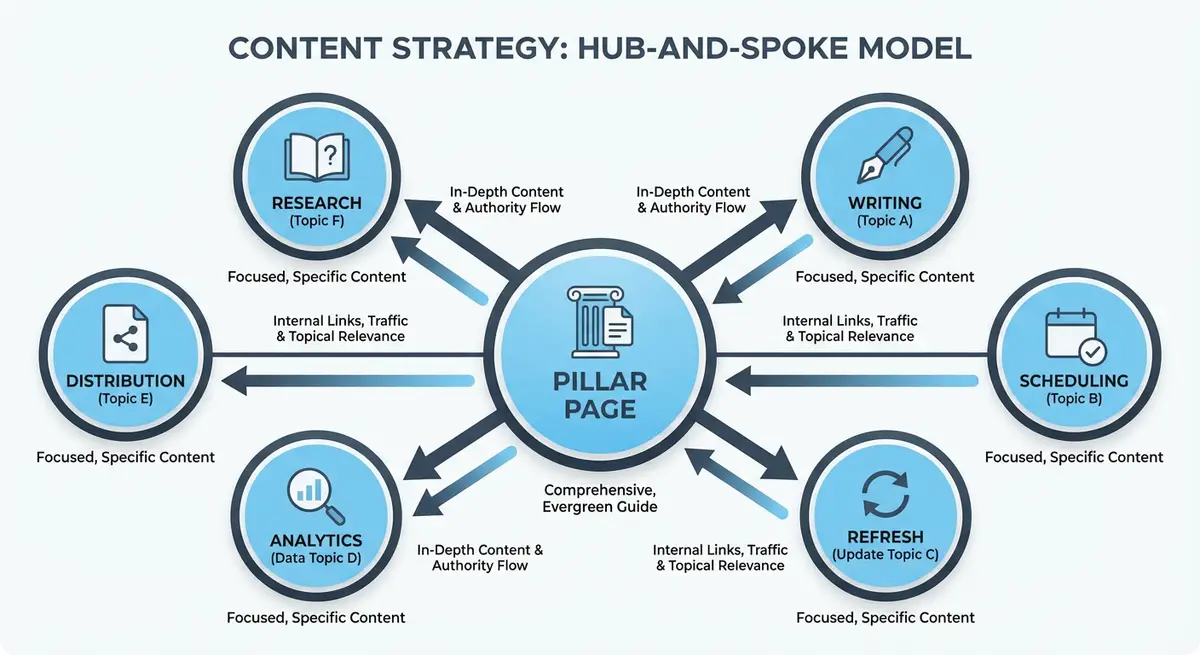
- Link from blog posts to the hub/pillar page in the same topic cluster.
- Cross-link between related blog posts.
- After publishing a new post, go back to 2-3 existing posts and add links to the new one.
- Link from service pages to relevant blog posts where natural (e.g., "Learn more about our process in our blog post on [topic]").
Pillar 4: Performance-Based Iteration
Review blog performance monthly in Google Search Console. Identify what is working and do more of it.
Monthly blog performance review
- Check the Performance report in GSC filtered to blog URLs only.
- Identify top posts by impressions and clicks.
- Find posts with high impressions but low clicks. These need better title tags and meta descriptions.
- Find posts with declining traffic. These need content refreshes.
- Identify posts ranking positions 5-15. These are "striking distance" keywords that may rank higher with content improvements.
- Double down on successful topics: if one post about "Wix speed optimisation" performs well, write 3 more supporting posts.
Building a 12-Month Blog Content Calendar
Creating your content calendar step by step
- Open your keyword map and identify all keywords assigned to blog posts rather than service pages.
- Group keywords into monthly themes based on seasonality, business priorities, or topic clusters.
- For each month, select 2-4 blog post topics that support your main service pages.
- Create a spreadsheet with columns: Month, Topic, Primary Keyword, Target Word Count, Internal Links To, Status.
- For each topic, write a brief content outline including the H1, 3-5 H2 headings, and key points.
- Set a realistic publishing frequency: 2 posts per month is sustainable for most small businesses.
- Batch your content creation by writing 2-4 posts in one session then scheduling them across the month.
- Before writing each post, check Google for the latest information to ensure freshness.
- After publishing each post, add 2-3 internal links from existing pages and vice versa.
- Share each new post on social media and email within 24 hours of publishing.
- At month's end, review which posts gained the most impressions in GSC.
- At quarter's end, update the calendar based on GSC data, adding new topics and retiring underperforming angles.
Blog Post Types That Drive Traffic
How-To Guides
Step-by-step tutorials targeting "how to" keywords. Example: "How to Add Schema Markup to Wix". These are the highest-performing blog post type for organic traffic because they match strong informational intent and are featured snippet candidates.
List Posts
Numbered lists targeting "best", "top", or number-based keywords. Example: "11 Wix SEO Tips That Actually Work in 2026". Lists are shareable, scannable, and rank well for commercial investigation queries.
Comparison Posts
Head-to-head comparisons targeting "vs" keywords. Example: "Wix vs WordPress for SEO: The Real Comparison". These target high-intent commercial queries and often earn featured snippets.
Case Studies
Detailed breakdowns of real results. Example: "How We Increased Organic Traffic by 300% for a Local Plumber on Wix". Case studies build E-E-A-T, attract backlinks, and support service page conversions.
Ultimate Guides
Comprehensive resources targeting competitive head terms. Example: "The Complete Guide to Wix SEO in 2026". These serve as pillar pages for your content clusters and attract the most backlinks over time.
FAQ Posts
Answers to common questions in your niche. Example: "Is Wix Good for SEO? Everything You Need to Know". FAQ posts target question keywords, earn featured snippets, and can be enhanced with FAQPage schema.
Topic Ideation Methods
Finding blog topics your audience actually searches for
- Google People Also Ask: search your main keywords and note every related question. Each is a blog post.
- AnswerThePublic: enter your topic and get a visual map of every question, comparison, and preposition variation.
- Google Search Console: check the Queries report for keywords you rank for but do not have a dedicated post about.
- Competitor analysis: use Ahrefs or Ubersuggest to see which blog posts drive traffic to competitor sites.
- Customer questions: keep a log of every question clients ask. These are blog post topics.
- Reddit and Quora: search your niche and note the most upvoted questions.
- Google Trends: identify rising topics in your niche for timely content.
- Industry forums and Facebook groups: note recurring questions and pain points.
Blog Post Length by Topic Type
- How-to guides: 1,500-3,000 words. Comprehensive step-by-step coverage.
- List posts: 1,000-2,500 words. Each list item should be substantive, not one-sentence filler.
- Comparison posts: 1,500-2,500 words. Thorough evaluation of both options.
- Case studies: 1,000-2,000 words. Problem, approach, results, with specific data.
- Ultimate guides: 2,500-5,000 words. The definitive resource on the topic.
- FAQ posts: 1,000-2,000 words. 8-15 questions with thorough answers.
- News/opinion posts: 500-1,000 words. Timely, focused, with a clear perspective.
Seasonal Content Planning
Many businesses have seasonal traffic patterns. Plan content 6-8 weeks before the seasonal peak to allow time for indexing and ranking.
- January: New Year planning, goal-setting, "best of" lists for the new year.
- February-March: Spring planning, preparation guides.
- April-May: Summer preparation content.
- June-August: Holiday and summer-specific content.
- September-October: Back-to-school, autumn preparation, early holiday planning.
- November-December: Christmas, Black Friday, year-end reviews, next year predictions.
- Always-on: evergreen content that is relevant year-round should make up 70% of your calendar.
Blog Post Promotion Strategy
Publishing is only half the work. Promoting each post accelerates indexing, drives initial traffic, and builds the engagement signals that Google uses for ranking.
Promoting every blog post
- Share on all social media platforms within 24 hours of publishing.
- Send to your email list with a summary and link to the full post.
- Submit the URL for indexing in Google Search Console.
- Share in relevant LinkedIn or Facebook groups where your audience is active.
- Repurpose key points into social media posts over the following 2 weeks.
- If the post references other businesses or tools, tag them when sharing for potential amplification.
- Add the post to your internal link structure by linking from 2-3 existing pages.
Avoiding Topic Cannibalisation
Topic cannibalisation occurs when multiple pages on your site target the same keyword, causing them to compete against each other in search results.
- Before writing any new post, search your own site (site:yoursite.com keyword) to check for existing content on the topic.
- If you already have a post on the topic, update that existing post rather than creating a new one.
- Each blog post should target a unique primary keyword not targeted by any other page.
- Use your keyword map to ensure no two pages share the same primary keyword.
- If cannibalisation occurs, consolidate the weaker post into the stronger one and 301 redirect.
Essential Tools for This Lesson
- AnswerThePublic: Discover every question people ask about your blog topics
- Google Trends: Identify seasonal trends and rising topics for timely blog content
- Ubersuggest: Free keyword research tool for finding blog post keywords with search volume data
- Google Search Console: Monitor blog performance and find content opportunities from your existing rankings
- Trello or Notion: Project management tool for organising your blog content calendar
Was this lesson useful?
It takes 1 minute to tell me. The course is free and I want to keep it that way, and your feedback shows me what is working and helps other people find it.
This lesson on Wix Blog SEO: strategy, frequency and what to write about is part of Module 5: Content Strategy & Blog SEO in The Most Comprehensive Complete Wix SEO Course in the World (2026 Edition). Created by Michael Andrews, a Wix Marketplace Legend Partner with 14 years of hands-on experience, 800 completed Wix SEO projects and 456 verified five-star reviews.