Ahrefs and SEMrush for Wix users, the essential features
Module 3: Keyword Research Masterclass | Lesson 26 of 683 | 55 min read
By Michael Andrews, Wix SEO Expert UK
Ahrefs and SEMrush are the two most powerful SEO tool suites available. Both have free tiers and trial periods that are genuinely useful. This lesson focuses specifically on the features that deliver the most value for Wix SEO, so you can make the most of a free trial or a limited subscription. Rather than trying to learn every feature (both tools have hundreds), I will show you the exact workflows I use with clients to find high-value keywords, analyse competitors, audit backlink profiles, and track ranking progress. Every workflow is tailored for Wix sites and takes into account the unique strengths and limitations of the Wix platform.
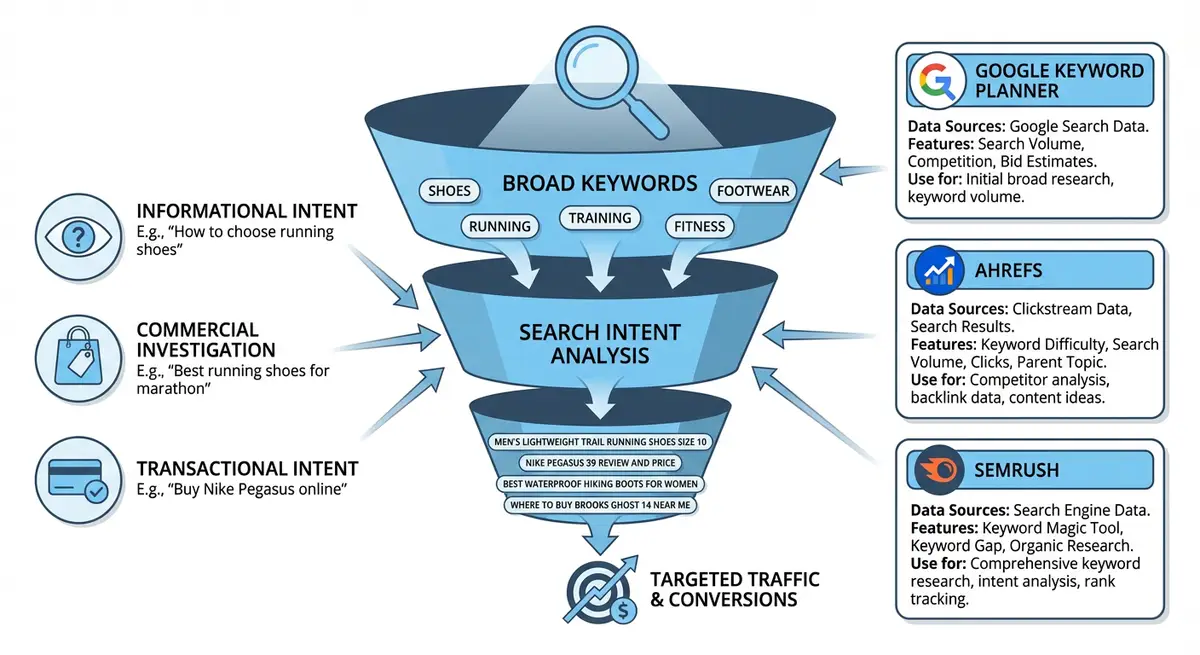
Ahrefs vs SEMrush: Which Should You Choose?
Both tools are excellent, and the best choice depends on your primary needs. Here is an honest comparison based on my experience using both daily.
- AHREFS strengths: Best backlink database in the industry, most accurate keyword difficulty scores, superior Site Explorer for competitor research, excellent Content Explorer for content gap analysis, cleaner interface.
- SEMRUSH strengths: Best keyword research interface (Keyword Magic Tool), superior position tracking with local and device-level granularity, better technical site audit tool, more comprehensive on-page SEO recommendations, better PPC research tools.
- AHREFS free tier: Ahrefs Webmaster Tools gives free access to Site Audit and Site Explorer for verified sites. Limited but useful for basic backlink and keyword data on your own site.
- SEMRUSH free tier: 10 free searches per day, limited data export. Enough for casual research but not for comprehensive projects.
- Pricing: Both start around £99/month. Ahrefs Lite plan is £99/month. SEMrush Pro plan is £129/month. Both offer 7-day trials.
- My recommendation: If you can only afford one, choose Ahrefs for its superior backlink data and keyword difficulty accuracy. If you need rank tracking and site auditing, SEMrush edges ahead.
Ahrefs: The Essential Features for Wix SEO
Keywords Explorer: Finding the Right Keywords
Ahrefs Keywords Explorer is the tool I use most frequently. It provides keyword difficulty (KD), traffic potential (not just volume), global volume, click data, and SERP history. The KD score is particularly valuable because it is based on actual backlink data of ranking pages, making it more reliable than estimates from other tools.
How to use Ahrefs Keywords Explorer effectively
- Go to Ahrefs Keywords Explorer and enter your seed keyword
- Set your target country from the dropdown
- Review the overview: Search Volume shows monthly searches, KD shows difficulty (0-100), Traffic Potential shows the total traffic the top-ranking page gets from all keywords it ranks for (not just the one you searched)
- The Traffic Potential metric is unique to Ahrefs and extremely valuable. A keyword with 100 monthly searches but a Traffic Potential of 5000 means the top page ranks for many related keywords simultaneously.
- Click "Matching terms" for keywords containing your seed keyword. Filter by KD max 20 for quick wins on a new Wix site.
- Click "Related terms" for semantically related keywords that do not necessarily contain your seed keyword. These reveal topical opportunities you might miss.
- Click "Search suggestions" for Google Autocomplete data with Ahrefs metrics attached.
- Click "Questions" for question-based keywords with difficulty and volume data.
- Use the "Also rank for" report: enter a competitor URL and see all keywords the top-ranking pages for your keyword also rank for. This reveals the topical breadth needed to compete.
- Export your filtered results and add them to your master keyword spreadsheet with the Ahrefs KD score.
Understanding Ahrefs Keyword Difficulty (KD)
Ahrefs KD is based on the number of backlinks the top 10 ranking pages have. It estimates how many backlinks from unique websites (referring domains) you need to rank in the top 10. This makes it one of the most actionable difficulty metrics available.
- KD 0-10: You can rank with good on-page SEO alone, no backlinks needed. Perfect for new Wix sites. Target these immediately.
- KD 11-20: A few quality backlinks needed alongside good on-page SEO. Achievable within 3-6 months for most Wix sites.
- KD 21-30: Requires decent content, solid on-page SEO, and 10-20 referring domains. Medium-term target.
- KD 31-50: Competitive space. You need comprehensive content, strong on-page SEO, and 30+ referring domains. Only target if your Wix site has established authority.
- KD 51-70: Very competitive. Dominated by established sites with extensive backlink profiles. Long-term aspirational target.
- KD 71-100: Dominated by major authority sites (Wikipedia, Forbes, government sites). Not realistic for most Wix sites.
Site Explorer: Competitor Research
Ahrefs Site Explorer is the most powerful competitor analysis tool available. Enter any competitor URL and you get their complete organic keyword profile, top-performing pages, backlink data, and traffic history.
How to use Ahrefs Site Explorer for competitor research
- Go to Site Explorer and enter a competitor domain (e.g., competitorsite.com)
- Choose "Exact URL" for homepage analysis or "Domain" for the entire site
- Review the overview: Domain Rating (DR), total backlinks, referring domains, organic keywords, organic traffic estimate
- Click "Top Pages" in the left sidebar. This shows the pages that drive the most organic traffic to the competitor. This is your content roadmap, these are the pages that work in your niche.
- For each top page, click to see which keywords drive traffic to it. Note the primary keyword, secondary keywords, and estimated traffic.
- Click "Organic Keywords" to see every keyword the competitor ranks for. Sort by traffic to see their most valuable keywords.
- Filter to keywords where the competitor ranks 1-3 (their strongest keywords) and keywords where they rank 4-10 (keywords where you might be able to compete).
- Click "Backlinks" to see who links to the competitor. Sort by DR to find the highest-quality backlink sources. These become targets for your own link building.
- Use "New Backlinks" to monitor competitors monthly and spot fresh link building opportunities they are finding.
- Export the competitor keyword list and add it to your gap analysis spreadsheet.
Content Explorer: Finding Proven Content Ideas
Content Explorer is a massive database of web content that you can search to find proven content ideas in your niche. Unlike keyword research (which tells you what people search for), Content Explorer tells you what content performs well (gets traffic, backlinks, and social shares).
How to use Content Explorer for Wix content planning
- Go to Content Explorer and enter a broad topic query (e.g., "wix seo" or "local seo")
- Sort by "Organic traffic" to find content that currently drives the most search traffic
- Filter by "Published" date to see recent content that is ranking well (proving it works in the current algorithm)
- Filter by referring domains (minimum 10) to find content that attracts backlinks naturally
- For each high-performing piece of content, note the topic angle, word count, and referring domain count
- Identify gaps: which topics have successful content from competitors but nothing from your Wix site?
- Create better, more comprehensive versions of successful content on your own Wix blog
- Use the "Highlight unlinked mentions" feature to find sites that mention your brand or topic without linking to you, these are easy outreach targets for backlinks
Ahrefs Free Webmaster Tools
Ahrefs offers free access to Site Audit and limited Site Explorer data for your own verified websites. You need to verify ownership through Google Search Console or by adding a DNS record. Once verified, you get free access to your own site data including backlinks, keywords, and a technical SEO audit.
Setting up Ahrefs Webmaster Tools for your Wix site
- Go to ahrefs.com/webmaster-tools and create a free account
- Add your Wix site URL
- Verify ownership via Google Search Console (easiest method if you already have GSC set up)
- Once verified, run a Site Audit to find technical SEO issues on your Wix site
- Review your organic keywords in the limited Site Explorer view
- Check your backlink profile to see who links to your Wix site
- Set up email alerts for new and lost backlinks
SEMrush: The Essential Features for Wix SEO
Keyword Magic Tool: The Best Keyword Research Interface
SEMrush Keyword Magic Tool is arguably the best keyword research interface available. It generates thousands of related keywords organised by topic clusters, making it easy to identify content opportunities and map keywords to Wix pages.
How to use SEMrush Keyword Magic Tool
- Go to SEMrush Keyword Magic Tool and enter your seed keyword
- Set your target country and database
- Review the results: the left sidebar shows topic clusters (keyword groups). Click any group to see only keywords in that cluster.
- This automatic clustering is unique to SEMrush and saves enormous time. Instead of manually grouping 1000 keywords, SEMrush does it for you.
- Apply filters: KD% max 30 for new Wix sites, Volume minimum 50, exclude irrelevant terms
- Click "Questions" to see only question-format keywords, perfect for blog content and FAQ sections
- Use the "Broad Match" tab for all keywords containing your term, "Phrase Match" for exact phrase, "Exact Match" for the exact keyword, and "Related" for semantically connected terms
- Star keywords you want to track and add them to a keyword list within SEMrush
- Export your filtered keywords and add to your master spreadsheet
- Use the "SERP Features" column to identify keywords where featured snippets, PAA boxes, or video results appear. These features indicate specific optimisation opportunities.
Position Tracking: Monitoring Your Wix Rankings
SEMrush Position Tracking monitors where your Wix site ranks for a set of target keywords. It sends weekly email reports showing position changes, provides visibility scores, and compares your rankings against competitors.
Setting up SEMrush Position Tracking for your Wix site
- Go to SEMrush Position Tracking and create a new project for your Wix domain
- Set your target location (country, state/region, or city) for accurate local ranking data
- Choose your target device type: Mobile (recommended for primary tracking since Google uses mobile-first indexing) and optionally Desktop as a secondary
- Add your target keywords: import from your keyword research spreadsheet or from other SEMrush tools
- Add competitor domains to track alongside your own (up to 20 competitors on the Pro plan)
- Set up weekly email reports to receive automatic ranking updates
- Review the Visibility trend to see your overall ranking trajectory over time
- Check the "Tags" feature to group keywords by topic, page, or priority for organised tracking
- Monitor the "Pages" report to see which Wix pages are ranking and for which keywords
- Check "Featured Snippets" opportunities where your site ranks in positions 1-10 but does not hold the featured snippet
Site Audit: Technical SEO for Wix Sites
SEMrush Site Audit crawls your Wix site and identifies technical SEO issues including broken links, missing meta tags, duplicate content, slow pages, and crawl issues. It prioritises issues by severity and provides fix recommendations.
Running a SEMrush Site Audit on your Wix site
- Go to SEMrush Site Audit and create a new project or select your existing project
- Configure the crawl settings: set crawl scope to your entire domain, enable JavaScript rendering (important for Wix since it uses client-side rendering)
- Set the crawler to respect robots.txt and include URL parameters
- Run the audit and wait for the crawl to complete (may take 10-30 minutes depending on site size)
- Review the Site Health Score: aim for 80+ as a baseline for a well-optimised Wix site
- Check "Errors" first (red), these are critical issues that need immediate fixing
- Then check "Warnings" (orange), these are important but less critical issues
- Common Wix-specific issues: duplicate meta descriptions on paginated pages, missing alt text on images, slow LCP on media-heavy pages
- Use the "Compare Crawls" feature after making fixes to verify improvement
- Schedule automatic weekly crawls to catch new issues as you add content
Keyword Gap Tool: Competitor Comparison
SEMrush Keyword Gap compares your keyword rankings against up to 5 competitors simultaneously. It shows keywords where competitors rank but you do not, keywords you share, and keywords where only you rank.
How to run a keyword gap analysis in SEMrush
- Go to SEMrush Keyword Gap tool
- Enter your Wix domain and up to 4 competitor domains
- Select "Organic Keywords" as the keyword type
- Click "Compare" to run the analysis
- Review the Venn diagram showing keyword overlap between you and competitors
- Click "Missing" to see keywords where ALL competitors rank but you do not. These are your highest priority gaps.
- Click "Weak" to see keywords where you rank lower than all competitors. These are optimisation opportunities.
- Click "Untapped" to see keywords where at least one competitor ranks but you do not.
- Filter results by volume (minimum 50), KD (maximum 40 for achievable targets), and remove branded competitor keywords
- Export the gap keywords and add them to your content planning spreadsheet with priority rankings
Free Trial Strategy: Maximising Value from Both Tools
If you cannot afford an ongoing subscription, here is how to extract maximum value from free trials of both Ahrefs and SEMrush.
How to maximise free trials of Ahrefs and SEMrush
- Sign up for Ahrefs 7-day trial in Month 1
- Day 1: Run Site Explorer on your top 5 competitors. Export their organic keywords, top pages, and backlink profiles.
- Day 2: Use Keywords Explorer to research all your seed keywords. Export all keyword suggestions with KD and volume data.
- Day 3: Run Content Explorer queries for your main topics. Export high-performing content ideas.
- Day 4: Use Competitive Analysis to run a full content gap analysis between your site and competitors.
- Day 5: Audit your own backlink profile. Identify your highest-quality backlinks and any toxic links.
- Day 6: Use Batch Analysis to check Domain Rating and top keywords for 200 competitor/prospect URLs.
- Day 7: Export everything you have not already downloaded. Cancel before the trial ends if needed.
- Sign up for SEMrush 7-day trial in Month 2
- Day 1: Run Keyword Magic Tool for all your seed keywords. Export topic clusters and keyword lists.
- Day 2: Set up Position Tracking for your top 100 keywords and add 5 competitors.
- Day 3: Run a full Site Audit on your Wix site. Export the issues list and fix recommendations.
- Day 4: Use Keyword Gap tool to compare your site against 4 competitors. Export all gap keywords.
- Day 5: Use On-Page SEO Checker for your top 10 pages. Implement the recommendations.
- Day 6: Explore the Backlink Audit tool to find toxic links and disavow opportunities.
- Day 7: Export all reports, tracking data, and audit results. Cancel before the trial ends if needed.
- Between trials, work on implementing the insights and optimisations from each tool.
Moz and Mangools: Affordable Alternatives
Moz Pro
Moz is the originator of Domain Authority (DA), still widely used in the SEO industry. Moz Pro costs £99/month with a 30-day free trial. Its Keyword Explorer provides unique "Priority" scores combining volume, difficulty, and organic CTR. The Link Explorer is good for backlink analysis, though smaller than Ahrefs database.
Mangools (KWFinder)
Mangools is the most affordable professional-grade SEO tool suite at £29/month (annually). KWFinder provides excellent keyword difficulty scores that are particularly accurate for long-tail keywords. It includes SERPChecker for SERP analysis, LinkMiner for backlink checking, and SiteProfiler for domain analysis. For budget-conscious Wix site owners, this is the best value tool available.
Complete How-To Guide: Running Your First Keyword Research Project in Ahrefs or SEMrush
This guide walks you through the exact workflow for using Ahrefs or SEMrush to find high-value keywords for your Wix site, analyse competitor rankings, and identify content gaps. Follow every step for a comprehensive keyword research project.
Follow these steps to complete your first keyword research project in Ahrefs or SEMrush
- Sign up for a free trial or free tier of Ahrefs (ahrefs.com) or SEMrush (semrush.com). Both offer limited free access sufficient for initial research.
- In Ahrefs go to Keywords Explorer (or SEMrush Keyword Magic Tool) and enter your primary service keyword. Set your target country and click Search.
- Review the overview metrics: search volume, keyword difficulty, traffic potential (Ahrefs) or trend data (SEMrush). Note the KD score as your difficulty benchmark.
- Filter results by keyword difficulty (KD under 30 for new sites, under 50 for established sites) and minimum search volume (50+ monthly searches).
- Export the filtered keyword list and add it to your master spreadsheet.
- Repeat for all your seed keywords (aim for 5-10 seed terms covering your main services and topics).
- Use the SERP Overview feature to click into any high-priority keyword and see exactly which pages are ranking, their Domain Rating, word count, and backlink count.
- Switch to Site Explorer (Ahrefs) or Domain Overview (SEMrush) and enter your own Wix site URL to see which keywords you already rank for and at what positions.
- Note your "striking distance" keywords: those ranking positions 4-20 where you are close to page 1 or the top 3. These are your quickest wins.
- Enter your top 3 competitor URLs into Site Explorer one at a time and export their organic keywords and top pages.
- In Ahrefs, use "Top Pages" to identify competitor pages driving the most organic traffic. In SEMrush, use "Top Pages" under Organic Research.
- Use the Content Gap tool (Ahrefs) or Keyword Gap tool (SEMrush) to find keywords your competitors rank for that you do not.
- Sort the gap keywords by traffic potential and filter to KD under 40 to find achievable opportunities.
- Cross-reference gap keywords with your existing Wix pages to identify which pages need optimisation and which new pages need to be created.
- Create a priority list of the top 30 keywords sorted by a combination of traffic potential and low difficulty.
- For each priority keyword, note the top-ranking page word count, format (blog post, service page, etc.), heading structure, and backlink count as benchmarks.
- Add intent classification to each keyword: informational, commercial investigation, transactional, or local.
- Map each priority keyword to an existing Wix page or mark it as "needs new page" in your spreadsheet.
- Set up rank tracking (SEMrush Position Tracking or Ahrefs Rank Tracker) to monitor your priority keywords weekly.
- Schedule a monthly review to check ranking progress, identify new opportunities, and adjust your content plan based on what is working.
Frequently Asked Questions
Is Ahrefs or SEMrush worth the money for a single Wix site?
For a single site, start with free tools and trial periods. If you find that keyword research and competitor analysis become a regular part of your workflow and you need the data frequently, a paid subscription pays for itself through better-targeted content and faster ranking improvements. Mangools at £29/month is a good middle ground.
Can I use Ahrefs/SEMrush data specifically for Wix sites?
Yes. Both tools treat Wix sites identically to any other website. There are no Wix-specific limitations. However, be aware that Wix uses client-side JavaScript rendering, which means some SEMrush Site Audit features may not capture all content unless JavaScript rendering is enabled in the crawl settings.
Which Ahrefs/SEMrush metric matters most for Wix SEO?
Keyword Difficulty (KD) combined with Traffic Potential. KD tells you whether you can realistically rank, and Traffic Potential tells you whether it is worth the effort. A keyword with KD 5 and Traffic Potential of 5000 is a much better target than KD 5 and Traffic Potential of 50.
How do I check if my Wix site has toxic backlinks?
In Ahrefs, go to Site Explorer, enter your domain, and click "Backlinks". Sort by Domain Rating ascending to find the lowest-quality links. Look for links from spam sites, irrelevant foreign-language sites, or link directories. In SEMrush, use the Backlink Audit tool which automatically flags potentially toxic links. Note that Google largely ignores low-quality links now, so disavowing is rarely necessary.
Essential Tools for This Lesson
- SEO Fix in a Box: My Wix app. Free to install, it scans your site and shows what needs fixing, and paid plans write the fixes from your own Google searches
Was this lesson useful?
It takes 1 minute to tell me. The course is free and I want to keep it that way, and your feedback shows me what is working and helps other people find it.
This lesson on Ahrefs and SEMrush for Wix users, the essential features is part of Module 3: Keyword Research Masterclass in The Most Comprehensive Complete Wix SEO Course in the World (2026 Edition). Created by Michael Andrews, a Wix Marketplace Legend Partner with 14 years of hands-on experience, 800 completed Wix SEO projects and 456 verified five-star reviews.