Free keyword tools: Google Keyword Planner, Ubersuggest, AnswerThePublic
Module 3: Keyword Research Masterclass | Lesson 25 of 683 | 55 min read
By Michael Andrews, Wix SEO Expert UK
Paid keyword tools are excellent, but you can build a comprehensive keyword strategy using entirely free tools. In fact, some of the most valuable keyword data comes exclusively from free Google tools that paid tools can only estimate. This lesson walks you through every major free keyword research tool available, shows you exactly how to extract maximum value from each one, and gives you a systematic workflow for combining their data into a master keyword list that rivals what agencies produce with expensive tool subscriptions. By the end of this lesson, you will have a keyword research process that costs nothing but produces professional-grade results for your Wix site.
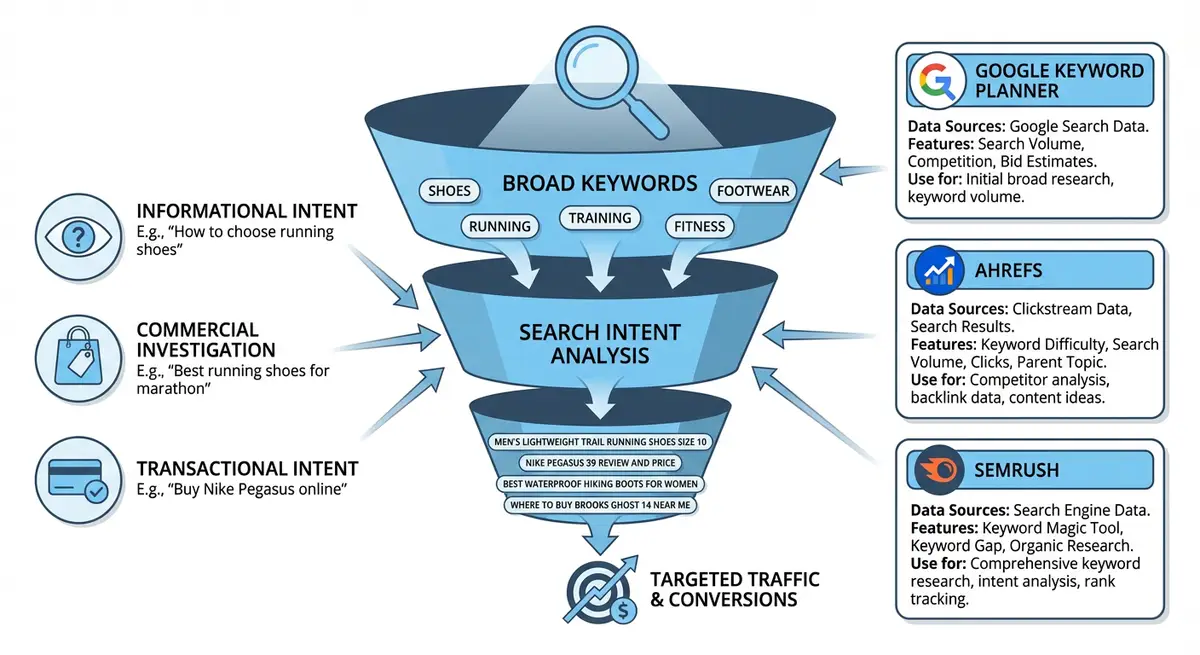
Why Free Tools Are Enough for Most Wix Sites
There is a persistent myth in the SEO industry that you need expensive tools to do effective keyword research. While paid tools like Ahrefs and SEMrush are genuinely excellent, they are not necessary for most Wix site owners, especially those in the early stages of building their organic presence. The truth is that Google provides incredibly powerful keyword data for free through several of its own tools, and combining these with other free options gives you more than enough data to build a winning keyword strategy.
- Google Keyword Planner: Direct keyword volume data from Google itself. No third-party tool can match the accuracy of data from the source.
- Google Search Console: The only tool that shows you ACTUAL keyword data for your site, not estimates. Real impressions, real clicks, real positions.
- Google Autocomplete and Related Searches: Real-time data on what people are actually searching, updated constantly.
- Google Trends: Seasonal patterns, trending topics, and geographic popularity data that no paid tool provides better.
- Most Wix sites target local or niche markets where 100-500 carefully researched keywords are more valuable than 10,000 untargeted ones.
Google Keyword Planner: The Foundation Tool
Google Keyword Planner is free inside Google Ads. Despite being designed for advertisers, it is one of the most powerful SEO keyword research tools available. You do not need to run ads or add billing information to access it. The data comes directly from Google, making it the most authoritative source of search volume information.
Setting Up Google Keyword Planner (Without Spending Money)
How to access Google Keyword Planner for free
- Go to ads.google.com and sign in with your Google account
- If prompted to set up a campaign, look for "Switch to Expert Mode" at the bottom of the page
- Click "Create an account without a campaign" (this option appears after switching to Expert mode)
- Confirm your business information (country, timezone, currency)
- Once in the Google Ads dashboard, click "Tools" in the top menu, then "Keyword Planner" under the Planning section
- You now have full access to Keyword Planner without spending any money or adding billing details
- If you already have a Google Ads account with billing, you will see exact search volumes. Without billing, you see volume ranges (1K-10K). The ranges are still useful for prioritisation.
Using "Discover New Keywords" for Wix SEO
Finding keyword opportunities with Google Keyword Planner
- Click "Discover new keywords" on the Keyword Planner main screen
- Enter 3-5 seed keywords related to your main service or product. For a Wix SEO consultant, these might be: "wix seo", "wix website seo", "wix seo services", "wix seo help"
- Set your target location to the specific country or region you serve. Do not leave it on "All locations" or your data will be diluted with irrelevant global searches.
- Set the language to match your target audience
- Click "Get Results" to generate keyword suggestions
- Sort results by "Avg. monthly searches" (descending) to see the highest-volume opportunities first
- Apply filters: set "Competition" to "Low" or "Medium" to find keywords where you have a realistic chance of ranking
- Look at the "Top of page bid (high range)" column. Higher bids indicate keywords with commercial value, meaning they convert to paying customers.
- Download the full results as a CSV file by clicking the download icon in the top right
- Repeat the process with different seed keywords to expand your list. Try service variations, problem-based seeds ("wix website not ranking"), and location-specific seeds.
Using "Get Search Volume" for Existing Keywords
If you already have a list of keywords (from competitor research, brainstorming, or client conversations), you can upload them to Keyword Planner to get volume and competition data. Click "Get search volume and forecasts", paste or upload your keyword list, and get data for all of them at once. This is faster than checking keywords one by one.
Ubersuggest: Neil Patel's Free Keyword Tool
Ubersuggest offers 3 free searches per day without an account (more with a free account). It provides keyword suggestions, exact search volume estimates, SEO difficulty scores, and content ideas. It is particularly strong for finding long-tail keyword variations and analysing competitor content strategies.
How to Use Ubersuggest Effectively
Step-by-step Ubersuggest keyword research
- Go to neilpatel.com/ubersuggest and enter your primary keyword
- Set your target country from the dropdown (this is crucial for accurate local data)
- Review the keyword overview: search volume, SEO difficulty (SD), paid difficulty (PD), and cost per click (CPC)
- Focus on the SEO Difficulty score. For a new or small Wix site, target keywords with SD below 30. For established sites, SD below 50 is achievable.
- Scroll down to "Keyword Ideas" which shows related keywords, questions, prepositions, and comparisons
- Click the "Related" tab to see semantically related keywords that Google associates with your seed term
- Click the "Questions" tab to find question-based keywords perfect for blog posts and FAQ sections
- Click the "Prepositions" tab for keywords like "seo for wix", "seo on wix", "seo with wix" which reveal different angles on the same topic
- Export each tab as a CSV file
- Click "Content Ideas" in the left menu to see which existing content ranks for your keyword. Note the estimated traffic, backlinks, and social shares for each result.
- Use the competitor domain analysis feature: enter a competitor URL in the search bar and select "Domain Overview" to see their top-ranking keywords
Reading Ubersuggest SEO Difficulty Scores
- 0-20 (Easy): New Wix sites with minimal backlinks can rank for these. Target these first.
- 21-40 (Medium): Achievable with good on-page SEO and a few quality backlinks. Good medium-term targets.
- 41-60 (Hard): Requires strong on-page SEO, multiple quality backlinks, and domain authority. Long-term targets.
- 61-80 (Very Hard): Dominated by established sites with extensive backlink profiles. Only target if your site has significant authority.
- 81-100 (Extremely Hard): Major authority sites only. Do not waste resources targeting these on a small Wix site.
AnswerThePublic: Question-Based Keyword Discovery
AnswerThePublic visualises the questions, prepositions, and comparisons people use around a keyword. It is arguably the best free tool for finding informational and commercial investigation keywords that make excellent blog post topics and FAQ content.
How to Use AnswerThePublic for Wix SEO
Extracting keyword ideas from AnswerThePublic
- Go to answerthepublic.com and enter your core topic keyword (e.g., "wix seo" or "plumber")
- Select your target country and language
- Click "Search" to generate the keyword visualisation (you get 3 free searches per day)
- Review the "Questions" section first. These are broken into Who, What, Where, When, Why, How, Are, Can, Which, and Will categories.
- Each question represents a real search query that people type into Google. These are gold for blog content.
- Review the "Prepositions" section for keywords like "wix seo for beginners", "wix seo without coding", "wix seo near me"
- Review the "Comparisons" section for "wix seo vs wordpress seo", "wix seo vs squarespace seo", "wix seo or shopify seo"
- Review the "Alphabeticals" section for A-Z keyword variations
- Click "Data" view (instead of the visual wheel) for an easier-to-read list format
- Export all results as a CSV file for adding to your master keyword spreadsheet
- Pay special attention to questions with high search intent that you can answer comprehensively. These become your blog content calendar.
Google Search Console: Your Most Valuable Free Tool
Google Search Console is the single most underused free keyword tool. Unlike every other tool that provides estimates, GSC shows you ACTUAL data about how Google treats your Wix site: real impressions, real clicks, real average positions, and real click-through rates. No paid tool can provide this data.
Finding Keyword Opportunities in GSC
How to find keyword gold in Google Search Console
- Open Google Search Console and go to Performance > Search Results
- Set the date range to the last 3 months for reliable data
- Enable all four metrics: Total clicks, Total impressions, Average CTR, Average position
- Click on the "Queries" tab to see all keywords your Wix site appears for in Google
- QUICK WIN 1: Filter for queries with average position 4-10. These are keywords where you are on page 1 but not in the top 3. Small optimisation improvements can push these up significantly.
- QUICK WIN 2: Filter for queries with high impressions but low clicks (low CTR). These keywords show that Google thinks your page is relevant but searchers are not clicking. Rewrite your title tag and meta description to be more compelling.
- QUICK WIN 3: Filter for queries with average position 11-20 (page 2). These are close to page 1 and may need only minor improvements to break through.
- HIDDEN GEMS: Sort by impressions (descending) and look for keywords you did not intentionally target. These reveal opportunities where Google already sees your site as relevant.
- Export the full query list as a CSV file and add to your master keyword spreadsheet
- Cross-reference GSC keywords with your keyword map to identify gaps and opportunities
GSC Page-Level Keyword Analysis
Click on a specific page in the "Pages" tab, then switch to the "Queries" tab to see all keywords that specific page ranks for. This reveals whether a page is properly focused on its primary keyword or is attracting irrelevant queries. If a service page is ranking for informational queries, you have an intent mismatch that needs fixing.
Google Trends: Seasonal and Trending Keyword Data
Google Trends shows you how search interest for a keyword changes over time. This is invaluable for understanding seasonality, identifying trending topics, and comparing the relative popularity of different keywords.
How to Use Google Trends for Wix SEO
Practical Google Trends workflow
- Go to trends.google.com and enter your primary keyword
- Set your target country and timeframe (use "Past 12 months" for seasonality, "Past 5 years" for long-term trends)
- Check if interest is growing, stable, or declining. Growing keywords are higher priority. Declining keywords may not be worth the investment.
- Click "Compare" to add up to 4 additional keywords. This shows relative popularity between keywords. If "wix seo" has much higher interest than "wix search engine optimisation", use "wix seo" as your primary keyword.
- Scroll down to "Interest by sub-region" to see geographic concentration. This helps you target location-specific content.
- Review "Related queries" at the bottom. "Rising" queries show keywords with rapidly growing interest. These are early opportunities before competition catches up.
- Check for seasonal patterns. If your keyword peaks in January (New Year resolutions) and dips in summer, plan content publication to align with the peak.
- Use Google Trends data to schedule your Wix blog content calendar: publish content 4-6 weeks before seasonal peaks to give Google time to index and rank your pages.
Additional Free Keyword Tools
Keyword Surfer (Free Chrome Extension)
Keyword Surfer shows search volumes directly in Google search results as you browse. It also shows related keywords with volumes in a sidebar panel. Install it once and you get free keyword data every time you use Google. It is particularly useful for quick checks while browsing or researching.
Keywords Everywhere (Free Tier)
Keywords Everywhere is a browser extension that shows related keywords, People Also Search For, and trending keywords for any Google search. The free tier shows relative trend data and related keywords without exact volumes. The paid credits are very affordable if you want exact data.
Google Autocomplete Mining
Systematic Google Autocomplete research
- Open Google in an incognito window to avoid personalised suggestions
- Type your seed keyword followed by a space and the letter "a"
- Note all autocomplete suggestions. These are real queries that real people search.
- Repeat with every letter of the alphabet: keyword + b, keyword + c, etc.
- This gives you 26 sets of suggestions (often 8-10 per letter)
- For service-based businesses, also try: keyword + "for", keyword + "near", keyword + "how", keyword + "best"
- Compile all unique suggestions into your master keyword spreadsheet
- This method is entirely free and gives you real-time keyword ideas updated daily by Google
People Also Ask (PAA) Mining
Extracting keywords from People Also Ask boxes
- Search your primary keyword in Google
- Look for the "People Also Ask" box in the search results
- Click on the first question to expand it. Google will add more questions at the bottom.
- Click on each new question to generate even more. You can uncover 20-30+ questions from a single starting search.
- Each PAA question is a real keyword with search volume that Google explicitly associates with your topic
- Use these questions as H2 or H3 headings in your Wix content and as FAQ section questions
- Answer each question directly in the first sentence under its heading to give yourself the best chance of appearing in PAA boxes
AlsoAsked.com
AlsoAsked.com maps People Also Ask questions hierarchically, showing you how questions branch from each other. This reveals the depth of a topic and helps you plan comprehensive content that covers all aspects of a subject. You get 3 free searches per day.
Exploding Topics
Exploding Topics identifies trending topics before they become mainstream. This gives you a first-mover advantage for creating Wix content on emerging topics in your niche. The free tier shows top trending topics across categories.
The Free Keyword Research Master Workflow
Here is the complete workflow for combining all free tools into a professional-grade keyword research process for your Wix site.
Complete How-To Guide: Building a Complete Keyword List Using Free Tools
This guide takes you through the step-by-step process of using Google Keyword Planner, Ubersuggest, AnswerThePublic, Google Search Console, and Google Trends together to build a comprehensive keyword list for your Wix site without spending a penny.
Follow these steps to build a comprehensive free keyword list
- Start with Google Keyword Planner at ads.google.com/keyword-planner (you need a free Google Ads account but do not need to run ads) and click "Discover New Keywords"
- Enter 3-5 seed keywords related to your main service or product, set your target country and language, then click Get Results
- Sort results by Average Monthly Searches and export the full list to a spreadsheet, keeping keywords with 10+ monthly searches
- In Keyword Planner, switch to "Start with a website" and enter your top 3 competitor URLs one at a time to discover keywords based on their content
- Open Ubersuggest at neilpatel.com/ubersuggest and enter your same seed keywords one by one, exporting the keyword suggestions and related keywords from each tab
- In Ubersuggest, click on "Content Ideas" to find keywords that existing top-ranking content is targeting, add relevant ones to your master spreadsheet
- Use the Ubersuggest "Questions" and "Prepositions" tabs to find long-tail variations and question-based keywords
- Go to AnswerThePublic at answerthepublic.com and enter your core topic to generate question-based keywords (who, what, where, when, why, how)
- Export the AnswerThePublic results and add all relevant questions to your spreadsheet as these are excellent blog post topics
- Open Google Search Console (if your site is already live) and export all queries from the Performance report, focusing on keywords with positions 4-20 (quick win opportunities)
- Open Google Trends and enter your top 10 seed keywords to check for seasonal patterns and trending interest. Note any "Rising" related queries as early opportunities.
- Open Google itself and perform systematic autocomplete mining: type your seed keyword + each letter of the alphabet, noting all suggestions
- Click on People Also Ask boxes in Google search results for your top 10 keywords, expanding each question to uncover 20+ additional questions per keyword
- Install the free Keyword Surfer Chrome extension for ongoing keyword data as you browse
- Combine all keyword data from all sources into a single master spreadsheet, removing exact duplicates and sorting by search volume
- Add columns for: Search Intent (informational/commercial/transactional/local), Difficulty (low/medium/high based on what ranks), Assigned Page (existing or needs creation), and Source (which tool found it)
- Categorise every keyword into topic clusters to identify natural content groupings
- Highlight the top 30 highest-opportunity keywords (good search volume + low difficulty + clear intent match) as your immediate priority targets
- Create a content calendar assigning 2-4 keywords to each month based on priority and seasonal timing
Frequently Asked Questions
How accurate are free keyword volume estimates?
Google Keyword Planner gives ranges, not exact numbers (unless you spend on ads). Ubersuggest provides estimates based on clickstream data, typically accurate within 20-30%. For most Wix SEO purposes, relative comparison between keywords matters more than exact volumes. A keyword showing 1000 monthly searches is clearly better than one showing 100, even if the actual numbers are slightly different.
Should I pay for keyword tools or stick with free ones?
If you are managing a single Wix site, free tools are sufficient for 90% of keyword research needs. Consider paid tools when you need: exact keyword difficulty scores, comprehensive backlink analysis, automatic rank tracking, or when you are managing multiple client sites. Start free, and upgrade only when you hit a genuine limitation.
How many keywords should I target on my Wix site?
Quality over quantity. A small Wix site with 10-20 pages should target 10-20 primary keywords (one per page) plus 3-5 secondary keywords per page. A larger site with 50+ pages can target 50+ primary keywords. Never create thin pages just to target more keywords. Each page should provide genuine value.
How often should I do keyword research?
Do a comprehensive keyword research session when you first launch or redesign your Wix site. After that, do a quarterly refresh to catch new opportunities, check for keyword trends, and find gaps. Between major research sessions, use Google Search Console weekly to spot emerging keywords your site is starting to rank for.
Was this lesson useful?
It takes 1 minute to tell me. The course is free and I want to keep it that way, and your feedback shows me what is working and helps other people find it.
This lesson on Free keyword tools: Google Keyword Planner, Ubersuggest, AnswerThePublic is part of Module 3: Keyword Research Masterclass in The Most Comprehensive Complete Wix SEO Course in the World (2026 Edition). Created by Michael Andrews, a Wix Marketplace Legend Partner with 14 years of hands-on experience, 800 completed Wix SEO projects and 456 verified five-star reviews.