Long-tail keyword strategy for faster, easier rankings
Module 3: Keyword Research Masterclass | Lesson 27 of 683 | 50 min read
By Michael Andrews, Wix SEO Expert UK
Most new Wix sites make the same mistake: targeting the most obvious, highest-volume keywords in their niche. "Plumber London" has thousands of monthly searches, but it also has thousands of competing pages from large, established businesses with years of backlinks. Competing for these head terms on a new Wix site is like bringing a knife to a tank battle. Long-tail keywords are your unfair advantage. They give you a realistic, proven path to page 1 rankings that builds traffic, authority, and revenue while your competitors fight over impossible head terms. This lesson teaches you the complete long-tail keyword strategy that I use with every Wix SEO client, from discovery through implementation to scaling.
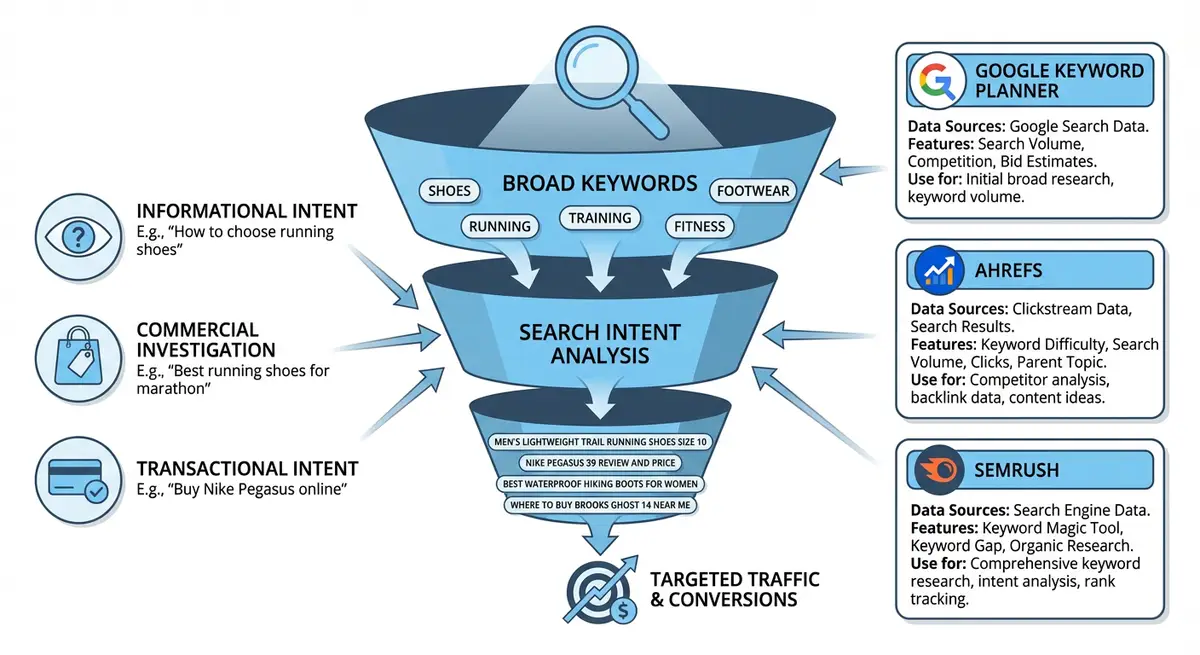
Understanding the Keyword Distribution Curve
Search queries follow a power law distribution. A tiny number of head terms (1-2 words) account for a small percentage of total search volume, while the vast majority of searches are longer, more specific queries. Research from Ahrefs shows that 92% of all keywords get fewer than 10 searches per month, and 70% of all search traffic comes from long-tail queries. This means the opportunity for new Wix sites lies overwhelmingly in long-tail keywords.
- Head terms (1-2 words): "plumber", "seo services". Extremely high volume, extremely high competition, very low conversion rate. Example: 50,000 monthly searches, KD 85+.
- Body terms (2-3 words): "plumber london", "wix seo expert". High volume, high competition, moderate conversion rate. Example: 5,000 monthly searches, KD 50-70.
- Long-tail terms (3+ words): "emergency plumber didsbury manchester", "wix seo expert for small business". Low to moderate volume, low competition, very high conversion rate. Example: 100 monthly searches, KD 5-20.
- The total traffic opportunity from 50 long-tail keywords often exceeds the traffic from one head term, but is 10x easier to achieve.
- Long-tail searchers convert at 2-3x the rate of head term searchers because they know exactly what they want.

Why Long-Tail Keywords Are Perfect for Wix Sites
- Domain Authority Reality: New Wix sites start with zero domain authority. Head terms require significant authority to rank. Long-tail terms often rank based on content quality and relevance alone.
- Faster Rankings: Long-tail keywords have less competition, meaning Google can rank your page faster. Many clients see page 1 rankings within 4-8 weeks for well-targeted long-tail terms.
- Higher Conversion Rate: "Emergency plumber Didsbury open Sunday" converts at 15-20% because the searcher knows exactly what they need and when. "Plumber" converts at under 1% because the intent is vague.
- Content Authority Building: Each long-tail page you create adds topical depth to your Wix site. Google recognises sites with comprehensive coverage of a topic and rewards them with higher authority over time.
- Natural Progression: Starting with long-tail keywords builds the foundation for eventually ranking for more competitive terms. As your site gains authority from long-tail success, medium-tail and eventually head terms become achievable.
- Wix Blog Advantage: The Wix Blog is perfectly suited for long-tail content. Each blog post can target a specific long-tail keyword cluster, building a content library that accumulates traffic over time.
What Makes a Keyword "Long-Tail"
A long-tail keyword is not simply defined by word count. "United States of America" is four words but not a long-tail keyword. True long-tail keywords share these characteristics:
- Specificity: They describe a precise need, service, or question. "Best affordable wix seo expert for therapists UK" is specific.
- Lower Search Volume: Typically under 200 monthly searches, often under 50. This is what scares off competitors and creates your opportunity.
- Lower Competition: Fewer pages specifically optimised for this exact query. Often you can rank by being the only page that perfectly answers the query.
- Higher Intent Clarity: The specificity reveals exactly what the searcher wants. You know their intent, their situation, and what they need.
- Question Format: Many long-tail keywords are questions ("how do I add alt text to wix images"). These are natural blog post topics.
- Modifier-Rich: They often include modifiers like location ("manchester"), qualifier ("for beginners", "affordable"), time ("2025", "open now"), or comparison ("vs", "alternative to").
Seven Methods for Finding Long-Tail Keywords
Method 1: Google Autocomplete Mining
Systematic Google Autocomplete research
- Open Google in an incognito window to avoid personalised suggestions
- Type your core keyword followed by a space and the letter "a"
- Note all autocomplete suggestions (typically 8-10 per letter)
- Continue with b, c, d through to z. This gives you 26 sets of suggestions.
- Also try your keyword with a space BEFORE typing each letter (different position changes suggestions)
- Try adding modifiers before your keyword: "best [keyword]", "how to [keyword]", "[keyword] for", "[keyword] near"
- Each autocomplete suggestion is a real query that real people search frequently enough for Google to suggest it
- Compile all unique suggestions into your master keyword spreadsheet
Method 2: People Also Ask (PAA) Expansion
Mining People Also Ask for long-tail gold
- Search your core keyword in Google and find the People Also Ask box
- Click on the first question to expand it. Google immediately adds 2-3 more questions at the bottom.
- Click each new question. Each click generates more questions.
- Continue clicking until Google stops generating new questions (typically after 20-30 expansions)
- Each PAA question is a validated long-tail keyword with proven search demand
- These questions are the exact words your potential customers are using
- Use these as H2 headings in blog posts and as FAQ section questions with FAQPage schema
- The questions often reveal sub-topics and angles you would never have thought of
Method 3: Google Search Console Discovery
Google Search Console is the most underrated long-tail keyword tool because it shows you ACTUAL queries people use to find your site.
Finding long-tail opportunities in GSC
- Open GSC and go to Performance > Search Results
- Set the date range to 3-6 months for sufficient data
- Sort by impressions (descending) and scan for long-tail queries (3+ words)
- Filter for queries with average position 8-30. These are keywords where Google already thinks your site is relevant but you are not ranking well enough for clicks.
- Filter for queries with high impressions but low clicks. These are keywords where your page appears in results but the title/description is not compelling enough to click.
- Look for queries you did not intentionally target. These "accidental rankings" reveal what Google naturally associates your content with.
- Export all queries with 3+ words and average position 4-30. These are your long-tail optimisation targets.
- For each discovered long-tail keyword, either optimise the existing page or create a new dedicated page.
Method 4: Competitor Blog Analysis
Stealing long-tail ideas from competitors
- Identify 5-10 competitor blogs in your niche
- Browse their blog archives and note every specific, long-tail blog post title
- Enter competitor blog URLs in Ahrefs Site Explorer or Ubersuggest to see which posts drive the most traffic
- Focus on posts with lower traffic volume (50-500 monthly visitors). These are likely targeting long-tail keywords that you can compete for.
- For each interesting competitor post, note the primary keyword, content format, word count, and angle
- Plan to create a more comprehensive, more specific, more up-to-date version on your Wix blog
Method 5: Customer Language Mining
Your customers describe their problems and needs in their own words, which are often long-tail keywords that no keyword tool would suggest.
Extracting keywords from customer language
- Review your email inbox for how clients describe their problems before hiring you
- Check your Google Business Profile reviews and Q&A section for the exact phrases customers use
- Read competitor reviews on Google and Trustpilot for common language patterns
- Browse Quora, Reddit, and Facebook groups in your niche for the questions people ask
- Review your Wix form submissions and chat transcripts for recurring phrases
- Note the exact words people use, not the industry jargon you would use. "My website does not show up on google" is a real keyword, even though you would say "poor search visibility".
- Create content using the EXACT language your customers use
Method 6: Location Modifiers
For local businesses on Wix, adding location modifiers to your core keywords creates hundreds of long-tail variations.
- City + service: "plumber manchester", "seo expert london"
- Neighbourhood + service: "plumber didsbury", "dentist harley street"
- County/region + service: "plumber greater manchester", "seo services west midlands"
- Service + near me: "emergency plumber near me" (optimise your Google Business Profile for these)
- Service + qualifier + location: "affordable wedding photographer surrey", "24 hour locksmith birmingham"
- Each location variation is a separate long-tail keyword that can be targeted with a dedicated Wix page
Method 7: Keyword Modifier Combinations
Generating long-tail keywords with modifiers
- Start with your core service keyword (e.g., "wix seo")
- Add intent modifiers: "how to", "what is", "why", "best", "top", "guide", "tips", "tutorial", "course"
- Add audience modifiers: "for beginners", "for small business", "for photographers", "for dentists", "for ecommerce"
- Add price modifiers: "affordable", "cheap", "cost", "price", "free", "budget"
- Add quality modifiers: "best", "top rated", "professional", "expert", "trusted", "reliable"
- Add time modifiers: "2025", "this year", "near me now", "open today", "urgent"
- Add comparison modifiers: "vs wordpress", "vs squarespace", "alternative to", "compared to"
- Combine multiple modifiers: "affordable wix seo expert for photographers uk"
- Each combination creates a unique long-tail keyword opportunity
Creating Content That Ranks for Long-Tail Keywords on Wix
Finding long-tail keywords is only half the battle. You need to create content that perfectly satisfies the search intent and signals to Google that your page is the best answer.
The Perfect Long-Tail Blog Post Structure
How to structure a Wix blog post for long-tail rankings
- Title Tag: Include the exact long-tail keyword. "How to Add Alt Text to Wix Images (Step-by-Step Guide)"
- H1 Heading: Match or closely mirror the title tag. This confirms the topic for both Google and readers.
- First Paragraph: Answer the query directly in the first 2-3 sentences. Google uses this for featured snippets. Do not bury the answer below introductory fluff.
- Content Depth: Write 1500-2500 words of genuinely helpful content. Cover every aspect of the topic that the searcher might need.
- H2 Sections: Use related long-tail variations as H2 headings to capture multiple related queries with a single page.
- FAQ Section: Add 5-10 related questions from People Also Ask as an FAQ section at the bottom with FAQPage schema markup.
- Internal Links: Link to 3-5 related pages on your Wix site. Link from the long-tail blog post to your relevant service pages.
- Images: Add 2-4 relevant images with descriptive alt text that includes keyword variations.
- Meta Description: Write a compelling 155-character meta description that includes the keyword and entices clicks.
- URL Slug: Use a clean URL slug that includes the primary keyword: /blog/how-to-add-alt-text-wix-images
Content Clustering: Grouping Related Long-Tail Keywords
Do not create a separate page for every single long-tail keyword. Many long-tail keywords are variations of the same query and should be grouped onto a single comprehensive page.
- Group keywords that share the same core intent. "How to add alt text to wix images", "wix image alt text", and "alt text in wix editor" should all be targeted by the same page.
- Use the primary keyword (highest volume) as your H1 and title tag.
- Use related variations as H2 and H3 headings within the page.
- A single comprehensive page targeting 5-10 related long-tail keywords is more powerful than 5-10 thin pages targeting one keyword each.
- Google rewards topical comprehensiveness. Covering all aspects of a topic on one page builds more authority than spreading thin content across multiple pages.
The Compound Effect: How Long-Tail Keywords Build Authority
- Each long-tail page you publish adds a new indexed page to Google, expanding your site footprint.
- Internal links between long-tail pages create a topical cluster that Google recognises as authority.
- Long-tail pages attract natural backlinks because they answer specific questions that other sites want to reference.
- Accumulated traffic from long-tail pages increases overall domain metrics (traffic, engagement, time on site), which indirectly benefits your more competitive pages.
- After 6-12 months of consistent long-tail content, many Wix sites find they can start ranking for medium-tail and even head terms that were previously impossible.
Long-Tail Keyword Prioritisation Framework
Not all long-tail keywords are equal. Use this framework to prioritise which ones to target first.
- Priority 1 (Target Immediately): Low difficulty (KD under 15) + transactional intent + you have an existing page that could be optimised. These are the quickest wins.
- Priority 2 (Target This Month): Low difficulty (KD under 15) + informational intent + you can write a comprehensive blog post. These build traffic and authority fast.
- Priority 3 (Target Next Month): Medium difficulty (KD 15-30) + commercial investigation intent + you can create a comparison or case study page. These capture high-value research traffic.
- Priority 4 (Target This Quarter): Medium difficulty (KD 15-30) + informational intent + requires in-depth research to create comprehensive content. Worth the investment for topical authority.
- Priority 5 (Target Later): Higher difficulty (KD 30+) or very low volume (under 20/month). Add to your backlog and target once you have established authority from Priority 1-4 keywords.
Tracking Long-Tail Keyword Performance
How to monitor your long-tail keyword rankings
- Add all target long-tail keywords to Google Search Console tracking (they appear automatically as your pages get indexed)
- Create a spreadsheet tracking: keyword, target page, publish date, initial position, current position, monthly impressions, monthly clicks
- Check rankings weekly for the first 8 weeks after publishing. Most long-tail content reaches its initial ranking within 4-8 weeks.
- If a page has not entered the top 50 within 8 weeks, it may need content improvements, better on-page optimisation, or internal links from other pages.
- If a page ranks positions 4-10, look for quick optimisation wins: improve the title tag, add more content depth, add an FAQ section, or improve internal linking.
- Track cumulative traffic from all long-tail pages monthly. This total should grow consistently as you publish more content.
- Set a 6-month review point: by this time, your first batch of long-tail content should be contributing meaningful traffic.
Common Long-Tail Mistakes to Avoid
- Creating thin content: A 300-word blog post will not rank even for a low-competition long-tail keyword. Aim for 1500+ words of genuinely useful content.
- Targeting keywords with zero search volume: Verify that real people actually search your target keyword using GSC data, Google Autocomplete, or keyword tools.
- Ignoring intent: Even long-tail keywords have intent. "How to fix leaky tap" is informational. "Emergency plumber sunday near me" is transactional. Match the page type to the intent.
- Cannibalisation: Do not create multiple pages targeting essentially the same keyword. Group related long-tail variations onto a single comprehensive page.
- Not promoting content: Publishing a blog post is not enough. Share it on social media, include it in email newsletters, and build internal links from other pages.
- Giving up too soon: Long-tail SEO is a compound strategy. The first few posts may not generate much traffic, but by your 20th or 30th post, the cumulative effect becomes significant.
Complete How-To Guide: Finding and Targeting Long-Tail Keywords for Your Wix Site
This guide shows you how to discover long-tail keywords with low competition and create Wix content that ranks for them quickly.
Follow these steps to find and target long-tail keywords
- Open Google Search Console and go to Performance. Filter for queries with average position 8-30 to find your "striking distance" long-tail opportunities.
- Export all queries with 3+ words and sort by impressions (descending) to find long-tail keywords where Google already considers your site relevant.
- Open Google in incognito mode and perform systematic autocomplete mining: type your core keyword + space + each letter a-z, noting all suggestions.
- For each core keyword, click through People Also Ask boxes to uncover 20-30 question-based long-tail keywords.
- Use Ubersuggest or Keyword Planner to check search volume and difficulty for your discovered keywords. Filter for keywords with 20+ monthly searches and difficulty under 20.
- Add location modifiers to your core keywords to create location-specific long-tail variations for each area you serve.
- Review customer emails, reviews, and social media questions for the exact language your target audience uses.
- Group related long-tail keywords into clusters that can be targeted by a single comprehensive page (one blog post per cluster, not per keyword).
- For each cluster, create a Wix blog post: use the primary keyword in the H1 and title tag, answer the query directly in the first paragraph, write 1500-2500 words of helpful content.
- Use related long-tail variations as H2 and H3 headings within the blog post.
- Add a FAQ section at the bottom with 5-10 PAA questions and FAQPage schema markup.
- Include 3-5 internal links from the blog post to relevant service pages and other related content on your site.
- Set the URL slug to include the primary keyword, add a compelling meta description, and optimise all image alt text.
- Submit each new page via GSC URL Inspection tool for faster indexing.
- Share each new post on social media and include it in any email newsletters.
- Track rankings weekly in GSC and note which pages reach page 1 within 4-8 weeks.
- After 8 weeks, optimise underperforming pages: improve content depth, add internal links, update title tags, or add more FAQ content.
- Continue publishing 2-4 long-tail content pieces per month for consistent growth.
Frequently Asked Questions
How long should a long-tail keyword blog post be?
Aim for 1500-2500 words as a baseline. The actual length should be determined by what it takes to comprehensively answer the query. Some long-tail questions can be thoroughly answered in 1000 words, while others need 3000+. Check what top-ranking competitors write and aim to be more thorough.
Is there such a thing as too long-tail?
Yes. A keyword with 0-5 monthly searches is likely too specific to justify a dedicated page. Verify that at least some search demand exists using Google Autocomplete (if Google suggests it, people search it) or GSC data. Keywords with under 10 monthly searches should be incorporated as secondary keywords within broader content.
How many long-tail posts should I publish per month?
For most Wix sites, 4-8 long-tail blog posts per month is a sustainable pace that generates meaningful results within 3-6 months. Quality matters more than quantity. Four well-researched, comprehensive posts will outperform eight thin, rushed ones every time.
Can I use long-tail keywords for Wix service pages?
Absolutely. Long-tail keywords with transactional intent should target service pages, not blog posts. "Affordable wix seo audit for small business" is a long-tail keyword that belongs on a service page, not a blog. Match the page type to the keyword intent.
Was this lesson useful?
It takes 1 minute to tell me. The course is free and I want to keep it that way, and your feedback shows me what is working and helps other people find it.
This lesson on Long-tail keyword strategy for faster, easier rankings is part of Module 3: Keyword Research Masterclass in The Most Comprehensive Complete Wix SEO Course in the World (2026 Edition). Created by Michael Andrews, a Wix Marketplace Legend Partner with 14 years of hands-on experience, 800 completed Wix SEO projects and 456 verified five-star reviews.