Wix Events: SEO for event listings, ticketing and promotion pages
Module 19: Wix-Specific Features SEO Masterclass | Lesson 228 of 683 | 25 min read
By Michael Andrews, Wix SEO Expert UK
Wix Events is a built-in app for creating event listings, selling tickets, managing RSVPs, and promoting events. Each event automatically generates its own page on your Wix site, which means every event is an SEO opportunity. Whether you run workshops, conferences, concerts, community meetups, or recurring classes, optimising your event pages can drive significant organic traffic from people searching for events in your area or industry.
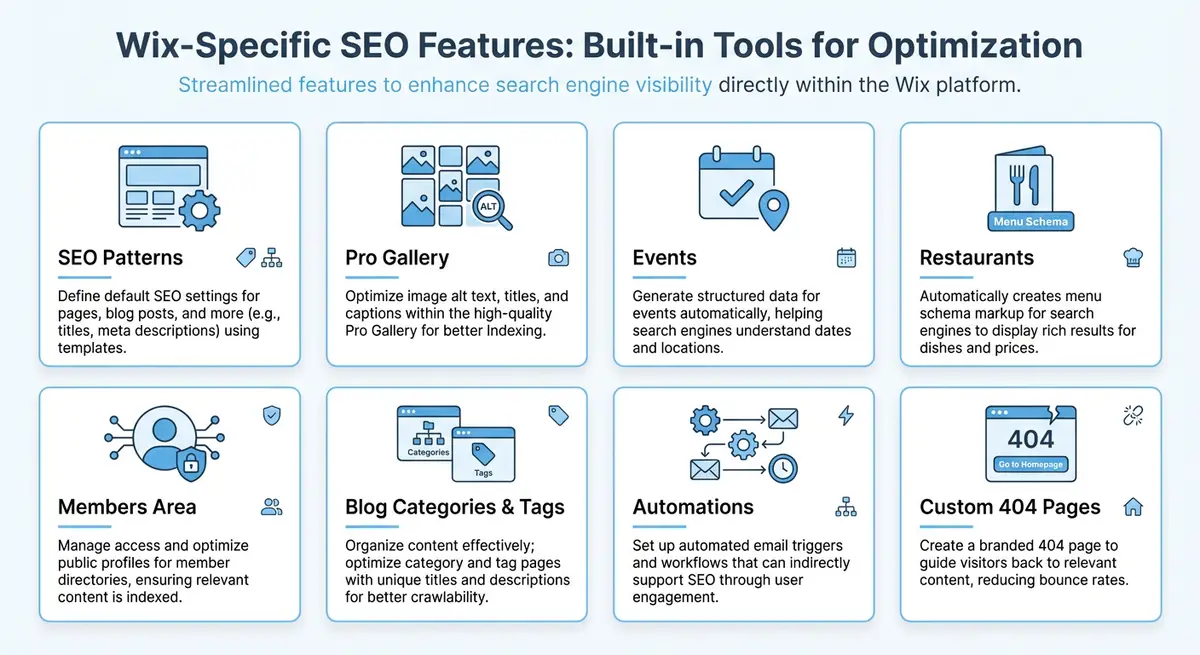
How Wix Events Generates Pages
When you create an event in Wix Events, the system automatically generates a dedicated event page with a URL based on the event title. This page includes the event details, date and time, location, description, ticket options, and an RSVP or purchase form. Wix also creates an Events List page that aggregates all your upcoming events into a single browsable directory. Both the individual event pages and the list page are indexable by search engines.
The automatically generated URL structure follows the pattern yourdomain.com/event-details/event-title. While this is functional, the default URL may include unnecessary words or be longer than ideal. You can customise the URL slug for each event in the event settings to create cleaner, more keyword-focused URLs. Always do this before the event page goes live and gets indexed.
Optimising Event Titles for Search
Your event title serves double duty: it is both the display title on the event page and the default foundation for the meta title and URL slug. Write event titles that include the event type, topic, and location. Instead of "Summer Workshop", use "Summer Photography Workshop London - Beginner Portrait Techniques". This immediately targets long-tail search queries that potential attendees are actually using.
- Include the event type: workshop, conference, seminar, class, concert, meetup, webinar.
- Add the topic or theme: photography, digital marketing, yoga, wine tasting, coding.
- Include the location for in-person events: city name at minimum, neighbourhood or venue name for local targeting.
- Consider adding the date or season for time-sensitive events: "Spring 2026" or "March 2026".
- Keep titles under 60 characters where possible to avoid truncation in search results.
Writing Descriptions That Rank and Convert
The event description field in Wix Events is your primary content area for SEO. Write at least 300-500 words that cover what the event is about, who it is for, what attendees will learn or experience, practical logistics, and speaker or instructor credentials. This text appears on the event page and gives search engines substantial content to index. Structure the description with clear sections using formatting to improve readability.
Incorporate relevant keywords naturally throughout the description. If you are running a "Beginner Yoga Retreat in Cornwall", mention yoga, retreat, Cornwall, beginner-friendly, and related terms like meditation, wellness, mindfulness, and countryside throughout the text. Include answers to common questions: What should attendees bring? Is parking available? What is the refund policy? These details match the informational queries people search for when evaluating events.
Implementing Event Schema Markup
Event schema is one of the most impactful structured data types because it can generate rich results in Google Search, including event date, time, location, ticket price, and availability directly in the search results. Wix Events adds some basic Event schema automatically, but you should verify and enhance it to ensure all fields are populated correctly. Rich event results dramatically increase click-through rates because searchers can see key details without visiting the page.
{
  "@context": "https://schema.org",
  "@type": "Event",
  "name": "Summer Photography Workshop London - Beginner Portrait Techniques",
  "description": "A full-day hands-on photography workshop in central London covering portrait lighting, composition, and post-processing techniques for beginners.",
  "startDate": "2026-07-15T09:00:00+01:00",
  "endDate": "2026-07-15T17:00:00+01:00",
  "eventAttendanceMode": "https://schema.org/OfflineEventAttendanceMode",
  "eventStatus": "https://schema.org/EventScheduled",
  "location": {
    "@type": "Place",
    "name": "The Photography Studio London",
    "address": {
      "@type": "PostalAddress",
      "streetAddress": "42 Rivington Street",
      "addressLocality": "London",
      "postalCode": "EC2A 3LX",
      "addressCountry": "GB"
    }
  },
  "image": "https://yourdomain.com/workshop-image.jpg",
  "performer": {
    "@type": "Person",
    "name": "Sarah Mitchell"
  },
  "organizer": {
    "@type": "Organization",
    "name": "Your Photography School",
    "url": "https://yourdomain.com"
  },
  "offers": {
    "@type": "Offer",
    "url": "https://yourdomain.com/event-details/summer-photography-workshop-london",
    "price": "149.00",
    "priceCurrency": "GBP",
    "availability": "https://schema.org/InStock",
    "validFrom": "2026-01-15"
  }
}Local Event SEO Strategies
For in-person events, local SEO is critical. Ensure your event page mentions the full address, neighbourhood, city, and region. Link from your event page to your Google Business Profile location and vice versa. If you regularly host events at the same venue, create a dedicated venue page on your site that links to all events held there. This builds topical authority around that location and helps Google associate your brand with the area.
Submit your events to local event directories and community calendars. Many local newspapers, council websites, and community organisations maintain event listings that provide both referral traffic and local backlinks. Cross-promote events on your Google Business Profile by using the Events post type, which displays your event directly in your business listing on Google Search and Maps.
Managing Recurring Events and Evergreen Pages
Recurring events present a unique SEO challenge. If you run a weekly yoga class or a monthly networking event, creating a new page for every occurrence dilutes your SEO equity across dozens of thin pages. Instead, create one evergreen page for the recurring event series that you update with the next upcoming date. This concentrates all backlinks, social shares, and ranking signals on a single authoritative URL.
For seasonal or annual events like an annual conference or holiday market, keep the same URL year after year and update the content with new dates, speakers, and details. A URL like /events/annual-digital-marketing-conference that accumulates authority over three or four years will significantly outperform a new URL created each year. Use the previous year content as a foundation and refresh it with current information while maintaining the same page structure.
Event Page Speed and Mobile Optimisation
Event searches have a strong mobile component because people frequently search for events on their phones while on the go. Ensure your Wix event pages load quickly on mobile by keeping event images optimised and avoiding heavy design elements on the event page template. Test your event pages using Google PageSpeed Insights and prioritise fixes for mobile performance metrics, particularly Largest Contentful Paint and Cumulative Layout Shift.
How to Add Event Schema and Optimise Wix Events Pages for Search Visibility
How to Add Event Schema and Optimise Wix Events Pages for Search Visibility
- Step 1: Go to Wix Dashboard > Events and open an existing event or create a new one via Dashboard > Events > New Event.
- Step 2: Verify the event title includes a keyword covering the type of event, location, and year, for example "Yoga Workshop London January 2026" rather than a generic name.
- Step 3: Write a full event description of at least 200 words including: what attendees will learn or experience, who it is for, what to bring, the venue details, and the price.
- Step 4: Add Event JSON-LD schema via Wix Editor > Settings > Advanced > Custom Code. Include @type: Event, name, description, startDate, endDate, location with name and address, organizer with name and url, eventStatus, eventAttendanceMode, and offers with price, availability, and url.
- Step 5: Go back to the Wix Events listing in the Editor and verify the event page URL slug is keyword-rich, for example /events/yoga-workshop-london-january-2026 rather than /events/event-1234.
- Step 6: Add structured data for recurring events using EventSeries type if the event runs on a regular schedule.
- Step 7: Test the event page in Google Rich Results Test to confirm Event markup is valid and eligible for event rich snippets in Google Search.
- Step 8: Request indexing via Google Search Console URL Inspection tool to prompt Google to crawl and process the new event page and its schema.
- Step 9: After the event ends, either redirect the URL to a future event page using a 301 redirect via Dashboard > SEO Tools > URL Redirect Manager, or update the page to an evergreen "Annual [Event Name]" format.
- Step 10: Set up a Wix Blog post promoting each event to create an internal link to the event page and improve its authority through internal link equity.
Complete How-To Guide: Optimising Wix Events Pages for Search Visibility
Follow this guide to ensure every event you create on Wix is fully optimised for search engines, from the initial setup through to post-event content that continues driving traffic.
How to create and optimise SEO-friendly event pages on Wix
- Step 1: In your Wix dashboard, go to Wix Events and click Create New Event. Enter a keyword-rich title that includes the event type, topic, and location: "Summer Photography Workshop London - Beginner Portrait Techniques" rather than just "Summer Workshop".
- Step 2: Before publishing, customise the URL slug in the event settings. Shorten it to the essential keywords: summer-photography-workshop-london. Remove unnecessary words like "beginner" from the slug while keeping the title descriptive.
- Step 3: Write the event description with at least 300-500 words. Cover what the event is about, who it is for, what attendees will learn, practical logistics like parking and what to bring, and speaker or instructor credentials.
- Step 4: Incorporate relevant keywords naturally throughout the description. For a yoga retreat in Cornwall, mention yoga, retreat, Cornwall, beginner-friendly, meditation, wellness, and mindfulness. Include answers to frequently asked questions about the event.
- Step 5: Add high-quality event images with descriptive alt text. The main event image should showcase the venue or activity, and the alt text should include the event name and location.
- Step 6: Go to the event page SEO settings and verify the meta title and description. Customise them if the auto-generated versions are not optimised. Keep the title under 60 characters and the description under 155 characters with a call to action.
- Step 7: Add Event schema markup through the Advanced SEO section. Include name, startDate in ISO 8601 format, endDate, location with full address, eventAttendanceMode, offers with price and currency, and organizer details. Use the code example from this lesson as a template.
- Step 8: After publishing, test the Event schema using Google Rich Results Test at search.google.com/test/rich-results. Fix any errors, especially date formatting issues that must follow ISO 8601.
- Step 9: Share the event on your Google Business Profile using the Events post type. This displays your event directly in your business listing on Google Search and Maps.
- Step 10: Submit the event to local event directories, community calendars, local newspaper event listings, and council websites. Each listing provides both referral traffic and a local backlink.
- Step 11: For recurring events, create one evergreen page that you update with the next upcoming date rather than creating new pages for each occurrence. This concentrates all link equity on a single authoritative URL.
- Step 12: After the event concludes, do not delete the page. Update it with a recap including photos, attendee testimonials, and key highlights. Add a prominent link to the next upcoming event or your general events page to convert ongoing traffic.
Essential Resources
- Google Rich Results Test: Validate Event schema markup on your Wix event pages
- Schema.org Event: Official reference for Event structured data properties and requirements
- Google Search Console: Monitor event rich result impressions and click-through rates
Was this lesson useful?
It takes 1 minute to tell me. The course is free and I want to keep it that way, and your feedback shows me what is working and helps other people find it.
This lesson on Wix Events: SEO for event listings, ticketing and promotion pages is part of Module 19: Wix-Specific Features SEO Masterclass in The Most Comprehensive Complete Wix SEO Course in the World (2026 Edition). Created by Michael Andrews, a Wix Marketplace Legend Partner with 14 years of hands-on experience, 800 completed Wix SEO projects and 456 verified five-star reviews.