Claude AI and Wix: How to Use Them Together
By Michael Andrews | Published: 2026-08-28 | Updated: 2026-08-28 | 12 min read
Claude and Wix now work together through a first-party MCP connector. This guide covers everything it can genuinely do in 2026: build sites, manage products, automate blogging, pull analytics, generate SEO content, and connect via the developer route. Honest about the limits, grounded in official Wix documentation.
Claude and Wix now work together more closely than most site owners realise. Through a first-party connection called the Wix MCP, you can build a Wix site, manage a live one, automate your blog, pull your analytics, and generate SEO content, much of it just by typing what you want in plain English. No dashboard digging, and for the built-in route, no code.
This is a complete, current guide to what that actually means in 2026. I've grounded every capability in Wix's own official documentation so you're getting what genuinely works today, not marketing hype. I'll also be honest about the limits: where Claude and Wix genuinely save you hours, and where human SEO expertise still matters. I'm a Wix SEO specialist, so I'll tell you both sides straight.
Key Takeaway: The Wix MCP is a built-in connector in Claude that lets you build, manage, and automate your Wix site through natural conversation. No code required for site owners. A developer route is also available for programmatic control via Claude Code, Cursor, or VS Code.
What is the Wix MCP, and why does it matter?
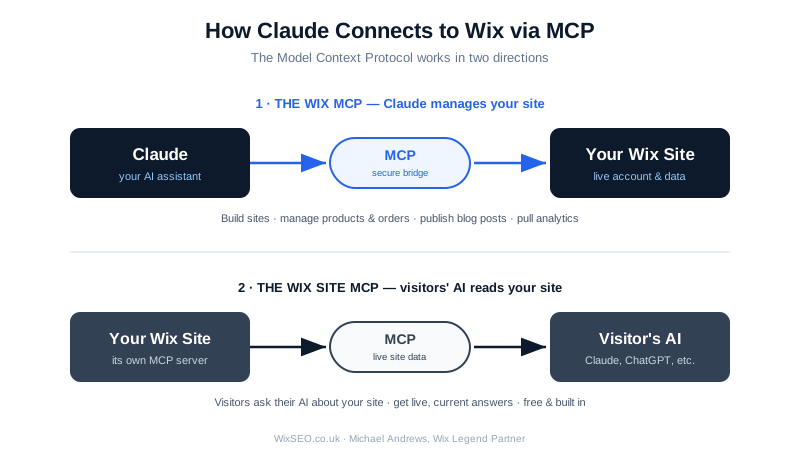
MCP stands for Model Context Protocol, an open standard that gives AI assistants a safe, structured way to connect to external apps and take real actions. Think of it as a secure bridge between Claude and your Wix account. Wix's own developer documentation covers the full MCP specification and capabilities.
The important thing for 2026: the Wix MCP is available as a built-in connector in Claude. That means you can use it without any code, plugins, or technical setup. You connect your Wix account once, and from then on Claude can read your real site data and take real actions on your behalf, through your authorised account.
There's a distinction worth understanding up front, because people confuse the two:
- The Wix MCP connects your AI agent (Claude) to Wix, so Claude can build and manage your sites.
- The Wix Site MCP goes the other direction: it connects visitors' AI agents to a single Wix site, so someone using their own AI can ask questions about your site and get live answers.
This guide is mostly about the first one, Claude managing your Wix site, but I'll cover the second, because it's a genuine, and often overlooked, opportunity. If you want to go deeper on how MCP connects AI platforms to Wix, I cover this in my free course lesson on the Wix MCP server and AI platform automation.
The two ways to use Claude with Wix
There are two distinct routes, and which one suits you depends on whether you're a site owner or a developer.
1. The built-in connector (for site owners, no code)
This is the simple route. The Wix MCP is built directly into Claude as a first-party integration. You connect your Wix account in Claude's settings, authorise it via a secure login, and Claude can then work with your live site through natural conversation. No configuration files, no Node.js, no technical setup.
This is what most site owners want. You open Claude, tell it what you need, and it does the work on your actual site.
2. The developer route (Claude Code, Cursor, config setup)
If you're a developer, or you want to wire the Wix MCP into other tools like Claude Code, Cursor, VS Code, or Windsurf, there's a more advanced route. This uses a configuration file and requires Node.js version 19.9.0 or higher. Agents that support remote MCP connect over HTTP; others use a local proxy.
This route unlocks programmatic control, writing and running code against Wix APIs, chaining multiple operations, and building automation, which is powerful for custom builds and headless projects.
For the rest of this guide, I'll cover what's possible across both, and flag which route each capability needs.
Everything Claude can do with Wix in 2026
Wix's official documentation groups the MCP's capabilities into four areas. Here's what each genuinely means for you.
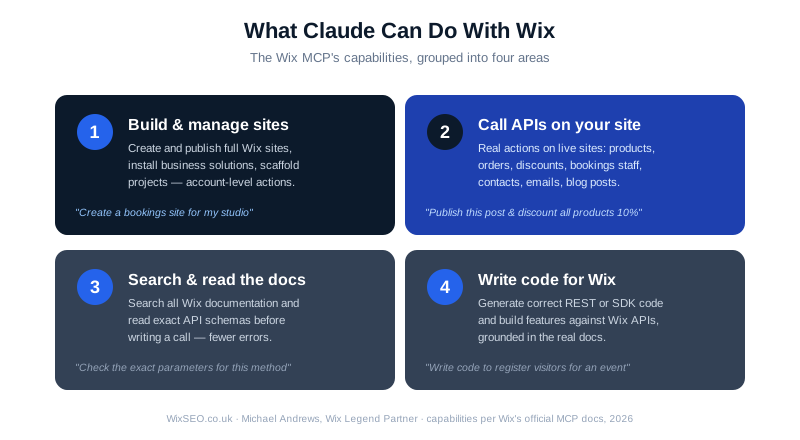
Building a full Wix site from a conversation
With the connector active, Claude can create and publish a Wix site. You describe what you want, the type of business, the pages you need, the style, and Claude builds a real, hosted Wix "Harmony" site, not a mock-up or exported code you have to assemble yourself.
Claude can create the site structure, set up pages, add content, and configure business tools, all without you opening the Wix editor. For someone starting from scratch, this genuinely compresses hours of setup into a conversation.
If you don't have a Wix account yet, you'll be prompted to create one as you go.
Managing a live site through natural language
This is where it gets genuinely useful for an existing business. Once connected, Claude can take real actions on your live site:
- Products and store: add, update, or unpublish products; apply a discount across all store products; check and manage inventory.
- Orders: query orders in real time and get summaries with fulfilment status ("how many orders did I get last week?").
- Pages and content: update page content and manage what's on your site.
- Bookings: add a bookings staff member and manage scheduling.
- Contacts and CRM: create and update contacts, and send an email to a contact.
- Media: upload images to your site's Media Manager.
- Business solutions: install a business solution (Stores, Bookings, and so on) onto a site.
In plain terms: a lot of the busywork you'd normally click through dashboards to do, Claude can do by conversation.
Automating your blog
For content-led businesses, this is one of the strongest use cases. Claude can:
- Read your existing blog posts to understand what you've already covered.
- Identify a content gap.
- Draft a full, structured post.
- Save it as a draft, or publish it directly to your Wix Blog.
A realistic workflow looks like: "Read my last ten posts, find a gap around customer retention, draft an 800-word post on it, and save it as a draft with the right tags and category." Claude works through those steps and hands you back a link to the draft in your Wix dashboard.
This is a genuine time-saver, and if you want to understand the tool itself better, see my lesson on the Wix AI Blog Writer for SEO content creation. But I'll add an honest caveat later about the difference between publishing content and content that ranks.
Pulling analytics in plain language
Instead of digging through dashboards, you can ask Claude questions about your site's performance in plain English, "how many visitors and orders did I get last month?", and get an instant answer drawn from your live data. Because Claude reads current data through the connection, the answers reflect what's actually happening now.
Searching and reading the Wix documentation
This one matters most for developers, but it's genuinely powerful. Claude can search across all of Wix's official documentation, the REST API reference, the SDK docs, the Design System, the Build Apps docs, and the Headless docs, and pull the full text of an article or the exact schema of an API method.
Why does this matter? It means Claude can check the precise parameters of an API method before writing a call, which dramatically reduces errors and "hallucinated" code. For anyone building against Wix APIs, this is a real accuracy boost.
Writing code for the Wix platform
Through the developer route, Claude can generate correct REST or SDK code and build features against Wix APIs, for example, writing the code to register visitors for an event in a headless project, or building custom business logic. Because it can read the real API schemas first, the code it writes is grounded in the actual documentation.
Managing sites, apps, and projects at the account level
Claude can perform account-level actions: creating, updating, and publishing sites, installing business solutions, and scaffolding new headless projects. This is the higher-level "manage my whole account" layer, distinct from the per-site business-data actions.
The actual tools behind the magic (for the technically curious)
If you like knowing what's under the hood, Wix's documentation lists the specific tools the MCP provides. You don't need to know these to use the connector, but they show the genuine scope:
- WixREADME: the entry point that routes your request to the right tool or recipe.
- Documentation search tools: for the REST docs, SDK docs, Design System, Build Apps, and Headless docs.
- ReadFullDocsArticle and ReadFullDocsMethodSchema: pull full articles and exact API method schemas.
- ListWixSites and GetSiteContext: find sites in an account and fetch a site's details and installed apps.
- CallWixSiteAPI: perform a single REST API call on a site.
- ExecuteWixAPI: run scripts that chain, loop, or paginate across multiple API calls (the main way to work with business data like Bookings, Stores, and the CMS).
- ManageWixSite: account-level actions like creating, updating, or publishing a site.
- UploadImageToWixSite: upload images to a site's Media Manager.
That's the real, documented toolset, not a wishlist.
The overlooked opportunity: the Wix Site MCP
Here's something most site owners haven't caught onto yet. Every Wix site is its own MCP server out of the box, for free, with no setup. This is the Wix Site MCP, and it works the other way around: it lets your visitors' AI tools connect directly to your site. Wix's support documentation explains how to connect your site to AI platforms, and I cover the SEO implications in my lesson on Model Context Protocol: your Wix site as an MCP server.
What does that mean in practice? Instead of clicking through your pages, a visitor using Claude (or another MCP-compatible AI) can have a direct conversation with your site, asking questions and getting live, current answers drawn from your actual site data.
Your site's MCP endpoint is automatically available at a URL based on your domain. You can share it with your audience so it's easy for them to connect. As AI-assisted browsing grows, being genuinely accessible to AI agents is becoming its own form of visibility, and it's free and already built in. If you want to take it further, read about how to get your Wix site found in AI answers through structured GEO work.
What this means for your SEO
This is my field, so let me be precise, and honest.
What Claude genuinely helps with
- Generating SEO metadata. Claude can draft page titles, meta descriptions, and header structures, and with the connector, apply them to your site.
- Producing structured data (schema). Claude can generate JSON-LD schema markup, which helps search engines and AI answer engines understand your content. See my lesson on using Claude and AI tools to generate schema and structured data for Wix for a full walkthrough.
- Writing optimised content. Claude can draft content built around a topic or keyword, with proper structure and internal linking suggestions.
- Content-gap analysis. By reading your existing posts, Claude can spot topics you haven't covered. My lesson on content gap analysis explains how to turn those gaps into a prioritised publishing plan.
- Speed and consistency. It removes hours of manual work, drafting, formatting, publishing, so you can produce more, faster.
Where human SEO expertise still matters, honestly
Here's the part a lot of AI-hype articles won't tell you. Generating SEO elements is not the same as SEO working. Claude can write a meta description in seconds, but knowing which keywords are worth targeting, understanding your competitive landscape, building genuine topical authority, diagnosing why a specific page isn't ranking, and shaping a strategy that actually moves you up the results, that's judgement built on experience, not something you get from a prompt.
Think of it this way: Claude with Wix is an extraordinary execution engine. It removes the busywork brilliantly. But strategy, knowing what to do and why, and reading the results to adjust course, is still human work. The best outcomes come from combining them: let AI handle the volume and the mechanics, and apply real SEO expertise to the strategy.
That's not me protecting my job, it's the honest reality. The site owners who win with AI are the ones who use it to execute a sound strategy faster, not the ones who assume the tool replaces the thinking.
Expert Tip: Want to understand more about whether Wix itself is a good platform for SEO? Read my detailed analysis: Is Wix Good for SEO in 2026?
How to get set up
For the built-in connector (the route most site owners want):
- In Claude (claude.ai or Claude Desktop), open Settings, then Connectors.
- Find the Wix connector, or add it, and connect.
- Authorise your Wix account via secure login (OAuth). Claude never sees your password, and you can revoke access at any time.
- Enable the connector in a conversation and start telling Claude what you want.
The whole process takes a couple of minutes and needs no code.
For the developer route (Claude Code, Cursor, and similar): install Node.js 19.9.0 or higher, add the Wix MCP configuration to your agent's config file (or ask the agent to add it), and authenticate through your Wix account. Wix's developer documentation has specific setup steps for each tool.
A few honest limits and cautions
To keep this genuinely accurate rather than a sales pitch:
- You're granting real access. When you connect, Claude can read and write to your live site through your authorised account. Review what you're authorising, and remember you can revoke access at any time.
- Check before you publish. For anything customer-facing, especially content, review what Claude produces before it goes live. AI is fast, but you're responsible for what's on your site.
- AI-generated content still needs a human eye for E-E-A-T. Search engines increasingly reward genuine experience and expertise. Use Claude to draft, but bring your real knowledge to the content, that's what makes it rank and what makes it trustworthy.
- This is evolving fast. Wix and Anthropic are both developing these capabilities quickly. What's here is accurate as of 2026, but check the official Wix documentation for the latest.
The bottom line
In 2026, Claude and Wix together genuinely change how you build and run a website. Through the built-in Wix MCP connector, you can create sites, manage products and orders, automate your blog, pull analytics, and generate SEO content, much of it in plain conversation, no code required. For developers, the MCP opens up real programmatic control over the Wix platform, with the accuracy boost of Claude reading the actual API docs before it writes a line.
It's a genuine leap in speed and convenience. But the smartest way to use it is as a powerful execution engine paired with real strategy, let AI handle the mechanics, and apply genuine SEO expertise to the decisions that actually determine whether you rank on Wix.
Fix your Wix SEO from your dashboard
Wix SEO Fix in a Box scans every page, writes your fixes from your own Google searches and puts them on in one click, with undo. Start on the free plan.

Want this sorted on your own Wix site?
I have worked only on Wix for 14 years. Get Wix SEO Fix in a Box on the Wix App Market to find and fix what is holding your site back, or see my packages and prices if you would rather I did it all for you.
Frequently Asked Questions
What is the Wix MCP and how does it work with Claude?
MCP stands for Model Context Protocol, an open standard that gives AI assistants a safe, structured way to connect to external apps and take real actions. The Wix MCP is available as a built-in connector in Claude, meaning you can use it without code, plugins, or technical setup. You connect your Wix account once, and Claude can then read your real site data and take actions on your behalf through your authorised account.
Can Claude actually build a full Wix website?
Yes. With the Wix MCP connector active, Claude can create and publish a genuine Wix Harmony site. You describe what you want, the type of business, pages, and style, and Claude builds a real hosted site. It can create the site structure, set up pages, add content, and configure business tools, all without you opening the Wix editor.
Does using Claude with Wix replace the need for SEO expertise?
No. Claude with the Wix MCP is an extraordinary execution engine that removes busywork brilliantly. But knowing which keywords to target, understanding competitive landscape, building topical authority, diagnosing ranking issues, and shaping strategy requires judgement built on experience. The best outcomes come from combining AI execution speed with real SEO expertise directing the strategy.
What is the Wix Site MCP and how is it different?
The Wix Site MCP goes the opposite direction to the Wix MCP. Instead of you using Claude to manage your site, it lets your visitors' AI tools connect to your site. Every Wix site is automatically its own MCP server for free with no setup. Visitors using Claude or other MCP-compatible AI can have a direct conversation with your site, getting live answers drawn from your actual site data.
Is the Wix MCP connector safe to use?
The connection uses secure OAuth authorisation. Claude never sees your password, and you can revoke access at any time. However, you are granting real read and write access to your live site through your authorised account, so review what you are authorising and check any customer-facing content before publishing it.