Why Is My Wix Site Not Ranking on Google?
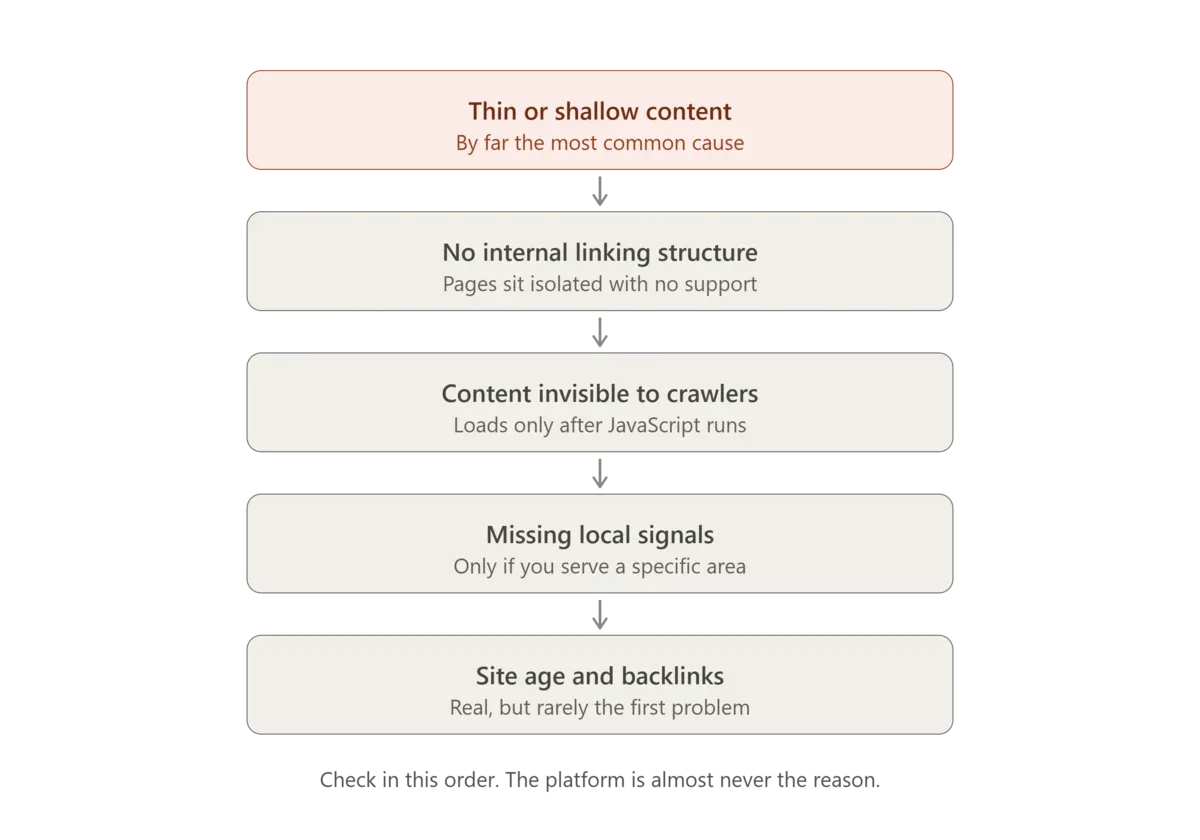
If your Wix website is not ranking on Google, the platform is almost certainly not the reason. In fourteen years and 805 Wix projects, I have found the cause is usually thin content, missing internal linking, or pages Google cannot properly read. Below are the ten most common causes, in the order worth checking.
Is your Wix site not showing on Google at all?
If you cannot find your site on Google even when you search for your business name, start with the basics before anything else:
- 1Check your site is allowed to appear in search. In your Wix SEO settings, make sure search engines are allowed to index your site. A site left hidden from search will never show up.
- 2Search for
site:followed by your domain (for examplesite:yourbusiness.co.uk). If nothing comes back, Google has not indexed your site yet. - 3Connect Google Search Console and check that your sitemap has been submitted. Search Console tells you which pages Google has found and which it has left out, and why.
- 4Give a new site time. A brand new site can take a few weeks to appear.
For every cause and how to fix it, read my guide to why a Wix site is not indexing on Google.
Why your Wix SEO is not working
Many people tell me they have done their SEO and nothing has changed. Usually that means they have completed the Wix SEO setup checklist. The checklist covers the basics, such as a title and description on every page, but it does not tell you which searches to aim for, how to beat your competitors or why Google prefers another page. The most common reasons SEO "isn't working" are:
- The pages target the wrong searches, words you would use rather than words your customers type.
- Several of your pages compete for the same search, so Google cannot decide which one to show. See how to fix keyword cannibalisation on Wix.
- The pages are too thin compared with the pages ranking above you.
- No other websites link to you, so Google has little reason to trust your site over others.
- It has not been long enough. Changes can take a few weeks to show.
The most common Wix SEO problems I fix
Across the Wix sites I work on, the same problems come up again and again: duplicate or missing titles and meta descriptions, pages left on automatic addresses, headings used for styling instead of structure, leftover copy pages competing with the real ones, and no structured data telling Google who the business is. I have written up the full list in 15 common Wix SEO mistakes and how to fix them.
Is Wix harder to rank than other website builders?
No. The idea that Wix cannot rank comes from how the platform worked many years ago. Today Wix lets you control everything that matters: titles, descriptions, headings, addresses, canonical tags, redirects, structured data and your sitemap. If your site is not ranking, the cause is almost always one of the reasons on this page, not the platform. For the longer answer, read is Wix good for SEO.
How to find out what is wrong with your Wix site
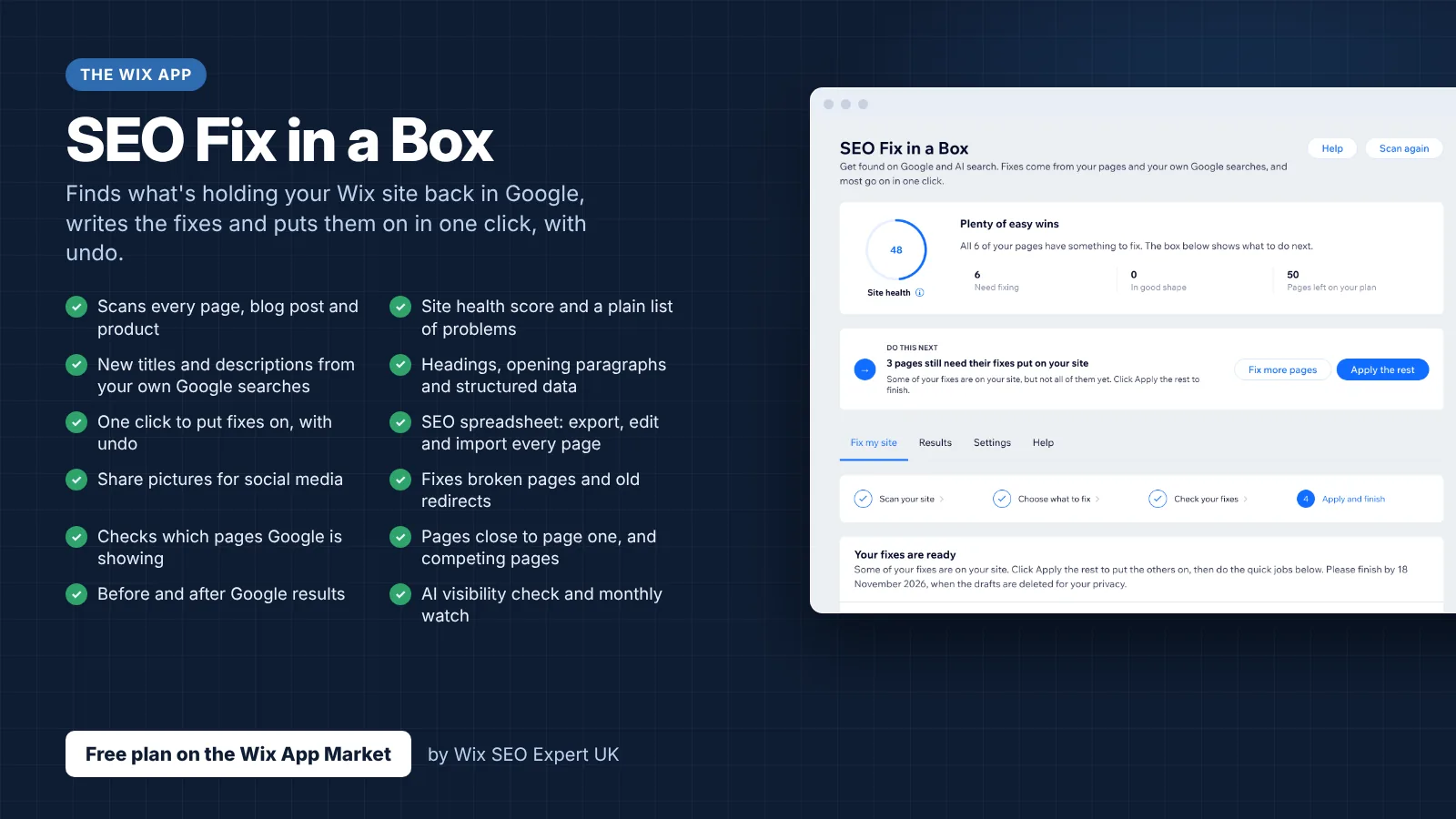
- 1Get Wix SEO Fix in a Box on the Wix App Market. The app scans every page of your Wix site, writes SEO fixes from your own Google searches and puts them on in one click, with undo.
1. Your pages are too thin
This is the most common cause by a distance.
A 300 word service page will not outrank a 2,000 word one, whatever platform either is built on. Google is choosing between your page and a competitor's, and depth is one of the clearest differences between them.
The usual pattern is a homepage that tries to cover every service in a paragraph each. Google ranks pages, not sections. One page cannot rank for five different services, because when someone searches for one of them, Google is looking for a page about that thing specifically.
2. You have no internal linking
Wix does not build this for you, and most Wix sites have almost none beyond the navigation menu.
Internal links do two jobs. They tell Google which of your pages matter most, and they pass authority between them. A page with no internal links pointing at it is effectively an island, and Google treats it accordingly.
3. Google cannot see your content
Wix renders server-side, so this is less common than it used to be, but it still happens with content that loads dynamically after the page does.
If your key text sits inside a gallery, a slider, an accordion that loads on click, or a third party app widget, Google may not be reading it at all.
4. Your titles and descriptions are not written for clicks
Ranking and being clicked are different problems.
Plenty of sites appear on page one and get almost no traffic, because the title says "Home | Business Name" and gives nobody a reason to choose it over the result above.
5. You have no local signals
If you serve a geographic area and your site does not make that clear, you will not appear in the local pack regardless of how good your content is.
That means a properly configured Google Business Profile, name, address and phone details that match exactly everywhere they appear online, and content that mentions the areas you actually serve. Wix local SEO covers this in detail.
6. Every page is targeting the same thing
Keyword cannibalisation. Five pages all optimised around "wedding photographer London" do not give you five chances to rank. They give Google five candidates for the same query, it picks one, and often it picks the wrong one.
7. Your structured data is missing or incomplete
Wix generates some schema automatically, but it produces disconnected fragments without @id linking, so the entity graph never resolves as one connected object.
This matters more than it used to. Answer engines like ChatGPT, Perplexity and Google AI Overviews cite sources they can parse confidently. Incomplete schema means you are legible to nobody. Wix schema markup explains why.
8. Your site is new
Google needs time. A site published last month competing against one published in 2015 is not losing because of Wix.
There is no fix for this beyond patience and continuing to do the other things properly. Anyone selling you a shortcut is selling you a problem.
9. You have no backlinks
Backlinks remain a major ranking factor and Wix neither helps nor hinders. If nobody links to you and your competitors have hundreds of references from suppliers, directories, local press and industry sites, that gap shows.
10. You are expecting results too soon
SEO changes take weeks to months to appear, and there is no reliable timeline. Anyone promising page one by a specific date is guessing, because neither of us controls Google.
Is Wix the problem?
Almost never.
Wix supports server-side rendering, editable meta tags, custom canonical tags, structured data injection, redirect management, robots.txt editing and XML sitemaps. Sites built on Wix rank on page one for competitive commercial terms every day.
The belief that Wix cannot rank comes from the platform as it existed around 2012, when it rendered entirely in JavaScript with no server-side fallback. That criticism was correct then. It stopped being correct years ago.
What Wix does not do is any of this for you.
Where to start
If your site is new, start with content depth and internal linking. Those are the two that matter most and the two most sites get wrong.
If your site has been live a while and is not improving, check for cannibalisation first, then look at whether Google can actually read your pages.
If you serve a local area and are not in the map pack, start with your Google Business Profile and NAP consistency.
The complete course covering all of this is free: 68 modules, 683 step by step lessons, no payment and no time limit.
If you would rather someone did it for you, that is what I do.
Fix your Wix SEO from your dashboard
SEO Fix in a Box scans every page, writes your fixes from your own Google searches and puts them on in one click, with undo. Start on the free plan.
By Michael Andrews, Wix Marketplace Legend Partner | Get the app on the Wix App Market