The Complete Wix SEO Course | Free & How-To Guides
By Michael Andrews | Published: 2026-07-03 | Updated: 2026-07-03 | 18 min read
The most comprehensive free Wix SEO course on the planet. 68 modules, 687 step-by-step lessons and 400+ hours of battle-tested Wix SEO strategy covering everything from keyword research and technical SEO to Google AI Overviews, Generative Engine Optimisation and Wix Studio. Built by the UK's No.1 Wix SEO Expert, Michael Andrews, with 14 years of experience and 793+ successful Wix projects.
If you have a Wix website and you want it to rank on Google, there is one resource that stands above everything else available anywhere online. Not a short YouTube video. Not a generic SEO guide that mentions Wix as an afterthought. The Complete Wix SEO Course: 68 modules, 687 step-by-step lessons, 400+ hours of battle-tested strategy, and every single word of it free. This is not a course about SEO that happens to include some Wix tips. It is the definitive, platform-specific, regularly updated training programme built entirely around how Wix works and how to make it rank.
Key Takeaway: The Complete Wix SEO Course is the world's most in-depth free Wix SEO training. 68 modules. 687 lessons. 400+ hours. Zero cost. Created by Michael Andrews, the UK's No.1 Wix SEO Expert with 14 years of experience and 793+ successful Wix projects. Start learning today at wixseo.co.uk/the-complete-wix-seo-course.
What Is the Complete Wix SEO Course?
The Complete Wix SEO Course is the most comprehensive free Wix SEO training programme in the world. It was created by Michael Andrews, a UK-based Wix SEO Expert with over 14 years of hands-on experience optimising Wix websites and more than 793 successful Wix projects across dozens of industries and markets worldwide.
The course is structured across 68 modules containing 687 individual lessons and more than 400 hours of step-by-step content. It covers every aspect of Wix SEO - from the very basics of how search engines work, through to advanced topics including Wix Studio, Velo dynamic SEO, Generative Engine Optimisation, Google AI Overviews, enterprise strategy, international SEO and programmatic content at scale.
Unlike generic SEO courses that are written for any platform and adapted for Wix as an afterthought, every lesson in this course is built specifically around how Wix works. The course explains not just what to do, but exactly where to find every setting in the Wix dashboard, what each option does, and the specific impact it has on your rankings. It is updated regularly to reflect algorithm changes, new Wix features and the evolving landscape of AI-driven search.
The course is 100% free. There is no subscription, no paywall, no credit card and no catch. Every module and every lesson is accessible to anyone, anywhere in the world, at wixseo.co.uk/the-complete-wix-seo-course.
The Complete Wix SEO Course contains 68 modules and 687 step-by-step lessons delivering over 400 hours of Wix-specific SEO training. It has been taken by learners across more than 150 countries and has helped hundreds of Wix website owners achieve first-page Google rankings for competitive keywords in their markets. — 68 Modules | 687 Lessons | 400+ Hours (Source: The Complete Wix SEO Course)
Who Is This Free Wix SEO Course For?
The course is designed for three distinct groups of Wix users, and the module structure reflects that. Whether you are starting from zero, looking to build on existing knowledge, or pushing into advanced territory, there is a clear path through the curriculum for you.
- Wix business owners who want more website traffic and Google rankings but do not know where to start - Modules 1 to 9 take you from zero to a fully optimised Wix site
- Small business owners who have tried SEO but struggled to get results on the Wix platform specifically - the course explains exactly what works in Wix and what does not
- Web designers and developers who build Wix sites for clients and want to deliver measurable SEO outcomes as part of their service
- Digital marketers and SEO professionals who want to expand their expertise to include Wix-specific technical knowledge
- Freelancers who want to offer Wix SEO as a professional service and command premium rates for platform-specific expertise
- eCommerce store owners on Wix who want to rank products in Google Shopping and organic search
- Wix Studio and Velo developers who want to harness dynamic SEO and programmatic content at scale
The Full Course Curriculum: All 68 Modules Listed
The curriculum covers the complete breadth and depth of Wix SEO. Each module contains multiple lessons, practical exercises and real-world examples drawn from 14 years of live Wix SEO work. Here is the complete module list.
Foundations & Technical Setup (Modules 1-8)
- Module 1: SEO Foundations & How Search Works - Build the mental model every successful SEO practitioner relies on
- Module 2: How to Set Up Your Wix Site for Maximum SEO - Get the technical foundations right from day one
- Module 3: Keyword Research Masterclass - Find the exact phrases your customers are typing into Google
- Module 4: On-Page SEO Optimisation for Wix - Optimise every element of every page for maximum ranking power
- Module 5: Content Strategy & Blog SEO - Create content that earns traffic, trust and links consistently
- Module 6: Technical SEO, Structured Data & Rich Snippets for Wix - Fix hidden issues and unlock rich results
- Module 7: Google Sitelinks - Earn the most powerful branded SERP feature through site structure and brand signals
- Module 8: Crawl Budget, Log Files & Advanced Site Health on Wix - Monitor how search engines and AI bots interact with your site
Core SEO Disciplines (Modules 9-16)
- Module 9: Local SEO Domination - Become the go-to business in your area and keep phone calls coming in
- Module 10: Link Building & Off-Page SEO - Build the authority and trust signals that move rankings
- Module 11: Social Signals, Open Graph & Cross-Platform Brand Presence - Amplify your SEO with social proof
- Module 12: Brand SERP Management & Google Feature Domination - Control what Google shows for your brand
- Module 13: Accessibility & SEO on Wix - Build accessible Wix websites that rank better and serve everyone
- Module 14: Privacy, GDPR & Cookie Consent for SEO on Wix - Stay legally compliant while protecting your analytics data
- Module 15: Wix Analytics & SEO Reporting - Use data to make every decision and prove your results in hard numbers
- Module 16: Wix Native SEO Tools & AI Visibility - Master every built-in Wix tool that monitors and improves search performance

Wix-Specific Specialisms (Modules 17-24)
- Module 17: Wix eCommerce SEO Mastery - Rank your Wix Store products in Google Shopping, organic search and Maps
- Module 18: Wix Bookings, Hotels & Service Business SEO - Attract more clients, fill your calendar and drive bookings from search
- Module 19: Wix-Specific Features SEO Masterclass - Master every native Wix feature that impacts your search rankings
- Module 20: Wix Studio & Velo Advanced SEO - Unlock the advanced capabilities most Wix users never discover
- Module 21: Conversion Rate Optimisation for Organic Traffic on Wix - Turn search visitors into leads, bookings and sales
- Module 22: Advanced Wix SEO Strategies - Go beyond the basics to dominate competitive niches
- Module 23: Competitor Analysis & Competitive SEO Strategy for Wix - Reverse-engineer what competitors do well and outrank them
- Module 24: Visual Search & Image SEO Beyond Alt Text on Wix - Master Google Lens, Image Pack rankings and advanced image optimisation
AI, Future Search & Next-Generation SEO (Modules 25-30)
- Module 25: Zero-Click SEO & Answer Engine Strategy for Wix - Profit from SERP visibility when searches never result in a click
- Module 26: AI, SGE & Future-Proof SEO - Stay ahead as AI transforms how people search and find businesses
- Module 27: GEO: Generative Engine Optimisation for Wix - Get your Wix website cited by ChatGPT, Perplexity, Gemini and Google AI Overviews
- Module 28: Wix SEO for AI Shopping Agents & Agentic Search - Prepare for AI agents that browse, evaluate and recommend autonomously
- Module 29: SEO & Paid Search (SEM) Integration - Use paid and organic search together for maximum visibility and revenue
- Module 30: Social Media Setup for Wix SEO - Optimise every major social platform to support Wix SEO and brand entity signals
Industry Verticals & Specialist Niches (Modules 31-41)
- Module 31: YMYL Deep Dive - Healthcare, legal and financial Wix websites with elevated E-E-A-T and compliance standards
- Module 32: Reputation Management & Online Review SEO on Wix - Build a multi-platform review ecosystem and protect your brand
- Module 33: PDF, Document & Downloadable Asset SEO on Wix - Optimise PDFs, whitepapers and downloadable content for search
- Module 34: Multi-Language & RTL Website SEO on Wix - Arabic, Hebrew, Farsi SEO, Wix Multilingual and hreflang at scale
- Module 35: Wix SEO for Non-English Markets & Alternative Search Engines - Reach audiences through Yandex, Naver, Baidu and DuckDuckGo
- Module 36: SEO for Creative Professionals on Wix - Portfolio, photographer, musician, podcaster and artist SEO strategies
- Module 37: SEO for Nonprofits & Charities on Wix - Google Ad Grants, donation pages, event SEO and NGO schema markup
- Module 38: SEO for SaaS & Digital Services on Wix - SaaS landing pages, comparison pages, free tools and Software Application schema
- Module 39: Wix SEO for Membership Sites & Digital Products - Balance paywall protection with search visibility using freemium strategies
- Module 40: Wix SEO for Directories, Marketplaces & Multi-Vendor Sites - Dynamic listing pages, faceted navigation and review aggregation
- Module 41: Parasite SEO & Third-Party Platform Authority - Reddit, LinkedIn, Medium, YouTube and multi-platform content distribution
Enterprise, Automation & Advanced Development (Modules 42-50)
- Module 42: Enterprise SEO Strategy on Wix - Scale SEO across large organisations, multi-site portfolios and international markets
- Module 43: Wix Headless SEO - Custom frontends with Next.js, rendering strategies and headless eCommerce SEO
- Module 44: Wix AI Marketing Tools & SEO Automation - Leverage Wix AI for keyword research, content creation and meta tag automation
- Module 45: Wix SEO Automation & Workflows at Scale - Build automated SEO monitoring using Velo, Zapier and Google APIs
- Module 46: Essential Wix Apps for SEO - The best Wix App Market tools to boost rankings, speed and visibility
- Module 47: How to Build a Wix App: Complete Developer Guide - Plan, build and publish a Wix App Market application from scratch
- Module 48: Migrating to Wix Without Losing Rankings - Move from any platform to Wix while preserving every drop of SEO value
- Module 49: Redesigning Your Wix Site Without Losing Rankings - Preserve organic traffic and rankings during a Wix website redesign
- Module 50: Wix SEO Troubleshooting, Diagnostics & Common Fixes - Diagnose and fix every common SEO problem on Wix
International SEO & Multilingual Wix (Modules 56-59)
- Module 56: Wix Multilingual App - Architecture, hreflang setup and international SEO configuration
- Module 57: Hreflang Setup for Wix - Complete hreflang implementation, verification and error fixes
- Module 58: Translating Metadata for Wix - Titles, meta descriptions, alt text and native keyword research across languages
- Module 59: URL Structure & Slug Strategy for Multilingual Wix - Native-language keyword slugs and URL architecture
Wix Events SEO (Modules 60-63)
- Module 60: Wix Events App SEO Architecture - How event pages get indexed and event SEO setup for maximum visibility
- Module 61: Event Structured Data - JSON-LD implementation for Wix events, Google Events carousel eligibility
- Module 62: Ranking Wix Event Pages for Local Searches - Local event search optimisation, GBP events and proximity factors
- Module 63: Recurring Events SEO - Managing event series without thin content proliferation using evergreen pages
Google AI Overviews Mastery (Modules 64-67)
- Module 64: How Google AI Overviews Work - Understanding AI Overview source selection and citation tracking in GSC
- Module 65: Content Formatting for AI Overview Citations on Wix - Inverted pyramid, heading structure and list strategies for citation
- Module 66: E-E-A-T Signals for AI Overview Citation on Wix - Building Experience, Expertise, Authoritativeness and Trust for AI citation
- Module 67: Measuring AI Overview Impressions & Citations in GSC - Tracking AI Overview performance metrics and setting up dashboards
Reference & Career Development (Modules 51-55)
- Module 51: Wix SEO Maintenance & Ongoing Optimisation Calendar - Build weekly, monthly and annual SEO routines that keep your site growing
- Module 52: SEO Audits, Client Work & Going Pro - Turn your Wix SEO knowledge into a business or freelance career
- Module 53: Useful Wix SEO Links and Resources - A curated reference library of official Wix documentation and tools
- Module 54: Course Recap - A comprehensive summing-up of every concept with actionable checklists and next steps
- Module 55: Wix SEO Glossary - Complete A-Z reference library of every SEO term with Wix-specific context
Why This Is the Best Free Wix SEO Course Available
There is no shortage of SEO content online. There are thousands of blog posts, YouTube channels, paid courses and free guides all claiming to teach SEO. So why is the Complete Wix SEO Course different, and why does it matter for Wix users specifically?
The answer is specificity. General SEO advice is useful in principle but often impossible to apply without a layer of platform-specific interpretation. When a generic guide tells you to "submit your sitemap", it does not tell you where to find the sitemap setting in Wix, which format it uses, how to verify it in Google Search Console, or what to do when it fails to index correctly. This course does all of that. Every piece of advice is given in the context of Wix's actual dashboard, actual settings and actual behaviour.
The Complete Wix SEO Course was built because I could not find a training resource that treated Wix with the seriousness it deserves. Wix is capable of ranking for anything, in any market, at any level of competition. But you need to understand how it works, not just how SEO works. That is what this course teaches.
- 100% Wix-specific - every lesson, every example and every screenshot is built around the Wix platform
- Built by a practitioner with 14 years of live Wix SEO experience and 793+ successful projects, not a content writer summarising other guides
- Regularly updated to reflect Google algorithm changes, new Wix features and the shift towards AI-driven search
- Covers AI and GEO (Generative Engine Optimisation) - including how to get your Wix site cited by ChatGPT, Perplexity and Google AI Overviews
- Goes from beginner to enterprise-grade - the same course that explains what a meta title is also explains Wix Velo dynamic SEO at scale
- Completely free - no subscription, no upsell, no locked modules and no hidden paywall
- Available worldwide - with content covering international SEO, multilingual Wix, US state-level local SEO and non-English market strategies
What You Will Be Able to Do After This Free Wix SEO Course
Learning outcomes are only meaningful when they are specific. After completing the Complete Wix SEO Course, you will be able to apply each of the following to a real Wix website:
- Rank your Wix website on page one of Google for competitive keywords in your industry and location
- Conduct professional keyword research using tools including Semrush, Ahrefs and Google's own free suite, and map keywords to Wix pages correctly
- Configure every Wix SEO setting correctly from day one: meta titles, meta descriptions, canonical tags, structured data, robots directives, sitemap, hreflang and more
- Identify and fix technical SEO issues that are silently blocking Wix sites from ranking - including crawl issues, indexing problems, Core Web Vitals and speed
- Build and execute a content strategy that creates compounding organic traffic month after month
- Earn high-quality backlinks from relevant, authoritative sources without risking a Google penalty
- Dominate local search results and the Google Map Pack for any town or city
- Rank Wix Store products in Google Shopping and organic search, with product schema and structured data
- Use Wix Studio and Wix Velo to build dynamic SEO at scale: CMS collections, programmatic pages and automated meta tags
- Optimise your Wix website for Google AI Overviews and be cited by generative AI tools including ChatGPT, Perplexity and Gemini
- Confidently audit any Wix website, identify priority actions and build a clear improvement roadmap
- Track and prove your SEO results using Google Analytics 4 and Google Search Console, including AI Overview impressions
- Turn your Wix SEO knowledge into a freelance income or professional career by auditing and managing client sites
- Future-proof your Wix website against AI-driven search changes that are reshaping how Google surfaces content
Wix SEO Course: Module Depth and What Each Section Teaches
To give you a sense of how deep this course goes, here is a closer look at what some of the most popular sections cover in practice.
Keyword Research for Wix (Module 3)
Most Wix users either skip keyword research entirely or do a cursory search and pick the highest-volume term they can find. Module 3 teaches the complete keyword research process: how to identify seed keywords from your business model, how to use intent mapping to separate informational from commercial queries, how to analyse SERP competition to find realistic targets, how to build keyword clusters and topic authority, and how to map keywords to specific Wix pages without cannibalisation. The module covers Google Search Console for keyword discovery, Semrush and Ahrefs for gap analysis, and free tools including Google's autocomplete, People Also Ask and related searches. By the end, you have a keyword strategy document that drives every piece of content and optimisation decision you make on your Wix site.
Technical SEO, Structured Data & Rich Snippets (Module 6)
Module 6 is one of the longest and most detailed in the course. It covers Core Web Vitals and how to improve LCP, FID and CLS on a Wix site specifically. It explains how Wix generates structured data automatically, what it gets right, and where it falls short. It teaches how to add custom JSON-LD schema to Wix pages using the head code injection - covering LocalBusiness, FAQ, HowTo, Article, Product, Review, BreadcrumbList, VideoObject and more. It explains how to validate structured data in Google's Rich Results Test, how to monitor rich snippet performance in Search Console, and how to troubleshoot when schema is applied correctly but rich results do not appear.
Local SEO for Wix (Module 9)
Local SEO is where Wix websites win or lose for most small businesses. Module 9 covers every element of the Google Map Pack ranking algorithm and how to influence it from a Wix site: Google Business Profile optimisation including categories, attributes, posts, products and Q&A; NAP citation consistency and how to audit and fix inconsistencies; local keyword placement in Wix pages for multi-location businesses; LocalBusiness and Service schema markup; review acquisition strategy; proximity signals; and how to monitor local ranking position using free and paid tools. The module also covers how to rank in multiple nearby towns and cities without creating thin, duplicate location pages.
Wix eCommerce SEO (Module 17)
Ranking a Wix Store requires a different approach from ranking a standard website. Module 17 covers product page optimisation, collection page hierarchy and internal linking, Google Shopping feed setup and optimisation, Product schema and structured data for rich snippets, category page keyword targeting, breadcrumb navigation for eCommerce, site search optimisation, user-generated review schema, Wix Stores SEO limitations and how to work within them, and the specific Google Shopping policies that can get Wix Store products suspended. It also covers how to use the Wix Velo API to build dynamic product meta tags at scale for large catalogues.
Generative Engine Optimisation (GEO) for Wix (Module 27)
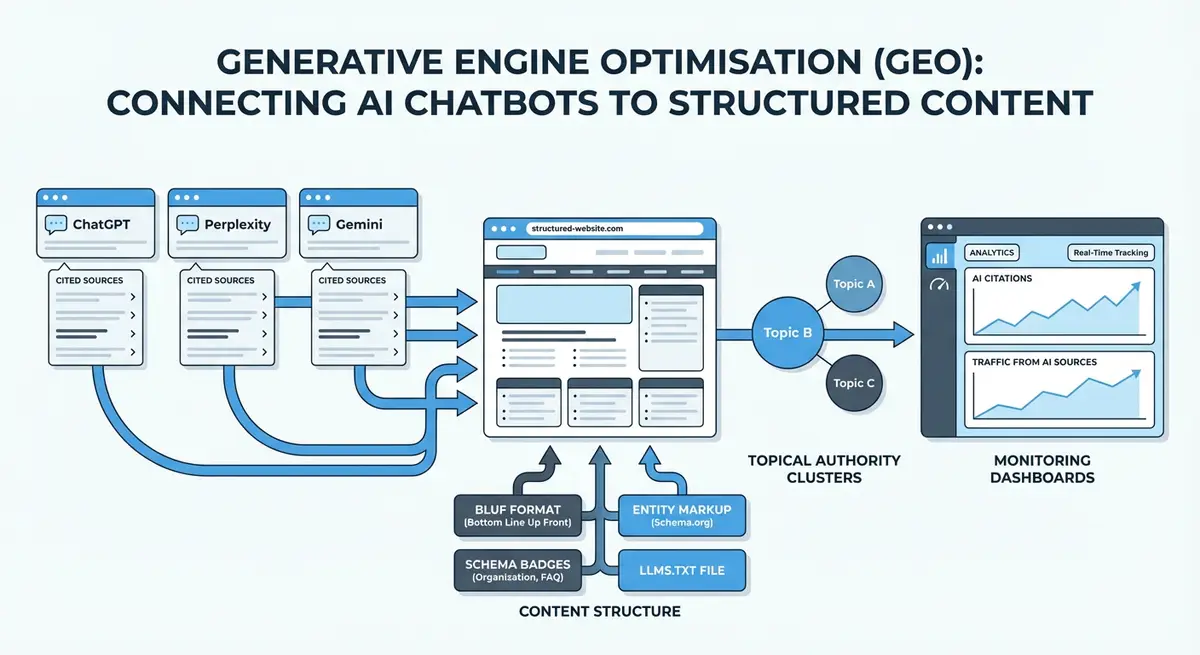
Module 27 is one of the most forward-looking in the entire course. It covers how AI tools including ChatGPT, Perplexity, Gemini and Google AI Overviews select and cite sources. It explains the factors that make a Wix page more likely to be cited: E-E-A-T signals, structured data quality, content formatting, entity clarity, citation chains and the relationship between traditional search ranking and AI citation frequency. It teaches how to structure Wix content for machine readability, how to use llms.txt and ai.txt, how to build author schema and publisher schema that AI engines can parse, and how to monitor whether your Wix site is being cited using Search Console's AI Overview report and third-party GEO tracking tools.
Why Wix Can Rank on Google: Debunking the Myths
There is a persistent myth in the SEO community that Wix is bad for SEO and cannot rank in competitive searches. This is false, and it is worth addressing directly because it causes Wix users to either abandon the platform unnecessarily or to dismiss SEO entirely because they believe it will not work.
Wix has invested heavily in its SEO capabilities over the past several years. It generates semantic HTML5, supports server-side rendering through its Wix ADI and Wix Studio systems, offers full control over URL structure, meta tags, canonical tags, structured data, hreflang, robots directives and sitemaps. It integrates natively with Google Search Console and Google Analytics 4. Wix pages can achieve excellent Core Web Vitals scores when configured correctly. Wix Velo enables dynamic, CMS-driven SEO that rivals any headless CMS.
The reason Wix sites sometimes underperform in search is not the platform. It is the SEO work, or the lack of it. Wix's out-of-the-box settings are not optimised for search. The default configurations for meta titles, image alt text, URL slugs and structured data all need to be reviewed and corrected manually. The Complete Wix SEO Course teaches you exactly what to change, where to find each setting, and what the impact will be.
Expert Tip: The single most common Wix SEO mistake is using the page title as the meta title and leaving the meta description blank. Wix allows full manual control over both - Module 4 explains exactly how to write and implement optimised meta tags for every type of Wix page, including dynamic pages generated from CMS collections.
How the Free Wix SEO Course Is Structured: Beginner to Advanced
The course follows a deliberate progression from foundational knowledge through to advanced and enterprise-level strategy. You do not need to complete every module in sequence, but the structure is designed so that each module builds logically on what came before.
| Level | Modules | Key Topics |
|---|---|---|
| Beginner | Modules 1-9 | SEO foundations, Wix setup, keyword research, on-page SEO, content strategy, technical basics, local SEO |
| Intermediate | Modules 10-22 | Link building, analytics, eCommerce SEO, Wix-specific features, CRO, competitor analysis, advanced strategy |
| Advanced | Modules 23-45 | GEO, AI Overviews, Wix Velo, enterprise SEO, automation, international SEO, YMYL, headless Wix |
| Professional | Modules 46-55 | Wix apps, site migration, auditing, client work, maintenance calendar, SEO career development |
| Specialist | Modules 56-68 | Multilingual Wix, Wix Events SEO, AI Overview citations, GSC measurement, hreflang at scale |
Wix SEO How-To Guides: Key Skills You Will Learn
Alongside the full course curriculum, the programme includes practical how-to guides for the most common Wix SEO tasks. Each guide walks through the process step by step within the Wix dashboard.
- How to set up Google Search Console for a Wix website and verify ownership
- How to connect Google Analytics 4 to a Wix site and track organic traffic correctly
- How to write an optimised meta title and meta description for every Wix page type
- How to fix Wix URL slugs for maximum keyword relevance and crawlability
- How to add JSON-LD structured data to Wix pages using head code injection
- How to submit a Wix sitemap to Google and resolve common indexing errors
- How to use Wix's SEO Wiz and what it does and does not do for your rankings
- How to optimise images in Wix for alt text, file size, format and Google Image Search
- How to set up canonical tags on Wix pages to prevent duplicate content issues
- How to build internal links in Wix that distribute page authority correctly
- How to configure hreflang for multilingual Wix websites using the Multilingual App
- How to track Wix rankings using Google Search Console Performance data
- How to run a full Wix SEO audit using free and paid tools
- How to migrate from WordPress, Squarespace or Shopify to Wix without losing rankings
- How to implement event schema for Wix Events pages and appear in the Google Events carousel
- How to optimise a Wix blog for featured snippets and AI Overview citations
The Instructor: Michael Andrews, UK's No.1 Wix SEO Expert
The Complete Wix SEO Course was created and is maintained by Michael Andrews, a UK-based Wix SEO Expert based in Doncaster, South Yorkshire. Michael has been working exclusively on Wix SEO for over 14 years and has completed more than 793 successful Wix projects across industries ranging from eCommerce, hospitality and healthcare to legal, SaaS and creative services.
Michael is listed as a Wix Partner and has accumulated over 452 five-star reviews from clients across the United States, United Kingdom, Australia, Canada, New Zealand, Ireland and beyond. He holds certified qualifications in technical SEO, keyword research, local SEO, on-page SEO, Google Analytics 4, link building and third-party SEO tools.
Every lesson in the course is drawn from real work carried out on real Wix sites. When Michael explains that a particular approach to internal linking improves rankings for competitive local terms, it is because he has tested it across dozens of Wix client sites. The course is not theoretical. It is a transfer of 14 years of platform-specific practice into an accessible, structured format.
You can find out more about Michael's background and credentials at wixseo.co.uk/about-michael-andrews-wix-seo-expert.
The Complete Wix SEO Course vs Paid Alternatives
There are paid Wix SEO courses available on Udemy, Coursera and other platforms. Most of them are short - typically two to eight hours - and cover SEO generically with Wix mentioned only in passing. Some are sold for between £30 and £200 and have not been updated since 2022 or 2023, before the major AI-driven changes to search that have reshaped SEO strategy entirely.
The Complete Wix SEO Course is 400+ hours, Wix-specific, regularly updated, includes GEO and AI Overview content that does not exist in any paid alternative, and costs nothing. For Wix users, there is no compelling reason to choose a paid generic course over this one.
The Complete Wix SEO Course covers 400+ hours of Wix-specific training compared to the typical 2-8 hours of most paid alternatives. It is updated regularly, includes GEO and AI Overview modules that paid alternatives do not offer, and is entirely free at wixseo.co.uk/the-complete-wix-seo-course. — 400+ Hours vs 2-8 Hours (Source: The Complete Wix SEO Course)
Is the Wix SEO Course Really Free?
Yes. The Complete Wix SEO Course is entirely free. There is no registration required to access any module or lesson. There is no subscription, no premium tier and no locked content. Every one of the 687 lessons across all 68 modules is available at no cost to anyone with an internet connection.
The course is free because making high-quality Wix SEO education accessible to every Wix user globally is the purpose behind it. Many of the people who benefit most from this course are small business owners who cannot afford to hire an SEO agency. Giving them the knowledge to rank their own Wix sites effectively is both the point and the reward.
Start the course right now at wixseo.co.uk/the-complete-wix-seo-course.
How to Get the Most From This Free Wix SEO Course
- Have your Wix dashboard open alongside the lessons and apply each concept to your actual site as you learn it - action beats passive consumption every time
- Start with Modules 1 to 6 if you are new to SEO, or jump directly to the module most relevant to your current challenge if you already have a foundation
- Use the Wix SEO Glossary in Module 55 whenever you encounter an unfamiliar term - it covers every SEO concept with Wix-specific context
- Set up Google Search Console and Google Analytics 4 before or alongside Module 1 so you have real data from your site to work with throughout
- After completing Modules 1-9, run a full audit of your Wix site using the checklist approach taught in Module 52 to identify your highest-priority improvements
- Return to the course when Google releases a major algorithm update - the modules most relevant to the change will have been updated to reflect it
- If you build Wix sites for clients, Modules 42, 52 and 45 cover the enterprise and client workflow aspects that will transform how you deliver SEO as a service
What Other Wix Users Say
The course has been taken by Wix users across more than 150 countries, ranging from first-time business owners with no prior SEO knowledge to experienced web designers looking to deepen their Wix-specific expertise. The consistent feedback is that the platform-specific depth - the fact that every lesson speaks directly to how Wix works - is what separates this course from everything else available.
Learners have used the course to rank local service businesses in competitive UK, US and Australian markets; to grow Wix Store organic revenue; to prepare Wix sites for clients across the health, legal and financial sectors; and to build SEO consultancies and freelance businesses based on Wix expertise.
Start the Free Wix SEO Course Today
The Complete Wix SEO Course is available right now, in full, at no cost. Whether you have a Wix website that is getting no traffic at all, a site that ranks for some keywords but not the ones that matter, or an established Wix presence you want to protect and grow in an AI-driven search environment, this course has everything you need.
68 modules. 687 lessons. 400+ hours. Free. Start today at wixseo.co.uk/the-complete-wix-seo-course.
Frequently Asked Questions
Is the Complete Wix SEO Course really free?
Yes. The Complete Wix SEO Course is 100% free. All 68 modules and 687 lessons are fully accessible at wixseo.co.uk/the-complete-wix-seo-course with no registration, no subscription and no paywall of any kind.
How many modules and lessons does the Wix SEO course have?
The Complete Wix SEO Course contains 68 modules and 687 step-by-step lessons delivering over 400 hours of Wix-specific SEO training. It covers SEO foundations, keyword research, on-page SEO, technical SEO, local SEO, link building, eCommerce SEO, Wix Studio and Velo, Generative Engine Optimisation, Google AI Overviews, international SEO, enterprise strategy and much more.
Who created the Complete Wix SEO Course?
The course was created and is maintained by Michael Andrews, a UK-based Wix SEO Expert with 14 years of experience and 793+ successful Wix projects. Michael holds a Wix Partner status and has over 452 five-star client reviews. Every lesson is drawn from real, hands-on Wix SEO work.
Can Wix websites actually rank on Google?
Yes. Wix websites can rank on page one of Google for highly competitive keywords in any market. The platform supports all technical SEO requirements including structured data, canonical tags, hreflang, server-side rendering, Core Web Vitals optimisation, custom sitemaps and full Google Search Console integration. The Complete Wix SEO Course teaches exactly how to configure all of these correctly.
Does the course cover AI and GEO for Wix?
Yes. The course includes dedicated modules on Generative Engine Optimisation (GEO) for Wix (Module 27), Google AI Overviews (Modules 64-67), AI Shopping Agents and Agentic Search (Module 28), and Zero-Click SEO strategy (Module 25). These modules teach how to get your Wix website cited by ChatGPT, Perplexity, Gemini and Google AI Overviews.
Does the free Wix SEO course cover Wix Studio and Velo?
Yes. Module 20 covers Wix Studio and Velo advanced SEO in depth, including dynamic page generation from CMS collections, programmatic meta tags, structured data automation, Velo API for SEO, headless Wix configuration and rendering strategies. Module 43 covers headless Wix with custom frontends including Next.js.
Is the course suitable for beginners with no SEO experience?
Absolutely. The course begins at Module 1 with SEO Foundations and How Search Works, which assumes no prior knowledge. It builds progressively through keyword research, on-page SEO and technical setup before advancing to more complex topics. Thousands of complete beginners have used this course to rank their first Wix website on Google.
How do I start the free Wix SEO course?
Go to wixseo.co.uk/the-complete-wix-seo-course and click on any module to begin. No account creation, email address or payment is required. The full curriculum is listed on the course page so you can navigate to the topic most relevant to your current need.