Writing GEO-optimised content on Wix: structure, format and the BLUF principle
Module 27: GEO: Generative Engine Optimisation for Wix | Lesson 322 of 683 | 40 min read
By Michael Andrews, Wix SEO Expert UK
AI engines prefer content that is direct, factual, well-structured and easy to extract answers from. This lesson teaches you the exact content structure, formatting rules and writing techniques that make your Wix pages the preferred citation source for AI-generated answers.
What you will learn in this Wix SEO lesson
- The BLUF principle: Bottom Line Up Front for every page
- How to structure paragraphs that AI engines can extract cleanly
- Heading hierarchy that signals topical depth to AI crawlers
- Using definition-style formatting for key concepts
- Lists, tables and structured formats AI engines prefer to cite
- Before and after examples of GEO-optimised Wix content
The way you structure and write content on your Wix site directly determines whether AI engines cite you or skip you. AI systems extract information differently from human readers. They scan for direct answers, evaluate factual density, and assess whether content is structured in a way that allows clean extraction. This lesson teaches you the exact writing framework that maximises your citation potential.
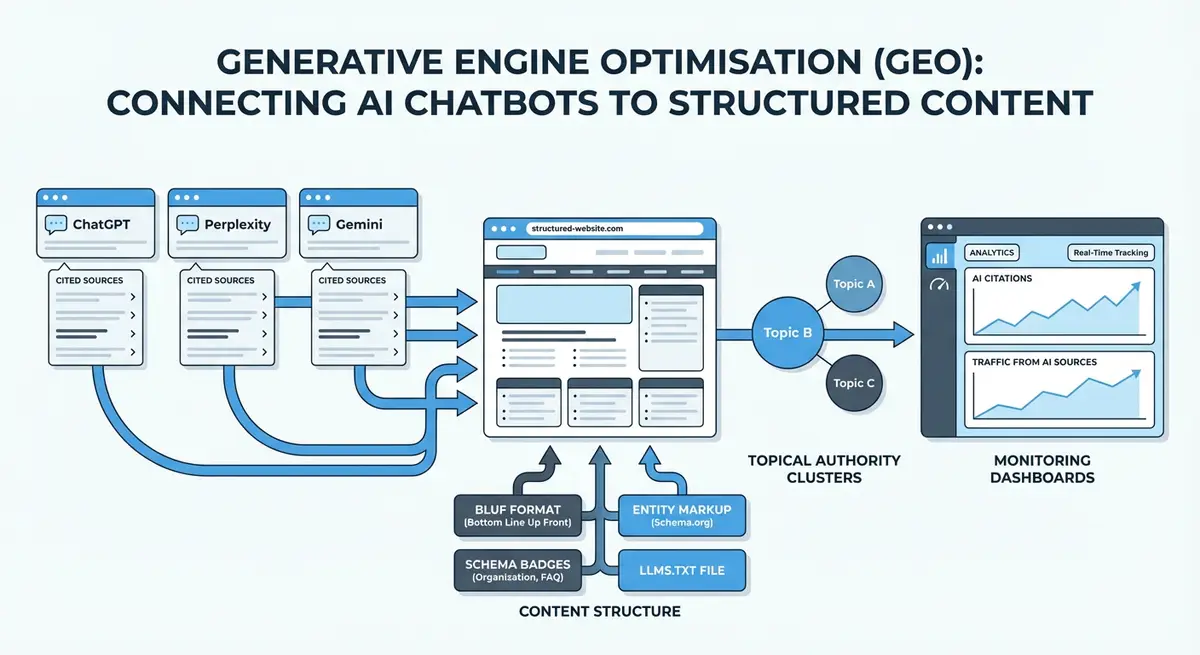
The BLUF Principle: Bottom Line Up Front
BLUF is a communication technique from military intelligence: put the most important information first, then elaborate. For GEO, this means every page and every section should open with a direct, complete answer to the question it addresses. AI engines extract answers from the first relevant paragraph they find. If your answer is buried in paragraph seven after a long introduction, the AI will cite a competitor whose answer appears first.
How to apply BLUF to your Wix pages
- Identify the primary question each page answers. Write it down explicitly.
- Write a 2-3 sentence answer to that question. Place it as the first paragraph after your H1.
- Expand with supporting detail, evidence and examples in subsequent paragraphs.
- For each H2 section, repeat the pattern: lead with the direct answer, then elaborate.
- Remove introductory padding. Delete sentences like "In this article we will explore..." or "Many people wonder about..."
Heading Hierarchy for AI Extraction
AI engines use heading hierarchy to understand content structure and find specific answers. A clear H1 > H2 > H3 structure acts as a table of contents that AI can navigate. Each H2 should address a distinct subtopic. Each H3 should break that subtopic into specific questions or aspects. The text immediately following each heading should directly address what the heading promises.
Extractable Answer Formats
Certain content formats are significantly easier for AI engines to extract and cite. When you present information in these formats, you dramatically increase the chances of being the cited source.
- Definition format: "X is..." sentences. When defining a concept, start the paragraph with a clear "X is [definition]" sentence.
- Numbered lists: step-by-step processes are extracted as complete units. AI engines love numbered instructions.
- Bullet lists: comparison points, feature lists and key characteristics are easily parsed as bullet lists.
- Tables: comparison data, pricing tiers and specifications are best presented in HTML tables on Wix.
- Statistics: "According to [source], X% of..." format is highly citable. AI engines extract specific numbers.
- FAQ format: question as heading, direct answer as the first sentence below. This mirrors how users query AI engines.
Before and After: GEO-Optimised Wix Content
Before: Traditional SEO Content
"If you are a small business owner looking to improve your online presence, you have probably wondered about SEO. Search engine optimisation is a complex topic with many different aspects to consider. In this guide, we will walk you through everything you need to know about improving your Wix website's visibility..."
After: GEO-Optimised Content
"Wix SEO is the process of optimising your Wix website to rank higher in Google search results and be cited by AI search engines. The most effective Wix SEO strategy in 2026 combines on-page optimisation (title tags, headings, content), technical SEO (site speed, schema markup, Core Web Vitals) and off-page authority (backlinks, brand mentions, reviews)."
Essential Resources
- Google Search Console: Monitor how GEO-optimised content performs in search
- Perplexity AI: Test whether AI engines cite your optimised content
- Schema.org: Structured data vocabulary for enhancing content machine-readability
- Wix SEO Help Centre: Official Wix documentation on content optimisation
Content Freshness and Update Signals
AI engines prefer to cite current, recently updated content. Adding a visible "Last updated: [date]" to your Wix pages and including dateModified in your Article schema sends a strong freshness signal. Review and update your most important pages at least quarterly, even if the changes are minor. Every update resets the freshness clock in AI systems.
Complete How-To Guide: Rewriting Your Wix Content for AI Citation
This guide covers applying BLUF formatting, restructuring headings for AI extraction, and converting existing content into citation-ready formats.
How to rewrite your Wix pages for maximum AI citation potential
- Step 1: Select your 5 most important pages to rewrite first. Prioritise pages that target your highest-value keywords and currently rank in the top 20 for those terms.
- Step 2: For each page, identify the primary question it answers. Write this question down explicitly. If you cannot state the question clearly, the page lacks focus and needs restructuring.
- Step 3: Write a 2-3 sentence BLUF answer. This answer should completely address the primary question without requiring any additional context. Place it as the first paragraph after the H1 heading.
- Step 4: Delete all introductory padding. Remove sentences like "In this article, we will explore...", "Many people wonder about...", or "If you have ever asked yourself...". These waste the critical first paragraph position.
- Step 5: Restructure your H2 headings as questions or clear topic labels. Instead of "Our Approach", use "How Does Wix SEO Improve Rankings?" Each H2 should signal exactly what the following section covers.
- Step 6: Under each H2, write a direct answer sentence before elaborating. The first sentence after every heading should address what the heading promises. Then expand with supporting detail.
- Step 7: Convert key information into extractable formats. Turn comparison text into bullet lists. Turn processes into numbered steps. Turn data into tables using the Wix table element.
- Step 8: Add definition sentences for any concepts your page explains. Format them as "[Term] is [definition]" at the start of a paragraph. AI engines extract these as direct answers to "what is [term]?" queries.
- Step 9: Include 3-5 specific statistics with clear attribution. Format as: "According to [Source], [data point]". Each cited statistic is a potential AI extraction point.
- Step 10: Add a visible "Last updated: [Month Year]" line below your H1 on each page. Update this date whenever you make substantive content changes.
- Step 11: Update the dateModified property in your Article schema to match the visible update date. Validate the schema using the Google Rich Results Test.
- Step 12: Test your rewritten pages by asking the primary question in ChatGPT and Perplexity. If your content is not cited, compare your page structure against the sources that are cited and identify remaining gaps.
Essential Resources
- Google Rich Results Test: Validate Article schema with dateModified on your BLUF-formatted pages
- Hemingway Editor: Ensure your BLUF content reads at the grade 8-10 readability level AI engines prefer
- Google Search Console: Monitor organic performance of restructured GEO-optimised pages
- SEO Fix in a Box: My Wix app. Free to install, it scans your site and shows what needs fixing, and the paid plan writes the fixes from your own Google searches
More lessons in Module 27: GEO: Generative Engine Optimisation for Wix
- What is GEO and how AI search engines work differently from Google
- Schema markup strategies that boost AI citations on Wix
- llms.txt and ai.txt: machine-readable files for AI crawlers on Wix
- Building topical authority that AI engines trust and cite
- Local GEO: getting your Wix business cited in AI answers for local queries
- Monitoring and measuring GEO performance: tools, metrics and tracking
- GEO audit checklist: the complete Wix website review
- Citational authority: becoming the source AI engines quote
- The agentic web: optimising your Wix site for AI agents and protocols
Was this lesson useful?
It takes 1 minute to tell me. The course is free and I want to keep it that way, and your feedback shows me what is working and helps other people find it.
This lesson on Writing GEO-optimised content on Wix: structure, format and the BLUF principle is part of Module 27: GEO: Generative Engine Optimisation for Wix in The Most Comprehensive Complete Wix SEO Course in the World (2026 Edition). Created by Michael Andrews, a Wix Marketplace Legend Partner with 14 years of hands-on experience, 805 completed Wix SEO projects and 459 verified five-star reviews.
