When to use paid search to fill organic gaps on Wix
Module 29: SEO & Paid Search (SEM) Integration | Lesson 348 of 683 | 20 min read
By Michael Andrews, Wix SEO Expert UK
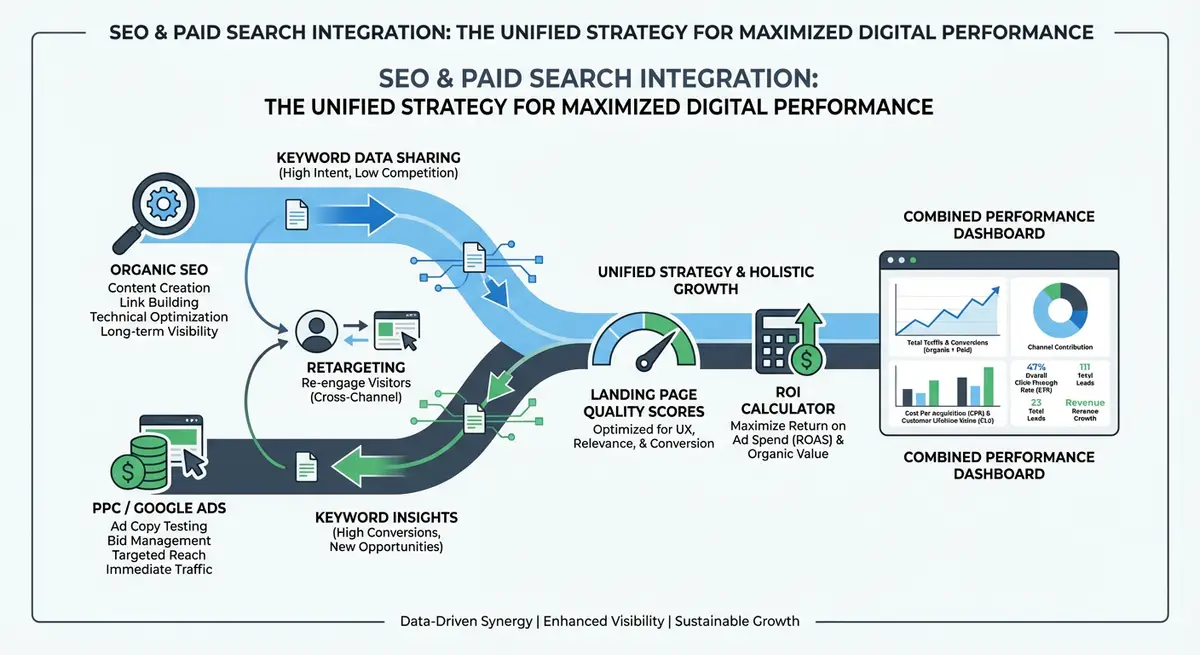
Paid search is not always the answer, but there are specific situations where PPC is the right tool to complement your organic SEO strategy. New site launches, seasonal demand spikes, competitive keyword battles and organic ranking gaps all present opportunities where strategic PPC spending delivers immediate results while organic authority builds in the background.
Scenario 1: New Wix Site or New Service Launch
A brand new Wix site has zero organic authority. Rankings take 3-6 months minimum to build. During this period, PPC provides immediate visibility and revenue while SEO lays the long-term foundation. Allocate a higher PPC budget in months 1-6 and plan to reduce it as organic rankings improve. Without PPC, a new site sits invisible for months while paying for SEO work that has not yet produced results.
Scenario 2: Seasonal Demand Spikes
If your business has seasonal peaks, such as Christmas for retail, January for fitness, or spring for garden services, PPC lets you capture demand spikes that organic content alone may not rank for in time. Create seasonal PPC campaigns that run during peak months while your evergreen organic content covers the baseline demand year-round.
Scenario 3: Highly Competitive Keywords
Some keywords are dominated by high-authority competitors that will take years of organic effort to outrank. For these keywords, PPC provides immediate top-of-page visibility. Run PPC for the highly competitive head terms while building organic content targeting the related long-tail variations that are easier to rank for.
Scenario 4: Testing New Markets or Services
Before investing months of SEO effort in a new service area or market, use PPC to test demand. Run a small campaign for 30 days and measure conversion rates. If the market converts well, invest in organic content. If it does not, you have saved months of wasted SEO effort and a few hundred pounds on a PPC test.
Budget Allocation Over Time
- Months 1-3: 70% PPC, 30% SEO investment. PPC drives immediate traffic while SEO foundations are built.
- Months 4-6: 50% PPC, 50% SEO. Organic rankings begin appearing. Start reducing PPC on keywords where organic ranks.
- Months 7-12: 30% PPC, 70% SEO. Organic rankings carry the majority of traffic. PPC focuses on gaps and retargeting.
- Month 12+: 15% PPC, 85% SEO. PPC handles competitive gaps, seasonal spikes and retargeting only.
Complete How-To Guide: Using PPC Strategically to Fill Organic Gaps on Wix
This guide covers identifying where PPC adds the most value, setting up gap-filling campaigns, and planning the transition from paid to organic traffic as rankings build.
How to strategically use paid search alongside SEO for your Wix site
- Step 1: Export your target keyword list and check your organic position for each in Google Search Console. Mark any keyword where you are not in the top 10 as a potential PPC gap.
- Step 2: Prioritise PPC gaps by commercial value. For each gap keyword, estimate the monthly revenue potential based on search volume and your average conversion rate. Focus PPC budget on the highest-value gaps.
- Step 3: For a new Wix site launch, set up PPC campaigns for your top 10 target keywords immediately. Use exact match and phrase match to control spend. Set a daily budget you can sustain for 6 months.
- Step 4: Create dedicated landing pages on your Wix site for each PPC campaign. Each landing page should match the ad copy, include the target keyword in the H1, and have a clear conversion path.
- Step 5: For seasonal keywords, create PPC campaigns 2-4 weeks before the seasonal peak begins. Set start and end dates for the campaigns. Prepare the ads and landing pages in advance.
- Step 6: Set up a competitor keyword campaign. Bid on competitor brand names (where legally permitted) with ads that highlight your unique value proposition. This captures comparison-shopping traffic.
- Step 7: Create a "PPC to Organic Transition Plan" spreadsheet. For each PPC keyword, set organic ranking milestones: at position 10, reduce PPC bid by 25%. At position 5, reduce by 50%. At position 3, pause PPC.
- Step 8: Monitor your organic rankings weekly for PPC keywords. When a keyword reaches the transition threshold, implement the planned bid reduction. Verify total click volume (organic + paid) remains stable.
- Step 9: Use Local Services Ads if your Wix business serves a specific area. LSAs appear above standard Google Ads and generate leads at a fixed cost per lead. They complement local SEO and Google Business Profile.
- Step 10: Set up Google Ads experiments to test the impact of pausing PPC on keywords where you rank organically. Run a 50/50 experiment for 30 days to measure whether organic compensates for the lost paid clicks.
- Step 11: Allocate 15-20% of your PPC budget permanently to retargeting. Even after organic rankings are strong, retargeting recaptures the 95% of organic visitors who leave without converting.
- Step 12: Review and adjust your budget allocation quarterly. Compare your actual PPC spend versus the planned reduction schedule. If organic rankings are building faster than expected, accelerate the PPC reduction. If slower, maintain PPC investment.
How to Identify and Fill Organic Search Gaps with Paid Campaigns on Wix
Paid search fills the visibility gaps that organic SEO cannot yet cover. These steps walk you through finding your organic gaps and deploying targeted Google Ads campaigns to bridge them.
How to use Google Ads to fill gaps in your Wix organic search coverage
- Step 1: In Google Search Console, navigate to Performance > Search Results. Set the date range to the last 3 months. Filter the Queries tab to show keywords with high impressions but position 11 or below. These are your organic gap keywords.
- Step 2: Export the list of gap keywords. Open Google Keyword Planner and enter these keywords to check their monthly search volume and estimated CPC. Sort by volume to prioritise by potential impact.
- Step 3: Log in to your Wix Dashboard and navigate to Marketing & SEO > Google Ads. Check whether any existing campaigns target these gap keywords. If not, these are your priority campaign additions.
- Step 4: In Google Ads, create a new Search campaign targeting your top 10 gap keywords. Use Exact Match and Phrase Match types to control when your ads show. Set a modest daily budget of 5-10 pounds per day for initial testing.
- Step 5: Create dedicated landing pages on your Wix site for each gap keyword cluster. Navigate to the Wix Editor and add a new page or duplicate an existing service page. Tailor the content to match the specific intent of the gap keyword.
- Step 6: Optimise the Wix landing page for the gap keyword. Update the H1, title tag, and meta description through the Wix page SEO panel to target the keyword precisely. Ensure the page has a clear conversion action (form, call button, or product add-to-cart).
- Step 7: Connect Google Ads conversion tracking to your Wix site. In Google Ads, go to Tools > Conversions. Use the website tag method and add the conversion tracking code via Wix Dashboard > Settings > Custom Code in the body section.
- Step 8: After 14 days of running the gap-filling campaigns, review conversion data in Google Ads. Identify which gap keywords converted and which did not. Pause non-converting keywords and increase budgets for converting ones.
- Step 9: For gap keywords that generate conversions through paid ads, prioritise those pages for organic SEO improvement. Log in to Wix Dashboard > Marketing & SEO > SEO Tools and use the AI SEO Assistant to get recommendations for improving those pages.
- Step 10: Set up negative keywords in Google Ads for searches unrelated to your business. Navigate to Keywords > Negative Keywords in your campaign and add irrelevant terms to prevent wasted spend on non-converting traffic.
- Step 11: Review your organic ranking progress for gap keywords monthly. As organic positions improve above position 5, reduce PPC bids for those specific keywords by 30% per quarter.
- Step 12: Track the transition timeline in a spreadsheet. For each gap keyword, log the month you started PPC targeting, the month organic hit position 10, position 5, and position 3. This timeline helps you predict how long to fund PPC for future gap keywords.
Essential Resources
- Google Ads: Create gap-filling PPC campaigns for keywords without organic coverage
- Microsoft Advertising: Extend PPC reach to Bing, which also powers AI search results
- Google Keyword Planner: Estimate CPC and competition for potential gap-filling keywords
Was this lesson useful?
It takes 1 minute to tell me. The course is free and I want to keep it that way, and your feedback shows me what is working and helps other people find it.
This lesson on When to use paid search to fill organic gaps on Wix is part of Module 29: SEO & Paid Search (SEM) Integration in The Most Comprehensive Complete Wix SEO Course in the World (2026 Edition). Created by Michael Andrews, a Wix Marketplace Legend Partner with 14 years of hands-on experience, 800 completed Wix SEO projects and 456 verified five-star reviews.