Using Google Ads keyword data to inform your Wix SEO strategy
Module 29: SEO & Paid Search (SEM) Integration | Lesson 345 of 683 | 30 min read
By Michael Andrews, Wix SEO Expert UK
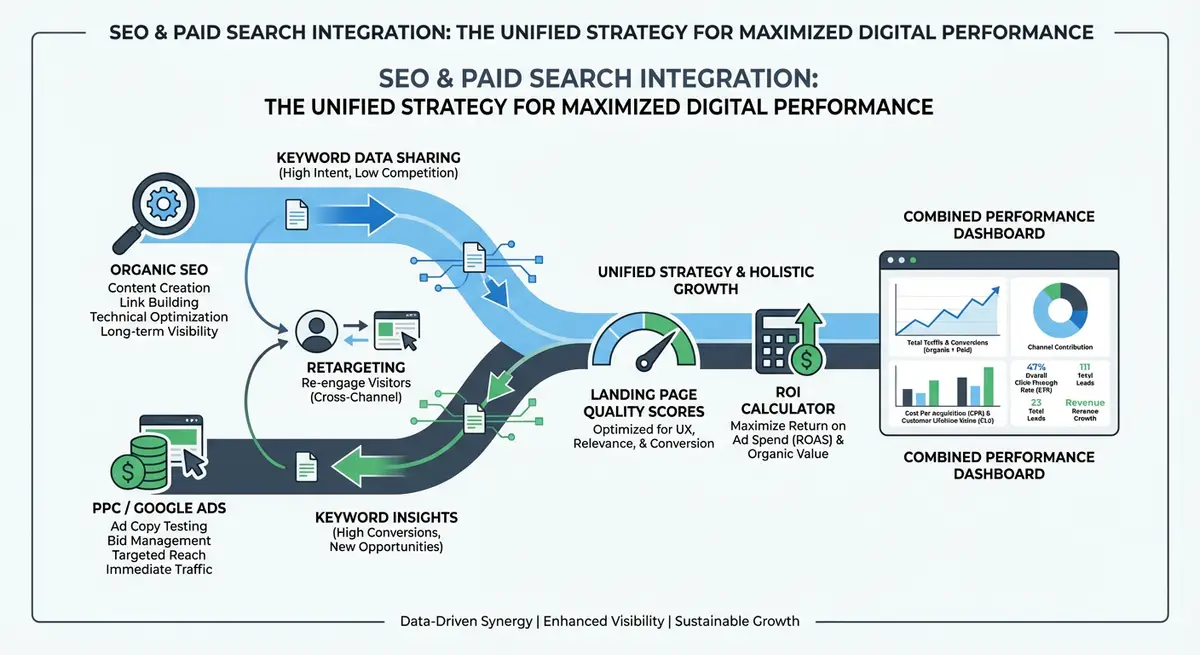
Google Ads provides the most accurate keyword performance data available anywhere. While SEO keyword research relies on estimated search volumes and predicted difficulty, Google Ads gives you actual conversion rates, real cost-per-click data, and genuine search terms that real users type. Mining this data to inform your Wix SEO strategy is one of the highest-value activities in integrated search marketing.
The Search Terms Report: Your SEO Goldmine
The Google Ads Search Terms Report shows the exact queries that triggered your ads, not just the keywords you bid on. This distinction is critical. You might bid on "wix seo" but discover that "wix seo expert for small businesses" and "wix seo specialist near me" are the actual queries driving conversions. These long-tail search terms are often easier to rank for organically and more commercially valuable than the broad terms you originally targeted.
Using Conversion Data to Prioritise SEO Keywords
Traditional SEO keyword research prioritises by search volume: the more searches, the better the keyword. But volume does not equal value. A keyword with 100 monthly searches that converts at 8% is far more valuable than a keyword with 1,000 searches that converts at 0.5%. Google Ads conversion data tells you exactly which keywords generate actual business results, letting you prioritise your SEO efforts on commercially proven terms.
- Export your Google Ads conversion report by keyword and sort by conversion rate
- Identify the top 20 keywords by conversion volume, these are your highest-priority SEO targets
- Note keywords with high conversion rates but low impressions, these are untapped opportunities
- Check which converting keywords you do not yet rank for organically, these are your SEO gaps
- Compare cost-per-conversion across keywords to identify where organic rankings would save the most money
Quality Score Insights for SEO
Google Ads Quality Score includes a "Landing Page Experience" component rated as Below Average, Average, or Above Average. This rating evaluates many of the same factors Google uses for organic rankings: page relevance, load speed, mobile usability and content quality. If your Quality Score landing page experience is Below Average, the same issues are likely hurting your organic rankings.
Identifying Keywords to Move from Paid to Organic
The ultimate integration goal is to identify keywords where you can replace paid clicks with organic clicks. Look for keywords where you are paying a high CPC but could realistically rank in the top 3 organically. Calculate the potential monthly savings: if a keyword costs three pounds per click and gets 200 clicks per month, ranking organically saves 600 pounds per month for that single keyword.
Complete How-To Guide: Mining Google Ads Data for SEO Keyword Intelligence
This guide covers extracting actionable SEO insights from your Google Ads data, identifying the highest-value organic keyword opportunities, and building a data-driven SEO prioritisation framework.
How to use Google Ads data to improve your Wix SEO strategy
- Step 1: In Google Ads, go to Insights & Reports then Search Terms. Set the date range to the last 90 days. Export the full report as a CSV file.
- Step 2: Sort the export by Conversions (highest first). Highlight the top 50 converting search terms. These are the queries that actually drive business results and should be your highest-priority SEO targets.
- Step 3: For each of the top 50 converting terms, check your current organic ranking in Google Search Console. Filter the Performance report by each query to see your average position.
- Step 4: Create a priority matrix. Categorise each keyword into: Already Ranking (position 1-10), Within Reach (position 11-30), Not Ranking (position 30+). Focus SEO efforts on "Within Reach" keywords first as they require the least effort to rank.
- Step 5: In Google Ads, go to Keywords then Columns then Modify and add "Quality Score" and "Landing Page Experience". Identify any keywords with Below Average landing page scores and fix those pages first.
- Step 6: Calculate the potential SEO savings for each keyword. Multiply average CPC by monthly clicks. This shows how much you would save if organic rankings replaced paid clicks. Prioritise keywords with the highest monthly cost.
- Step 7: Review Ad Group performance data for content ideas. Ad Groups with high CTR reveal messaging angles that resonate with your audience. Use these angles in your organic title tags and content headlines.
- Step 8: Check your Google Ads Auction Insights report. This shows which competitors appear alongside you in paid results. Search these competitors organically to understand what content they rank for that you do not.
- Step 9: Use Google Ads Ad Preview Tool to see which ad copy variations perform best. The headlines and descriptions with the highest CTR should directly inform your organic meta titles and descriptions.
- Step 10: Set up a monthly export routine. On the first of each month, export your search terms report and conversion data. Compare month-over-month to identify trending keywords and shifting conversion patterns.
- Step 11: As you build organic rankings for high-converting keywords, gradually reduce PPC bids. Monitor total click volume (organic + paid) to ensure you are not losing traffic during the transition.
- Step 12: Create a quarterly SEO Impact Report showing: keywords moved from paid to organic, monthly PPC savings achieved, organic traffic growth for PPC-identified keywords, and total search marketing ROI improvement.
How to Use Google Ads Keyword Data to Plan Your Wix SEO Content
Google Ads provides real conversion data that generic keyword research tools cannot match. These steps show you how to extract that data and use it to guide your Wix content strategy.
How to extract Google Ads keyword insights and apply them to Wix SEO
- Step 1: Log in to Google Ads and navigate to Reports > Search Terms. Set the date range to the last 90 days. Filter to show only search terms with at least one conversion.
- Step 2: Export the search terms report to a spreadsheet. Add columns for organic ranking position (from Google Search Console), monthly organic impressions, and a priority score.
- Step 3: In Google Search Console, use the Performance report to look up the current organic position for each of your top 20 converting paid search terms. Note which ones have no organic impressions at all.
- Step 4: Sort your spreadsheet by highest conversion count. The keywords at the top are your SEO priority list because you already know they convert, not just that they attract clicks.
- Step 5: For each high-converting keyword with no organic presence, identify the best existing Wix page to target it or determine that you need to create a new page.
- Step 6: Log in to your Wix Dashboard and navigate to the target page in the Wix Editor. Open the SEO panel (three dots > SEO Settings) and update the title tag to include the exact high-converting keyword from your ads data.
- Step 7: Update the page's H1 heading to match the search intent of your top converting keyword. Review the opening paragraph and ensure the keyword appears naturally within the first 100 words.
- Step 8: Review your paid ad copy for keywords with high CTR in Google Ads. The ad headlines and descriptions that earn the most clicks reveal what language resonates with your audience. Use the same phrasing in your organic meta descriptions.
- Step 9: Check your paid landing page conversion rates versus your Wix page conversion rates. If your paid landing page converts at 5% and your Wix organic page at 1%, investigate the differences and update the organic page design.
- Step 10: Use Google Ads Keyword Planner to discover close variants of your top converting keywords. Search for related terms and filter for low difficulty. Add these long-tail variations as subheadings and FAQ answers on your Wix pages.
- Step 11: Set up a monthly keyword intelligence meeting. Pull the latest search terms report, identify any new high-converting terms, and update your Wix content calendar accordingly.
- Step 12: Track organic conversions for keywords you have migrated from paid to organic focus. In Google Analytics 4, set up a custom report filtering organic sessions by landing page to measure conversion rates for each targeted keyword.
Essential Resources
- Google Ads: Access Search Terms Report and conversion data for SEO keyword intelligence
- Google Keyword Planner: Research keyword volumes and CPC estimates for SEO prioritisation
- Google Search Console: Check current organic rankings for PPC-identified high-converting keywords
- SEO Fix in a Box: My Wix app. Free to install, it scans your site and shows what needs fixing, and paid plans write the fixes from your own Google searches
Was this lesson useful?
It takes 1 minute to tell me. The course is free and I want to keep it that way, and your feedback shows me what is working and helps other people find it.
This lesson on Using Google Ads keyword data to inform your Wix SEO strategy is part of Module 29: SEO & Paid Search (SEM) Integration in The Most Comprehensive Complete Wix SEO Course in the World (2026 Edition). Created by Michael Andrews, a Wix Marketplace Legend Partner with 14 years of hands-on experience, 800 completed Wix SEO projects and 456 verified five-star reviews.