Service area business SEO for Wix sites without a physical storefront
Module 9·Lesson 7 of 14·55 min read

Service area business SEO: ranking without a physical storefront on Wix

Plumbers, mobile hairdressers, cleaners and consultants who travel to clients face unique local SEO challenges. This lesson covers how to set up your Wix site and Google Business Profile for service area businesses that have no walk-in location.

What you will learn in this Wix SEO lesson

  • Configuring Google Business Profile for service area businesses
  • Hiding your home address while maintaining local rankings
  • Creating location pages for every area you serve on Wix
  • Service area schema markup for businesses without a storefront
  • How the local algorithm differs for SABs vs brick-and-mortar

Service area businesses (SABs) face a fundamentally different local SEO challenge from storefront businesses. Plumbers, mobile hairdressers, cleaners, electricians, consultants, dog walkers, mobile mechanics and dozens of other business types travel to their customers rather than having customers visit a fixed location. This changes the local SEO equation in critical ways: you cannot rely on physical proximity as a ranking signal, you cannot display a walk-in address on your Google Business Profile, and you need to prove local relevance for multiple areas without a fixed local anchor point. The good news is that SABs can absolutely rank in the Map Pack and organic local results. The local algorithm weighs reviews, profile completeness, website content and citation consistency more heavily for SABs since physical proximity is not a factor. This lesson covers every SAB-specific local SEO strategy, from GBP configuration through to content and schema implementation on Wix.

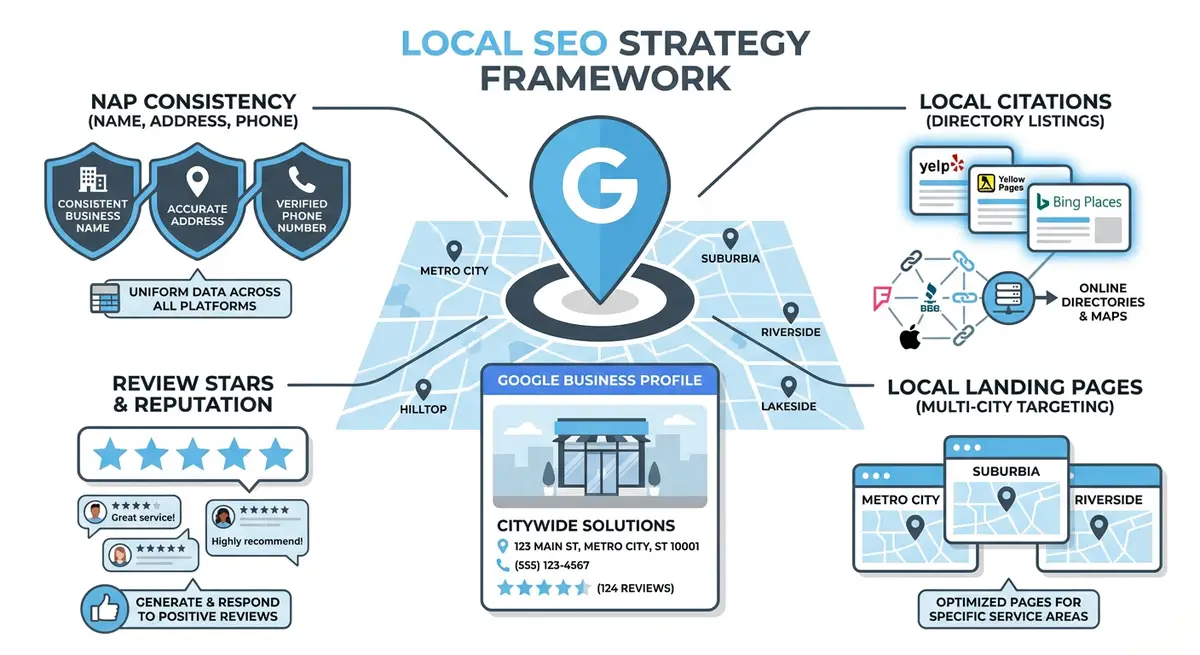
How-to diagram showing local SEO strategy including Google Business Profile optimisation, NAP consistency, local citations, review generation, and local landing pages
Local SEO combines Google Business Profile optimisation with on-site signals to dominate local search results for your Wix business.

Configuring Google Business Profile for Service Area Businesses

Complete GBP setup for SABs

  1. 1Log into your Google Business Profile at business.google.com.
  2. 2Navigate to Edit Profile > Business Information > Address.
  3. 3Toggle on "I deliver goods and services to my customers at their location".
  4. 4Clear your physical address from public display. Your home address or registered office address remains on file with Google for verification but is hidden from customers.
  5. 5Add every city, town and borough you genuinely serve as a service area. Be specific: add individual town names rather than broad regions.
  6. 6Set your primary category to your main service type (e.g., "Plumber" not "Home Services").
  7. 7Add up to 9 secondary categories covering your additional service offerings.
  8. 8Verify that your listing shows service areas without displaying a street address.
  9. 9Do NOT add a fake office address or use a virtual office to appear in the Map Pack with a pin. Google actively penalises this.

Address Policy

Google's guidelines explicitly state that SABs must not display a physical address unless customers actually visit that location. Using a virtual office, PO Box or fake address to gain a map pin is a violation that can result in listing suspension. The correct configuration is hidden address with visible service areas.

How the Local Algorithm Differs for SABs

  • Proximity weighting is reduced: for storefront businesses, proximity to the searcher is a dominant ranking factor. For SABs, Google reduces this weighting because the business travels to the customer.
  • Service area matching: Google matches your listed service areas to the searcher's location. You must have the searcher's city listed as a service area to appear in their results.
  • Relevance takes priority: your primary category, business description, website content and review content become more important ranking factors when proximity is de-emphasised.
  • Review signals are amplified: reviews mentioning specific locations, services and positive outcomes carry extra weight for SAB rankings.
  • Website content signals: Google relies more heavily on your Wix site content to determine geographic relevance for SABs. Location pages are critical.
  • Citation consistency: consistent NAP across directories is especially important because there is no physical storefront for Google to verify visually.

Building Location Pages for Every Service Area

For SABs, location pages are your most important SEO asset. Each page targets "[service] in [location]" keywords and demonstrates genuine expertise in that specific area. Without a physical address, your website content is the primary way Google determines your geographic relevance.

Creating location pages for SABs

  1. 1List every city and major town in your service area.
  2. 2Prioritise by search volume, competition and existing client base.
  3. 3Create a dedicated page for each priority location on your Wix site.
  4. 4Write genuinely unique content for each page: area-specific advice, local conditions, local case studies.
  5. 5Include a real testimonial from a client in or near that location.
  6. 6Reference specific neighbourhoods, postcodes and local landmarks that only a genuine local service provider would know.
  7. 7Add a Google Map embed showing your service coverage area rather than a single address pin.
  8. 8Include clear CTAs: "Book [Service] in [City]" or "Get a Quote for [City] Area".
  9. 9Add Service schema with areaServed targeting that specific city.
  10. 10Interlink location pages to your main service page and to adjacent location pages.

Service Area Schema Markup for SABs

{
  "@context": "https://schema.org",
  "@type": "Plumber",
  "name": "Your Business Name",
  "url": "https://yoursite.com",
  "telephone": "+44-161-123-4567",
  "areaServed": [
    { "@type": "City", "name": "Manchester" },
    { "@type": "City", "name": "Salford" },
    { "@type": "City", "name": "Stockport" },
    { "@type": "City", "name": "Bolton" },
    { "@type": "City", "name": "Bury" }
  ],
  "serviceArea": {
    "@type": "GeoCircle",
    "geoMidpoint": {
      "@type": "GeoCoordinates",
      "latitude": 53.4808,
      "longitude": -2.2426
    },
    "geoRadius": "25 mi"
  },
  "hasOfferCatalog": {
    "@type": "OfferCatalog",
    "name": "Plumbing Services",
    "itemListElement": [
      {
        "@type": "Offer",
        "itemOffered": {
          "@type": "Service",
          "name": "Emergency Plumbing",
          "areaServed": { "@type": "City", "name": "Manchester" }
        }
      }
    ]
  }
}

Note the use of both areaServed (listing individual cities) and serviceArea (defining a geographic radius). Using both provides maximum geographic context to Google.

Review Strategy for Service Area Businesses

Reviews are disproportionately important for SAB rankings because Google cannot use physical proximity as a primary signal. Reviews that mention specific locations strengthen your geographic relevance for those areas.

  • Ask every customer for a Google review regardless of their location.
  • When requesting reviews, suggest (but do not require) that customers mention their area: "If you could mention that we serviced your home in Bolton, that would be really helpful."
  • Reviews containing location names strengthen your relevance for searches in those areas.
  • Respond to every review and naturally reference the location: "Thank you for choosing us for your plumbing needs in Bolton."
  • Monitor which service areas have the fewest reviews and prioritise review requests from customers in those areas.
  • Display location-specific reviews on the corresponding location pages on your Wix site.

Citation Building for SABs

  • Use your registered business address for directory submissions but do not display a street address where possible.
  • Some directories require a physical address. Use your home or registered office address consistently. The address itself should match your GBP registration, even though it is hidden from public view.
  • Add your service areas to every directory that has a "service area" or "coverage area" field.
  • Prioritise industry-specific directories: Checkatrade, MyBuilder, Rated People and Bark for tradespeople; specific directories for your industry.
  • Ensure your phone number format is identical across all directories (matching your Master NAP document).
  • List your service types and coverage areas in your business descriptions on every directory.

Content Strategy for SABs

Building geographic authority through content

  1. 1Create blog posts about specific locations: "Common [Service] Problems in [City]" or "Your Guide to [Service] Costs in [Area]".
  2. 2Write about local regulations, planning rules or conditions relevant to your service in each area.
  3. 3Share case studies from different service areas, clearly identifying the location in each case study.
  4. 4Create "Areas We Cover" content that links to individual location pages.
  5. 5Develop seasonal content relevant to specific areas: "Preparing Your [City] Home for Winter" for a plumber.
  6. 6Photograph your work in different locations and include location-tagged images on your Wix site with descriptive alt text.
  7. 7Create locally-focused social media content that demonstrates your presence across your service area.

FAQ: SAB Local SEO

Can SABs rank in the Google Map Pack?

Yes. SABs regularly appear in the Map Pack for searches within their service areas. The key difference is that an SAB listing shows without a map pin (just the service area label). Rankings are based on relevance, review signals and GBP completeness rather than proximity to a specific address.

Should I use my home address on my Wix site?

Only if you want customers to come to your home. For most SABs, the Wix site should display your service areas, phone number and contact form without a street address. Use LocalBusiness schema with areaServed instead of a physical address to maintain consistency with your GBP configuration.

SAB Priority Stack

For SABs, the ranking priority order is: (1) GBP category and completeness, (2) review volume and quality with location mentions, (3) location pages on your Wix site with unique content, (4) consistent citations across directories, (5) local blog content demonstrating area expertise. Focus your effort in this order.

Finished this lesson?

Mark it complete to track your course progress.

AI Lesson Tutor

AI Powered

Got a question about this lesson? Ask the AI tutor for a quick explanation or practical examples.

Your Course Resources

11 downloadable PDFs -- checklists, templates, worksheets and your certificate

Course Progress0/561 lessons

Checklists

Wix SEO Audit ChecklistPDF

20-point site-wide audit covering technical, on-page, content and local SEO

On-Page SEO ChecklistPDF

37-point per-page checklist: titles, headings, content, images, links, schema

Technical SEO Deep-DivePDF

50-point technical audit: crawlability, Core Web Vitals, speed, security, Wix-specific

Local SEO Setup ChecklistPDF

42-point local checklist: Google Business Profile, NAP, citations, reviews, local links

Site Launch SEO ChecklistPDF

48-point pre-launch and post-launch guide for new Wix sites going live

Templates & Worksheets

Keyword Research TemplatePDF

Printable tracker with columns for volume, difficulty, intent, priority and notes

Monthly SEO Report TemplatePDF

Client-ready report covering traffic, rankings, technical health and action plan

Content Brief TemplatePDF

Plan every page: target keywords, outline, competitor analysis, internal links, CTAs

Backlink Outreach TrackerPDF

Campaign log with status tracking plus 3 proven outreach email templates

Competitor Analysis WorksheetPDF

14-metric comparison table, content gap analysis and SEO SWOT framework

Achievement

Certificate of CompletionLocked

Complete all lessons to unlock (0/561 done)

Lesson Tools

No part of this Wix SEO Course content may be reproduced, copied, or distributed without the written consent of Michael Andrews.

This lesson on Service area business SEO: ranking without a physical storefront on Wix is part of Module 9: Local SEO Domination in The Most Comprehensive Complete Wix SEO Course in the World (2026 Edition). It covers Wix SEO optimization (US) and optimisation (UK) strategies applicable to businesses in the United Kingdom, United States, Australia, Canada, New Zealand, Ireland and worldwide. Created by Michael Andrews, the UK's No.1 Wix SEO Expert with 14 years of hands-on experience, 750+ completed Wix SEO projects and 425+ verified five-star reviews. This is lesson 99 of 561 in the most affordable, most comprehensive Wix SEO training programme available in 2026.