Schema markup strategies that boost AI citations on Wix
Module 27: GEO: Generative Engine Optimisation for Wix | Lesson 324 of 683 | 38 min read
By Michael Andrews, Wix SEO Expert UK
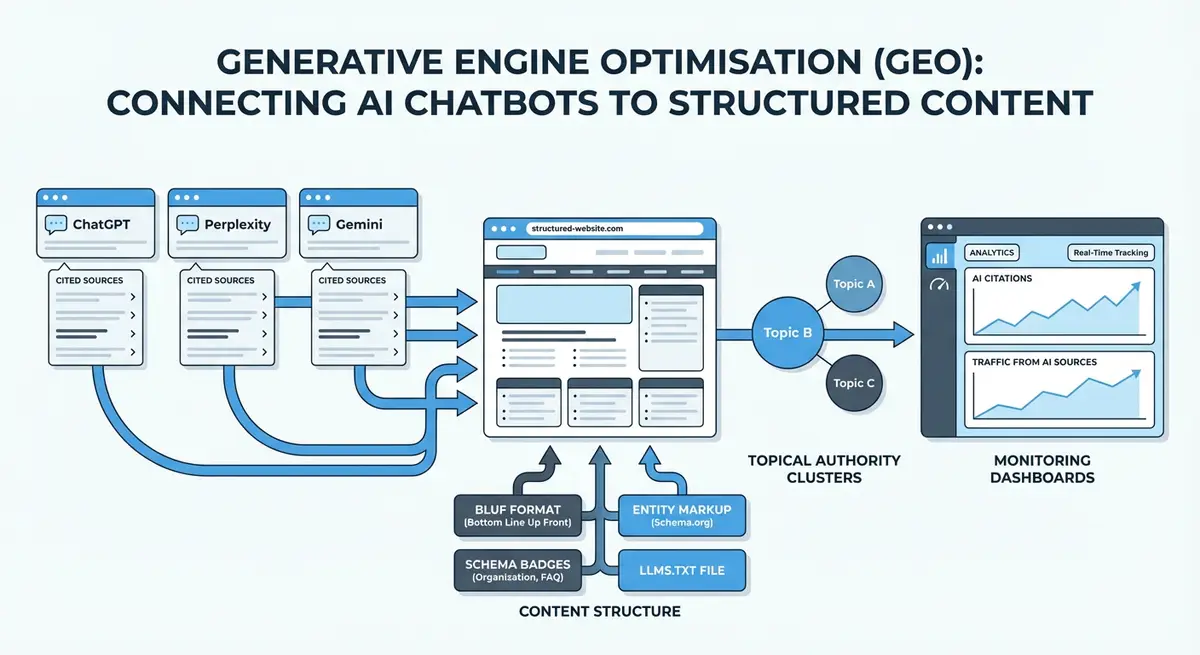
Schema markup has always mattered for SEO. For GEO, it is even more critical. AI engines use structured data as a machine-readable layer that helps them understand who created content, what it is about, when it was last updated, and how authoritative the source is. This lesson covers the specific schema types and implementation strategies that directly increase your chances of being cited in AI-generated answers.
Why Schema Matters More for GEO Than Traditional SEO
In traditional SEO, schema markup helps you earn rich results but is not a direct ranking factor. In GEO, schema serves a fundamentally different purpose: it provides the machine-readable metadata AI engines use to evaluate source trustworthiness, verify author credentials and assess content freshness. A page with comprehensive schema markup gives AI engines confidence that the source is legitimate, well-maintained and authoritative.
Person Schema: Establishing Author Authority
Person schema connects your content to a verified author identity. For GEO, this is one of the most impactful schema types because AI engines use author information to assess E-E-A-T. A blog post with Person schema linking to a professional LinkedIn profile, credentials and published works signals far more authority than anonymous content.
{
  "@context": "https://schema.org",
  "@type": "Person",
  "name": "Your Name",
  "jobTitle": "Wix SEO Specialist",
  "url": "https://yourdomain.com/about",
  "image": "https://yourdomain.com/your-photo.jpg",
  "sameAs": [
    "https://linkedin.com/in/yourprofile",
    "https://twitter.com/yourhandle"
  ],
  "knowsAbout": ["Wix SEO", "Technical SEO", "Local SEO"],
  "alumniOf": {
    "@type": "EducationalOrganization",
    "name": "Your University or Certification Body"
  },
  "hasCredential": {
    "@type": "EducationalOccupationalCredential",
    "name": "Wix SEO Certification",
    "credentialCategory": "Professional Certification"
  }
}
Article Schema with Freshness Signals
Every piece of content on your Wix site that you want AI engines to cite should have Article or BlogPosting schema with datePublished, dateModified and author linking. The dateModified property is particularly important: AI engines prefer to cite recently updated content, and this property is how they determine freshness programmatically.
Speakable Schema: Marking AI-Extractable Content
Speakable schema identifies sections of a page that are especially suited for text-to-speech and AI extraction. While originally designed for voice assistants, speakable markup signals to AI engines which parts of your content are the most concise, direct and suitable for inclusion in generated answers. Mark your key definitions, summaries and direct answers with speakable schema.
{
  "@context": "https://schema.org",
  "@type": "WebPage",
  "name": "Your Page Title",
  "speakable": {
    "@type": "SpeakableSpecification",
    "cssSelector": ["h1", ".key-answer", ".summary-box"]
  }
}
FAQ and HowTo Schema as AI-Extractable Formats
FAQPage schema and HowTo schema present information in the exact format AI engines use to construct answers. When ChatGPT encounters a page with FAQ schema, it can extract individual Q&A pairs directly. When Perplexity finds HowTo schema, it can cite specific steps. These schema types are not just for rich results anymore. They are citation-ready content structures.
Implementing Schema on Wix
How to add GEO-optimised schema to your Wix site
- Go to your Wix Dashboard, then Settings, then Custom Code
- Click Add Custom Code and set the location to Head
- Choose whether to apply to a specific page or all pages
- Paste your JSON-LD schema inside a <script type="application/ld+json"> tag
- Validate with Google Rich Results Test and Schema.org validator
- Test by querying AI engines about topics your schema covers and checking for citations
Complete How-To Guide: Implementing GEO Schema Markup on Your Wix Site
This guide covers adding each schema type that boosts AI citations, implementing them correctly on Wix, and validating that AI engines can read your structured data.
How to add GEO-optimised schema markup to your Wix website
- Step 1: Audit your existing schema. Use the Google Rich Results Test on your homepage, about page and three key content pages. Note which schema types are present and which are missing.
- Step 2: Add Organization schema to your homepage. In Wix Dashboard, go to Settings then Custom Code then Head. Add a script tag with JSON-LD containing: name, url, logo, founder, sameAs array, areaServed, and knowsAbout array.
- Step 3: Add Person schema to your author or about page. Include: name, jobTitle, url, image, sameAs array linking to LinkedIn and other profiles, knowsAbout, hasCredential, and alumniOf.
- Step 4: Add Article schema to every blog post. Include: headline, datePublished, dateModified, author (referencing your Person entity by URL), publisher (referencing your Organization), and image.
- Step 5: Add FAQPage schema to any page with a FAQ section. Each question-answer pair should be a mainEntity item. This is one of the most frequently extracted schema types by AI engines.
- Step 6: Add HowTo schema to any step-by-step guide pages. Include the name, description, and each step as a HowToStep with name and text. AI engines extract these as complete instructional sequences.
- Step 7: Add Speakable schema to pages where you want AI engines to extract specific sections. Use cssSelector to identify your key answer paragraphs, summary boxes, and definition sentences.
- Step 8: Use the @graph pattern to combine multiple schema types in a single JSON-LD block on each page. This is more efficient than multiple separate script tags and helps AI engines understand the relationships between entities.
- Step 9: Validate every schema implementation using both the Google Rich Results Test and the Schema.org Validator at validator.schema.org. Fix any errors or warnings before publishing.
- Step 10: Test AI extraction by asking ChatGPT and Perplexity questions that your schema-marked content answers. Note whether the structured information (steps, FAQs, definitions) is being extracted and cited.
- Step 11: Add dateModified to your Article schema and update it whenever you make substantive content changes. Set up a quarterly schedule to review and update all schema across your site.
- Step 12: Monitor the Google Search Console Enhancements section for any schema errors or warnings. Address issues promptly as invalid schema can reduce your visibility in both rich results and AI citations.
Essential Resources
- Google Rich Results Test: Validate all schema markup types on your Wix GEO-optimised pages
- Schema Markup Validator: Deep validation of nested schema structures against the full vocabulary
- Schema.org: Complete reference for all structured data types used by AI engines
Was this lesson useful?
It takes 1 minute to tell me. The course is free and I want to keep it that way, and your feedback shows me what is working and helps other people find it.
This lesson on Schema markup strategies that boost AI citations on Wix is part of Module 27: GEO: Generative Engine Optimisation for Wix in The Most Comprehensive Complete Wix SEO Course in the World (2026 Edition). Created by Michael Andrews, a Wix Marketplace Legend Partner with 14 years of hands-on experience, 800 completed Wix SEO projects and 456 verified five-star reviews.