Retargeting organic visitors with paid campaigns on Wix websites
Module 29·Lesson 5 of 9·55 min read

Retargeting organic visitors with paid campaigns on Wix

Most organic visitors leave without converting. Retargeting lets you follow them across the web with paid ads, bringing them back to complete a booking, purchase or enquiry. This lesson covers setting up retargeting for organic traffic on Wix.

What you will learn in this Wix SEO lesson

  • How retargeting works and why it is essential for organic traffic
  • Setting up Google Ads remarketing tags on Wix via GTM
  • Facebook and Instagram retargeting for Wix organic visitors
  • Creating audience segments based on organic landing page visits
  • Writing retargeting ad copy that converts returning visitors

Over 95% of organic visitors leave your Wix site without converting. They found your page through Google, read your content, and left. Retargeting lets you follow these visitors with targeted ads across the web, bringing them back to complete a purchase, booking or enquiry. It is one of the most cost-effective paid advertising strategies because you are targeting people who already know your brand and have shown interest in your content. This lesson covers setting up retargeting on Wix, building smart audience segments, and creating campaigns that convert returning visitors.
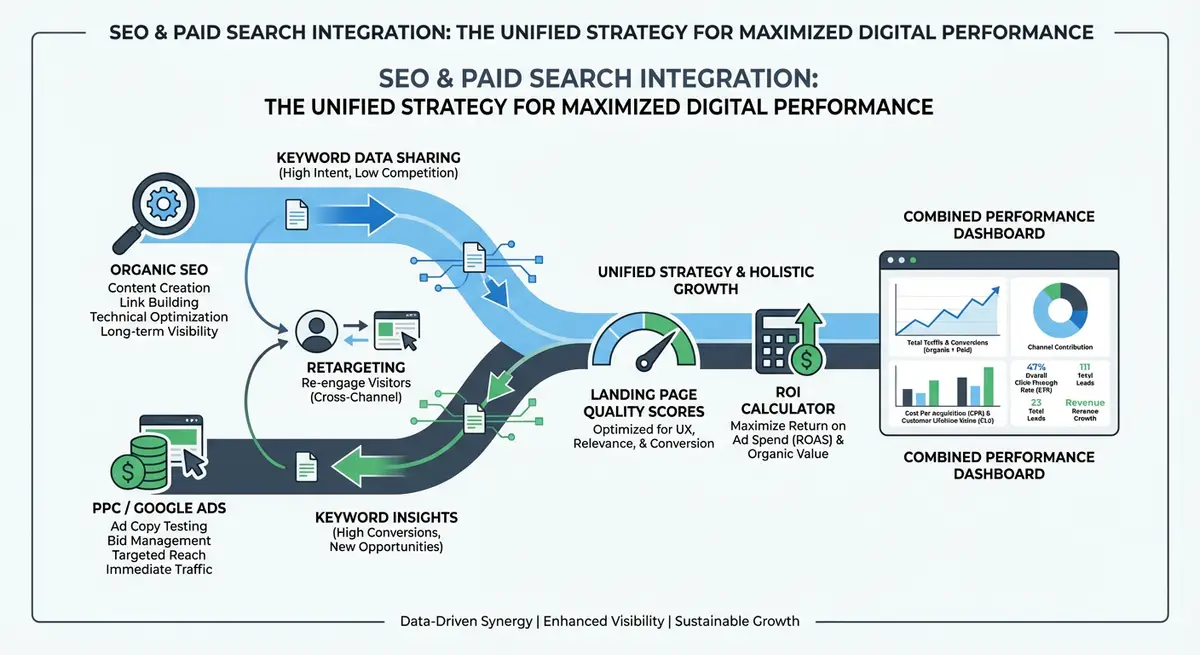
How-to diagram showing SEO and paid search integration including organic and PPC synergy, keyword data sharing, retargeting strategies, landing page quality, and combined ROI measurement
Integrating SEO with paid search creates a powerful unified strategy that maximises visibility and ROI for your Wix business.

How Retargeting Works: The Technical Foundation

When someone visits your Wix site, a small piece of code (a tracking pixel) places a cookie in their browser. This cookie allows advertising platforms like Google Ads and Meta (Facebook/Instagram) to identify these visitors as they browse other websites. You can then serve them targeted ads reminding them of your services, offering a special incentive, or directing them to a conversion-focused landing page.

Retargeting vs Standard Display Advertising

  • Standard display ads: shown to everyone in a broad audience based on demographics and interests. Cold audience, low conversion rate (typically 0.5-1%).
  • Retargeting ads: shown only to people who have already visited your website. Warm audience, much higher conversion rate (typically 2-5%).
  • Retargeting CPC is 50-70% lower than standard display because the audience is pre-qualified and platforms assign higher relevance scores.
  • Retargeting converts at 3-10x the rate of standard display ads because the audience already knows your brand.
  • The ROI of retargeting organic visitors is particularly high because these visitors arrived through a search query, demonstrating active intent.

The Organic Retargeting Advantage

Organic visitors are your highest-value retargeting audience. They searched for something relevant, found your content useful enough to click, and consumed your content. They have both intent and awareness. Retargeting converts this awareness into action at a fraction of the cost of acquiring new visitors.

Building Smart Audience Segments

Not all organic visitors are equal. Someone who read three blog posts and visited your pricing page is far more likely to convert than someone who bounced from a single page. Creating tiered audience segments lets you allocate budget to the highest-intent visitors and customise messaging for each tier.

The Four-Tier Audience Framework

  • Tier 1 - High Intent (Hottest): visited pricing, contact, or booking pages. These visitors evaluated your offering and were close to converting. Bid highest, use direct conversion messaging.
  • Tier 2 - Engaged (Warm): visited 3+ pages or spent 3+ minutes on site. These visitors showed genuine interest in your content and services. Bid moderately, use benefit-focused messaging with social proof.
  • Tier 3 - Service Interested (Interested): visited specific service or product pages but not pricing/contact. These visitors know what you offer but need more convincing. Bid moderately, use case study and testimonial messaging.
  • Tier 4 - Blog Readers (Cool): visited blog content only. These visitors know your brand but have not explored services. Bid lowest, use educational messaging that bridges from content to services.

Allocate your retargeting budget proportionally: 40% to Tier 1, 25% to Tier 2, 20% to Tier 3, and 15% to Tier 4. This ensures the highest spend goes to the visitors most likely to convert.

Creating Audience Segments in Google Ads

How to set up retargeting audience segments

  1. 1In Google Ads, go to Tools & Settings > Shared Library > Audience Manager
  2. 2Click the blue plus button to create a new segment
  3. 3Select "Website visitors" as the segment type
  4. 4Create Tier 1 segment: visitors to URLs containing /contact, /pricing, /book, or /quote. Set membership duration to 30 days.
  5. 5Create Tier 2 segment: visitors who viewed 3+ pages. Use "Pages per session" condition. Set duration to 45 days.
  6. 6Create Tier 3 segment: visitors to URLs containing /services or specific service page URLs. Set duration to 60 days.
  7. 7Create Tier 4 segment: visitors to URLs containing /blog. Set duration to 90 days.
  8. 8Exclude converters from all segments: create a "Converted" segment for thank-you page visitors and exclude it from all retargeting campaigns.

Setting Up Retargeting on Your Wix Site

Google Ads Remarketing Setup

How to install Google Ads remarketing on your Wix site

  1. 1In Google Ads, go to Tools & Settings > Shared Library > Audience Manager
  2. 2Click "Your Data Segments" then click the setup tag button
  3. 3Copy the Google Ads Global Site Tag (gtag.js) or use Google Tag Manager
  4. 4In your Wix Dashboard, go to Settings > Custom Code > Head
  5. 5Paste the remarketing tag code in the Head section, set to apply to All Pages
  6. 6Verify the tag is working: in Google Ads Audience Manager, check that audience counts start increasing within 24-48 hours
  7. 7If using Google Tag Manager (recommended): create a new tag with Google Ads Remarketing type, add your Conversion ID, set trigger to All Pages

Meta (Facebook/Instagram) Retargeting Setup

How to install Meta Pixel for retargeting on Wix

  1. 1In Meta Business Suite, go to Events Manager > Connect Data Sources
  2. 2Select "Web" then "Meta Pixel"
  3. 3Name your pixel and copy the base pixel code
  4. 4In your Wix Dashboard, go to Settings > Custom Code > Head
  5. 5Paste the Meta Pixel code in the Head section, apply to All Pages
  6. 6Create Custom Audiences in Meta Ads Manager mirroring your Google segments
  7. 7For each audience, use URL-based rules: "People who visited specific web pages" with URL conditions
  8. 8Verify the pixel is working using the Meta Pixel Helper Chrome extension

Writing Retargeting Ad Copy That Converts

Retargeting ads should acknowledge the visitor's previous interaction with your site without being intrusive. The messaging must match the audience tier, addressing their specific stage in the buyer journey.

Ad Copy by Audience Tier

  • Tier 1 (High Intent): "Ready to grow your organic traffic? Complete your booking: limited availability this month." Use urgency and direct CTAs. These visitors were close to converting.
  • Tier 2 (Engaged): "What our clients achieve in 90 days: 247% more organic traffic. See our latest case study." Use proof and specific results to reinforce your value proposition.
  • Tier 3 (Service Interested): "Still looking for a Wix SEO expert? Here is what makes us different: 750+ projects, 400+ 5-star reviews." Use differentiation and social proof.
  • Tier 4 (Blog Readers): "Enjoyed our SEO guide? Get a free 15-minute strategy call to discuss your Wix site." Bridge from content value to service value with a low-commitment offer.

Frequency Capping

Set a frequency cap of 3-5 impressions per day per user. Without frequency capping, retargeting becomes annoying and damages your brand perception. In Google Ads campaign settings and Meta campaign settings, configure impression limits. The goal is gentle, persistent reminders, not bombardment.

Measuring Retargeting ROI

Retargeting ROI should be measured differently from standard advertising because these visitors already have brand awareness. The relevant metrics are:

  • View-through conversions: users who saw your retargeting ad but converted later through another channel (organic search, direct visit). These are legitimate attributable results.
  • Click-through conversions: users who clicked the retargeting ad and converted. This is direct attribution.
  • Cost per re-acquisition: total retargeting spend divided by total conversions from retargeting. Compare this against the cost of acquiring a new visitor through PPC.
  • Incremental lift: the additional conversions generated by retargeting that would not have happened without it. Compare conversion rates of retargeted vs non-retargeted visitor groups.
  • Assisted conversions: in GA4, check the Conversion Paths report for retargeting touchpoints that assisted conversions attributed to other channels.

Complete How-To Guide: Setting Up Retargeting for Organic Traffic on Wix

How to retarget your organic visitors step by step

  1. 1Step 1: Install Google Tag Manager on your Wix site. Go to Wix Dashboard > Settings > Custom Code > Head. Add the GTM container snippet. GTM provides a single platform for managing all tracking tags.
  2. 2Step 2: Set up the Google Ads remarketing tag through GTM. Create a new tag with Google Ads Remarketing type. Add your Conversion ID (found in Google Ads > Tools > Audience Manager > Setup Tag). Set trigger to fire on All Pages.
  3. 3Step 3: Install the Meta Pixel through GTM. Create a new Custom HTML tag with your Meta Pixel base code. Set trigger to All Pages. Verify with the Meta Pixel Helper extension.
  4. 4Step 4: Create your four audience segments in Google Ads (Tier 1-4 as described above). Use URL conditions to match page types. Exclude converted users from all segments.
  5. 5Step 5: Create matching Custom Audiences in Meta Ads Manager. Use "Website visitors" with URL rules matching the same page types as your Google segments.
  6. 6Step 6: Wait 7-14 days for audience lists to populate. Google requires at least 100 users in a list before serving ads. If your Wix site gets low traffic, consolidate to fewer segments initially.
  7. 7Step 7: Build your Google Display retargeting campaign. Create a Display campaign, select your Tier 1 audience first. Write tier-specific ad copy with direct conversion messaging. Set daily budget to 5-10 GBP to start.
  8. 8Step 8: Build responsive display ads. Google recommends multiple headlines (5), descriptions (5), images (3), and logos. The system automatically tests combinations and optimises for the best-performing version.
  9. 9Step 9: Set frequency caps to 4 impressions per day per user in campaign settings. This prevents ad fatigue while maintaining consistent visibility.
  10. 10Step 10: Create a Meta retargeting campaign targeting your Custom Audiences. Use carousel ads showing different testimonials or case studies. Set daily budget to 5-10 GBP per audience tier.
  11. 11Step 11: Set up conversion tracking for both platforms. In Google Ads, create conversion actions for form submissions, phone clicks and bookings. Install conversion tags on your Wix thank-you pages through GTM.
  12. 12Step 12: Review performance weekly for the first month, then fortnightly. Check: impressions, frequency (should stay below cap), CTR, conversions and cost per conversion for each audience segment. Pause underperforming segments. Scale budget on segments with the best ROI.

Start Small

Begin with a daily budget of 5-10 GBP targeting only your Tier 1 (High Intent) audience segment. This gives you the highest conversion rate at the lowest cost. Once profitable, expand to Tier 2 and Tier 3 with incremental budget increases. Tier 4 (Blog Readers) should only receive budget after the other tiers are profitable.

Finished this lesson?

Mark it complete to track your course progress.

AI Lesson Tutor

AI Powered

Got a question about this lesson? Ask the AI tutor for a quick explanation or practical examples.

Your Course Resources

11 downloadable PDFs -- checklists, templates, worksheets and your certificate

Course Progress0/561 lessons

Checklists

Wix SEO Audit ChecklistPDF

20-point site-wide audit covering technical, on-page, content and local SEO

On-Page SEO ChecklistPDF

37-point per-page checklist: titles, headings, content, images, links, schema

Technical SEO Deep-DivePDF

50-point technical audit: crawlability, Core Web Vitals, speed, security, Wix-specific

Local SEO Setup ChecklistPDF

42-point local checklist: Google Business Profile, NAP, citations, reviews, local links

Site Launch SEO ChecklistPDF

48-point pre-launch and post-launch guide for new Wix sites going live

Templates & Worksheets

Keyword Research TemplatePDF

Printable tracker with columns for volume, difficulty, intent, priority and notes

Monthly SEO Report TemplatePDF

Client-ready report covering traffic, rankings, technical health and action plan

Content Brief TemplatePDF

Plan every page: target keywords, outline, competitor analysis, internal links, CTAs

Backlink Outreach TrackerPDF

Campaign log with status tracking plus 3 proven outreach email templates

Competitor Analysis WorksheetPDF

14-metric comparison table, content gap analysis and SEO SWOT framework

Achievement

Certificate of CompletionLocked

Complete all lessons to unlock (0/561 done)

Lesson Tools

No part of this Wix SEO Course content may be reproduced, copied, or distributed without the written consent of Michael Andrews.

This lesson on Retargeting organic visitors with paid campaigns on Wix is part of Module 29: SEO & Paid Search (SEM) Integration in The Most Comprehensive Complete Wix SEO Course in the World (2026 Edition). It covers Wix SEO optimization (US) and optimisation (UK) strategies applicable to businesses in the United Kingdom, United States, Australia, Canada, New Zealand, Ireland and worldwide. Created by Michael Andrews, the UK's No.1 Wix SEO Expert with 14 years of hands-on experience, 750+ completed Wix SEO projects and 425+ verified five-star reviews. This is lesson 325 of 561 in the most affordable, most comprehensive Wix SEO training programme available in 2026.