Rank tracking setup with free and paid tools
Module 15: Wix Analytics & SEO Reporting | Lesson 171 of 683 | 56 min read
By Michael Andrews, Wix SEO Expert UK
Rank tracking tools show you where your Wix site ranks for a set of target keywords over time. While Google Search Console provides average position data, dedicated rank tracking gives you daily precision, historical comparisons, and local ranking data that GSC alone cannot provide. This lesson covers both free and paid rank tracking options, teaches you to set up a tracking system tailored to your business, and explains how to interpret ranking data without overreacting to normal fluctuations.
Free Rank Tracking with Google Search Console
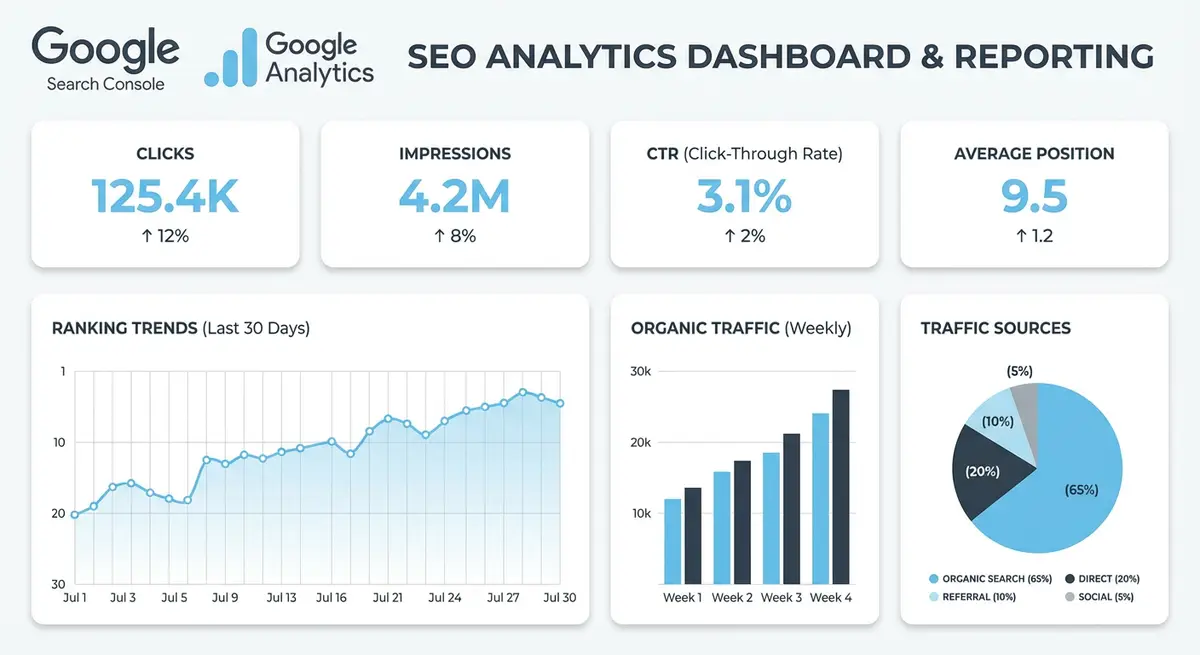
GSC Performance report shows your average position for each keyword. Filter by keyword to track a specific term position over time. Export data to Google Sheets to track trends. While this is averages across all locations and devices, it is sufficient for basic tracking and is always the authoritative source.
Limitations of GSC for Rank Tracking
Google Search Console reports average positions, not exact positions. A keyword showing average position 4.2 might rank position 2 in London and position 8 in Manchester. GSC also aggregates across all devices, so a keyword might rank position 3 on mobile but position 7 on desktop. For local businesses where geo-specific rankings matter, GSC averages can be misleading without supplementary location-specific tracking.
GSC also has a 16-month data retention limit. Any data older than 16 months is permanently deleted. If you do not export your data regularly, you lose the ability to make year-over-year comparisons, which are essential for understanding seasonal patterns and long-term SEO progress.
Paid Rank Tracking Tools Worth Considering
- SEMrush Position Tracking: excellent for tracking a large keyword set with daily updates, competitor comparison, local tracking by postcode, and SERP feature monitoring. Includes visibility score trend for overall progress tracking.
- Ahrefs Rank Tracker: very accurate, clean interface, good for tracking up to 750 keywords on basic plans. Shows traffic estimates alongside positions to help prioritise efforts.
- AccuRanker: specialist rank tracker with extremely fast daily updates. Best for agencies with many clients. Offers the most granular local tracking options available.
- BrightLocal: specifically designed for local rank tracking. Shows rankings in the Google Map Pack as well as organic results by specific city or postcode. Essential for local service businesses.
- SE Ranking: budget-friendly option with daily position tracking, competitor monitoring, and on-page audit tools. Available as a Wix app for direct dashboard integration.
- SERPRobot: affordable entry-level tracker with daily updates. Good for small business Wix site owners tracking 20-50 keywords without the cost of enterprise tools.
Choosing the Right Keywords to Track
Keyword Selection Strategy
Track a mix of keyword types to get a complete picture of your SEO performance. Include your primary commercial keywords (the ones that directly drive revenue), secondary keywords (related terms that support your main topics), branded keywords (your business name and variations), and aspirational keywords (terms you are working toward ranking for). A balanced tracking list of 30-50 keywords for a typical Wix site covers all these categories.
- Primary commercial keywords (10-15): your main service or product terms with high buying intent, e.g. "Wix SEO expert London"
- Secondary support keywords (10-15): related terms that indicate interest, e.g. "Wix website SEO tips", "how to improve Wix Google ranking"
- Local keywords (5-10): geo-modified versions of your services, e.g. "SEO agency Manchester", "web design Sheffield"
- Branded keywords (3-5): your business name and common variations people use to find you
- Aspirational keywords (5-10): high-value terms you are building toward but do not yet rank on page one for
Setting Up a Rank Tracking Project
Configuring a rank tracking project in any tool
- Select the keywords you want to track, start with your primary target keywords (30-50 is a manageable number)
- Set your location: country, and for local SEO, specific city or postcode for the most accurate data
- Set your device: track mobile and desktop separately as rankings differ significantly between devices
- Set the search engine: Google is primary, but consider adding Bing if you target the Microsoft ecosystem
- Set up weekly report emails so you are notified of significant changes without logging in daily
- Add 3-5 competitor domains to track their rankings alongside yours for context
- Tag keywords by category (commercial, informational, local) to analyse performance by keyword group
Interpreting Ranking Data Without Overreacting
The most common mistake in rank tracking is overreacting to daily fluctuations. Google rankings naturally move up and down by 2-5 positions on any given day due to algorithm refreshes, personalisation, and testing. A keyword at position 4 today might show position 7 tomorrow and position 3 the day after. This is normal noise, not a signal to change your strategy.
What Constitutes a Real Ranking Change
- A sustained position change over 7+ days is a real signal worth investigating
- A sudden drop of 10+ positions usually indicates a Google algorithm update, technical issue, or competitor improvement
- Gradual improvement over 4-8 weeks after making SEO changes confirms your work is having an effect
- Multiple keywords in the same topic cluster moving in the same direction indicates a site-level change, not keyword-level noise
- Position changes that correlate with impressions changes in GSC are more reliable than rank tracker data alone
- Local ranking changes are more volatile than national rankings due to smaller data sets and Google local algorithm updates
Tracking Local Rankings Effectively
For local service businesses on Wix, standard national rank tracking is insufficient. You need to track rankings for your specific city and ideally for multiple locations within your service area. Tools like BrightLocal and AccuRanker allow you to set specific postcodes as your tracking location, showing you exactly what a user in that area would see when searching. This is critical because local rankings can vary dramatically within a few miles.
Map Pack vs Organic Local Tracking
Google displays two types of local results: the Map Pack (3-pack of Google Business Profile listings) and organic results below it. These are ranked by different algorithms and can show completely different results. A business might rank position 1 in the Map Pack but not appear on page one of organic results, or vice versa. Track both separately to understand your full local search visibility.
Essential Tools for This Lesson
- Google Search Console: Free authoritative position data from Google
- BrightLocal: Local rank tracking with Map Pack monitoring
- AccuRanker: Fast daily rank tracking with granular local options
- SE Ranking: Budget-friendly rank tracker with Wix app integration
Complete How-To Guide: Building a Rank Tracking System for Your Wix Site
This guide walks you through setting up a practical rank tracking system that monitors your Wix site keyword positions using both free and paid methods.
How to set up and maintain keyword rank tracking for your Wix site
- Step 1: Start with Google Search Console as your free baseline. Go to Performance > Search Results, set the date range to Last 28 Days, and click the Pages tab. Export this data to Google Sheets as your starting point.
- Step 2: Identify your 30-50 most important target keywords. Include commercial keywords, local keywords, branded keywords, and aspirational keywords. List them in a spreadsheet with columns for keyword, category, current position, and target URL.
- Step 3: In Google Search Console, filter by each target keyword individually and record the average position. Note this is an average across all locations and devices, so treat it as directional rather than precise.
- Step 4: If using a paid tool like SEMrush, create a new Position Tracking project. Enter your Wix site domain, select your target country and for local businesses your specific city or postcode.
- Step 5: Add all target keywords to the rank tracker. Tag each keyword by category (commercial, informational, local, branded) so you can analyse performance by segment. Set tracking to daily updates on both mobile and desktop.
- Step 6: Add 3-5 competitor domains to your rank tracking project. These should be businesses that rank for the same keywords you target. Their ranking movements provide essential context for interpreting your own changes.
- Step 7: Set up email alerts for significant ranking changes. Configure notifications for any keyword that moves more than 5 positions up or down in a single day. This catches both opportunities and problems early.
- Step 8: Create a Google Sheets tracking log with columns for keyword, current position, position last week, 30-day trend, target URL, and notes. Update this weekly using your rank tracker exports or GSC data.
- Step 9: For local SEO, set up BrightLocal or a similar local rank tracker to check positions specifically in the Google Map Pack for your target city. Standard rank trackers do not capture local pack positions accurately.
- Step 10: Record your baseline positions for all target keywords before making any SEO changes. This gives you a clear before-and-after comparison to measure the impact of your work objectively.
- Step 11: Create a monthly ranking summary showing: number of keywords in top 3, top 10, and top 20; number of keywords that improved vs declined; and your overall visibility score if your tool provides one.
- Step 12: Cross-reference ranking changes with Google Search Console impressions for the same keyword. If impressions remain stable but rank tracker shows a drop, it may be a tracking anomaly. If both drop, investigate the cause.
- Step 13: Review ranking trends monthly rather than reacting to daily fluctuations. Google rankings naturally fluctuate by 2-5 positions daily. Focus on the 30-day trend direction rather than individual day positions.
- Step 14: When rankings drop significantly for multiple keywords simultaneously, check Google algorithm update trackers like SEMrush Sensor or MozCast. Algorithm updates affect many sites and require a different response than individual keyword drops.
- Step 15: At the end of each quarter, review your keyword list and update it. Remove keywords that are no longer strategically relevant, add new keywords based on content you have published, and adjust your aspirational keywords based on progress made.
Was this lesson useful?
It takes 1 minute to tell me. The course is free and I want to keep it that way, and your feedback shows me what is working and helps other people find it.
This lesson on Rank tracking setup with free and paid tools is part of Module 15: Wix Analytics & SEO Reporting in The Most Comprehensive Complete Wix SEO Course in the World (2026 Edition). Created by Michael Andrews, a Wix Marketplace Legend Partner with 14 years of hands-on experience, 800 completed Wix SEO projects and 456 verified five-star reviews.