Product page optimisation: titles, descriptions and conversion-driven copy
Module 17: Wix eCommerce SEO Mastery | Lesson 194 of 683 | 30 min read
By Michael Andrews, Wix SEO Expert UK
A product page must accomplish two things simultaneously: rank well enough in search results to attract organic traffic, and convert that traffic into purchases once visitors arrive. Too many store owners focus entirely on one side, either stuffing keywords into every sentence or writing beautiful copy that Google cannot parse. This lesson teaches you to do both at once, creating product pages that rank and sell.
Writing Product Titles That Rank AND Convert
Your product title is the single most important on-page SEO element. It directly influences your title tag, your URL slug, and how Google categorises your product. But it is also the first thing a shopper reads on the page and in search results. The best product titles follow a specific formula: Primary Keyword + Key Differentiator + Specification. For example, "Organic Lavender Essential Oil - Pure Therapeutic Grade - 30ml" hits the primary keyword, communicates quality, and specifies size.
Avoid the temptation to get creative with product titles at the expense of clarity. Titles like "Serenity Drops" or "Purple Dream" might sound appealing in a marketing meeting, but nobody searches for those terms. Lead with what the product actually is, using the exact language your customers use when searching. Use tools like Google Keyword Planner or Ahrefs to verify which product name variations have the highest search volume.
- Lead with the primary product keyword (what people actually search for)
- Include the brand name if it has search demand
- Add key specifications: size, weight, colour, material, or model number
- Keep titles under 70 characters to avoid truncation in search results
- Use title case for readability and separate elements with hyphens or pipes
- Never stuff multiple keyword variations into the title; one primary keyword is enough
Writing Product Descriptions That Drive Rankings and Sales
The product description is where most eCommerce sites fail at SEO. Either they copy the manufacturer's description (creating duplicate content across hundreds of competing stores) or they write a single paragraph that provides no value. Google needs substantial, unique text content to understand what your product is, who it is for, and why it matters. Aim for 250 to 500 words of unique description per product as a minimum.
The Inverted Pyramid Structure for Product Descriptions
Start with the most compelling benefit and the primary keyword in the opening sentence. Follow with supporting details that address common questions and objections. Close with technical specifications. This structure serves both scan-readers (who only read the first line) and thorough researchers (who read every word), while ensuring Google encounters your target keyword early in the content.
Product description writing process
- Research the top 5 ranking pages for your primary product keyword and note what topics they cover
- Write an opening paragraph (2-3 sentences) that includes the primary keyword and the product's main benefit
- Add a "Why Choose This Product" section with 3-5 bullet points highlighting unique selling propositions
- Write a "How to Use" or "What's Included" section that naturally incorporates secondary keywords
- Include a specifications section covering dimensions, materials, weight, compatibility, and care instructions
- Close with a paragraph addressing the ideal customer: "Perfect for [use case], this [product] is designed for [audience]"
- Read the description aloud to ensure it sounds natural and not keyword-stuffed
Product Image Optimisation for SEO
Product images are critical for both conversion and SEO. Google Image Search drives significant eCommerce traffic, and properly optimised product images can appear in both standard image results and Google Shopping visual feeds. Every product image on your Wix Store should have a descriptive filename, comprehensive alt text, and be compressed for fast loading without sacrificing visual quality.
- Rename image files before uploading: use "organic-lavender-essential-oil-30ml.jpg" not "IMG_4523.jpg"
- Write alt text that describes the product and includes the primary keyword: "Organic lavender essential oil in 30ml amber glass bottle with dropper cap"
- Upload images at a maximum of 2000px on the longest side; Wix will serve responsive versions automatically
- Use a white or neutral background for the primary product image to improve visual consistency and Google Shopping eligibility
- Include at least 4-6 images per product: front, back, detail shots, lifestyle/in-use photos, and scale reference
- Compress images to under 200KB before uploading using Squoosh or TinyPNG
Handling Product Variants Without Creating SEO Problems
Wix Stores handles variants (size, colour, material) within a single product page by default. This is actually the SEO-preferred approach for most products because it concentrates all reviews, backlinks, and authority onto one URL rather than splitting them across dozens of variant pages. However, there are exceptions where separate pages make more sense.
If each variant has genuinely different search demand, consider creating separate product listings. For example, "Red Nike Air Max 90" and "Black Nike Air Max 90" might each have enough search volume to justify their own pages. But for most stores, keeping variants on a single page with a variant selector is the correct approach. Ensure your variant names use descriptive terms that match search behaviour rather than codes like "SKU-4523-BLK".
Leveraging Customer Reviews as SEO Content
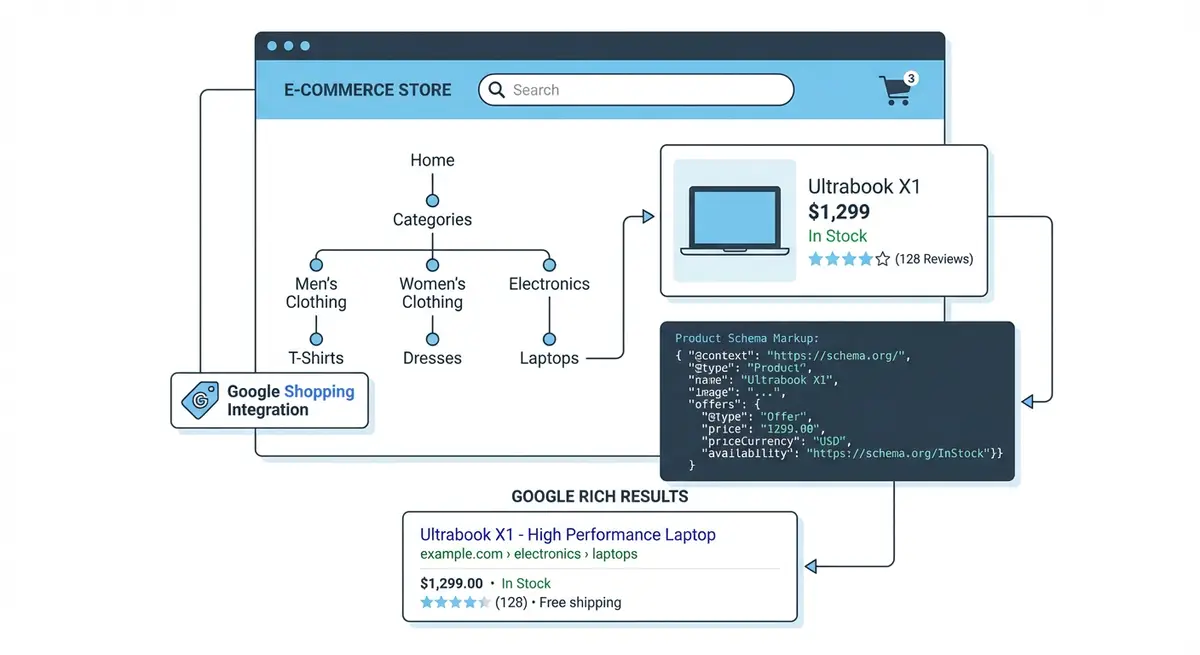
Customer reviews are a goldmine for eCommerce SEO. They add unique, user-generated content to your product pages, naturally include long-tail keyword variations you would never think to target, and signal freshness to Google as new reviews are posted. Reviews also generate the star ratings that appear in search results through AggregateRating schema, dramatically improving click-through rates.
Wix Stores includes a native reviews feature. Enable it on every product page and actively solicit reviews through post-purchase emails. A product page with 20 genuine reviews can contain 500 or more words of unique, keyword-rich content that you did not have to write. Google treats review content as part of the page's overall content, which means it directly contributes to your keyword coverage and topical relevance.
Product Page Optimisation Tools
- Google Keyword Planner: Research search volume for product name variations to choose the best title keywords
- Squoosh: Compress and convert product images to WebP format before uploading to Wix
- Hemingway Editor: Check readability of product descriptions to ensure they are clear and accessible
- Wix SEO Panel: Set custom title tags, meta descriptions, and URL slugs for each product page
Complete How-To Guide: Optimising Wix Product Pages for Rankings and Conversions
This guide walks you through optimising a single Wix product page end to end, from title to images to schema, creating a template you can replicate across your entire store.
How to optimise a Wix Store product page for SEO and conversions
- Step 1: Research the primary keyword for the product using Semrush, Ahrefs or Google Keyword Planner. Choose the product name variation with the highest search volume.
- Step 2: Write the product title using the formula: Primary Keyword + Key Differentiator + Specification. For example: "Organic Lavender Essential Oil - Pure Therapeutic Grade - 30ml."
- Step 3: Open the product in your Wix Dashboard and update the title. Then go to the SEO section and set a custom title tag that includes the keyword within the first 30 characters.
- Step 4: Write a meta description under 155 characters that includes the primary keyword, a unique benefit, and a call to action like "Shop now" or "Free UK delivery."
- Step 5: Set the URL slug to a concise, keyword-rich version of the product name. Remove unnecessary words and keep it under 60 characters.
- Step 6: Write the product description in two sections: a short compelling paragraph above the fold for scanners, and a detailed description below covering features, benefits, specifications and use cases.
- Step 7: Include the primary keyword naturally in the first 100 words of the description and use related keywords throughout. Aim for 300-500 words minimum for the full description.
- Step 8: Optimise product images. Use descriptive file names before uploading (organic-lavender-oil-30ml.jpg not IMG_4523.jpg). Add keyword-rich alt text to every image.
- Step 9: Upload at least 3-5 high-quality images per product showing different angles, the product in use, packaging, and size reference.
- Step 10: Add trust signals to the product page: customer reviews, a money-back guarantee badge, secure payment icons, and shipping information.
- Step 11: Verify that Product schema is present on the page. Test the URL in Google Rich Results Test and confirm that price, availability and review data appear correctly.
- Step 12: Add internal links from the product page to the parent category page and 3-5 related products. This strengthens the internal linking architecture and helps Google understand product relationships.
Was this lesson useful?
It takes 1 minute to tell me. The course is free and I want to keep it that way, and your feedback shows me what is working and helps other people find it.
This lesson on Product page optimisation: titles, descriptions and conversion-driven copy is part of Module 17: Wix eCommerce SEO Mastery in The Most Comprehensive Complete Wix SEO Course in the World (2026 Edition). Created by Michael Andrews, a Wix Marketplace Legend Partner with 14 years of hands-on experience, 800 completed Wix SEO projects and 456 verified five-star reviews.