People Also Ask: systematically dominating related questions in Google
Module 12: Brand SERP Management & Google Feature Domination | Lesson 147 of 683 | 25 min read
By Michael Andrews, Wix SEO Expert UK
The People Also Ask (PAA) box appears on over 85% of Google search results pages, making it one of the most visible SERP features available. Each PAA result links directly to the page Google extracted the answer from, giving you an additional ranking position beyond the traditional ten blue links. Winning PAA placements means your Wix site can appear multiple times on the same results page, dramatically increasing your visibility and click-through rate.
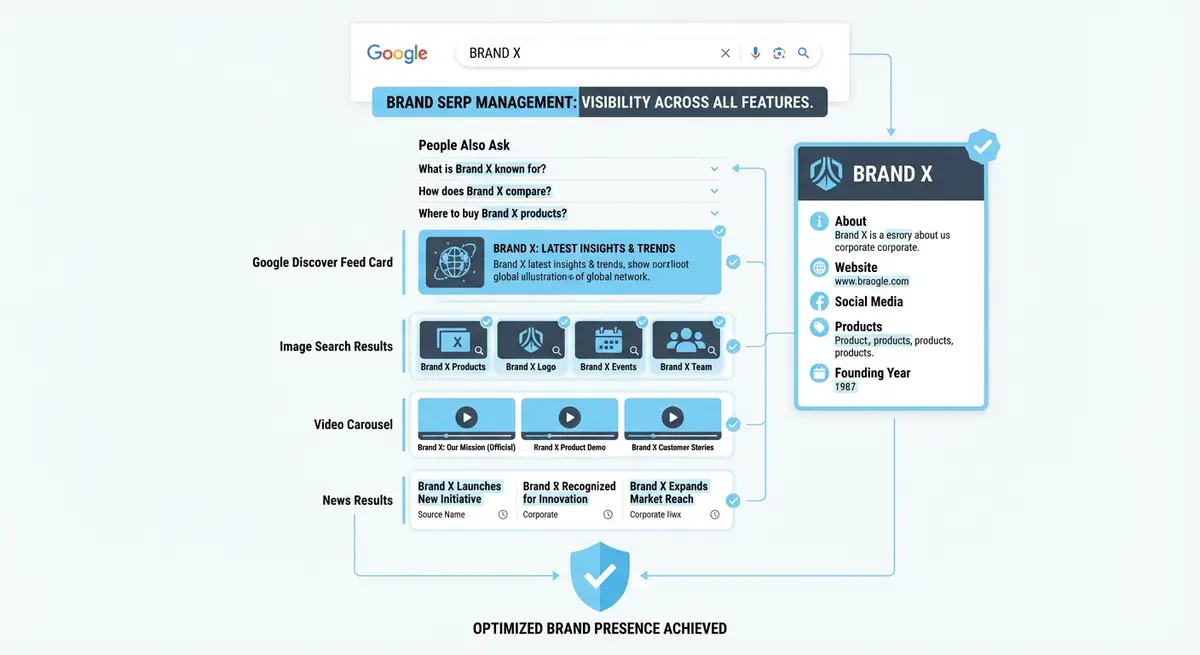
How People Also Ask Works
The PAA box contains four to six expandable questions related to the original search query. When a user clicks on one question to expand it, Google dynamically loads additional related questions, creating an almost infinite chain. Google selects PAA answers by identifying concise, well-structured passages on web pages that directly answer a specific question. The answer is displayed as a snippet with a link to the source page.
PAA results are algorithmically generated based on what questions Google believes are related to the original query. They are not limited to pages that rank on page one. A page ranking on page three for the primary keyword can still win a PAA placement if it provides a better direct answer to the related question. This makes PAA one of the most accessible SERP features for newer or lower-authority Wix sites.
Finding PAA Opportunities for Your Niche
Systematic PAA research process
- Search your primary keywords in Google and note every PAA question that appears
- Click each PAA question to expand it and reveal additional related questions
- Continue expanding questions through three to four levels deep to build a comprehensive list
- Export PAA questions using AlsoAsked.com for a visual map of question relationships
- Cross-reference with your existing content to identify questions you already answer and those you do not
- Prioritise questions where your Wix site has relevant content but no current PAA presence
Structuring Content to Win PAA Placements
Google extracts PAA answers from content that follows a specific pattern: the question appears as a heading or is stated clearly in the text, and the answer follows immediately in one to three concise sentences. The answer paragraph should be 40 to 60 words for optimal extraction. After the concise answer, you can expand with additional detail, but the initial response must be direct and self-contained.
Building FAQ Sections That Win PAA
Adding a comprehensive FAQ section to your Wix blog posts and service pages is one of the most reliable methods for winning PAA placements. Structure each FAQ item as an H3 heading containing the exact question, followed by a concise answer paragraph. Implement FAQPage schema markup on these sections to further signal to Google that the content is in question-and-answer format.
{
  "@context": "https://schema.org",
  "@type": "FAQPage",
  "mainEntity": [
    {
      "@type": "Question",
      "name": "How long does SEO take to work on Wix?",
      "acceptedAnswer": {
        "@type": "Answer",
        "text": "SEO on Wix typically takes 3-6 months to show significant results for competitive keywords. New sites may see initial improvements in 4-8 weeks for low-competition terms."
      }
    }
  ]
}
Monitoring Your PAA Appearances
Google Search Console does not report PAA appearances separately, so you need third-party tools to track them. Semrush and Ahrefs both report SERP features in their rank tracking modules. Set up tracking for your target keywords and filter for PAA appearances. Monitor which pages are winning PAA slots and which questions are being answered by competitors so you can optimise your content accordingly.
Advanced PAA Strategies
- Create dedicated FAQ hub pages that answer 20-30 related questions on a single topic
- Use internal linking from FAQ answers to detailed guide pages for each topic
- Update your FAQ content quarterly with new questions discovered through PAA research
- Add PAA-optimised sections to existing high-performing pages rather than creating new thin pages
- Test different answer lengths and formats to find what Google prefers for your niche
- Combine PAA optimisation with featured snippet targeting for maximum SERP coverage
Complete How-To Guide: Winning People Also Ask Placements from Your Wix Site
This guide covers systematically researching PAA opportunities, formatting your content for answer extraction, and scaling your PAA strategy across your entire Wix site.
How to dominate People Also Ask boxes with your Wix content
- Step 1: Open Google and search your top 10 target keywords one by one. For each keyword, note every question that appears in the People Also Ask box. Click each question to expand it and reveal additional related questions. Continue 3-4 levels deep.
- Step 2: Use AlsoAsked.com to generate a visual tree of PAA questions for each of your target keywords. Export the results. This gives you a comprehensive map of every question Google associates with your topics.
- Step 3: Compile all PAA questions into a master spreadsheet. Remove duplicates. Add columns for: current snippet holder URL, snippet format (paragraph/list/table), whether your site already answers this question, and priority (high/medium/low).
- Step 4: Prioritise questions where you already rank in the top 20 for the parent keyword. These are easiest to win because Google already considers your page relevant to the topic.
- Step 5: For each priority question, open the relevant page on your Wix site. Add the exact question as an H2 or H3 heading. Immediately below, write a direct answer in 40-60 words. Start with a clear statement, not a preamble.
- Step 6: After the concise answer, add 2-3 paragraphs of expanded detail. Google prefers to extract answers from comprehensive pages, not thin pages with only a single answer. The depth of content on the page supports the snippet extraction.
- Step 7: For list-format PAA questions (e.g. "What are the best..."), structure your answer as a numbered or bulleted list with 5-8 clear items. Each item should be one concise sentence.
- Step 8: Add FAQPage schema markup to every page where you have structured Q&A content. Include each question as a Question type with its acceptedAnswer. Test using the Google Rich Results Test.
- Step 9: Build dedicated FAQ sections on your key service and blog pages. Group 5-10 related questions per section. Each question gets an H3 heading and a concise answer paragraph. This creates multiple PAA opportunities from a single page.
- Step 10: Request re-indexing for each updated page through Google Search Console URL Inspection. This prompts Google to re-evaluate your content for PAA eligibility faster than waiting for the next natural crawl.
- Step 11: Monitor PAA appearances weekly. Search your target keywords in incognito mode and check if your site appears in any PAA results. Use Semrush or Ahrefs SERP feature tracking for automated monitoring across all keywords.
- Step 12: Refresh your PAA research quarterly. New questions appear as search behaviour evolves. Add newly discovered questions to your content. Update existing answers with fresh data or examples. Remove answers for questions that no longer appear in PAA boxes.
Essential Tools for This Lesson
- SEO Fix in a Box: My Wix app. Free to install, it scans your site and shows what needs fixing, and paid plans write the fixes from your own Google searches
Was this lesson useful?
It takes 1 minute to tell me. The course is free and I want to keep it that way, and your feedback shows me what is working and helps other people find it.
This lesson on People Also Ask: systematically dominating related questions in Google is part of Module 12: Brand SERP Management & Google Feature Domination in The Most Comprehensive Complete Wix SEO Course in the World (2026 Edition). Created by Michael Andrews, a Wix Marketplace Legend Partner with 14 years of hands-on experience, 800 completed Wix SEO projects and 456 verified five-star reviews.