Migrating from Shopify to Wix: eCommerce SEO transition
Module 48: Migrating to Wix Without Losing Rankings | Lesson 538 of 683 | 35 min read
By Michael Andrews, Wix SEO Expert UK
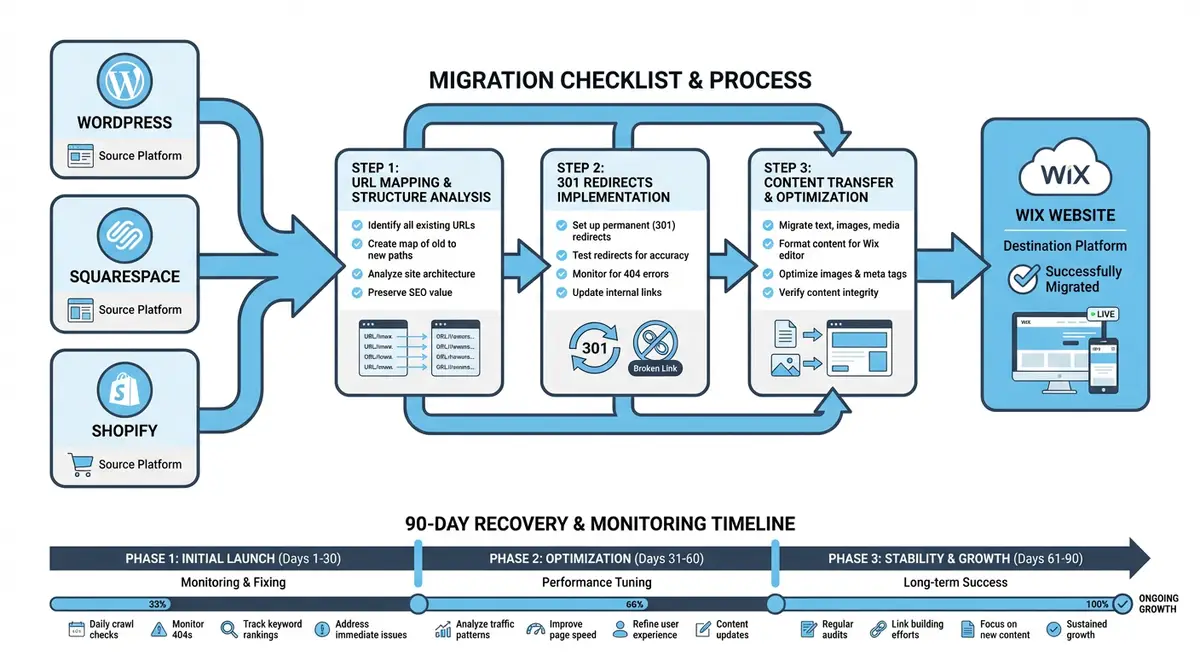
Migrating an eCommerce store from Shopify to Wix involves more complexity than a standard content site migration because you are dealing with product data, collection structures, customer reviews, and Google Merchant Center feeds alongside traditional SEO elements. Shopify uses a rigid URL structure with /products/ and /collections/ prefixes that differs fundamentally from Wix store URLs. This lesson covers the complete eCommerce SEO transition process, from product URL mapping to Merchant Center migration to post-migration revenue monitoring.
Understanding Shopify URL Structure
Shopify enforces a strict URL hierarchy that cannot be customised. Product pages always use /products/product-handle. Collection pages use /collections/collection-handle. Products within collections appear at /collections/collection-handle/products/product-handle, creating duplicate URL patterns. Blog posts use /blogs/blog-name/post-handle. Pages use /pages/page-handle. Understanding this rigid structure is essential because every one of these URL patterns needs a corresponding redirect to the Wix equivalent.
Shopify URL                                              →  Wix URL
/products/blue-ceramic-mug                               →  /product-page/blue-ceramic-mug
/collections/kitchen-essentials                          →  /shop/kitchen-essentials
/collections/kitchen-essentials/products/blue-ceramic-mug →  /product-page/blue-ceramic-mug
/blogs/news/our-latest-collection                        →  /post/our-latest-collection
/pages/about-us                                          →  /about-us
/pages/contact                                           →  /contact
/collections/all                                         →  /shop
/cart → /cart-pageProduct Data Migration
Migrating product data from Shopify to Wix
- Export all products from Shopify as CSV via Products > Export in the Shopify admin
- Download all product images at full resolution using a bulk image download tool or Shopify API
- Map Shopify product fields to Wix Store product fields: title, description, price, SKU, weight, variants
- Import products into Wix Store using the Wix product import CSV template
- Verify that all product variants (size, colour, material) have been correctly imported
- Re-upload product images and ensure they are assigned to the correct products and variants
- Recreate product collections in Wix and assign products to the appropriate collections
- Verify that all product descriptions, titles, and meta data match the Shopify originals exactly
Preserving Product Schema and Rich Results
Shopify automatically generates Product schema markup that powers rich results in Google: prices, availability, reviews, and ratings. Wix Store also generates Product schema, but you must verify that the markup is complete and matches the data Google had previously indexed. Use Google Rich Results Test on your new Wix product pages to confirm that price, availability, review count, and rating are all present and accurate. Any discrepancy in structured data can cause rich results to disappear temporarily.
Google Merchant Center Transition
If you use Google Merchant Center for Shopping ads or free product listings, the migration requires careful coordination. Your product feed URLs must be updated to point to the new Wix product page URLs. Update your Merchant Center feed with the new URLs, new image URLs, and verify that all product data remains accurate. Google Shopping listings that point to 404 pages will be immediately disapproved, potentially triggering account warnings.
Updating Google Merchant Center during migration
- Before migration, export your current Merchant Center product feed as a backup
- Update the product feed URLs to match your new Wix Store product page URLs
- Update image URLs in the feed to point to Wix-hosted product images
- Submit the updated feed to Merchant Center immediately after the Wix site goes live
- Monitor the Diagnostics tab in Merchant Center for feed errors and disapprovals
- Verify that product prices, availability, and shipping information are correct in the new feed
- Re-verify your website claim in Merchant Center if the domain or platform has changed
Handling Shopify /products/ URL Structure
The /products/ prefix in Shopify URLs is mandatory and cannot be removed. If your Shopify store has been live for years, Google has indexed potentially hundreds of /products/ URLs. Wix uses /product-page/ as its default product URL prefix. This means every single product URL changes during migration. Create a bulk redirect CSV that maps every /products/handle to /product-page/handle, plus every /collections/collection/products/handle variation.
Post-Migration Revenue and Conversion Monitoring
- Track daily revenue from organic search in GA4 for the first 90 days and compare to the pre-migration baseline
- Monitor product page conversion rates individually to identify any products with broken buy flows
- Check that all payment gateways are processing correctly on Wix by placing test orders
- Verify that abandoned cart recovery emails are functioning with the new Wix store URLs
- Monitor Google Merchant Center for product disapprovals that could indicate feed or landing page issues
- Track organic product impressions in Google Search Console filtered by product page URLs
- Compare average order value and cart completion rate pre and post migration to identify checkout friction
eCommerce Migration Tools
- Shopify Product CSV Export: Export all product data from Shopify in CSV format
- Google Merchant Center: Update your product feed URLs and monitor listing status during migration
- Wix Store Import: Import product data to Wix Store using CSV files
- Google Rich Results Test: Verify Product schema markup is complete on your new Wix product pages
- SEO Fix in a Box: My Wix app. Free to install, it scans your site and shows what needs fixing, and paid plans write the fixes from your own Google searches
Complete How-To Guide
This step-by-step guide walks you through the complete Shopify-to-Wix eCommerce migration, covering product data transfer, the critical /products/ to /product-page/ URL restructuring, Google Merchant Center feed updates, and revenue monitoring to ensure your online store transitions without losing sales or search visibility.
How to Migrate Your Shopify Store to Wix Without Losing eCommerce SEO
- Step 1: Export all product data from Shopify. Go to Products > Export in the Shopify admin and download the full CSV file. This includes product titles, descriptions, prices, SKUs, variants, images, and inventory levels. Separately export customer data, order history, and discount codes if needed.
- Step 2: Crawl your entire Shopify store with Screaming Frog. Capture every URL including both /products/handle and /collections/collection/products/handle variations. Shopify creates duplicate product URLs under each collection, and both versions may be indexed in Google. Your redirect map must cover every variation.
- Step 3: Export your SEO baseline. Download 16 months of Google Search Console data and 12 months of GA4 data including organic revenue, conversion rates, and top-performing product pages. Export your backlink profile, paying special attention to links pointing directly to product and collection pages.
- Step 4: Export your Google Merchant Center product feed as a backup. Note every product URL, image URL, price, and availability status in the current feed. This backup ensures you can quickly update the feed with new Wix URLs after migration.
- Step 5: Build your URL redirect map covering all Shopify URL patterns. Map /products/handle to /product-page/handle, /collections/handle to /shop/handle (or your Wix category equivalent), /collections/handle/products/handle to /product-page/handle, /blogs/name/post to /post/post, and /pages/handle to the corresponding Wix page path. Include /collections/all redirecting to /shop.
- Step 6: Set up your Wix Store and import products. Use the Wix Store CSV import template, mapping Shopify fields to Wix fields: title, description, price, compare-at price, SKU, weight, and inventory. Import products in batches and verify that all variants (size, colour, material) are correctly created for each product.
- Step 7: Upload all product images to your Wix Store at full resolution. Ensure each image is assigned to the correct product and variant. Preserve the image order (primary image first) and add alt text matching the original Shopify image alt attributes. Download images from Shopify before your subscription ends, as Shopify CDN URLs will eventually become inaccessible.
- Step 8: Recreate your product collections and categories on Wix. Match the Shopify collection structure as closely as possible. Assign every product to its appropriate collections. Recreate collection page SEO titles and meta descriptions to match the Shopify originals exactly.
- Step 9: Migrate customer reviews from your Shopify review app (Judge.me, Loox, Stamped, etc.). Export reviews as CSV from the app, then import them into a Wix-compatible review solution. Prioritise migrating reviews for your top 50 products by revenue, as review schema markup directly impacts click-through rates in search results.
- Step 10: Verify Product structured data on your new Wix product pages. Use the Google Rich Results Test to check that each product page has complete schema markup including name, price, currency, availability, image, review count, and aggregate rating. Any missing fields may cause rich result snippets to disappear from search results.
- Step 11: Import all redirects into the Wix URL Redirect Manager via CSV bulk upload. Set every redirect to 301 (permanent). Test at least 50 redirects manually, including both /products/ and /collections/collection/products/ URL variations. Verify that collection pages, blog posts, and static pages also redirect correctly.
- Step 12: Update your Google Merchant Center product feed. Replace all Shopify product URLs with the new Wix product page URLs. Update all image URLs to point to Wix-hosted images. Submit the updated feed immediately after your Wix store goes live. Monitor the Merchant Center Diagnostics tab daily for disapprovals or errors.
- Step 13: Switch your domain DNS to Wix and verify that all eCommerce functionality works on the live site. Place test orders using every payment method. Test the checkout flow on both desktop and mobile. Verify that shipping calculations, tax calculations, and discount codes function correctly. Confirm that order confirmation emails are sent with the correct branding and links.
- Step 14: Submit your Wix sitemap to Google Search Console. Request indexing for your top 20 product pages and your main collection pages. Monitor the Index Coverage report daily for the first two weeks, watching for 404 errors on product URLs that indicate missing redirects.
- Step 15: Monitor organic revenue daily for 90 days. Compare daily revenue from organic search against the same period in the prior year. Track product page conversion rates individually to identify any products with broken buy flows, missing images, or lost reviews that are reducing purchase intent.
Was this lesson useful?
It takes 1 minute to tell me. The course is free and I want to keep it that way, and your feedback shows me what is working and helps other people find it.
This lesson on Migrating from Shopify to Wix: eCommerce SEO transition is part of Module 48: Migrating to Wix Without Losing Rankings in The Most Comprehensive Complete Wix SEO Course in the World (2026 Edition). Created by Michael Andrews, a Wix Marketplace Legend Partner with 14 years of hands-on experience, 800 completed Wix SEO projects and 456 verified five-star reviews.