Landing page optimisation for organic search traffic on Wix
Module 21: Conversion Rate Optimisation for Organic Traffic on Wix | Lesson 256 of 683 | 28 min read
By Michael Andrews, Wix SEO Expert UK
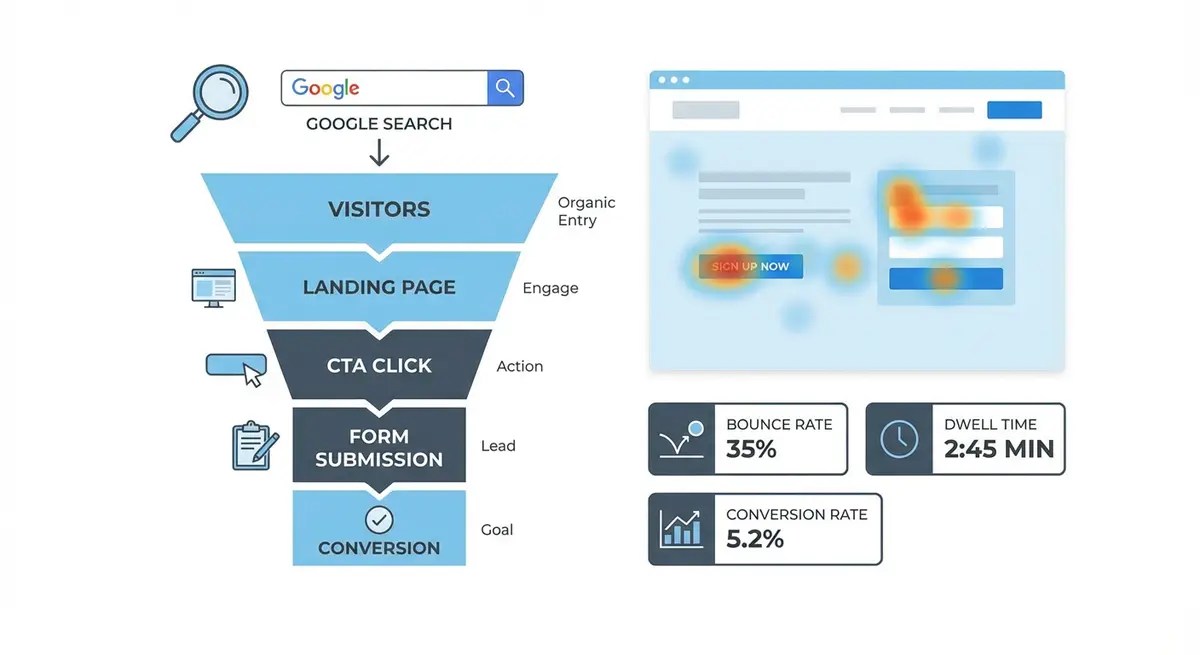
Driving organic traffic to your Wix site is only half the battle. If visitors land on your pages and leave without taking action, your SEO investment generates impressions but not revenue. Landing page optimisation for organic traffic is fundamentally different from paid traffic optimisation because you cannot control which page a searcher lands on or what query triggered their visit. This lesson teaches you how to convert organic visitors by matching page design, content, and calls to action to the intent behind the search queries driving traffic to each page.
Matching Content to Search Intent
Every organic visitor arrives with a specific intent that was expressed through their search query. Informational visitors want answers, and pushing them toward a purchase immediately creates friction. Commercial investigation visitors are comparing options and need evidence of your superiority. Transactional visitors are ready to buy and need a frictionless path to conversion. The critical first step in landing page optimisation is mapping each page to the dominant intent of the queries driving traffic to it.
How to map search intent to your Wix landing pages
- Open Google Search Console and navigate to the Performance report
- Filter by page to see which queries drive traffic to each specific URL
- Categorise the top 10-20 queries for each page by intent: informational, commercial, or transactional
- Identify the dominant intent: if 70% of queries are informational, the page should prioritise education
- Audit the current page layout against the dominant intent to identify mismatches
- Redesign above-fold content to immediately satisfy the dominant intent
Above-the-Fold Strategy for Organic Visitors
The above-fold area is the portion of the page visible without scrolling. For organic visitors, this space must accomplish three things within five seconds: confirm they have found what they searched for, establish your credibility, and indicate a clear next step. If the visitor has to scroll to understand whether the page is relevant to their query, you have already lost a significant percentage of them to the back button.
On Wix, design your above-fold section with a clear H1 that mirrors the language of the search queries driving traffic. Include a one-sentence value proposition directly below the heading. Place a primary call-to-action button within the visible viewport on both desktop and mobile. Avoid large hero images or autoplay videos that push useful content below the fold on smaller screens.
Layout Principles That Convert Organic Traffic
- Single-column layouts outperform multi-column layouts for conversion on content-heavy pages
- Visual hierarchy should guide the eye from headline to value proposition to CTA in a natural F-pattern or Z-pattern
- White space increases comprehension and reduces cognitive load, making conversion decisions easier
- Trust signals (testimonials, logos, certifications) should appear within the first screenful of scrolling
- Navigation should be simplified on key conversion pages: fewer menu items reduce decision paralysis
- Progressive disclosure works well: reveal information in stages as the user scrolls rather than overwhelming them upfront
Page Speed as a Conversion Factor
Page speed impacts conversion rates independently of its effect on rankings. A one-second delay in page load time reduces conversions by an average of 7%. For mobile organic visitors on slower connections, the impact is even more severe. Wix provides built-in performance optimisation, but you must avoid sabotaging it with uncompressed images, excessive custom fonts, third-party widgets, and heavy embedded content that blocks rendering.
A/B Testing Landing Pages on Wix
A/B testing is the only reliable way to know whether a change improves conversion. Intuition and best practices are starting points, not endpoints. Use Google Optimize (via custom code integration) or a Wix-compatible testing tool to run controlled experiments on headlines, CTAs, layouts, and imagery. Test one element at a time, run each test for a minimum of two weeks, and ensure statistical significance before declaring a winner.
Setting up a basic A/B test for a Wix landing page
- Identify the single element you want to test: headline, CTA text, hero image, or layout
- Create two versions of the page element with a meaningful difference
- Set up the test using Google Optimize or a redirect test with two Wix page URLs
- Define your conversion goal in GA4: form submission, button click, or purchase
- Run the test for a minimum of 14 days or until you reach 1000 visitors per variation
- Analyse results and implement the winning variation permanently
Mobile Landing Page Optimisation
Over 60% of organic search traffic arrives on mobile devices. Your Wix landing pages must be designed mobile-first, not adapted from desktop as an afterthought. On mobile, the above-fold area is roughly 600 pixels tall. Your headline, value proposition, and primary CTA must all fit within that space. Tap targets should be at least 44x44 pixels. Forms should use mobile-appropriate input types. Scrolling should be smooth and uninterrupted by fixed elements that consume valuable screen space.
Landing Page Optimisation Tools
- Google PageSpeed Insights: Measure page speed and get specific optimisation recommendations
- Hotjar: Heatmaps and session recordings to understand visitor behaviour
- Google Optimize: Free A/B testing tool that integrates with GA4
- Unbounce Smart Copy: AI-powered headline and CTA copy suggestions for testing variations
Complete How-To Guide
This step-by-step guide walks you through a full landing page optimisation workflow for organic search traffic on Wix, from auditing your current pages through to testing and measuring improvements.
How to optimise your Wix landing pages for organic search conversions
- Step 1: Open Google Search Console and export the Queries report filtered by each of your top 10 landing pages to identify which search terms are driving traffic to each page
- Step 2: Categorise every query by intent (informational, commercial investigation, or transactional) and determine the dominant intent for each landing page
- Step 3: Open each landing page in the Wix Editor and screenshot the above-fold area on both desktop and mobile views to assess what visitors see first
- Step 4: Rewrite the H1 heading on each page to closely mirror the language of the top search queries driving traffic, ensuring the visitor immediately recognises the page is relevant to their search
- Step 5: Add a clear one-sentence value proposition directly below the H1 that communicates the specific benefit the visitor will receive by staying on the page
- Step 6: Place a primary call-to-action button within the above-fold viewport on both desktop and mobile, using action-oriented copy that matches the dominant search intent
- Step 7: Audit and remove any unnecessary Wix apps, large hero videos, autoplay media, or uncompressed images that slow down page load time below the 3-second threshold
- Step 8: Run each landing page through Google PageSpeed Insights and address every recommendation in the Opportunities and Diagnostics sections
- Step 9: Add trust signals within the first scroll depth: client testimonials, certification badges, star ratings, or recognisable client logos
- Step 10: Restructure the page layout into a single-column design with a clear visual hierarchy guiding the eye from headline to value proposition to supporting evidence to CTA
- Step 11: Switch to the Wix Mobile Editor and verify that all content, CTAs, and trust signals display correctly with tap targets of at least 44x44 pixels
- Step 12: Set up a basic A/B test using Google Optimize or redirect testing with two Wix page variants, testing one element at a time such as the headline or CTA placement
- Step 13: Configure GA4 conversion tracking for each landing page by setting up destination-based goals tied to your thank-you page or confirmation event
- Step 14: Run the five-second test with at least five people unfamiliar with your business to verify that your above-fold content communicates what the page is about, what you do, and what action to take
- Step 15: After two weeks of data collection, review GA4 conversion rates and Search Console click-through rates to measure improvement, then iterate on the lowest-performing pages
Was this lesson useful?
It takes 1 minute to tell me. The course is free and I want to keep it that way, and your feedback shows me what is working and helps other people find it.
This lesson on Landing page optimisation for organic search traffic on Wix is part of Module 21: Conversion Rate Optimisation for Organic Traffic on Wix in The Most Comprehensive Complete Wix SEO Course in the World (2026 Edition). Created by Michael Andrews, a Wix Marketplace Legend Partner with 14 years of hands-on experience, 800 completed Wix SEO projects and 456 verified five-star reviews.