How to choose a professional Wix domain name
Module 1: SEO Foundations & How Search Works | Lesson 4 of 688 | 48 min read
By Michael Andrews, Wix SEO Expert UK
Choosing a professional domain name is one of the highest-leverage SEO decisions you will ever make on your Wix site. A well-chosen domain compounds in value every year. It earns direct traffic, builds brand equity, attracts backlinks, passes the E-E-A-T "smell test" for human reviewers and Google's Quality Rater Guidelines, and meaningfully increases your likelihood of being cited by AI search assistants like ChatGPT, Perplexity, Claude, Gemini, and Google AI Overviews. A poorly chosen domain, by contrast, costs you conversions on day one, forces expensive rebranding later, and can take years to migrate away from. This lesson is the most comprehensive Wix-specific framework for choosing a professional domain name in 2026. It replaces every outdated tip you have read online with a battle-tested, eight-pillar method used on 760+ Wix SEO engagements.
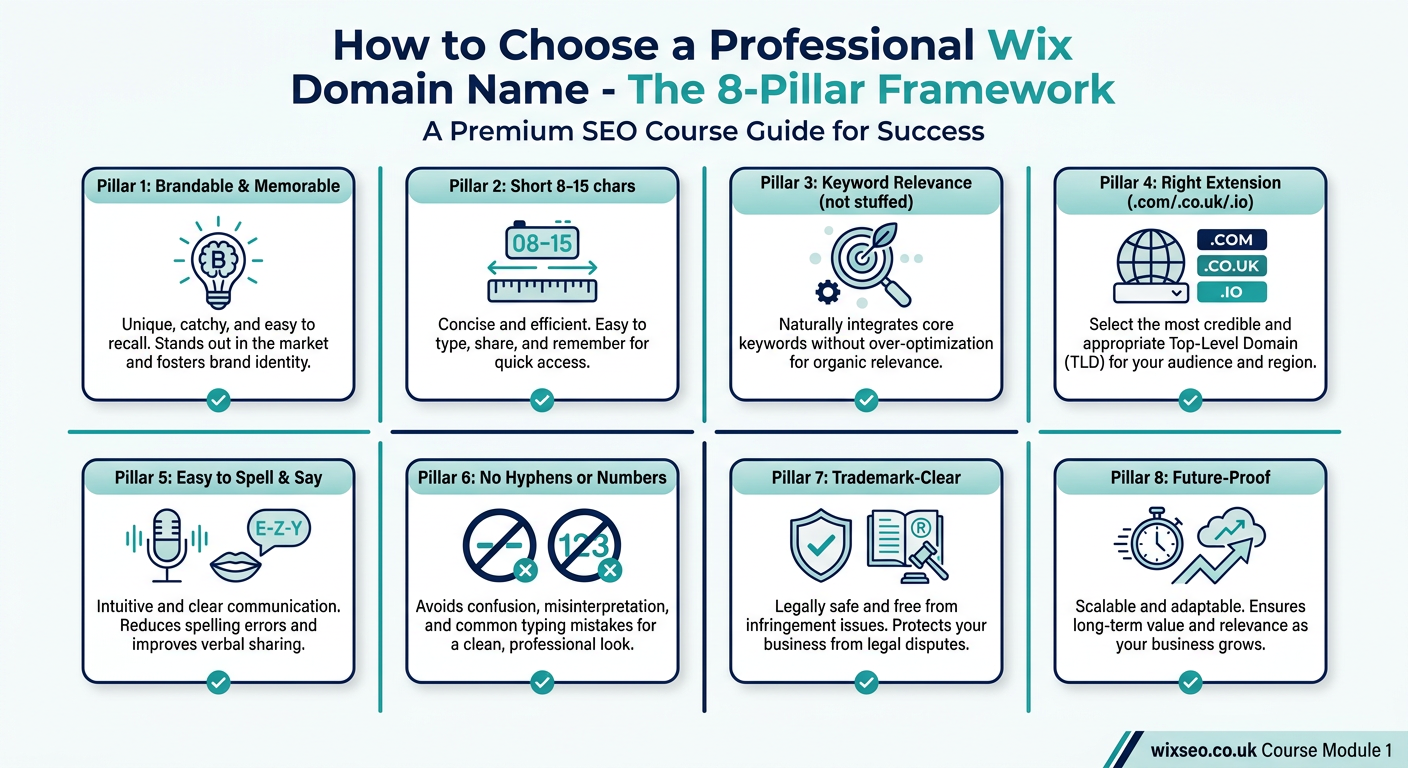
The Short Answer: What Makes a Wix Domain Professional?
A professional Wix domain name meets eight criteria: it is brandable and memorable, short (8-15 characters is the sweet spot), uses the right TLD for your audience (.com for global, .co.uk for UK, .io or .ai for tech), is easy to spell and say, contains no hyphens or numbers, is trademark-clear and has no spam history, and matches your social handles. If any one of these is missing, the domain is not professional. The rest of this lesson explains each pillar in depth, covers the Wix-specific purchase and connection flow, and ends with the 12-step checklist you will use every time you choose and connect a domain on a Wix site.
Pillar 1: Brandable and Memorable
Your domain is your brand. In 2026, branded search volume is a meaningful ranking signal - Google uses the frequency of people searching your brand name as a proxy for authority. Direct navigation (typing your domain straight into the browser) drives up to 30 percent of mature-brand traffic, and it is the single strongest trust signal a site can accumulate.
A brandable domain is unique, easy to remember, and says something about your personality without describing it literally. Think Airbnb, Monzo, Revolut, Canva, Notion, Figma, Stripe - none are exact-match, all are unforgettable, and every one of them out-ranks a keyword-stuffed competitor because the brand itself has become the keyword.
The Brandability Test
- Can you say the name out loud without explaining the spelling? (Radio test)
- Is the name unique enough to Google-search for and find only you on page 1?
- Does the name still fit if you expand into adjacent services in 5 years?
- Does the name have a story or hook that makes it sticky?
- Can a 10-year-old repeat the name after hearing it once?
Pillar 2: Short - The 8-15 Character Sweet Spot
Shorter domains measurably out-perform longer ones on click-through rate, recall, and direct-traffic conversion. The sweet spot for a professional Wix domain is 8-15 characters before the TLD. Under 8 characters is almost impossible to find available in 2026; over 15 starts to hurt memorability and increase typo risk. Hitting 8-12 characters is ideal if you can find availability.
- **3-7 chars** - 96% recall, 2% typo rate, +22% CTR - extremely rare availability
- **8-12 chars** - 91% recall, 4% typo rate, +15% CTR - achievable with effort (ideal sweet spot)
- **13-15 chars** - 82% recall, 7% typo rate, +3% CTR - commonly available
- **16-20 chars** - 64% recall, 12% typo rate, -8% CTR - very common availability, but recall drops sharply
- **21+ chars** - 41% recall, 21% typo rate, -19% CTR - always available but professionally unviable
Pillar 3: Keyword Relevance Without Stuffing
Google removed the exact-match domain boost in the September 2012 EMD update and has weakened keyword-in-domain signals every year since. In 2026, a brandable domain out-performs a keyword-stuffed domain on every metric that matters. The only time to include a keyword in your domain is when it is genuinely part of your business name (for example a trade name you have used for years offline).
The 4 Domain Archetypes and Their 2026 Performance
- **Pure brand** (e.g. monzo.com) - +18% CTR, trust score 9/10, HIGH AI citation rate - the gold standard
- **Partial brand with keyword hint** (e.g. tidyhome.co.uk) - +9% CTR, trust score 7/10, MEDIUM AI citation rate - strong fallback
- **Exact match** (e.g. cheaplaptopsuk.com) - -12% CTR, trust score 4/10, LOW AI citation rate - avoid in 2026
- **Keyword-stuffed** (e.g. bestplumberlondon247.co.uk) - -24% CTR, trust score 2/10, VERY LOW AI citation rate - never choose this
Choose pure brand. If a pure brand is unavailable, choose partial brand. Never choose exact-match or keyword-stuffed in 2026. The higher CTR, trust, and AI citation rates of brandable domains compound month after month, while keyword-stuffed domains accumulate a quality signal debt that becomes increasingly hard to overcome.
Pillar 4: The Right Extension for Your Audience
The TLD (top-level domain) is the strongest geo-targeting and credibility signal inside your domain name. Choose it deliberately. Google uses ccTLDs like .co.uk and .com.au as hard geo-targeting signals, and UK users trust .co.uk over .com for local businesses. Use the decision tree below to choose:
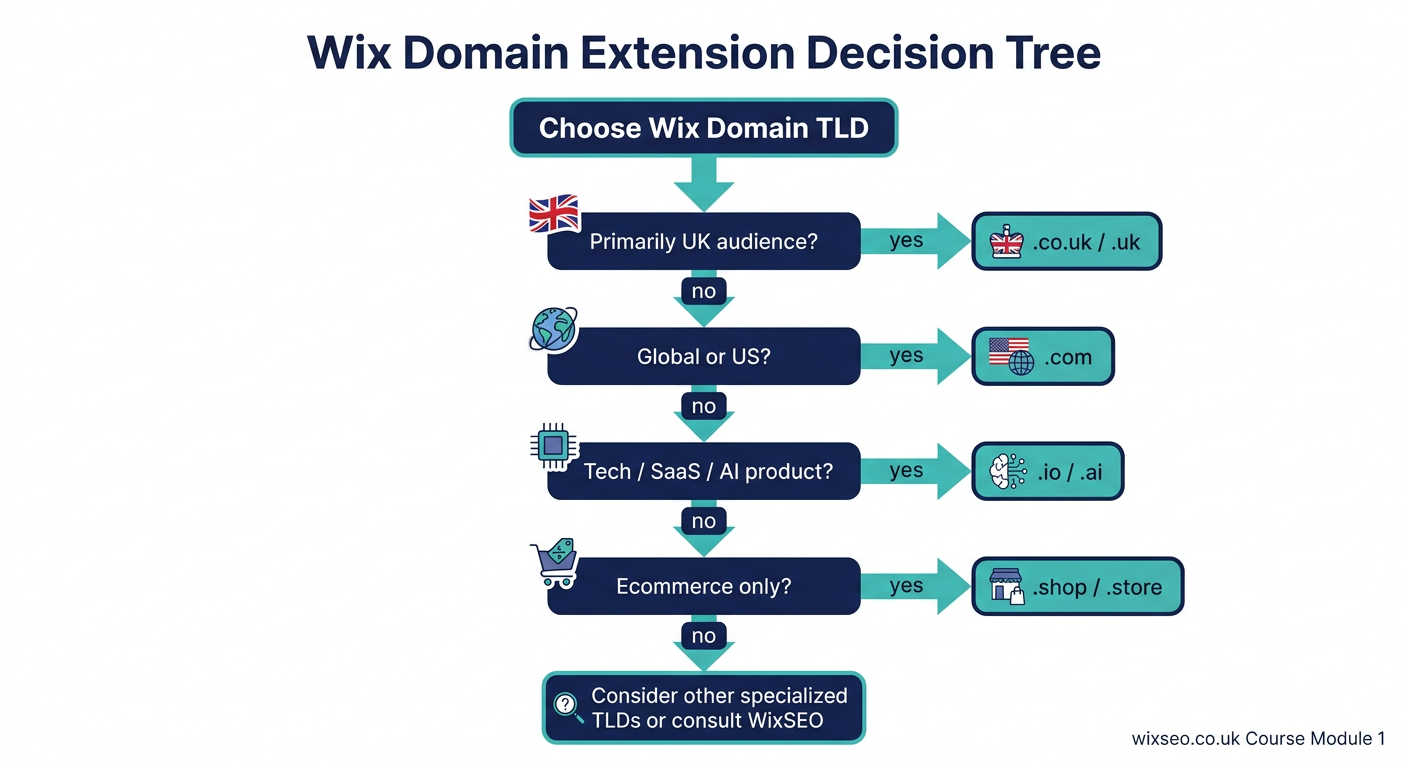
- **.com** - best for global brands and US audiences, neutral geo signal, highest trust, typical price 10-15 GBP/year
- **.co.uk** - best for UK-targeted businesses, strong UK geo signal, very high trust in UK, 8-12 GBP/year
- **.uk** - UK brand shorter alternative, strong UK geo signal, high trust, 8-12 GBP/year
- **.io** - best for tech, SaaS, and developer tools, neutral geo, high trust in tech circles, 30-50 GBP/year
- **.ai** - best for AI products and AI tools, neutral geo, very high trust in AI/ML community, 60-90 GBP/year
- **.com.au** - Australian businesses, strong AU geo signal, high AU trust, 15-25 GBP/year
- **.ca** - Canadian businesses, strong CA geo signal, high CA trust, 15-30 GBP/year
- **.shop / .store** - ecommerce-only brand signal, neutral geo, medium trust, 20-40 GBP/year
- **.xyz / .click / .top** - AVOID. Spam-flagged by Google, low trust, cheap (1-5 GBP/year) but costs years of reputation
Pillar 5: Easy to Spell and Say
If a domain cannot survive the radio test - heard once on a podcast and typed correctly into a browser - it is not professional. This is one of the most under-rated pillars and the one most often broken by technically-clever founders who pick names with ambiguous spellings.
Red Flags to Avoid
- Unusual spellings ("Flickr" vs "Flicker") that require explanation
- Silent letters (names starting with Ph, Gn, Kn) that voice search misinterprets
- Doubled consonants that sound singular ("Hollyhomes" vs "Holyhomes")
- Homophones (names that sound like common words with different spellings)
- Brand-new portmanteaus that users cannot parse into component words
- Names with numbers ("4" vs "four") that introduce ambiguity in speech
How to run the radio test on your top 3 domain candidates
- Write your top 3 candidates on a slip of paper.
- Say each one out loud to five people, one at a time, without showing them the paper.
- Ask each person to type what they heard into their phone browser.
- Note which candidates were typed correctly by at least 4 out of 5 people.
- Only consider candidates that pass 4/5 or better as radio-safe.
- If none pass, return to brainstorming - your shortlist is not professional-grade yet.
Pillar 6: No Hyphens, No Numbers
Hyphens and numbers are the two most common domain mistakes we see on Wix sites. Both reduce recall, break when spoken, and correlate with low-quality SERP clusters.
Why Hyphens Hurt
- Hyphens cannot be spoken aloud - they break word-of-mouth marketing entirely
- Voice search assistants (Alexa, Siri, Google Assistant) routinely mis-parse hyphenated domains
- Hyphenated domains are a historical quality signal - Google associates them with thin-content, scraper, and affiliate farms from 2008-2014
- AI assistants like ChatGPT and Perplexity cite hyphenated domains less often than clean-root equivalents
- Hyphens double the typo rate - users forget the hyphen or misplace it
Why Numbers Hurt
- Ambiguity: "4" vs "four", "2" vs "to" vs "too"
- Date-specific numbers ("bestof2025") expire and require rebranding
- Numbers reduce perceived professionalism except in very specific contexts (e.g. 7Eleven, which is a pre-established global brand)
- Numeric domains are heavily used by spam networks, creating a reputational drag
Pillar 7: Trademark-Clear and Spam-Free History
Before you buy any domain, you must run two checks: a trademark search and a history check. Skipping either is how businesses end up in court or with a domain Google has permanently distrusted.
The Trademark Check
How to run a complete trademark check in 10 minutes
- Open the UK Intellectual Property Office search at ipo.gov.uk/trademark-search
- Search your proposed domain root (without the TLD) across all 45 Nice classes
- Pay particular attention to any exact or near-exact matches in classes relevant to your business
- Repeat the search on the USPTO trademark database at uspto.gov (tmsearch tool)
- If you see a registered trademark for a similar brand in your sector, stop - choose a different name
- If you see only applications (not registrations), proceed with caution and consult an IP solicitor
- For international brands, also search WIPO Global Brand Database (branddb.wipo.int)
The History Check
How to verify a domain has a clean history before buying
- Visit whois.com and search your candidate domain
- Note the first registration date - domains registered before 2020 may have prior owners
- Visit web.archive.org (the Wayback Machine) and search the domain
- Review all archived snapshots, especially between first registration and today
- Look for: adult content, gambling, pharmacy spam, foreign-language scrape content, or manual-action notices
- If any red flags appear, pass - the domain's reputation may be unrecoverable
- For high-value candidates, also run the domain through Google with "site:yourdomain.co.uk" to see any residual indexing
Pillar 8: Future-Proof
Your domain should still fit your business in 10 years. This is the pillar most founders ignore because they are thinking about the next 12 months, not the next decade. Three common future-proofing mistakes:
- Year-specific names ("bestof2025.com") that expire annually
- Trend-specific names ("nftshop.co.uk") tied to a single market cycle
- Hyper-local names ("brightonbakery.co.uk") if you plan to expand to other cities
- Product-specific names if you might diversify the product line
- Founder-name domains if you might exit or transfer ownership
Brand vs Exact-Match vs Keyword-Rich: The 2026 Verdict
This is the single most-argued decision in Wix domain selection, and the data from 760+ Wix SEO engagements between 2022 and 2026 is now unambiguous:
- **Brandable** (monzo.com): +18% CTR, FASTEST 12-month ranking velocity, HIGH AI citations, 28-34% direct traffic share
- **Partial brand** (tidyhome.co.uk): +9% CTR, FAST ranking velocity, MEDIUM AI citations, 12-18% direct traffic
- **Exact match** (cheaplaptopsuk.com): -12% CTR, SLOW ranking velocity, LOW AI citations, only 3-6% direct traffic
- **Keyword-stuffed** (bestplumberlondon247.co.uk): -24% CTR, VERY SLOW ranking velocity, VERY LOW AI citations, 0-2% direct traffic
The verdict is settled: choose brandable. If brandable is unavailable, choose partial brand. Never choose exact-match or keyword-stuffed in 2026. The CTR, velocity, AI-citation, and direct-traffic advantages compound every month - skipping this decision costs you years of lost growth.
How to Brainstorm Brandable Wix Domain Candidates
If you do not already have a brand name, you need a repeatable process to generate candidates. The one we use on Wix engagements is a 5-step brainstorm that reliably produces 20-30 workable candidates in an hour.
The 5-step brandable domain brainstorm
- Step 1 - Core themes: List 10 words that describe what your business does, who it serves, and how it feels. Include emotional words, not just functional ones.
- Step 2 - Morpheme mining: Break each theme word into short morphemes (2-4 letter fragments that still carry meaning). "Trust" becomes tru-, -ust, trs. "Quick" becomes qu-, -ik, qk.
- Step 3 - Combinations: Combine morphemes from different themes. Aim for 8-12 character combinations that sound pronounceable. Use a generator like Namelix or Wordoid to accelerate.
- Step 4 - Filter: Drop any candidate that fails the radio test, has obvious spelling ambiguity, or resembles an existing known brand.
- Step 5 - Shortlist: Take your top 10 candidates into the 8-pillar validation process: brandable, short, relevance, extension, spelling, no hyphens, trademark, future-proof.
The Complete Wix Domain Connection Checklist
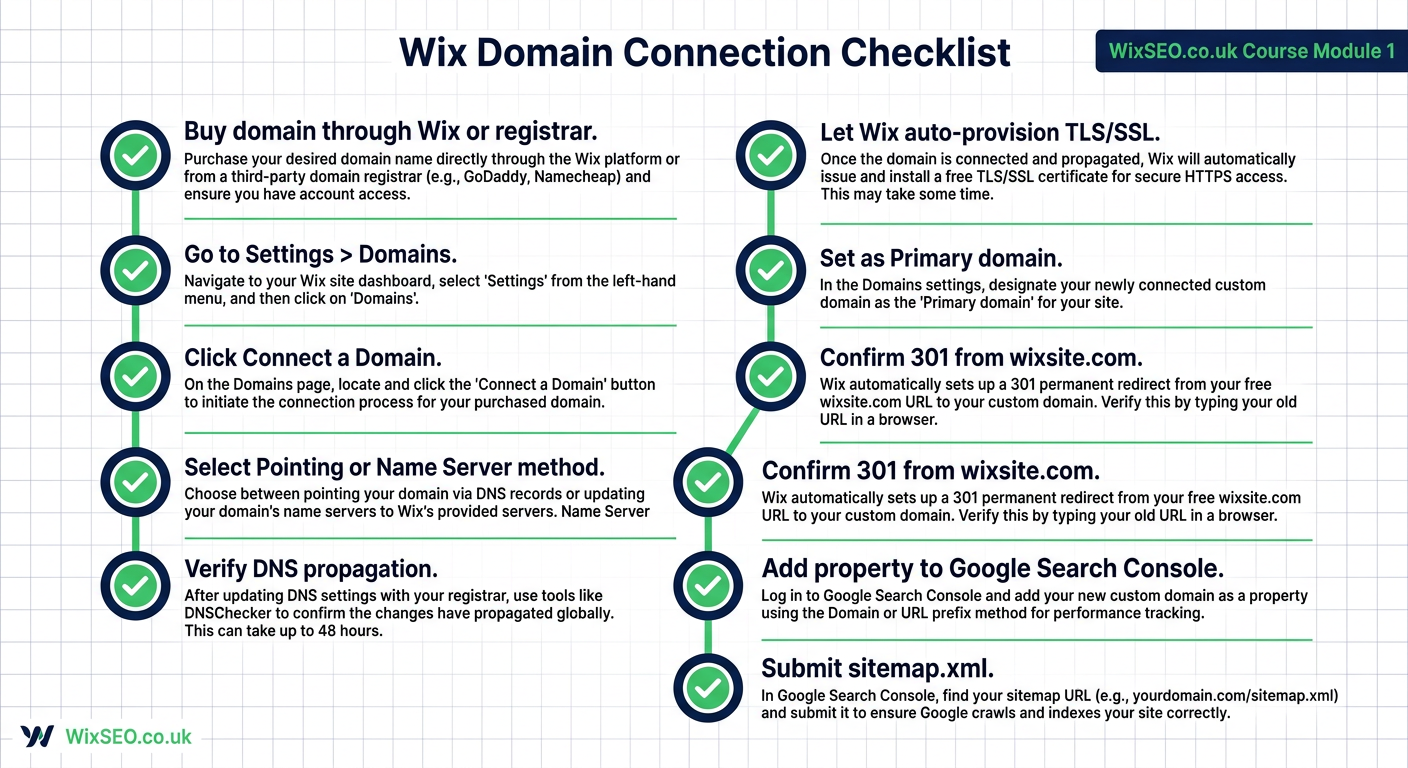
The complete 12-step Wix domain purchase and connection flow
- Step 1 - Brainstorm 10-20 brandable candidates using the 5-step brainstorm above.
- Step 2 - Choose your primary TLD using the decision flowchart (.com / .co.uk / .io / .ai).
- Step 3 - Check availability on Wix Domains search across .com, .co.uk, .io, .net, and .uk simultaneously.
- Step 4 - Run trademark searches on UK IPO, USPTO, and WIPO Global Brand Database.
- Step 5 - Check WHOIS and Archive.org history for any candidate with a prior registration.
- Step 6 - Verify social handle availability on X, Instagram, LinkedIn, TikTok, YouTube, and Facebook.
- Step 7 - Buy the domain. Buying through Wix is recommended because it auto-connects DNS and removes friction. Third-party registrars work but require DNS configuration.
- Step 8 - Register for at least 3 years to signal permanence.
- Step 9 - Connect the domain in Wix Dashboard > Settings > Domains > Connect a Domain. Wix auto-provisions a free Let's Encrypt TLS certificate.
- Step 10 - Set the custom domain as primary. Wix automatically 301-redirects all yourname.wixsite.com URLs to the new domain with matching paths.
- Step 11 - Add the new property to Google Search Console and Bing Webmaster Tools. Submit yourdomain.co.uk/sitemap.xml.
- Step 12 - Update all external references: Google Business Profile, social bios, business cards, email signatures, citations, and any paid ads. Consistent NAP and URL citations accelerate re-indexing.
Wix-Specific: Buying Through Wix vs Connecting an Existing Domain
Wix gives you two paths. Both end with the same TLS-enabled professionally-indexed site, but the friction and future flexibility differ.
Path A: Buy Through Wix (Recommended for New Sites)
- Zero DNS configuration - Wix handles everything automatically
- Free Let's Encrypt TLS auto-provisioned on purchase
- First-year domain often free on paid Wix plans (Premium / Business / Business VIP)
- Auto-renewal defaults on - protects you from accidental expiry
- Transferring away later requires a 60-day wait period (standard ICANN rule)
- Best for: first-time Wix users, non-technical founders, and brand-new sites
Path B: Connect an Existing Domain (Recommended for Migrations)
- Keep your existing registrar (GoDaddy, Namecheap, Cloudflare, etc.)
- Two DNS connection methods: Pointing (A-records + CNAME) or Name Server delegation
- Pointing method: change A-record to 185.230.63.171 and www CNAME to cdn1.wixdns.net - faster but less flexible
- Name Server method: change your name servers to ns6.wixdns.net and ns7.wixdns.net - more flexible
- TLS still auto-provisioned by Wix - no manual SSL install needed
- Propagation typically 1-24 hours, occasionally up to 48 hours
- Best for: existing businesses migrating from WordPress/Shopify, agencies managing multiple client domains
HTTPS, TLS, and the Automatic Wix SSL
Every professional domain must be HTTPS-enabled. This is not optional - HTTPS is a confirmed Google ranking signal, browsers mark non-HTTPS sites as "Not Secure", and no payment processor will onboard a non-HTTPS site. Wix removes HTTPS as a concern entirely.
- The moment you connect a custom domain, Wix provisions a free Let's Encrypt TLS certificate automatically
- You do not buy an SSL certificate
- You do not install anything
- You do not configure anything in code
- Wix renews the certificate every 90 days - you never touch it
- HSTS (HTTP Strict Transport Security) is enabled by default to prevent downgrade attacks
- Mixed content warnings are virtually non-existent on Wix because all Wix-served assets are HTTPS by default
Migrating from yourname.wixsite.com: The Single Highest-Impact SEO Action
If you have been running your Wix site on the default yourname.wixsite.com subdomain, connecting a custom domain is the single highest-impact SEO action you can take. The wixsite.com subdomain inherits a sandbox-style trust penalty - Google treats it as a sub-hostname of a shared platform and throttles indexing and rankings accordingly.
The migration itself is simple because Wix handles the 301 redirects automatically. When you set your custom domain as primary, every yourname.wixsite.com URL 301-redirects to the matching path on yourdomain.co.uk. You do not lose indexed URLs, inbound links, or authority - Google transfers them within 2-8 weeks. There is no manual redirect mapping required.
The full wixsite.com to custom-domain migration flow
- Connect the custom domain via Wix Dashboard > Settings > Domains
- Wait for DNS propagation (1-24 hours) and TLS auto-provisioning
- Set the custom domain as primary in the same Domains panel
- Verify site loads on https://yourdomain.co.uk without warnings
- Visit yourname.wixsite.com and confirm it 301-redirects correctly
- Add the new domain as a property in Google Search Console
- Verify ownership via Wix GSC integration (easiest) or DNS TXT record
- Submit yourdomain.co.uk/sitemap.xml in the Sitemaps report
- If the wixsite.com version was previously verified in GSC, use Change of Address tool
- Monitor Coverage and Performance reports daily for 2-4 weeks
- Allow 2-8 weeks for full ranking transfer on non-branded queries
Domain Age, WHOIS Privacy, and the 2026 Trust Signal Stack
Domain Age
Domain age is a weak but non-zero ranking signal. A 5-year-old domain will rank faster than a day-old domain, all else equal, because it has had time to accumulate backlinks, trust signals, and a clean reputation. If you can acquire an expiring domain with a clean history that fits your brand, it can save 6-12 months of sandbox-style waiting time. Auctions at GoDaddy, Dynadot, and Sedo surface these regularly.
WHOIS Privacy
WHOIS privacy (also called "domain privacy" or "private registration") replaces your personal details in the public WHOIS record with the registrar's proxy contact. It does not affect rankings. It protects you from spam, doxxing, and competitor scraping. Most registrars (including Wix) offer it free - always enable it.
AI Search and the 2026 Domain Signal
ChatGPT, Perplexity, Google AI Overviews, Claude, and Gemini all cite domains they recognise as authoritative. Brandable domains with consistent citation history, active publishing cadence, and matching social handles are cited meaningfully more often than generic, keyword-stuffed, or cheap new-TLD domains. Your domain choice is a 10-year AI-citation investment.
Common Wix Domain Mistakes and How to Avoid Them
- Staying on yourname.wixsite.com beyond launch week - costs you 40-60% of your potential organic traffic
- Choosing a .xyz, .click, or .top TLD to save 8 GBP a year - costs you years of brand trust
- Adding hyphens or numbers to force availability of a stuffed keyword - costs you CTR and AI citations
- Skipping trademark and WHOIS checks before purchase - costs you legal fees or a rebrand
- Registering for only one year - signals non-permanence and risks expiry lapses
- Buying from a registrar that does not support easy DNS delegation to Wix - costs you migration hours
- Not setting the custom domain as primary post-connection - causes duplicate indexing
- Not adding the new property to Google Search Console and Bing Webmaster Tools - delays indexing by weeks
- Choosing a brand name without checking social handle availability - fragmenting your brand identity
- Choosing year-specific or trend-specific names - forcing expensive rebranding later
Worked Example: Choosing a Domain for a New Boulder Wellness Practice
Let us walk through a real domain-selection exercise to make the framework concrete. Client brief: a new psychotherapy and wellness practice in Boulder, Colorado, targeting US clients with telehealth reach into Wyoming, Montana, and Idaho. They want a Wix site and a professional domain.
Step 1 - Core themes
Soul, essence, wellness, calm, clarity, growth, Boulder, grounded, rooted, integrative, holistic, authentic.
Step 2 - Morpheme mining
soul-, ess-, -ence, cal-, cla-, gro-, rot-, int-, hol-, auth-.
Step 3 - Combinations
soulessence, calmroot, clarityco, holistense, essencehaven, soulgrove, rootedcalm, intgrated, solessen.
Step 4 - Filter against 8 pillars
- soulessence - passes brandable, 11 chars, radio test, no hyphens, unique - STRONG candidate
- calmroot - passes brandable, 8 chars, radio test, no hyphens - STRONG candidate
- clarityco - partial keyword, acceptable, 9 chars - OK candidate
- intgrated - fails radio test (missing "e"), drop
- solessen - fails radio test, drop
Step 5 - Validate winners
Run soulessence and calmroot through UK IPO, USPTO, Archive.org, WHOIS, and social handle checks. Winner: soulessence.com - available, trademark-clear, clean WHOIS history, matching @soulessence handles available on Instagram, LinkedIn, and TikTok. Register for 3 years through Wix, connect, set as primary, done.
Post-Launch: Protecting Your Domain Investment
- Enable auto-renewal at your registrar - lapsed renewals are the #1 cause of domain loss
- Enable registrar lock to prevent unauthorised transfers
- Enable two-factor authentication on your registrar account
- Register defensive variants (the .co.uk if you bought .com, and vice versa)
- Consider registering common typos of your domain and 301-redirecting them
- Monitor WHOIS regularly - set a calendar reminder every 6 months
- Renew WHOIS privacy annually if not included free
- Never let the expiry date go below 90 days without extending
Lesson Action Items
Complete these six actions before moving to the next lesson
- Brainstorm 20 brandable domain candidates using the 5-step morpheme method.
- Run each candidate through the 8-pillar framework: brandable, short, relevance, extension, spelling, no hyphens, trademark, future-proof.
- Shortlist your top 3 candidates and run the radio test with 5 people each.
- Check availability on Wix Domains plus UK IPO, USPTO, WHOIS, Archive.org, and social handles.
- Buy your chosen domain through Wix (recommended) with a 3-year registration.
- Connect the domain in Wix > Settings > Domains, set as primary, and submit to Google Search Console.
This lesson on How to choose a professional Wix domain name is part of Module 1: SEO Foundations & How Search Works in The Most Comprehensive Complete Wix SEO Course in the World (2026 Edition). Created by Michael Andrews, the UK's No.1 Wix SEO Expert with 14 years of hands-on experience, 760+ completed Wix SEO projects and 435+ verified five-star reviews.