Apple Business Connect and Bing Places: beyond Google for local SEO
Module 9: Local SEO Domination | Lesson 121 of 687 | 20 min read
By Michael Andrews, Wix SEO Expert UK
Google dominates search, but it is not the only platform where potential customers discover local businesses. Apple Maps serves over a billion active Apple device users, Bing powers search results on Microsoft Edge and Cortana, and both platforms are increasingly integrated into voice search and smart assistants. Ignoring these platforms means missing out on a meaningful segment of local searchers who may never see your Google listing.
Apple Business Connect: Setup and Optimisation
Apple Business Connect launched in January 2023 and gives business owners direct control over how their business appears across Apple Maps, Siri, Wallet, Safari, and other Apple apps. Previously, Apple Maps data was primarily sourced from third-party aggregators, meaning businesses had little control over their listings. Business Connect changes that entirely, giving you a dashboard similar to Google Business Profile.
Claiming your Apple Business Connect listing is free and available to businesses of all sizes. The verification process requires you to prove ownership through a phone call, email, or document verification. Once verified, you gain access to features including custom action links, showcases similar to Google Posts, and detailed analytics about how users interact with your listing on Apple platforms.
Claiming and setting up Apple Business Connect
- Visit businessconnect.apple.com and sign in with your Apple ID, or create a new one for your business
- Search for your business using your business name and address to find your existing listing
- Click Claim This Business and select your preferred verification method from phone, email, or document upload
- Complete the verification process, which typically takes one to five business days for approval
- Once verified, update your business name, address, phone number, categories, hours, and add your Wix site URL
- Upload high-quality photos including your logo, cover image, and at least five additional photos of your business
- Configure your Action Links to drive specific user behaviour such as ordering, booking, or contacting your business
Apple Maps Ranking Factors
Apple Maps uses a different algorithm from Google, and while Apple has not published its ranking factors, SEO professionals have identified several key signals. Listing completeness and accuracy are critical, as is the consistency of your NAP (name, address, phone) across the web. Apple also appears to weigh user engagement signals like taps for directions, calls, and website clicks when determining local rankings.
Reviews on Apple Maps are handled through Yelp integration in many markets, which means your Yelp reputation directly affects your Apple Maps presence. Ensure your Yelp listing is claimed and actively managed. Apple has also begun incorporating its own ratings system, so encourage satisfied customers to rate your business directly through Apple Maps on their iPhones.
Bing Places: Verification and Optimisation
Bing Places for Business is Microsoft's equivalent of Google Business Profile. With Bing powering the default search experience on Microsoft Edge, Xbox, and Windows devices, plus serving as the backend for several AI assistants, Bing Places reaches more users than most business owners realise. In 2026, Bing's integration with Copilot means your Bing Places listing can also appear in AI-generated local recommendations.
Setting up Bing Places for your Wix business
- Go to bingplaces.com and sign in with your Microsoft account
- Choose whether to import your Google Business Profile data directly or create a new listing from scratch
- If importing, authorise the Google connection and review all imported data for accuracy
- If creating manually, enter your complete business information including name, address, phone, website, categories, and hours
- Complete verification via postcard, phone, or email depending on what Bing offers for your location
- Add photos, a business description rich with local keywords, and select all relevant categories
- Submit your Wix site sitemap through Bing Webmaster Tools to complement your Places listing
Bing-Specific Local Ranking Factors
Bing places a heavier emphasis on social signals than Google does. Your Facebook page activity, Twitter presence, and LinkedIn company page can all influence your Bing local rankings. Bing also uses Yelp and TripAdvisor reviews as part of its local ranking algorithm, so maintaining positive ratings on these platforms has a dual benefit for both Bing and Apple Maps visibility.
Another unique Bing factor is the weighting given to exact-match domain names and page titles. While Google has largely moved past exact-match domains, Bing still gives them noticeable weight. Ensure your Wix page titles for location-specific pages include your city or region name prominently. Additionally, Bing's crawling of Wix sites tends to lag behind Google, so submitting your sitemap through Bing Webmaster Tools is essential rather than optional.
Managing Multi-Platform Local Listings at Scale
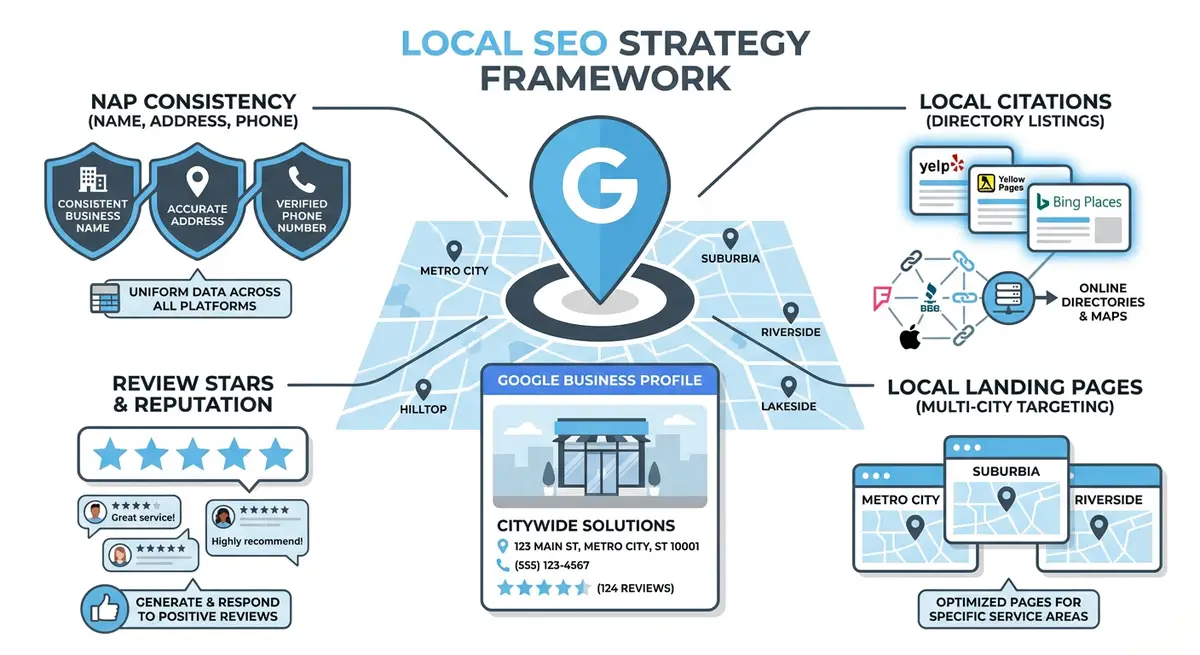
The challenge of maintaining accurate listings across Google, Apple, Bing, Yelp, Facebook, and industry-specific directories grows with every platform you add. NAP inconsistencies across platforms confuse search engines and erode trust signals. A single misspelling of your street address or an outdated phone number on one platform can cascade into ranking problems across all of them.
- Create a master spreadsheet with your exact business name, address, phone number, website URL, hours, and description that serves as the single source of truth
- Audit your existing listings across all platforms quarterly using a tool like BrightLocal, Moz Local, or Semrush Listing Management
- Prioritise fixing inconsistencies on the highest-authority platforms first: Google, Apple, Bing, Yelp, and Facebook
- Set calendar reminders to update all platforms simultaneously whenever your business information changes
- Consider using a listing management service if you have multiple locations, as manual management becomes impractical beyond three to five locations
A comprehensive local SEO strategy extends beyond Google. Every platform you optimise adds another doorway for potential customers to discover your business, and the NAP consistency across all of them strengthens your authority everywhere.
Complete How-To Guide: Setting Up Apple Business Connect and Bing Places
This step-by-step guide walks you through claiming, verifying, and optimising your business listings on Apple Business Connect, Bing Places, and other non-Google local platforms. Follow each step to ensure your Wix business is discoverable everywhere potential customers search.
Follow these steps to set up and optimise Apple Business Connect and Bing Places
- Step 1: Visit businessconnect.apple.com and sign in with your Apple ID. If you do not have an Apple ID, create one using your business email address. Search for your business by name and address to locate your existing listing in Apple Maps.
- Step 2: Click Claim This Business on your listing and select your preferred verification method. Apple offers verification via phone call, email, or document upload. Complete the verification process, which typically takes one to five business days for approval.
- Step 3: Once verified in Apple Business Connect, update your complete business profile including business name, address, phone number, website URL pointing to your Wix site, business hours, and primary category. Ensure every field matches your Google Business Profile information exactly for NAP consistency.
- Step 4: Optimise your Apple Maps presence by uploading a high-resolution logo, cover image, and at least five additional photos of your business interior, exterior, products, or team. Configure your Action Links to direct users to key pages on your Wix site such as booking, ordering, or contact pages.
- Step 5: Go to bingplaces.com and sign in with your Microsoft account. Choose the option to import your Google Business Profile data directly, which pre-fills most fields automatically. Review every imported field for accuracy and correct any discrepancies before submitting.
- Step 6: If importing is not available for your listing, create your Bing Places profile manually. Enter your complete business information including name, address, phone, Wix site URL, categories, hours, and a keyword-rich business description. Submit for verification via postcard, phone, or email.
- Step 7: Sync your NAP data across all platforms by creating a master spreadsheet containing your exact business name, street address, phone number, Wix website URL, business hours, and description. Use this document as your single source of truth whenever updating any listing.
- Step 8: Add high-quality photos and select all relevant categories on both Apple Business Connect and Bing Places. Upload the same photos you use on Google Business Profile for brand consistency, and ensure your category selections match across all platforms.
- Step 9: Claim and optimise your Yelp Business listing at biz.yelp.com. Since Yelp powers review content for Apple Maps in many markets, your Yelp reputation directly affects your Apple Maps visibility. Add your Wix site URL, upload photos, and respond to all reviews promptly.
- Step 10: Submit your business data to the four major data aggregators: Data Axle, Neustar Localeze, Foursquare, and Factual. These aggregators feed your business information to hundreds of smaller directories and apps, establishing a foundation of consistent citations across the web.
Completing your multi-platform local listing setup
- Step 11: Configure your DuckDuckGo Maps presence by ensuring your Apple Maps listing is complete and accurate, as DuckDuckGo sources its map data from Apple Maps. Verify that your business appears correctly by searching for it on DuckDuckGo and checking the map results.
- Step 12: Submit your Wix site's sitemap through Bing Webmaster Tools at bing.com/webmasters to complement your Bing Places listing. This ensures Bing can crawl and index your Wix site pages efficiently, which supports your local search visibility on the Bing platform.
- Step 13: Set up a quarterly audit schedule to review all non-Google listings for accuracy. Use a tool like BrightLocal, Moz Local, or Semrush Listing Management to scan for inconsistencies across platforms and fix any NAP discrepancies immediately.
This lesson on Apple Business Connect and Bing Places: beyond Google for local SEO is part of Module 9: Local SEO Domination in The Most Comprehensive Complete Wix SEO Course in the World (2026 Edition). Created by Michael Andrews, the UK's No.1 Wix SEO Expert with 14 years of hands-on experience, 794+ completed Wix SEO projects and 453+ verified five-star reviews.