Wix Stores SEO architecture: categories, subcategories and product URL strategy
Module 17: Wix eCommerce SEO Mastery | Lesson 193 of 683 | 35 min read
By Michael Andrews, Wix SEO Expert UK
Your Wix Store's information architecture is the single most impactful SEO decision you will make before writing a single product description. A well-structured category hierarchy ensures that Google can crawl every product efficiently, that link equity flows from your homepage to your deepest product pages, and that shoppers find what they need within two or three clicks. Get this wrong and you will fight an uphill battle on every other eCommerce SEO tactic in this module.
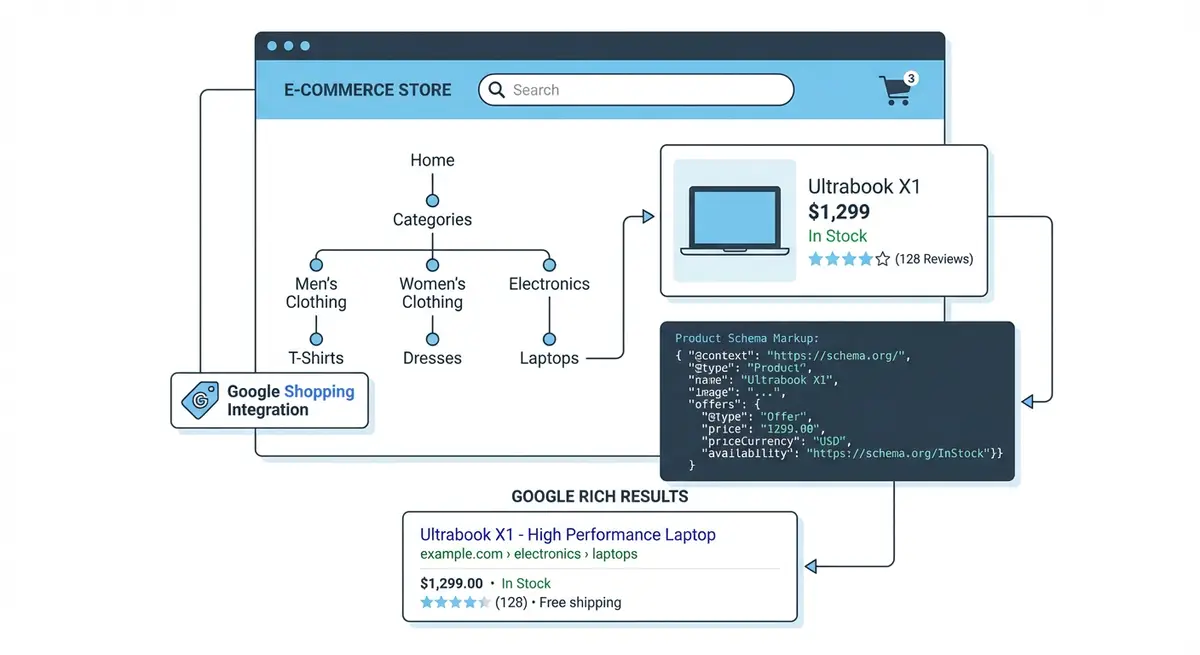
Why Site Architecture Matters More for eCommerce Than Any Other Site Type
A typical service-based website might have 10 to 30 pages. An eCommerce store can have hundreds or thousands. When a site scales to that level, the way pages connect to one another determines whether Google even discovers your products, let alone ranks them. A product buried four clicks deep from the homepage with no category page linking to it is essentially invisible to both Googlebot and shoppers.
Site architecture also determines which pages accumulate the most authority. Your homepage naturally receives the most backlinks and internal link equity. Every click away from the homepage dilutes that equity. A flat architecture where category pages sit directly beneath the homepage ensures those critical collection pages inherit maximum authority, which they then pass down to individual product pages.
Flat vs Deep Architecture: Choosing the Right Model
Flat Architecture (Recommended for Most Wix Stores)
A flat architecture means your category pages sit directly below the homepage, and products sit directly below categories. There are no unnecessary intermediate pages. For a store with fewer than 500 products, this is almost always the best approach. It minimises click depth, concentrates link equity on the pages that target your highest-volume keywords (categories), and simplifies navigation for users and crawlers alike.
- Homepage links directly to 5-12 main category pages in the navigation
- Each category page lists all products within that category
- Products can appear in multiple categories without creating duplicate content issues when canonical URLs are set correctly
- Breadcrumbs reinforce the hierarchy: Home > Category > Product
- Faceted navigation (filters) is handled within the category page rather than creating new URLs
Deep Architecture (For Large Catalogues Only)
If you sell 500 or more products across genuinely distinct subcategories, a deeper hierarchy is acceptable. For example, a fashion retailer might need Clothing > Women > Dresses > Maxi Dresses. The key is that every level of the hierarchy must represent a genuine keyword opportunity and a meaningful user distinction. Never create a subcategory just for the sake of organisation if there is no search demand behind that grouping.
URL Slug Strategy for Wix Store Products and Categories
Wix allows you to customise the URL slug for every product and collection page. This is one of the most important on-page SEO levers you have. A well-optimised URL tells Google exactly what the page is about before it even reads the content, and it looks trustworthy to shoppers in search results. By default, Wix generates slugs from your product title, but you should always review and optimise them manually.
How to optimise product URL slugs in Wix Stores
- Go to your Wix Dashboard and open the Store Products section
- Click on a product to edit it and scroll to the SEO section at the bottom
- In the URL slug field, enter a concise, keyword-rich slug using hyphens to separate words
- Remove unnecessary words like "the", "and", "for", "with" from the slug
- Keep slugs under 60 characters and ensure they describe the product clearly
- Use your primary keyword for the product at the beginning of the slug where possible
- Repeat this process for every product and collection page in your store
Breadcrumb Navigation: Reinforcing Your Hierarchy
Breadcrumbs serve a dual purpose in eCommerce SEO. For users, they provide clear wayfinding and a one-click path back to parent categories. For Google, they reinforce your site hierarchy and can appear directly in search results as rich breadcrumb trails, replacing the raw URL. This improves click-through rates because shoppers can see exactly where a product sits within your store before clicking.
Wix Stores automatically generates breadcrumbs on product pages based on the collection the product belongs to. If a product belongs to multiple collections, Wix uses the first collection assigned. This means you should be intentional about the primary collection you assign to each product, as it determines the breadcrumb path that Google indexes. Always assign the most relevant, keyword-rich category as the primary collection.
{
  "@context": "https://schema.org",
  "@type": "BreadcrumbList",
  "itemListElement": [
    {
      "@type": "ListItem",
      "position": 1,
      "name": "Home",
      "item": "https://www.yourstore.com"
    },
    {
      "@type": "ListItem",
      "position": 2,
      "name": "Essential Oils",
      "item": "https://www.yourstore.com/essential-oils"
    },
    {
      "@type": "ListItem",
      "position": 3,
      "name": "Organic Lavender Essential Oil 30ml",
      "item": "https://www.yourstore.com/product-page/organic-lavender-essential-oil-30ml"
    }
  ]
}
Internal Linking Strategy for eCommerce Architecture
Beyond navigation menus and breadcrumbs, you need a deliberate internal linking strategy that connects related products, links from blog content to product and category pages, and creates cross-sell pathways. Internal links are the veins of your site architecture, and they carry both user attention and search engine authority from page to page.
- Add "Related Products" or "You May Also Like" sections to every product page linking to 3-6 complementary items
- Link from category page descriptions to subcategories and featured products using keyword-rich anchor text
- Create blog posts that target informational queries and link naturally to relevant product and category pages
- Use your site footer to link to your top 5-8 category pages, ensuring they are crawled from every page on the site
- Add cross-category links where relevant, for example linking from an "Essential Oils" product to a "Diffusers" category
- Audit your internal links quarterly using Screaming Frog or Ahrefs Site Audit to find orphan products with no internal links pointing to them
Handling Products in Multiple Categories
Wix Stores allows you to assign a single product to multiple collections. This is a powerful feature for user experience because shoppers can find the same product whether they browse by type, brand, use case, or price range. However, it raises a potential SEO concern about duplicate content. The good news is that Wix handles this correctly by default: each product has a single canonical URL regardless of which collection the shopper navigated from. The URL always resolves to the same /product-page/slug path.
To use this effectively, assign every product to its primary category plus any relevant secondary categories such as "Sale", "New Arrivals", "Best Sellers", or brand-specific collections. Ensure the primary category is the one that best matches the product's core keyword theme, as this will appear in breadcrumbs and influence how Google contextualises the product within your site hierarchy.
Recommended Architecture Planning Tools
- Screaming Frog SEO Spider: Crawl your Wix Store to visualise site architecture, find orphan pages, and audit internal links
- Ahrefs Site Audit: Identify crawl depth issues, internal linking opportunities, and orphaned product pages
- Whimsical or Miro: Create visual sitemaps to plan your category hierarchy before building it in Wix
- Google Search Console: Monitor which product and category pages Google has crawled and indexed
Complete How-To Guide: Planning and Building Your Wix Store SEO Architecture
This guide walks you through designing, building and validating an SEO-optimised site architecture for your Wix eCommerce store.
How to build an SEO-optimised Wix Store architecture from scratch
- Step 1: List every product in your Wix Store in a spreadsheet with columns for product name, primary category, secondary categories, target keyword and current URL slug.
- Step 2: Group products into 5-12 main categories based on how customers search. Use Google Keyword Planner to verify that each category name aligns with actual search terms (e.g., "essential oils" not "aromatherapy products" if volume favours the former).
- Step 3: For each category, check if subcategories are needed. Only create subcategories if the subcategory term has independent search volume of at least 200 monthly searches.
- Step 4: Create a visual sitemap showing Homepage > Categories > Products. Verify every product is reachable within 3 clicks maximum from the homepage.
- Step 5: In your Wix Dashboard, create Collection pages for each main category. Set the URL slug to your primary category keyword (e.g., /essential-oils, /candles, /gift-sets).
- Step 6: Assign every product to its primary collection and any relevant secondary collections. Ensure the primary collection matches the product's main keyword theme.
- Step 7: Optimise every product URL slug. Go to each product, open SEO settings, and replace auto-generated slugs with keyword-rich, concise slugs.
- Step 8: Set up your main navigation menu to link directly to all primary category pages. Go to the Wix Editor, open the menu settings, and add each collection page.
- Step 9: Add "Related Products" sections to every product page linking to 3-6 complementary items within the same or related categories.
- Step 10: Link from category page descriptions to featured products and related categories using descriptive anchor text.
- Step 11: Verify breadcrumbs display correctly on product pages. Navigate to several products from different categories and confirm the breadcrumb trail shows the correct hierarchy.
- Step 12: Crawl your Wix Store using Screaming Frog or Ahrefs Site Audit. Check for orphan products with no internal links, crawl depth greater than 3, and any broken links in your architecture.
Was this lesson useful?
It takes 1 minute to tell me. The course is free and I want to keep it that way, and your feedback shows me what is working and helps other people find it.
This lesson on Wix Stores SEO architecture: categories, subcategories and product URL strategy is part of Module 17: Wix eCommerce SEO Mastery in The Most Comprehensive Complete Wix SEO Course in the World (2026 Edition). Created by Michael Andrews, a Wix Marketplace Legend Partner with 14 years of hands-on experience, 800 completed Wix SEO projects and 456 verified five-star reviews.